
Spring Boot 4 + Thymeleaf 电商主题实战 阶段五:异步交互、性能与企业级应用
Spring Boot 4 + Thymeleaf 电商主题实战 阶段五:异步交互、性能与企业级应用
学习目标: 综合运用 Thymeleaf、缓存、异步请求和安全技术,完成较完整的应用。
第18章 · axios 异步加载
章节目标
- 理解前后端分离的核心理念
- 掌握 @RestController 返回 JSON 的实现
- 学会使用 axios 进行异步 HTTP 请求
- 熟悉 Thymeleaf 的数据传递(
/*[[${...}]]*/语法) - 完成商品详情页面的异步评价加载和推荐加载
理论知识
前后端分离思路:
- 基础信息资源端渲染:商品名称、价格等核心数据,通过 Thymeleaf 服务端渲染到 HTML 中(首次访问快、SEO 友好)
- 次要数据异步加载:评价列表、猜你喜欢等"非关键"数据,通过 axios 异步请求 JSON 接口,再动态插入 DOM(页面不刷新、用户体验好)
@RestController 与 @Controller 区别:
@Controller:返回视图名,Spring 自动渲染模板@RestController:返回对象,Spring 自动序列化为 JSON(等价于@Controller+@ResponseBody)
axios 异步流程:
axios.get(url)发送 GET 请求,返回 Promise.then(response => {...})回调处理响应,response.data是 JSON 对象- 遍历 JSON 数组,生成 HTML,插入到 DOM
- 整个过程页面不刷新,用户继续浏览
Thymeleaf 变量传递:/*[[${product.id}]]*/ 0 语法在 HTML 页面的 JavaScript 中嵌入服务器端变量,0 是默认值(防止变量为空时 JS 出错)。
项目结构
chapter18-async/
├── pom.xml
└── src/main/
    ├── java/com/lihaozhe/ch18/
    │   ├── Ch18Application.java
    │   ├── controller/
    │   │   ├── ProductController.java     # 页面渲染(@Controller)
    │   │   └── ProductApiController.java  # JSON 接口(@RestController)
    │   ├── dao/
    │   │   ├── ProductMapper.java
    │   │   └── ReviewMapper.java
    │   ├── model/
    │   │   ├── Product.java
    │   │   └── Review.java
    │   └── service/
    │       └── ProductService.java
    └── resources/
        ├── application.yml
        ├── schema.sql
        ├── data.sql
        └── templates/
            ├── product-list.html
            └── product-detail.html        # 含 axios 异步加载
完整代码
pom.xml
<?xml version="1.0" encoding="UTF-8"?>
<project xmlns="http://maven.apache.org/POM/4.0.0"
         xmlns:xsi="http://www.w3.org/2001/XMLSchema-instance"
         xsi:schemaLocation="http://maven.apache.org/POM/4.0.0 https://maven.apache.org/xsd/maven-4.0.0.xsd">
    <modelVersion>4.0.0</modelVersion>

    <parent>
        <groupId>com.lihaozhe</groupId>
        <artifactId>sb-thymeleaf</artifactId>
        <version>1.0.0</version>
    </parent>

    <artifactId>chapter18-async</artifactId>
    <packaging>jar</packaging>

    <dependencies>
        <dependency>
            <groupId>org.springframework.boot</groupId>
            <artifactId>spring-boot-starter-webmvc</artifactId>
        </dependency>
        <dependency>
            <groupId>org.springframework.boot</groupId>
            <artifactId>spring-boot-starter-thymeleaf</artifactId>
        </dependency>
        <dependency>
            <groupId>com.baomidou</groupId>
            <artifactId>mybatis-plus-spring-boot4-starter</artifactId>
        </dependency>
        <dependency>
            <groupId>com.baomidou</groupId>
            <artifactId>mybatis-plus-jsqlparser</artifactId>
        </dependency>
        <dependency>
            <groupId>com.mysql</groupId>
            <artifactId>mysql-connector-j</artifactId>
            <scope>runtime</scope>
        </dependency>
        <dependency>
            <groupId>org.springframework.boot</groupId>
            <artifactId>spring-boot-starter-test</artifactId>
            <scope>test</scope>
        </dependency>
    </dependencies>

    <build>
        <plugins>
            <plugin>
                <groupId>org.springframework.boot</groupId>
                <artifactId>spring-boot-maven-plugin</artifactId>
            </plugin>
        </plugins>
    </build>
</project>
Ch18Application.java
package com.lihaozhe.ch18;

import org.springframework.boot.SpringApplication;
import org.springframework.boot.autoconfigure.SpringBootApplication;

/**
 * 第18章 启动入口。
 */
@SpringBootApplication
public class Ch18Application {

    public static void main(String[] args) {
        SpringApplication.run(Ch18Application.class, args);
    }
}
controller/ProductController.java
package com.lihaozhe.ch18.controller;

import com.lihaozhe.ch18.model.Product;
import com.lihaozhe.ch18.service.ProductService;
import org.springframework.stereotype.Controller;
import org.springframework.ui.Model;
import org.springframework.web.bind.annotation.GetMapping;
import org.springframework.web.bind.annotation.PathVariable;

import java.util.List;

/**
 * 商品控制器(第18章:服务端渲染基础页面)
 *
 * <p>理论知识 —— @Controller + 返回视图名:
 * 浏览器请求 /product/1 时,Controller 查询商品基础信息,
 * 渲染 product-detail.html 模板,返回完整 HTML。
 * 评价、"猜你喜欢"等异步数据由前端 axios 后续请求。</p>
 */
@Controller
public class ProductController {

    private final ProductService productService;

    public ProductController(ProductService productService) {
        this.productService = productService;
    }

    /**
     * 商品列表页。
     */
    @GetMapping("/")
    public String list(Model model) {
        List<Product> products = productService.findAll();
        model.addAttribute("products", products);
        return "product-list";
    }

    /**
     * 商品详情页(基础信息服务端渲染)。
     *
     * @param id 商品ID
     * @param model 传递数据到视图
     * @return 视图名 "product-detail"
     */
    @GetMapping("/product/{id}")
    public String detail(@PathVariable Long id, Model model) {
        Product product = productService.findById(id);
        model.addAttribute("product", product);
        // 注意:评价列表不在 Model 中,由前端 axios 异步加载
        return "product-detail";
    }
}
controller/ProductApiController.java
package com.lihaozhe.ch18.controller;

import com.lihaozhe.ch18.model.Product;
import com.lihaozhe.ch18.model.Review;
import com.lihaozhe.ch18.service.ProductService;
import org.springframework.web.bind.annotation.GetMapping;
import org.springframework.web.bind.annotation.PathVariable;
import org.springframework.web.bind.annotation.RequestMapping;
import org.springframework.web.bind.annotation.RestController;

import java.util.List;

/**
 * 商品 API 控制器(第18章:异步 JSON 接口)
 *
 * <p>理论知识 —— @RestController + JSON 响应:
 * 标记 @RestController 后,方法返回值自动序列化为 JSON(通过 Jackson)。
 * 前端 axios 请求这些接口,获取 JSON 数据,在页面中动态渲染。
 * 这种方式实现"页面分离":HTML 负责结构,JS 负责动态内容。</p>
 */
@RestController
@RequestMapping("/api")
public class ProductApiController {

    private final ProductService productService;

    public ProductApiController(ProductService productService) {
        this.productService = productService;
    }

    /**
     * 获取商品评价(JSON)。
     *
     * @param productId 商品ID
     * @return 评价列表
     */
    @GetMapping("/products/{productId}/reviews")
    public List<Review> getReviews(@PathVariable Long productId) {
        return productService.findReviews(productId);
    }

    /**
     * 获取猜你喜欢商品(JSON)。
     *
     * @param productId 当前商品ID
     * @return 推荐商品列表
     */
    @GetMapping("/products/{productId}/recommendations")
    public List<Product> getRecommendations(@PathVariable Long productId) {
        return productService.findRecommendations(productId);
    }
}
dao/ProductMapper.java
package com.lihaozhe.ch18.dao;

import com.baomidou.mybatisplus.core.mapper.BaseMapper;
import com.lihaozhe.ch18.model.Product;
import org.apache.ibatis.annotations.Mapper;

/**
 * 商品 Mapper(第18章)
 */
@Mapper
public interface ProductMapper extends BaseMapper<Product> {
}
dao/ReviewMapper.java
package com.lihaozhe.ch18.dao;

import com.baomidou.mybatisplus.core.mapper.BaseMapper;
import com.lihaozhe.ch18.model.Review;
import org.apache.ibatis.annotations.Mapper;

/**
 * 评价 Mapper(第18章)
 */
@Mapper
public interface ReviewMapper extends BaseMapper<Review> {
}
model/Product.java
package com.lihaozhe.ch18.model;

import com.baomidou.mybatisplus.annotation.IdType;
import com.baomidou.mybatisplus.annotation.TableId;
import com.baomidou.mybatisplus.annotation.TableName;

import java.math.BigDecimal;
import java.time.LocalDateTime;

/**
 * 商品实体(第18章)
 */
@TableName("t_ch18_product")
public class Product {

    @TableId(type = IdType.AUTO)
    private Long id;

    private String name;

    private BigDecimal price;

    private String category;

    private String description;

    private Integer stock;

    private LocalDateTime createTime;

    private LocalDateTime updateTime;

    public Long getId() {
        return id;
    }

    public void setId(Long id) {
        this.id = id;
    }

    public String getName() {
        return name;
    }

    public void setName(String name) {
        this.name = name;
    }

    public BigDecimal getPrice() {
        return price;
    }

    public void setPrice(BigDecimal price) {
        this.price = price;
    }

    public String getCategory() {
        return category;
    }

    public void setCategory(String category) {
        this.category = category;
    }

    public String getDescription() {
        return description;
    }

    public void setDescription(String description) {
        this.description = description;
    }

    public Integer getStock() {
        return stock;
    }

    public void setStock(Integer stock) {
        this.stock = stock;
    }

    public LocalDateTime getCreateTime() {
        return createTime;
    }

    public void setCreateTime(LocalDateTime createTime) {
        this.createTime = createTime;
    }

    public LocalDateTime getUpdateTime() {
        return updateTime;
    }

    public void setUpdateTime(LocalDateTime updateTime) {
        this.updateTime = updateTime;
    }
}
model/Review.java
package com.lihaozhe.ch18.model;

import com.baomidou.mybatisplus.annotation.IdType;
import com.baomidou.mybatisplus.annotation.TableId;
import com.baomidou.mybatisplus.annotation.TableName;

import java.time.LocalDateTime;

/**
 * 评价实体(第18章:商品评价)
 */
@TableName("t_ch18_review")
public class Review {

    @TableId(type = IdType.AUTO)
    private Long id;

    private Long productId;

    private String userName;

    private Integer rating;

    private String content;

    private LocalDateTime createTime;

    public Long getId() {
        return id;
    }

    public void setId(Long id) {
        this.id = id;
    }

    public Long getProductId() {
        return productId;
    }

    public void setProductId(Long productId) {
        this.productId = productId;
    }

    public String getUserName() {
        return userName;
    }

    public void setUserName(String userName) {
        this.userName = userName;
    }

    public Integer getRating() {
        return rating;
    }

    public void setRating(Integer rating) {
        this.rating = rating;
    }

    public String getContent() {
        return content;
    }

    public void setContent(String content) {
        this.content = content;
    }

    public LocalDateTime getCreateTime() {
        return createTime;
    }

    public void setCreateTime(LocalDateTime createTime) {
        this.createTime = createTime;
    }
}
service/ProductService.java
package com.lihaozhe.ch18.service;

import com.baomidou.mybatisplus.core.conditions.query.LambdaQueryWrapper;
import com.lihaozhe.ch18.dao.ProductMapper;
import com.lihaozhe.ch18.dao.ReviewMapper;
import com.lihaozhe.ch18.model.Product;
import com.lihaozhe.ch18.model.Review;
import org.springframework.stereotype.Service;

import java.util.List;

/**
 * 商品服务(第18章:异步加载)
 *
 * <p>理论知识 —— 异步加载场景:
 * 商品详情页基础信息(名称、价格)可以通过 Thymeleaf 服务端渲染,
 * 但评价列表、猜你喜欢等"次要数据"可以异步加载:
 * 1. 页面加载时先展示基础信息(快);
 * 2. 页面 JS 通过 axios 异步请求评价 API;
 * 3. 数据返回后动态插入 DOM(无需整页刷新)。</p>
 */
@Service
public class ProductService {

    private final ProductMapper productMapper;
    private final ReviewMapper reviewMapper;

    public ProductService(ProductMapper productMapper, ReviewMapper reviewMapper) {
        this.productMapper = productMapper;
        this.reviewMapper = reviewMapper;
    }

    public Product findById(Long id) {
        return productMapper.selectById(id);
    }

    /**
     * 查某商品的全部评价。
     *
     * @param productId 商品ID
     * @return 评价列表
     */
    public List<Review> findReviews(Long productId) {
        LambdaQueryWrapper<Review> wrapper = new LambdaQueryWrapper<>();
        wrapper.eq(Review::getProductId, productId)
               .orderByDesc(Review::getCreateTime);
        return reviewMapper.selectList(wrapper);
    }

    /**
     * 猜你喜欢:返回同一分类的其他商品(最多 4 个)。
     *
     * @param productId 当前商品ID(排除)
     * @return 推荐商品列表
     */
    public List<Product> findRecommendations(Long productId) {
        Product current = findById(productId);
        if (current == null) {
            return List.of();
        }

        LambdaQueryWrapper<Product> wrapper = new LambdaQueryWrapper<>();
        wrapper.eq(Product::getCategory, current.getCategory())
               .ne(Product::getId, productId)  // 排除自己
               .last("LIMIT 4");  // 最多4个
        return productMapper.selectList(wrapper);
    }

    public List<Product> findAll() {
        return productMapper.selectList(null);
    }
}
application.yml
# 第18章:axios 异步加载
# 端口规则:8080 + 章号 18 → 8118
server:
  port: 8118

spring:
  application:
    name: chapter18-async
  datasource:
    url: jdbc:mysql://118.31.221.165:3306/sb_thymeleaf?useSSL=false&serverTimezone=Asia/Shanghai&characterEncoding=UTF-8&allowPublicKeyRetrieval=true
    username: root
    password: lihaozhe
    driver-class-name: com.mysql.cj.jdbc.Driver
    hikari:
      maximum-pool-size: 5
      minimum-idle: 2
      connection-timeout: 10000
  sql:
    init:
      mode: always
  thymeleaf:
    cache: false
    encoding: UTF-8
    mode: HTML
    check-template: true
    check-template-location: true

mybatis-plus:
  configuration:
    map-underscore-to-camel-case: true
    log-impl: org.apache.ibatis.logging.stdout.StdOutImpl
schema.sql
-- 第18章:商品表
CREATE TABLE IF NOT EXISTS t_ch18_product (
    id BIGINT AUTO_INCREMENT PRIMARY KEY COMMENT '商品ID',
    name VARCHAR(100) NOT NULL COMMENT '商品名称',
    price DECIMAL(10,2) NOT NULL COMMENT '商品价格',
    category VARCHAR(50) COMMENT '商品分类',
    description VARCHAR(500) COMMENT '商品描述',
    stock INT DEFAULT 0 COMMENT '库存',
    create_time TIMESTAMP DEFAULT CURRENT_TIMESTAMP COMMENT '创建时间',
    update_time TIMESTAMP DEFAULT CURRENT_TIMESTAMP ON UPDATE CURRENT_TIMESTAMP COMMENT '更新时间'
) ENGINE=InnoDB DEFAULT CHARSET=utf8mb4 COMMENT='第18章商品表';

-- 第18章:评价表
CREATE TABLE IF NOT EXISTS t_ch18_review (
    id BIGINT AUTO_INCREMENT PRIMARY KEY COMMENT '评价ID',
    product_id BIGINT NOT NULL COMMENT '商品ID',
    user_name VARCHAR(50) COMMENT '用户名',
    rating INT DEFAULT 5 COMMENT '评分(1-5)',
    content VARCHAR(500) COMMENT '评价内容',
    create_time TIMESTAMP DEFAULT CURRENT_TIMESTAMP COMMENT '创建时间',
    FOREIGN KEY (product_id) REFERENCES t_ch18_product(id)
) ENGINE=InnoDB DEFAULT CHARSET=utf8mb4 COMMENT='第18章评价表';
data.sql
-- 第18章:商品种子数据
INSERT INTO t_ch18_product (name, price, category, description, stock) VALUES
('iPhone 16 Pro', 8999.00, '手机', '苹果最新旗舰手机', 100),
('Samsung Galaxy S24', 6999.00, '手机', '三星旗舰手机', 80),
('MacBook Air M3', 9999.00, '电脑', '苹果轻薄笔记本', 50),
('Dell XPS 13', 7999.00, '电脑', '戴尔轻薄本', 60),
('iPad Pro 11', 6999.00, '平板', '苹果平板电脑', 70),
('Sony WH-1000XM5', 2499.00, '耳机', '索尼降噪耳机', 120),
('Nintendo Switch OLED', 2399.00, '游戏机', '任天堂游戏机', 90),
('PlayStation 5', 4299.00, '游戏机', '索尼游戏机', 40),
('AirPods Pro 2', 1899.00, '耳机', '苹果无线耳机', 150),
('Xiaomi 14 Pro', 4999.00, '手机', '小米旗舰手机', 110);

-- 第18章:评价种子数据
INSERT INTO t_ch18_review (product_id, user_name, rating, content) VALUES
(1, '数码玩家', 5, '手机性能很强,拍照效果好'),
(1, '小美', 4, '续航还不错,就是有点重'),
(2, '张三', 5, '三星的屏幕真的好,色彩鲜艳'),
(3, '李四', 5, '轻薄便携,办公神器'),
(3, '王五', 4, '续航稍弱,但整体满意'),
(4, '赵六', 4, '做工精致,性价比高'),
(5, '钱七', 5, '平板体验流畅,看剧很爽'),
(6, '孙八', 5, '降噪效果一流,音质出色'),
(7, '周九', 4, '游戏体验好,OLED屏很棒'),
(8, '吴十', 5, '索尼大法好,独占游戏多');
templates/product-list.html
<!DOCTYPE html>
<html lang="zh-CN" xmlns:th="http://www.thymeleaf.org">
<head>
    <meta charset="UTF-8">
    <meta name="viewport" content="width=device-width, initial-scale=1.0">
    <title>第18章 · 商品列表</title>

    <script src="https://cdn.tailwindcss.com"></script>
    <link href="https://cdn.jsdelivr.net/npm/bootstrap@5.3.3/dist/css/bootstrap.min.css" rel="stylesheet">
    <script src="https://cdn.jsdelivr.net/npm/bootstrap@5.3.3/dist/js/bootstrap.bundle.min.js"></script>
    <script src="https://code.jquery.com/jquery-4.0.0.min.js"></script>
    <script src="https://cdn.jsdelivr.net/npm/axios@1.7.9/dist/axios.min.js"></script>
</head>
<body class="bg-gray-50 min-h-screen">

<nav class="navbar navbar-dark bg-dark px-4">
    <span class="navbar-brand">第18章 · axios 异步加载商品商城</span>
</nav>

<div class="container mt-4">
    <div class="row row-cols-1 row-cols-md-3 g-4">
        <div class="col" th:each="product : ${products}">
            <div class="card h-100 shadow-sm">
                <div class="card-body d-flex flex-column">
                    <h5 class="card-title" th:text="${product.name}">商品名</h5>
                    <span class="badge bg-info mb-2" th:text="${product.category}">分类</span>
                    <p class="card-text text-danger fw-bold" th:text="'¥' + ${product.price}">价格</p>
                    <p class="card-text text-muted small" th:text="'库存:' + ${product.stock}">库存</p>
                    <p class="card-text text-muted flex-grow-1" th:text="${#strings.abbreviate(product.description, 50)}">描述</p>
                    <!-- 详情链接 -->
                    <a th:href="@{/product/{id}(id=${product.id})}" class="btn btn-primary mt-auto">查看详情</a>
                </div>
            </div>
        </div>
    </div>
</div>

</body>
</html>
templates/product-detail.html
<!DOCTYPE html>
<html lang="zh-CN" xmlns:th="http://www.thymeleaf.org">
<head>
    <meta charset="UTF-8">
    <meta name="viewport" content="width=device-width, initial-scale=1.0">
    <title>第18章 · 商品详情</title>

    <script src="https://cdn.tailwindcss.com"></script>
    <link href="https://cdn.jsdelivr.net/npm/bootstrap@5.3.3/dist/css/bootstrap.min.css" rel="stylesheet">
    <script src="https://cdn.jsdelivr.net/npm/bootstrap@5.3.3/dist/js/bootstrap.bundle.min.js"></script>
    <script src="https://code.jquery.com/jquery-4.0.0.min.js"></script>
    <script src="https://cdn.jsdelivr.net/npm/axios@1.7.9/dist/axios.min.js"></script>
</head>
<body class="bg-gray-50 min-h-screen">

<nav class="navbar navbar-dark bg-dark px-4">
    <span class="navbar-brand">第18章 · 商品详情</span>
    <a th:href="@{/}" class="btn btn-outline-light btn-sm">返回列表</a>
</nav>

<div class="container mt-4" th:if="${product != null}">
    <div class="row">
        <!-- 商品基础信息(服务端渲染) -->
        <div class="col-md-8">
            <div class="card shadow-sm mb-4">
                <div class="card-body">
                    <h2 class="card-title" th:text="${product.name}">商品名称</h2>
                    <span class="badge bg-info mb-3" th:text="${product.category}">分类</span>
                    <p class="text-danger fw-bold fs-3" th:text="'¥' + ${product.price}">价格</p>
                    <p class="text-muted" th:text="'库存:' + ${product.stock} + ' 件'">库存</p>
                    <hr>
                    <h5>商品描述</h5>
                    <p class="text-muted" th:text="${product.description}">描述内容</p>
                </div>
            </div>

            <!-- 评价区(axios 异步加载) -->
            <div class="card shadow-sm">
                <div class="card-header d-flex justify-content-between align-items-center">
                    <h5 class="mb-0">用户评价</h5>
                    <!-- 加载中提示 -->
                    <span id="review-loading" class="text-muted small">加载中...</span>
                </div>
                <!-- 评价容器:JS 动态填充 -->
                <div class="card-body" id="review-container">
                    <!-- 初始空,由 axios 填充 -->
                </div>
            </div>
        </div>

        <!-- 猜你喜欢(axios 异步加载) -->
        <div class="col-md-4">
            <div class="card shadow-sm">
                <div class="card-header">
                    <h5 class="mb-0">猜你喜欢</h5>
                </div>
                <!-- 推荐容器:JS 动态填充 -->
                <div class="card-body" id="recommend-container">
                    <p class="text-muted small" id="recommend-loading">加载中...</p>
                </div>
            </div>
        </div>
    </div>
</div>

<script>
/**
 * 异步加载评价列表。
 *
 * 理论知识 —— axios + JSON:
 * 1. axios.get() 发送 HTTP GET 请求,返回 Promise;
 * 2. .then() 回调中,response.data 是 JSON 数组;
 * 3. 遍历数组生成 HTML,插入到页面 DOM。
 */
function loadReviews(productId) {
    axios.get('/api/products/' + productId + '/reviews')
        .then(function(response) {
            const reviews = response.data;
            const container = document.getElementById('review-container');
            const loading = document.getElementById('review-loading');

            // 隐藏加载提示
            loading.style.display = 'none';

            if (reviews.length === 0) {
                container.innerHTML = '<p class="text-muted">暂无评价</p>';
                return;
            }

            // 生成评价 HTML
            let html = '';
            reviews.forEach(function(review) {
                const stars = '★'.repeat(review.rating) + '☆'.repeat(5 - review.rating);
                html += `
                    <div class="border-bottom pb-3 mb-3">
                        <div class="d-flex justify-content-between">
                            <strong>${review.userName}</strong>
                            <span class="text-warning">${stars}</span>
                        </div>
                        <p class="text-muted mb-1">${review.content}</p>
                        <small class="text-muted">${review.createTime}</small>
                    </div>
                `;
            });
            container.innerHTML = html;
        })
        .catch(function(error) {
            console.error('加载评价失败', error);
            document.getElementById('review-loading').textContent = '加载失败';
        });
}

/**
 * 异步加载猜你喜欢。
 */
function loadRecommendations(productId) {
    axios.get('/api/products/' + productId + '/recommendations')
        .then(function(response) {
            const products = response.data;
            const container = document.getElementById('recommend-container');
            const loading = document.getElementById('recommend-loading');

            loading.style.display = 'none';

            if (products.length === 0) {
                container.innerHTML = '<p class="text-muted">暂无推荐</p>';
                return;
            }

            let html = '';
            products.forEach(function(product) {
                html += `
                    <div class="mb-3">
                        <a href="/product/${product.id}" class="text-decoration-none">
                            <div class="d-flex">
                                <div class="flex-grow-1">
                                    <div class="fw-bold">${product.name}</div>
                                    <small class="text-danger">¥${product.price}</small>
                                </div>
                            </div>
                        </a>
                    </div>
                `;
            });
            container.innerHTML = html;
        })
        .catch(function(error) {
            console.error('加载推荐失败', error);
            document.getElementById('recommend-loading').textContent = '加载失败';
        });
}

// 页面加载完成后触发异步请求
document.addEventListener('DOMContentLoaded', function() {
    // Thymeleaf 将商品ID作为 JavaScript 变量传递
    const productId = /*[[${product.id}]]*/ 0;
    loadReviews(productId);
    loadRecommendations(productId);
});
</script>

</body>
</html>
运行验证
cd sb-thymeleaf/chapter18-async
mvn clean package -DskipTests
java -jar target/chapter18-async-1.0.0.jar
# 浏览器访问 http://localhost:8118/
# 商品列表:http://localhost:8118/
# 商品详情:http://localhost:8118/product/1
# 异步 API:
#   GET http://localhost:8118/api/products/1/reviews
#   GET http://localhost:8118/api/products/1/recommendations
观察异步加载:
- 打开商品详情页 http://localhost:8118/product/1
- 页面先渲染商品基础信息(同步)
- 评价区域显示"加载中…"
- 大约 0.5-1 秒后,评价列表动态出现(axios 异步加载完成)
- 右侧"猜你喜欢"也异步加载
测试 API 接口:
curl http://localhost:8118/api/products/1/reviews
# 返回 JSON 数组:[ {"id":1,"productId":1,"userName":"数码玩家",...}, ... ]

curl http://localhost:8118/api/products/1/recommendations
# 返回同分类商品列表
注意:
- 表
t_ch18_product和t_ch18_review会在启动时自动创建 - 数据初始化:10 个商品 + 10 条评价
- axios 在浏览器中自动处理 JSON 序列化,无需手动 parse
页面效果
以下截图均为本地启动后浏览器真实渲染结果。
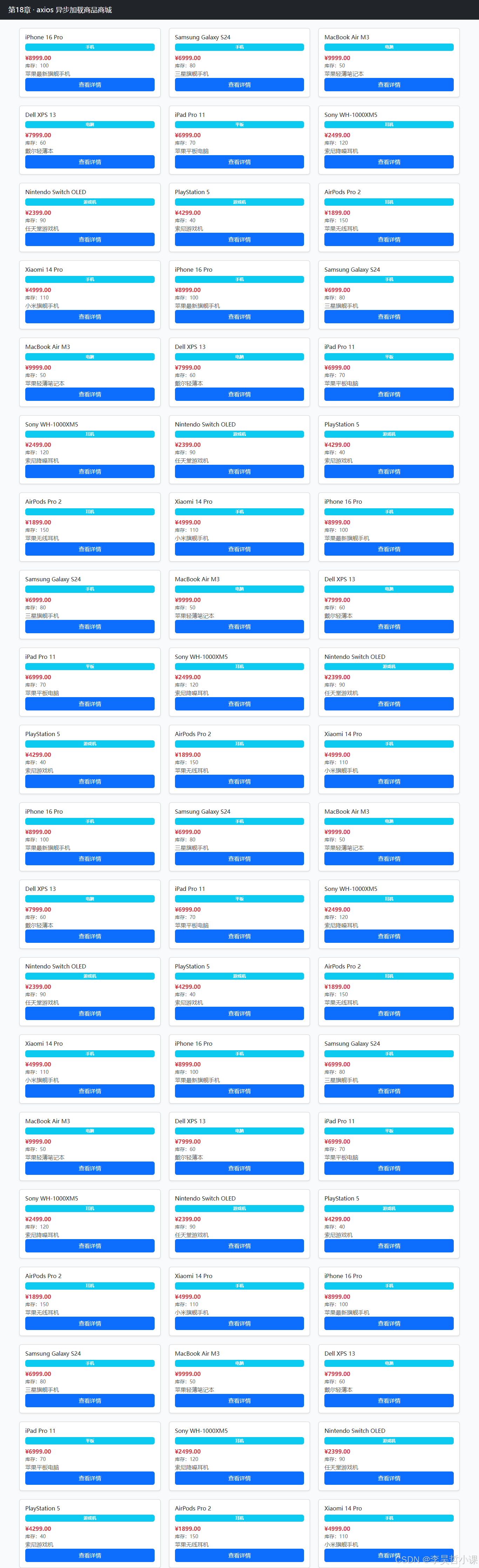
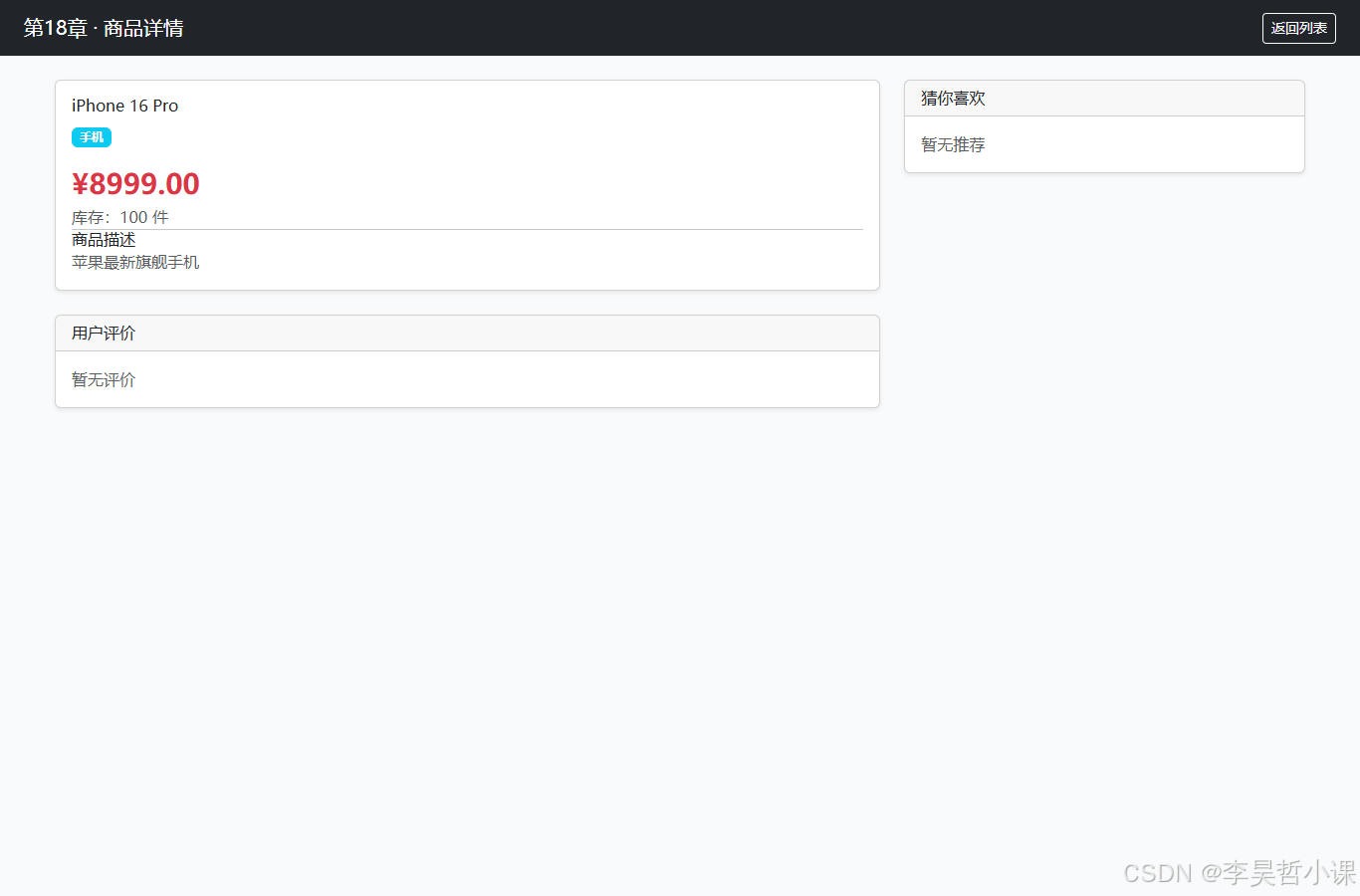
常见坑
-
跨域问题(CORS):如果 axios 请求的 API 和页面不在同一域名/端口,会触发 CORS 错误。本章中页面和 API 同域(http://localhost:8118),所以没问题。如果前端工程分离部署,需要在
ProductApiController上添加@CrossOrigin注解。 -
Thymeleaf 变量内联:
/*[[${product.id}]]*/ 0语法中,结尾的0是** JavaScript 默认值**,不是 Thymeleaf 语法。Thymeleaf 处理后会替换为真实值,JS 引擎最后看到的是const productId = 1;或const productId = 0;(如果变量空)。 -
异步加载顺序:
loadReviews()和loadRecommendations()是独立的异步请求,完成的顺序不一定。如果某个请求慢,页面其他部分已经渲染完成,用户不会等待。 -
JSON 日期序列化:
LocalDateTime默认序列化为 ISO 格式(“2024-01-15T10:30:00”)。前端显示时应该格式化(如new Date(dateStr).toLocaleString()),但本章直接显示原生字符串。 -
全局错误处理:本章只捕获了单个 axios 请求的
.catch()。生产环境应该添加全局错误处理(如 axios 拦截器)统一处理网络错误、401 未授权等。
第19章 · Redis 缓存
章节目标
- 理解 Spring Cache 抽象层与 Redis 后端集成
- 掌握 @Cacheable、@CacheEvict 注解的使用
- 理解 GenericJackson2JsonRedisSerializer 的类型信息要求
- 学会配置 RedisCacheManager(TTL、序列化等)
- 完成商品查询的缓存优化
理论知识
Spring Cache 抽象:Spring 提供统一的缓存 API,上层代码使用 @Cacheable、@CacheEvict 等注解,下层可以是 Redis、EhCache、Caffeine 等具体实现。切换缓存后端时,业务代码无需改动。
@Cacheable 工作流程:
- 方法执行前,Spring 先查缓存(key = 方法名 + 参数)
- 若命中,直接返回缓存值,方法体不执行(数据库零查询)
- 若未命中,执行方法体,结果存入缓存,下次直接返回
@CacheEvict 工作流程:
- 方法执行后,删除指定缓存
- 用于数据更新时使缓存失效,下次查询重新从 DB 加载(保证一致性)
Redis 序列化关键点:
GenericJackson2JsonRedisSerializer序列化对象时会写入@class类型信息(如"@class":"com.lihaozhe.ch19.model.Product")- 反序列化时根据
@class创建对应对象 - 如果 ObjectMapper 不开启
activateDefaultTyping,序列化结果没有类型信息,反序列化只能得到LinkedHashMap,转型Product会抛ClassCastException - 本章在
CacheConfig中已正确配置,避免了这个坑
TTL(Time-To-Live):
- 缓存条目存活时间,过期后自动删除
- 防止缓存无限增长和数据过旧
- 本章设置为 10 分钟
项目结构
chapter19-cache/
├── pom.xml
└── src/main/
    ├── java/com/lihaozhe/ch19/
    │   ├── Ch19Application.java
    │   ├── config/
    │   │   └── CacheConfig.java          # Redis 缓存管理器配置
    │   ├── controller/
    │   │   └── ProductController.java
    │   ├── dao/
    │   │   └── ProductMapper.java
    │   ├── model/
    │   │   └── Product.java
    │   └── service/
    │       └── ProductService.java       # @Cacheable 注解
    └── resources/
        ├── application.yml               # Redis 连接配置
        ├── schema.sql
        ├── data.sql
        └── templates/
            ├── product-list.html
            └── product-detail.html
完整代码
pom.xml
<?xml version="1.0" encoding="UTF-8"?>
<project xmlns="http://maven.apache.org/POM/4.0.0"
         xmlns:xsi="http://www.w3.org/2001/XMLSchema-instance"
         xsi:schemaLocation="http://maven.apache.org/POM/4.0.0 https://maven.apache.org/xsd/maven-4.0.0.xsd">
    <modelVersion>4.0.0</modelVersion>

    <parent>
        <groupId>com.lihaozhe</groupId>
        <artifactId>sb-thymeleaf</artifactId>
        <version>1.0.0</version>
    </parent>

    <artifactId>chapter19-cache</artifactId>
    <packaging>jar</packaging>

    <dependencies>
        <dependency>
            <groupId>org.springframework.boot</groupId>
            <artifactId>spring-boot-starter-webmvc</artifactId>
        </dependency>
        <dependency>
            <groupId>org.springframework.boot</groupId>
            <artifactId>spring-boot-starter-thymeleaf</artifactId>
        </dependency>
        <dependency>
            <groupId>com.baomidou</groupId>
            <artifactId>mybatis-plus-spring-boot4-starter</artifactId>
        </dependency>
        <dependency>
            <groupId>com.baomidou</groupId>
            <artifactId>mybatis-plus-jsqlparser</artifactId>
        </dependency>
        <!-- Redis 缓存 -->
        <dependency>
            <groupId>org.springframework.boot</groupId>
            <artifactId>spring-boot-starter-data-redis</artifactId>
        </dependency>
        <dependency>
            <groupId>org.apache.commons</groupId>
            <artifactId>commons-pool2</artifactId>
        </dependency>
        <!-- Jackson JSON 序列化(用于 Redis 缓存) -->
        <dependency>
            <groupId>com.fasterxml.jackson.core</groupId>
            <artifactId>jackson-databind</artifactId>
        </dependency>
        <dependency>
            <groupId>com.fasterxml.jackson.datatype</groupId>
            <artifactId>jackson-datatype-jsr310</artifactId>
        </dependency>
        <dependency>
            <groupId>com.mysql</groupId>
            <artifactId>mysql-connector-j</artifactId>
            <scope>runtime</scope>
        </dependency>
        <dependency>
            <groupId>org.springframework.boot</groupId>
            <artifactId>spring-boot-starter-test</artifactId>
            <scope>test</scope>
        </dependency>
    </dependencies>

    <build>
        <plugins>
            <plugin>
                <groupId>org.springframework.boot</groupId>
                <artifactId>spring-boot-maven-plugin</artifactId>
            </plugin>
        </plugins>
    </build>
</project>
Ch19Application.java
package com.lihaozhe.ch19;

import org.springframework.boot.SpringApplication;
import org.springframework.boot.autoconfigure.SpringBootApplication;
import org.springframework.cache.annotation.EnableCaching;

/**
 * 第19章 启动入口。
 *
 * <p>理论知识 —— @EnableCaching:
 * 启用 Spring 的缓存抽象层。加上这个注解后,
 * @Cacheable / @CacheEvict 等缓存注解才会生效,
 * Spring 自动找缓存管理器(这里是 RedisCacheManager)。</p>
 */
@SpringBootApplication
@EnableCaching
public class Ch19Application {

    public static void main(String[] args) {
        SpringApplication.run(Ch19Application.class, args);
    }
}
config/CacheConfig.java
package com.lihaozhe.ch19.config;

import com.fasterxml.jackson.databind.ObjectMapper;
import com.fasterxml.jackson.datatype.jsr310.JavaTimeModule;
import org.springframework.context.annotation.Bean;
import org.springframework.context.annotation.Configuration;
import org.springframework.data.redis.cache.RedisCacheConfiguration;
import org.springframework.data.redis.cache.RedisCacheManager;
import org.springframework.data.redis.connection.RedisConnectionFactory;
import org.springframework.data.redis.serializer.GenericJackson2JsonRedisSerializer;
import org.springframework.data.redis.serializer.RedisSerializationContext;
import org.springframework.data.redis.serializer.StringRedisSerializer;

import java.time.Duration;

/**
 * Redis 缓存管理器配置(第19章)
 *
 * <p>理论知识 —— RedisCacheManager:
 * Spring Cache 抽象层需要一个 CacheManager 来实现缓存操作。
 * RedisCacheManager 使用 Redis 作为后端存储。
 * 配置缓存默认 TTL(存活时间)和序列化方式。</p>
 */
@Configuration
public class CacheConfig {

    /**
     * 配置 RedisCacheManager。
     *
     * @param connectionFactory Redis 连接工厂
     * @return RedisCacheManager 实例
     */
    @Bean
    public RedisCacheManager cacheManager(RedisConnectionFactory connectionFactory) {
        // 创建 ObjectMapper 并注册 JavaTimeModule(支持 LocalDateTime 序列化)
        ObjectMapper objectMapper = new ObjectMapper();
        objectMapper.registerModule(new JavaTimeModule());
        // 关键:开启默认类型信息,序列化时写入 @class 字段(如 com.lihaozhe.ch19.model.Product)。
        // 否则从 Redis 反序列化时只能得到 LinkedHashMap,转型 Product 会抛 ClassCastException。
        // 这是 GenericJackson2JsonRedisSerializer 能反序列化为具体类型的必经之路。
        objectMapper.activateDefaultTyping(
                objectMapper.getPolymorphicTypeValidator(),
                ObjectMapper.DefaultTyping.NON_FINAL);

        // 缓存配置:默认 TTL 10分钟
        // 键用字符串,值用 JSON(GenericJackson2JsonRedisSerializer 自动处理类型信息)
        RedisCacheConfiguration config = RedisCacheConfiguration.defaultCacheConfig()
                .entryTtl(Duration.ofMinutes(10))
                .serializeKeysWith(RedisSerializationContext.SerializationPair
                        .fromSerializer(new StringRedisSerializer()))
                .serializeValuesWith(RedisSerializationContext.SerializationPair
                        .fromSerializer(new GenericJackson2JsonRedisSerializer(objectMapper)))
                .disableCachingNullValues();

        return RedisCacheManager.builder(connectionFactory)
                .cacheDefaults(config)
                .build();
    }
}
controller/ProductController.java
package com.lihaozhe.ch19.controller;

import com.lihaozhe.ch19.model.Product;
import com.lihaozhe.ch19.service.ProductService;
import org.springframework.stereotype.Controller;
import org.springframework.ui.Model;
import org.springframework.web.bind.annotation.GetMapping;
import org.springframework.web.bind.annotation.PathVariable;
import org.springframework.web.bind.annotation.RequestParam;

import java.util.List;

/**
 * 商品控制器(第19章:Redis 缓存展示)
 *
 * <p>理论知识 —— 缓存命中可视化:
 * 通过记录查询是否真正访问数据库(System.out.println),
 * 在页面展示"数据来源:DB 或 CACHE"。
 * 第二次访问同一商品时,应该看到"CACHE",且日志不再有数据库查询。</p>
 */
@Controller
public class ProductController {

    private final ProductService productService;

    public ProductController(ProductService productService) {
        this.productService = productService;
    }

    /**
     * 商品列表页。
     *
     * @param category 分类筛选(可选)
     * @param model 传递数据到视图
     * @return 视图名 "product-list"
     */
    @GetMapping("/")
    public String list(@RequestParam(required = false) String category, Model model) {
        List<Product> products = productService.findByCategory(category);
        model.addAttribute("products", products);
        model.addAttribute("category", category);
        return "product-list";
    }

    /**
     * 商品详情页。
     *
     * @param id 商品ID
     * @param model 传递数据到视图
     * @return 视图名 "product-detail"
     */
    @GetMapping("/product/{id}")
    public String detail(@PathVariable Long id, Model model) {
        Product product = productService.findById(id);
        model.addAttribute("product", product);
        return "product-detail";
    }
}
model/Product.java
package com.lihaozhe.ch19.model;

import com.baomidou.mybatisplus.annotation.IdType;
import com.baomidou.mybatisplus.annotation.TableId;
import com.baomidou.mybatisplus.annotation.TableName;

import java.math.BigDecimal;
import java.time.LocalDateTime;

/**
 * 商品实体(第19章)
 */
@TableName("t_ch19_product")
public class Product {

    @TableId(type = IdType.AUTO)
    private Long id;

    private String name;

    private BigDecimal price;

    private String category;

    private String description;

    private Integer stock;

    private LocalDateTime createTime;

    private LocalDateTime updateTime;

    public Long getId() {
        return id;
    }

    public void setId(Long id) {
        this.id = id;
    }

    public String getName() {
        return name;
    }

    public void setName(String name) {
        this.name = name;
    }

    public BigDecimal getPrice() {
        return price;
    }

    public void setPrice(BigDecimal price) {
        this.price = price;
    }

    public String getCategory() {
        return category;
    }

    public void setCategory(String category) {
        this.category = category;
    }

    public String getDescription() {
        return description;
    }

    public void setDescription(String description) {
        this.description = description;
    }

    public Integer getStock() {
        return stock;
    }

    public void setStock(Integer stock) {
        this.stock = stock;
    }

    public LocalDateTime getCreateTime() {
        return createTime;
    }

    public void setCreateTime(LocalDateTime createTime) {
        this.createTime = createTime;
    }

    public LocalDateTime getUpdateTime() {
        return updateTime;
    }

    public void setUpdateTime(LocalDateTime updateTime) {
        this.updateTime = updateTime;
    }
}
service/ProductService.java
package com.lihaozhe.ch19.service;

import com.baomidou.mybatisplus.core.conditions.query.LambdaQueryWrapper;
import com.baomidou.mybatisplus.extension.plugins.pagination.Page;
import com.lihaozhe.ch19.dao.ProductMapper;
import com.lihaozhe.ch19.model.Product;
import org.springframework.cache.annotation.CacheEvict;
import org.springframework.cache.annotation.Cacheable;
import org.springframework.stereotype.Service;

import java.util.List;

/**
 * 商品服务(第19章:Redis 缓存)
 *
 * <p>理论知识 —— @Cacheable 工作原理:
 * 1. 方法执行前,Spring 先查缓存(key = 方法名 + 参数);
 * 2. 若命中,直接返回缓存值,不执行方法体(数据库零查询);
 * 3. 若未命中,执行方法体,结果存入缓存,下次直接返回。
 *
 * <p>缓存 key 生成规则(默认):
 * 类名 + 方法名 + 参数值(逗号分隔),如 "ProductService.findById(1)"。</p>
 *
 * <p>@CacheEvict 工作原理:
 * 方法执行后,删除指定缓存。用于"数据更新"时使缓存失效,
 * 下次查询重新从数据库加载(保证数据一致性)。</p>
 */
@Service
public class ProductService {

    private final ProductMapper productMapper;

    public ProductService(ProductMapper productMapper) {
        this.productMapper = productMapper;
    }

    /**
     * 查全部商品(带缓存)。
     *
     * @Cacheable:首次查询从 DB 取,结果缓存;
     *            后续查询直接返回缓存(速度极快)。
     *
     * @return 商品列表
     */
    @Cacheable(value = "products", key = "'list'")
    public List<Product> findAll() {
        System.out.println(">>> 查询数据库:selectList");
        return productMapper.selectList(null);
    }

    /**
     * 根据 id 查商品(带缓存)。
     *
     * @Cacheable:key = 方法名 + 参数 id
     *            例如 findById(1) 的缓存 key 是 "products::findById(1)"
     *
     * @param id 商品ID
     * @return 商品实体
     */
    @Cacheable(value = "products", key = "#id")
    public Product findById(Long id) {
        System.out.println(">>> 查询数据库:selectById(" + id + ")");
        return productMapper.selectById(id);
    }

    /**
     * 根据分类查商品(带缓存)。
     *
     * @Cacheable:key 包含参数 category
     *
     * @param category 分类名称
     * @return 商品列表
     */
    @Cacheable(value = "products", key = "'category:' + #category")
    public List<Product> findByCategory(String category) {
        System.out.println(">>> 查询数据库:selectByCategory(" + category + ")");
        if (category == null || category.isEmpty()) {
            return findAll();
        }
        LambdaQueryWrapper<Product> wrapper = new LambdaQueryWrapper<>();
        wrapper.eq(Product::getCategory, category);
        return productMapper.selectList(wrapper);
    }

    /**
     * 更新商品(缓存失效)。
     *
     * @CacheEvict:更新后删除该商品的缓存,
     *              下次查询会重新从 DB 加载(数据一致性)。
     *
     * @param product 商品实体(含ID)
     * @return 更新行数
     */
    @CacheEvict(value = "products", key = "#product.id")
    public int update(Product product) {
        return productMapper.updateById(product);
    }

    /**
     * 删除商品(缓存失效 + 清理全列表缓存)。
     *
     * @CacheEvict:删除该商品缓存,并清空列表缓存
     *
     * @param id 商品ID
     * @return 删除行数
     */
    @CacheEvict(value = "products", allEntries = true)
    public int delete(Long id) {
        return productMapper.deleteById(id);
    }
}
dao/ProductMapper.java
package com.lihaozhe.ch19.dao;

import com.baomidou.mybatisplus.core.mapper.BaseMapper;
import com.lihaozhe.ch19.model.Product;
import org.apache.ibatis.annotations.Mapper;

/**
 * 商品 Mapper(第19章)
 */
@Mapper
public interface ProductMapper extends BaseMapper<Product> {
}
application.yml
# 第19章:Redis 缓存
# 端口规则:8080 + 章号 19 → 8119
server:
  port: 8119

spring:
  application:
    name: chapter19-cache
  datasource:
    url: jdbc:mysql://118.31.221.165:3306/sb_thymeleaf?useSSL=false&serverTimezone=Asia/Shanghai&characterEncoding=UTF-8&allowPublicKeyRetrieval=true
    username: root
    password: lihaozhe
    driver-class-name: com.mysql.cj.jdbc.Driver
    hikari:
      maximum-pool-size: 5
      minimum-idle: 2
      connection-timeout: 10000
  sql:
    init:
      mode: always
  # Redis 配置
  data:
    redis:
      host: 118.31.221.165
      port: 6379
      password: lihaozhe
      timeout: 5s
      lettuce:
        pool:
          max-active: 8
          max-idle: 4
          min-idle: 1
          max-wait: 3s
  thymeleaf:
    cache: false
    encoding: UTF-8
    mode: HTML
    check-template: true
    check-template-location: true
  # 缓存配置
  cache:
    type: redis
    redis:
      # 键前缀:多应用共用 Redis 时区分
      key-prefix: "ch19:"
      # 缓存条目存活时间:10分钟
      time-to-live: 600000
      # 是否缓存空值(防止缓存穿透)
      cache-null-values: false

mybatis-plus:
  configuration:
    map-underscore-to-camel-case: true
    log-impl: org.apache.ibatis.logging.stdout.StdOutImpl
schema.sql
-- 第19章:商品表
CREATE TABLE IF NOT EXISTS t_ch19_product (
    id BIGINT AUTO_INCREMENT PRIMARY KEY COMMENT '商品ID',
    name VARCHAR(100) NOT NULL COMMENT '商品名称',
    price DECIMAL(10,2) NOT NULL COMMENT '商品价格',
    category VARCHAR(50) COMMENT '商品分类',
    description VARCHAR(500) COMMENT '商品描述',
    stock INT DEFAULT 0 COMMENT '库存',
    create_time TIMESTAMP DEFAULT CURRENT_TIMESTAMP COMMENT '创建时间',
    update_time TIMESTAMP DEFAULT CURRENT_TIMESTAMP ON UPDATE CURRENT_TIMESTAMP COMMENT '更新时间'
) ENGINE=InnoDB DEFAULT CHARSET=utf8mb4 COMMENT='第19章商品表';
data.sql
-- 第19章:商品种子数据
INSERT INTO t_ch19_product (name, price, category, description, stock) VALUES
('iPhone 16 Pro', 8999.00, '手机', '苹果最新旗舰手机', 100),
('Samsung Galaxy S24', 6999.00, '手机', '三星旗舰手机', 80),
('MacBook Air M3', 9999.00, '电脑', '苹果轻薄笔记本', 50),
('Dell XPS 13', 7999.00, '电脑', '戴尔轻薄本', 60),
('iPad Pro 11', 6999.00, '平板', '苹果平板电脑', 70),
('Sony WH-1000XM5', 2499.00, '耳机', '索尼降噪耳机', 120),
('Nintendo Switch OLED', 2399.00, '游戏机', '任天堂游戏机', 90),
('PlayStation 5', 4299.00, '游戏机', '索尼游戏机', 40),
('AirPods Pro 2', 1899.00, '耳机', '苹果无线耳机', 150),
('Xiaomi 14 Pro', 4999.00, '手机', '小米旗舰手机', 110),
('Huawei Mate 60 Pro', 6999.00, '手机', '华为旗舰手机', 75),
('LG C3 OLED TV', 12999.00, '电视', 'LG OLED 电视', 30);
templates/product-list.html
<!DOCTYPE html>
<html lang="zh-CN" xmlns:th="http://www.thymeleaf.org">
<head>
    <meta charset="UTF-8">
    <meta name="viewport" content="width=device-width, initial-scale=1.0">
    <title>第19章 · 商品列表</title>

    <script src="https://cdn.tailwindcss.com"></script>
    <link href="https://cdn.jsdelivr.net/npm/bootstrap@5.3.3/dist/css/bootstrap.min.css" rel="stylesheet">
    <script src="https://cdn.jsdelivr.net/npm/bootstrap@5.3.3/dist/js/bootstrap.bundle.min.js"></script>
    <script src="https://code.jquery.com/jquery-4.0.0.min.js"></script>
    <script src="https://cdn.jsdelivr.net/npm/axios@1.7.9/dist/axios.min.js"></script>
</head>
<body class="bg-gray-50 min-h-screen">

<nav class="navbar navbar-dark bg-dark px-4">
    <span class="navbar-brand">第19章 · Redis 缓存商品商城</span>
    <span class="text-light small">缓存前缀:ch19:</span>
</nav>

<div class="container mt-4">
    <div class="row row-cols-1 row-cols-md-3 g-4">
        <div class="col" th:each="product : ${products}">
            <div class="card h-100 shadow-sm">
                <div class="card-body d-flex flex-column">
                    <h5 class="card-title" th:text="${product.name}">商品名</h5>
                    <span class="badge bg-info mb-2" th:text="${product.category}">分类</span>
                    <p class="card-text text-danger fw-bold" th:text="'¥' + ${product.price}">价格</p>
                    <p class="card-text text-muted small" th:text="'库存:' + ${product.stock}">库存</p>
                    <p class="card-text text-muted flex-grow-1" th:text="${#strings.abbreviate(product.description, 50)}">描述</p>
                    <a th:href="@{/product/{id}(id=${product.id})}" class="btn btn-primary mt-auto">查看详情</a>
                </div>
            </div>
        </div>
    </div>

    <div class="alert alert-info mt-4" role="alert">
        <h5>缓存说明</h5>
        <p class="mb-0">
            商品详情页首次访问时从数据库查询,结果会缓存到 Redis(TTL: 10分钟)。
            10分钟内再访问同一商品,直接返回缓存,不查数据库(页面源显示"CACHE")。
            通过控制台日志可观察缓存命中情况。
        </p>
    </div>
</div>

</body>
</html>
templates/product-detail.html
<!DOCTYPE html>
<html lang="zh-CN" xmlns:th="http://www.thymeleaf.org">
<head>
    <meta charset="UTF-8">
    <meta name="viewport" content="width=device-width, initial-scale=1.0">
    <title>第19章 · 商品详情</title>

    <script src="https://cdn.tailwindcss.com"></script>
    <link href="https://cdn.jsdelivr.net/npm/bootstrap@5.3.3/dist/css/bootstrap.min.css" rel="stylesheet">
    <script src="https://cdn.jsdelivr.net/npm/bootstrap@5.3.3/dist/js/bootstrap.bundle.min.js"></script>
    <script src="https://code.jquery.com/jquery-4.0.0.min.js"></script>
    <script src="https://cdn.jsdelivr.net/npm/axios@1.7.9/dist/axios.min.js"></script>
</head>
<body class="bg-gray-50 min-h-screen">

<nav class="navbar navbar-dark bg-dark px-4">
    <span class="navbar-brand">第19章 · 商品详情</span>
    <a th:href="@{/}" class="btn btn-outline-light btn-sm">返回列表</a>
</nav>

<div class="container mt-4" th:if="${product != null}">
    <div class="row">
        <div class="col-md-8">
            <div class="card shadow-sm">
                <div class="card-body">
                    <h2 class="card-title" th:text="${product.name}">商品名称</h2>
                    <span class="badge bg-info mb-3" th:text="${product.category}">分类</span>
                    <p class="text-danger fw-bold fs-3" th:text="'¥' + ${product.price}">价格</p>
                    <p class="text-muted" th:text="'库存:' + ${product.stock} + ' 件'">库存</p>
                    <hr>
                    <h5>商品描述</h5>
                    <p class="text-muted" th:text="${product.description}">描述内容</p>
                    <hr>
                    <p class="small text-muted">
                        创建时间:<span th:text="${product.createTime}">创建时间</span><br>
                        更新时间:<span th:text="${product.updateTime}">更新时间</span>
                    </p>
                </div>
            </div>
        </div>

        <!-- 缓存状态面板 -->
        <div class="col-md-4">
            <div class="card shadow-sm border-warning">
                <div class="card-header bg-warning text-dark">
                    <h5 class="mb-0">📊 数据来源</h5>
                </div>
                <div class="card-body">
                    <p class="mb-2">本页面多次访问同一商品时:</p>
                    <ul class="list-unstyled">
                        <li class="mb-2">✓ 第一次:查询数据库,结果缓存到 Redis</li>
                        <li>✓ 第二次(10分钟内):直接从 Redis 返回,不查 DB</li>
                    </ul>
                    <div class="alert alert-success mt-3 mb-0">
                        <strong>观察方式:</strong>查看应用控制台日志,
                        第二次访问时不会出现 <code>>>> 查询数据库</code> 输出,
                        说明数据是来自缓存(CACHE)而非数据库(DB)。
                    </div>
                </div>
            </div>

            <div class="card shadow-sm mt-3">
                <div class="card-body">
                    <button class="btn btn-success w-100 mb-2">加入购物车</button>
                    <button class="btn btn-outline-primary w-100 mb-2">立即购买</button>
                    <button class="btn btn-outline-secondary w-100">收藏</button>
                </div>
            </div>
        </div>
    </div>
</div>

<!-- 商品不存在提示 -->
<div class="container mt-4" th:if="${product == null}">
    <div class="alert alert-danger">
        商品不存在或已下架
    </div>
    <a th:href="@{/}" class="btn btn-primary">返回列表</a>
</div>

</body>
</html>
运行验证
cd sb-thymeleaf/chapter19-cache
mvn clean package -DskipTests
java -jar target/chapter19-cache-1.0.0.jar
# 浏览器访问 http://localhost:8119/
# 商品列表:http://localhost:8119/
# 商品详情:http://localhost:8119/product/1
观察缓存命中:
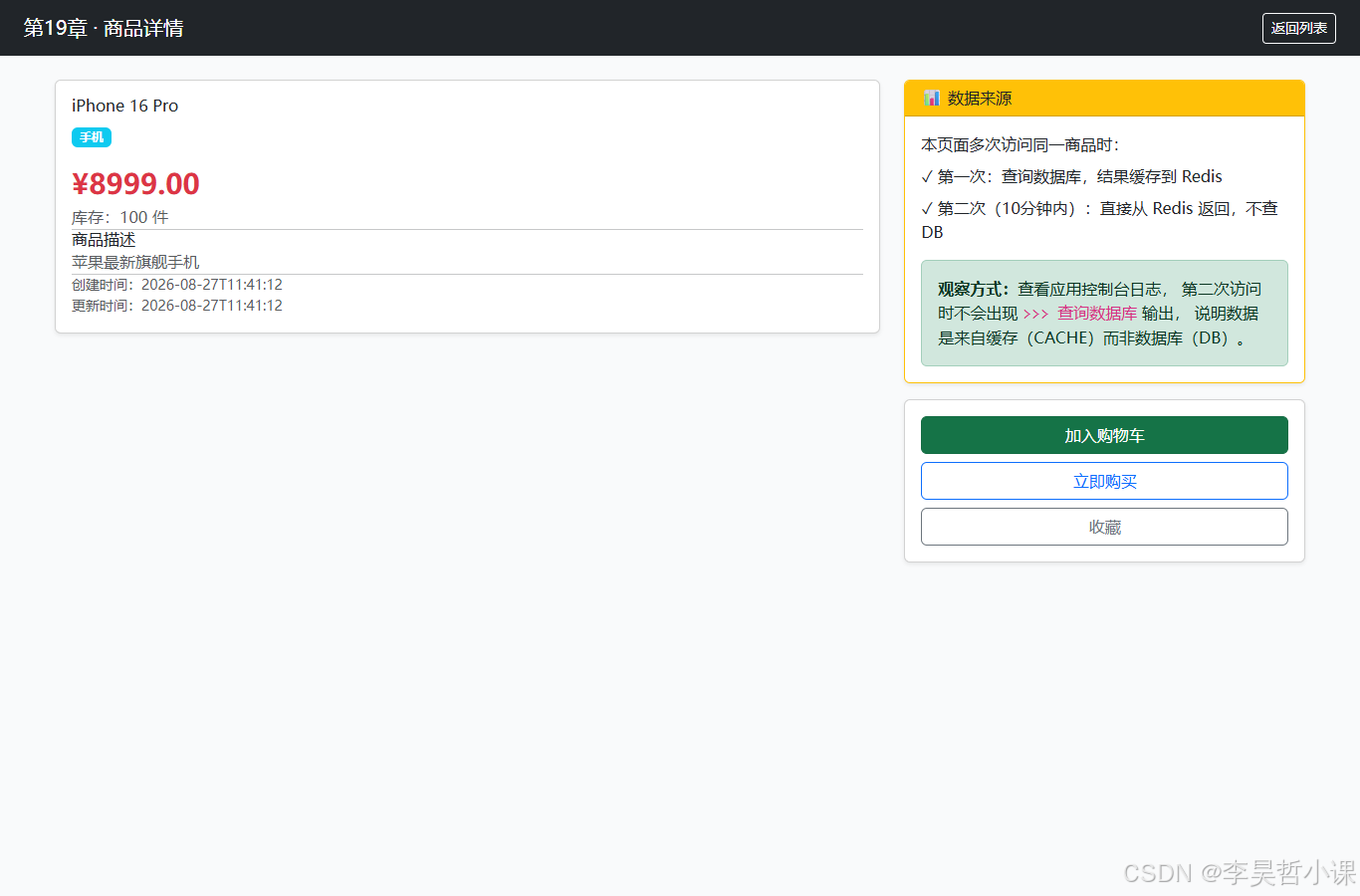
- 访问 http://localhost:8119/product/1
- 控制台输出:“>>> 查询数据库:selectById(1)”
- 刷新页面(再访问同一商品)
- 控制台不再输出数据库查询,说明数据来自 Redis 缓存
- 10分钟后再次访问,缓存过期,会重新查询数据库
查看 Redis 缓存:
redis-cli -h 118.31.221.165 -p 6379 -a lihaozhe
KEYS ch19:*
# 输出:ch19:products::1
GET ch19:products::1
# 输出 JSON,包含 @class 字段
注意:
- 表
t_ch19_product会在启动时自动创建 - Redis 连接:118.31.221.165:6379,密码 lihaozhe
- 缓存前缀
ch19:用于区分不同应用 - 缓存 TTL 10 分钟(
time-to-live: 600000)
页面效果
以下截图均为本地启动后浏览器真实渲染结果。

常见坑
-
ClassCastException 反序列化失败:
- 症状:从 Redis 反序列化时抛出
java.lang.ClassCastException: java.util.LinkedHashMap cannot be cast to com.lihaozhe.ch19.model.Product - 原因:
GenericJackson2JsonRedisSerializer序列化对象时,如果没有开启activateDefaultTyping,不会写入@class类型信息,反序列化只能得到LinkedHashMap - 解决:在
ObjectMapper上调用.activateDefaultTyping(polymorphicTypeValidator, DefaultTyping.NON_FINAL) - 本章代码已正确配置,不会出现此问题
- 症状:从 Redis 反序列化时抛出
-
缓存更新后未失效:
- 如果修改商品信息后,直接返回前端,用户看到的还是缓存中的旧数据
- 必须在修改方法上添加
@CacheEvict,使缓存失效 - 本章的
update()和delete()方法都有@CacheEvict注解
-
序列化 LocalDateTime 失败:
LocalDateTime是 Java 8 时间类型,Jackson 默认不支持- 需要注册
JavaTimeModule:objectMapper.registerModule(new JavaTimeModule()) - 本章已注册
-
缓存穿透:
- 查询不存在的 ID(如 -1),每次都查数据库
- 解决:使用
cache-null-values: true缓存空结果(防止恶意攻击) - 本章设置
cache-null-values: false(教学演示,简化处理)
-
Redis 连接失败:
- 检查 Redis 服务是否启动(118.31.221.165:6379)
- 检查密码是否正确
- 应用启动时会自动连接 Redis,连接失败会报错
第20章 · Spring Security 安全与国际化
章节目标
本章通过构建一个简单的电商商城系统,学习以下关键概念:
- Spring Security 组件式配置:使用现代的
SecurityFilterChainBean 替代已废弃的WebSecurityConfigurerAdapter - 用户认证与授权:从数据库加载用户信息,基于角色的访问控制(RBAC)
- 表单登录:自定义登录页面、登录处理、登出功能
- 完整国际化(i18n):中/英双语支持,通过 Thymeleaf
#{key}语法引用消息资源 - 前端集成:Tailwind CSS、Bootstrap 5.3、jQuery、axios 等 CDN 资源的集成使用
理论知识
Spring Security 现代配置方式
Spring Boot 4 推荐使用组件式配置而非继承 WebSecurityConfigurerAdapter。核心思想包括:
- SecurityFilterChain Bean:定义 HTTP 安全规则链,通过链式调用
authorizeHttpRequests()、formLogin()、logout()等方法配置 - UserDetailsService:自定义用户详情服务,从数据源(如数据库)加载用户信息
- PasswordEncoder:密码加密(生产环境应使用 BCrypt,教学演示用明文)
- 规则顺序:URL 匹配规则按声明顺序匹配,具体规则在前,通用规则在后
表单登录流程
用户访问受保护资源
  ↓
Security 检查是否已认证
  ↓ (未认证)
重定向到登录页 /login
  ↓
用户提交表单 (POST /login)
  ↓
UserDetailsService 验证用户名
PasswordEncoder 验证密码
  ↓ (验证成功)
重定向到默认成功页面
基于角色的访问控制(RBAC)
在 SecurityFilterChain 中配置:
/admin/**→hasRole("ADMIN"):仅 ADMIN 角色可访问/product/**→permitAll():所有人可访问- 其他 URL →
authenticated():需登录
权限格式:ROLE_ + 角色名(如 ROLE_ADMIN、ROLE_USER)。
完整国际化(i18n)
Spring MVC 通过 MessageSource 实现多语言:
- 配置文件
messages.properties(默认)、messages_zh_CN.properties(中文)、messages_en_US.properties(英文) - 在
application.yml中设置spring.messages.basename: i18n/messages和encoding: UTF-8 - 模板中通过
#{key}引用消息,如<span th:text="#{login.title}">登录</span> - 浏览器根据
Accept-Language头自动选择语言文件
项目结构
chapter20-security/
├── pom.xml                                    # Maven 配置
├── src/main/java/com/lihaozhe/ch20/
│   ├── Ch20Application.java                   # 启动入口
│   ├── config/
│   │   └── SecurityConfig.java                # Spring Security 配置
│   ├── controller/
│   │   ├── AdminController.java               # 后台管理控制器
│   │   └── ShopController.java                # 前台控制器
│   ├── dao/
│   │   ├── ProductMapper.java                 # 商品 Mapper
│   │   └── UserMapper.java                    # 用户 Mapper
│   ├── model/
│   │   ├── Product.java                       # 商品实体
│   │   └── User.java                          # 用户实体
│   └── service/
│       └── ShopService.java                   # 业务逻辑层
├── src/main/resources/
│   ├── application.yml                        # 应用配置
│   ├── schema.sql                             # 建表脚本
│   ├── data.sql                               # 种子数据
│   ├── i18n/
│   │   ├── messages.properties                # 国际化默认(中文)
│   │   ├── messages_zh_CN.properties          # 中文版
│   │   └── messages_en_US.properties          # 英文版
│   └── templates/
│       ├── login.html                         # 登录页
│       ├── product-list.html                  # 商品列表页
│       ├── product-detail.html                # 商品详情页
│       ├── admin-dashboard.html               # 后台仪表盘
│       └── admin-users.html                   # 用户管理页
完整代码
pom.xml
<?xml version="1.0" encoding="UTF-8"?>
<project xmlns="http://maven.apache.org/POM/4.0.0"
         xmlns:xsi="http://www.w3.org/2001/XMLSchema-instance"
         xsi:schemaLocation="http://maven.apache.org/POM/4.0.0 https://maven.apache.org/xsd/maven-4.0.0.xsd">
    <modelVersion>4.0.0</modelVersion>

    <parent>
        <groupId>com.lihaozhe</groupId>
        <artifactId>sb-thymeleaf</artifactId>
        <version>1.0.0</version>
    </parent>

    <artifactId>chapter20-security</artifactId>
    <packaging>jar</packaging>

    <dependencies>
        <dependency>
            <groupId>org.springframework.boot</groupId>
            <artifactId>spring-boot-starter-webmvc</artifactId>
        </dependency>
        <dependency>
            <groupId>org.springframework.boot</groupId>
            <artifactId>spring-boot-starter-thymeleaf</artifactId>
        </dependency>
        <!-- Spring Security -->
        <dependency>
            <groupId>org.springframework.boot</groupId>
            <artifactId>spring-boot-starter-security</artifactId>
        </dependency>
        <dependency>
            <groupId>com.baomidou</groupId>
            <artifactId>mybatis-plus-spring-boot4-starter</artifactId>
        </dependency>
        <dependency>
            <groupId>com.baomidou</groupId>
            <artifactId>mybatis-plus-jsqlparser</artifactId>
        </dependency>
        <dependency>
            <groupId>com.mysql</groupId>
            <artifactId>mysql-connector-j</artifactId>
            <scope>runtime</scope>
        </dependency>
        <dependency>
            <groupId>org.springframework.boot</groupId>
            <artifactId>spring-boot-starter-test</artifactId>
            <scope>test</scope>
        </dependency>
    </dependencies>

    <build>
        <plugins>
            <plugin>
                <groupId>org.springframework.boot</groupId>
                <artifactId>spring-boot-maven-plugin</artifactId>
            </plugin>
        </plugins>
    </build>
</project>
Ch20Application.java
package com.lihaozhe.ch20;

import org.springframework.boot.SpringApplication;
import org.springframework.boot.autoconfigure.SpringBootApplication;

/**
 * 第20章 启动入口。
 */
@SpringBootApplication
public class Ch20Application {

    public static void main(String[] args) {
        SpringApplication.run(Ch20Application.class, args);
    }
}
SecurityConfig.java
package com.lihaozhe.ch20.config;

import com.baomidou.mybatisplus.core.conditions.query.LambdaQueryWrapper;
import com.lihaozhe.ch20.dao.UserMapper;
import com.lihaozhe.ch20.model.User;
import org.springframework.context.annotation.Bean;
import org.springframework.context.annotation.Configuration;
import org.springframework.security.authentication.AuthenticationManager;
import org.springframework.security.config.annotation.authentication.configuration.AuthenticationConfiguration;
import org.springframework.security.config.annotation.web.builders.HttpSecurity;
import org.springframework.security.config.annotation.web.configuration.EnableWebSecurity;
import org.springframework.security.core.userdetails.UserDetails;
import org.springframework.security.core.userdetails.UserDetailsService;
import org.springframework.security.core.userdetails.UsernameNotFoundException;
import org.springframework.security.crypto.bcrypt.BCryptPasswordEncoder;
import org.springframework.security.crypto.password.PasswordEncoder;
import org.springframework.security.web.SecurityFilterChain;

/**
 * Spring Security 配置(第20章:组件式配置)
 *
 * <p>理论知识 —— 现代组件式 Security 配置(Boot 4 推荐):
 * 1. 不再继承 WebSecurityConfigurerAdapter(已废弃);
 * 2. 定义 SecurityFilterChain Bean,链式配置 HTTP 安全规则;
 * 3. 自定义 UserDetailsService 从数据库加载用户;
 * 4. PasswordEncoder 使用 BCrypt 哈希(防止明文泄露)。</p>
 */
@Configuration
@EnableWebSecurity
public class SecurityConfig {

    private final UserMapper userMapper;

    public SecurityConfig(UserMapper userMapper) {
        this.userMapper = userMapper;
    }

    /**
     * 密码编码器:使用明文(教学演示,生产环境应使用 BCrypt)。
     *
     * @return PasswordEncoder 实例
     */
    @Bean
    public PasswordEncoder passwordEncoder() {
        // 教学用:明文密码便于测试;生产环境应使用 BCryptPasswordEncoder
        return org.springframework.security.crypto.password.NoOpPasswordEncoder.getInstance();
    }

    /**
     * 用户详情服务:从数据库加载用户信息。
     *
     * <p>Spring Security 登录时调用此服务:
     * 1. 根据 username 查 DB 获取用户;
     * 2. 返回 UserDetails(含密码、角色);
     * 3. Security 自动验证密码(与数据库比对)。</p>
     *
     * @return UserDetailsService 实例
     */
    @Bean
    public UserDetailsService userDetailsService() {
        return username -> {
            // 从数据库查询用户
            LambdaQueryWrapper<User> wrapper = new LambdaQueryWrapper<>();
            wrapper.eq(User::getUsername, username);
            User user = userMapper.selectOne(wrapper);

            if (user == null) {
                throw new UsernameNotFoundException("用户不存在: " + username);
            }

            // 将数据库用户转换为 Spring Security 的 UserDetails
            // 权限格式:"ROLE_" + 角色名(如 ROLE_ADMIN, ROLE_USER)
            return org.springframework.security.core.userdetails.User
                    .withUsername(user.getUsername())
                    .password(user.getPassword())
                    .authorities("ROLE_" + user.getRole())
                    .build();
        };
    }

    /**
     * 认证管理器:处理登录请求。
     *
     * @param config 认证配置
     * @return AuthenticationManager 实例
     * @throws Exception 异常
     */
    @Bean
    public AuthenticationManager authenticationManager(
            AuthenticationConfiguration config) throws Exception {
        return config.getAuthenticationManager();
    }

    /**
     * 安全过滤器链:定义访问规则。
     *
     * <p>理论知识 —— 链式配置:
     * 1. authorizeHttpRequests:定义 URL 访问权限;
     * 2. formLogin:启用表单登录(重定向到 /login);
     * 3. logout:启用登出功能(POST /logout)。
     *
     * <p>规则顺序很重要:具体规则在前,通用规则在后。
     * .anyRequest().authenticated() 表示其他所有请求需要登录。</p>
     *
     * @param http HttpSecurity 对象
     * @return SecurityFilterChain 实例
     * @throws Exception 异常
     */
    @Bean
    public SecurityFilterChain securityFilterChain(HttpSecurity http) throws Exception {
        http
            // 关闭 CSRF(教学简化;生产环境应启用)
            .csrf(csrf -> csrf.disable())

            // 授权规则
            .authorizeHttpRequests(auth -> auth
                // 公开资源(所有人可访问)
                .requestMatchers("/", "/product/**", "/css/**", "/js/**", "/images/**").permitAll()
                // 登录页和登录处理公开
                .requestMatchers("/login", "/login/**").permitAll()
                // 后台管理页:仅 ADMIN 角色
                .requestMatchers("/admin/**").hasRole("ADMIN")
                // 其他请求:需登录
                .anyRequest().authenticated()
            )

            // 表单登录配置
            .formLogin(form -> form
                // 登录页面 URL
                .loginPage("/login")
                // 登录处理 URL(POST)
                .loginProcessingUrl("/login")
                // 登录成功重定向
                .defaultSuccessUrl("/", true)
                // 登录失败重定向(带错误参数)
                .failureUrl("/login?error=true")
                // 允许所有人访问登录页
                .permitAll()
            )

            // 登出配置
            .logout(logout -> logout
                // 登出 URL(POST)
                .logoutUrl("/logout")
                // 登出成功重定向
                .logoutSuccessUrl("/login?logout=true")
                .permitAll()
            );

        return http.build();
    }
}
AdminController.java
package com.lihaozhe.ch20.controller;

import com.lihaozhe.ch20.model.User;
import com.lihaozhe.ch20.service.ShopService;
import org.springframework.security.core.Authentication;
import org.springframework.security.core.GrantedAuthority;
import org.springframework.stereotype.Controller;
import org.springframework.ui.Model;
import org.springframework.web.bind.annotation.GetMapping;

import java.util.List;

/**
 * 后台管理控制器(第20章:ADMIN 权限)
 *
 * <p>理论知识 —— 角色保护:
 * SecurityFilterChain 中已配置 /admin/** 需要 ROLE_ADMIN。
 * 未授权的用户访问时会被重定向到登录页(或403)。
 * 本控制器仅对 ADMIN 可见,无需再在方法上加 @PreAuthorize。</p>
 */
@Controller
public class AdminController {

    private final ShopService shopService;

    public AdminController(ShopService shopService) {
        this.shopService = shopService;
    }

    /**
     * 后台管理主页(ADMIN 专属)。
     */
    @GetMapping("/admin/dashboard")
    public String dashboard(Model model, Authentication auth) {
        List<User> users = shopService.findAllUsers();
        model.addAttribute("users", users);
        model.addAttribute("username", auth.getName());

        // 统计信息
        long userCount = users.size();
        model.addAttribute("userCount", userCount);

        return "admin-dashboard";
    }

    /**
     * 用户管理页(ADMIN 专属)。
     */
    @GetMapping("/admin/users")
    public String users(Model model, Authentication auth) {
        List<User> users = shopService.findAllUsers();
        model.addAttribute("users", users);
        model.addAttribute("username", auth.getName());
        return "admin-users";
    }
}
ShopController.java
package com.lihaozhe.ch20.controller;

import com.lihaozhe.ch20.model.Product;
import com.lihaozhe.ch20.service.ShopService;
import org.springframework.security.core.Authentication;
import org.springframework.security.core.GrantedAuthority;
import org.springframework.stereotype.Controller;
import org.springframework.ui.Model;
import org.springframework.web.bind.annotation.GetMapping;
import org.springframework.web.bind.annotation.PathVariable;

import java.util.List;

/**
 * 前台控制器(第20章:公开页面)
 *
 * <p>理论知识 —— Model 传递角色信息:
 * 前端页面通过 Model 获取当前用户的角色,
 * 用 th:if 条件判断显示/隐藏按钮(而非依赖 sec:authorize 方言),
 * 避免额外的依赖与版本风险。</p>
 */
@Controller
public class ShopController {

    private final ShopService shopService;

    public ShopController(ShopService shopService) {
        this.shopService = shopService;
    }

    /**
     * 商品列表页(公开)。
     */
    @GetMapping("/")
    public String list(Model model, Authentication auth) {
        List<Product> products = shopService.findAllProducts();
        model.addAttribute("products", products);

        // 传递角色信息到视图(用于 UI 显隐)
        boolean isAdmin = false;
        if (auth != null) {
            isAdmin = auth.getAuthorities().stream()
                    .map(GrantedAuthority::getAuthority)
                    .anyMatch(a -> a.equals("ROLE_ADMIN"));
        }
        model.addAttribute("isAdmin", isAdmin);
        model.addAttribute("username", auth != null ? auth.getName() : null);

        return "product-list";
    }

    /**
     * 商品详情页(公开)。
     */
    @GetMapping("/product/{id}")
    public String detail(@PathVariable Long id, Model model, Authentication auth) {
        Product product = shopService.findProductById(id);
        model.addAttribute("product", product);

        boolean isAdmin = false;
        if (auth != null) {
            isAdmin = auth.getAuthorities().stream()
                    .map(GrantedAuthority::getAuthority)
                    .anyMatch(a -> a.equals("ROLE_ADMIN"));
        }
        model.addAttribute("isAdmin", isAdmin);
        model.addAttribute("username", auth != null ? auth.getName() : null);

        return "product-detail";
    }

    /**
     * 登录页(公开)。
     */
    @GetMapping("/login")
    public String login() {
        return "login";
    }
}
ProductMapper.java
package com.lihaozhe.ch20.dao;

import com.baomidou.mybatisplus.core.mapper.BaseMapper;
import com.lihaozhe.ch20.model.Product;
import org.apache.ibatis.annotations.Mapper;

/**
 * 商品 Mapper(第20章)
 */
@Mapper
public interface ProductMapper extends BaseMapper<Product> {
}
UserMapper.java
package com.lihaozhe.ch20.dao;

import com.baomidou.mybatisplus.core.mapper.BaseMapper;
import com.lihaozhe.ch20.model.User;
import org.apache.ibatis.annotations.Mapper;

/**
 * 用户 Mapper(第20章)
 */
@Mapper
public interface UserMapper extends BaseMapper<User> {
}
Product.java
package com.lihaozhe.ch20.model;

import com.baomidou.mybatisplus.annotation.IdType;
import com.baomidou.mybatisplus.annotation.TableId;
import com.baomidou.mybatisplus.annotation.TableName;

import java.math.BigDecimal;
import java.time.LocalDateTime;

/**
 * 商品实体(第20章)
 */
@TableName("t_ch20_product")
public class Product {

    @TableId(type = IdType.AUTO)
    private Long id;

    private String name;

    private BigDecimal price;

    private String category;

    private String description;

    private Integer stock;

    private LocalDateTime createTime;

    private LocalDateTime updateTime;

    public Long getId() {
        return id;
    }

    public void setId(Long id) {
        this.id = id;
    }

    public String getName() {
        return name;
    }

    public void setName(String name) {
        this.name = name;
    }

    public BigDecimal getPrice() {
        return price;
    }

    public void setPrice(BigDecimal price) {
        this.price = price;
    }

    public String getCategory() {
        return category;
    }

    public void setCategory(String category) {
        this.category = category;
    }

    public String getDescription() {
        return description;
    }

    public void setDescription(String description) {
        this.description = description;
    }

    public Integer getStock() {
        return stock;
    }

    public void setStock(Integer stock) {
        this.stock = stock;
    }

    public LocalDateTime getCreateTime() {
        return createTime;
    }

    public void setCreateTime(LocalDateTime createTime) {
        this.createTime = createTime;
    }

    public LocalDateTime getUpdateTime() {
        return updateTime;
    }

    public void setUpdateTime(LocalDateTime updateTime) {
        this.updateTime = updateTime;
    }
}
User.java
package com.lihaozhe.ch20.model;

import com.baomidou.mybatisplus.annotation.IdType;
import com.baomidou.mybatisplus.annotation.TableId;
import com.baomidou.mybatisplus.annotation.TableName;

import java.time.LocalDateTime;

/**
 * 用户实体(第20章:Spring Security 用户)
 *
 * <p>理论知识 —— 角色权限模型:
 * 用户表存储 username / password(BCrypt 加密)/ role。
 * 登录时,Spring Security 验证密码,根据 role 决定可访问的资源。
 * 常见角色:USER(普通用户)、ADMIN(管理员)。</p>
 */
@TableName("t_ch20_user")
public class User {

    @TableId(type = IdType.AUTO)
    private Long id;

    private String username;

    private String password;

    /**
     * 角色:USER 或 ADMIN(大写)
     */
    private String role;

    private String realName;

    private String email;

    private LocalDateTime createTime;

    public Long getId() {
        return id;
    }

    public void setId(Long id) {
        this.id = id;
    }

    public String getUsername() {
        return username;
    }

    public void setUsername(String username) {
        this.username = username;
    }

    public String getPassword() {
        return password;
    }

    public void setPassword(String password) {
        this.password = password;
    }

    public String getRole() {
        return role;
    }

    public void setRole(String role) {
        this.role = role;
    }

    public String getRealName() {
        return realName;
    }

    public void setRealName(String realName) {
        this.realName = realName;
    }

    public String getEmail() {
        return email;
    }

    public void setEmail(String email) {
        this.email = email;
    }

    public LocalDateTime getCreateTime() {
        return createTime;
    }

    public void setCreateTime(LocalDateTime createTime) {
        this.createTime = createTime;
    }
}
ShopService.java
package com.lihaozhe.ch20.service;

import com.baomidou.mybatisplus.core.conditions.query.LambdaQueryWrapper;
import com.lihaozhe.ch20.dao.ProductMapper;
import com.lihaozhe.ch20.dao.UserMapper;
import com.lihaozhe.ch20.model.Product;
import com.lihaozhe.ch20.model.User;
import org.springframework.stereotype.Service;

import java.util.List;

/**
 * 商品和会员服务(第20章:基础 CRUD)
 */
@Service
public class ShopService {

    private final ProductMapper productMapper;
    private final UserMapper userMapper;

    public ShopService(ProductMapper productMapper, UserMapper userMapper) {
        this.productMapper = productMapper;
        this.userMapper = userMapper;
    }

    public List<Product> findAllProducts() {
        return productMapper.selectList(null);
    }

    public Product findProductById(Long id) {
        return productMapper.selectById(id);
    }

    public List<User> findAllUsers() {
        LambdaQueryWrapper<User> wrapper = new LambdaQueryWrapper<>();
        wrapper.orderByAsc(User::getId);
        return userMapper.selectList(wrapper);
    }

    public User findUserByUsername(String username) {
        LambdaQueryWrapper<User> wrapper = new LambdaQueryWrapper<>();
        wrapper.eq(User::getUsername, username);
        return userMapper.selectOne(wrapper);
    }
}
application.yml
# 第20章:Spring Security + i18n
# 端口规则:8080 + 章号 20 → 8120
server:
  port: 8120

spring:
  application:
    name: chapter20-security
  datasource:
    url: jdbc:mysql://118.31.221.165:3306/sb_thymeleaf?useSSL=false&serverTimezone=Asia/Shanghai&characterEncoding=UTF-8&allowPublicKeyRetrieval=true
    username: root
    password: lihaozhe
    driver-class-name: com.mysql.cj.jdbc.Driver
    hikari:
      maximum-pool-size: 5
      minimum-idle: 2
      connection-timeout: 10000
  sql:
    init:
      mode: always
  # i18n 国际化配置
  messages:
    basename: i18n/messages
    encoding: UTF-8
  thymeleaf:
    cache: false
    encoding: UTF-8
    mode: HTML
    check-template: true
    check-template-location: true

mybatis-plus:
  configuration:
    map-underscore-to-camel-case: true
    log-impl: org.apache.ibatis.logging.stdout.StdOutImpl
schema.sql
-- 第20章:用户表
CREATE TABLE IF NOT EXISTS t_ch20_user (
    id BIGINT AUTO_INCREMENT PRIMARY KEY COMMENT '用户ID',
    username VARCHAR(50) NOT NULL UNIQUE COMMENT '用户名',
    password VARCHAR(100) NOT NULL COMMENT '密码(明文存储,教学演示)',
    role VARCHAR(20) NOT NULL COMMENT '角色:USER 或 ADMIN',
    real_name VARCHAR(50) COMMENT '真实姓名',
    email VARCHAR(100) COMMENT '邮箱',
    create_time TIMESTAMP DEFAULT CURRENT_TIMESTAMP COMMENT '创建时间'
) ENGINE=InnoDB DEFAULT CHARSET=utf8mb4 COMMENT='第20章用户表';

-- 第20章:商品表
CREATE TABLE IF NOT EXISTS t_ch20_product (
    id BIGINT AUTO_INCREMENT PRIMARY KEY COMMENT '商品ID',
    name VARCHAR(100) NOT NULL COMMENT '商品名称',
    price DECIMAL(10,2) NOT NULL COMMENT '商品价格',
    category VARCHAR(50) COMMENT '商品分类',
    description VARCHAR(500) COMMENT '商品描述',
    stock INT DEFAULT 0 COMMENT '库存',
    create_time TIMESTAMP DEFAULT CURRENT_TIMESTAMP COMMENT '创建时间',
    update_time TIMESTAMP DEFAULT CURRENT_TIMESTAMP ON UPDATE CURRENT_TIMESTAMP COMMENT '更新时间'
) ENGINE=InnoDB DEFAULT CHARSET=utf8mb4 COMMENT='第20章商品表';

-- 每次启动清空用户表,确保密码是明文(教学演示)
TRUNCATE TABLE t_ch20_user;
data.sql
-- 第20章:用户种子数据(密码统一为:123456,明文存储用于教学演示)
-- 使用 INSERT IGNORE 避免重复插入(每次重启都执行 data.sql)
INSERT IGNORE INTO t_ch20_user (username, password, role, real_name, email) VALUES
('admin', '123456', 'ADMIN', '管理员', 'admin@example.com'),
('user1', '123456', 'USER', '用户一', 'user1@example.com'),
('user2', '123456', 'USER', '用户二', 'user2@example.com');

-- 第20章:商品种子数据
INSERT INTO t_ch20_product (name, price, category, description, stock) VALUES
('iPhone 16 Pro', 8999.00, '手机', '苹果最新旗舰手机', 100),
('Samsung Galaxy S24', 6999.00, '手机', '三星旗舰手机', 80),
('MacBook Air M3', 9999.00, '电脑', '苹果轻薄笔记本', 50),
('Dell XPS 13', 7999.00, '电脑', '戴尔轻薄本', 60),
('iPad Pro 11', 6999.00, '平板', '苹果平板电脑', 70),
('Sony WH-1000XM5', 2499.00, '耳机', '索尼降噪耳机', 120),
('Nintendo Switch OLED', 2399.00, '游戏机', '任天堂游戏机', 90),
('PlayStation 5', 4299.00, '游戏机', '索尼游戏机', 40),
('AirPods Pro 2', 1899.00, '耳机', '苹果无线耳机', 150),
('Xiaomi 14 Pro', 4999.00, '手机', '小米旗舰手机', 110),
('Huawei Mate 60 Pro', 6999.00, '手机', '华为旗舰手机', 75),
('LG C3 OLED TV', 12999.00, '电视', 'LG OLED 电视', 30);
i18n/messages.properties
# 国际化消息文件(默认/根)
# Spring 在找不到特定语言文件时会回退到这里
# 本教程以中文为主,所以根文件也用中文

# 通用
app.title=第20章 · Spring Security 商城
app.login=登录
app.logout=登出
app.welcome=欢迎

# 导航
nav.home=首页
nav.products=商品
nav.admin=后台管理

# 登录页
login.title=用户登录
login.username=用户名
login.password=密码
login.submit=登录
login.error=用户名或密码错误
login.hint=尝试:admin / 123456(管理员)或 user1 / 123456(用户)

# 商品列表
product.list.title=商品列表
product.name=商品名称
product.price=价格
product.category=分类
product.stock=库存
product.view=查看详情

# 商品详情
product.detail.title=商品详情
product.description=商品描述
product.add.to.cart=加入购物车
product.buy.now=立即购买

# 管理员
admin.dashboard=后台管理
admin.users=用户管理
admin.user.list=用户列表
admin.username=用户名
admin.role=角色
admin.real.name=真实姓名
admin.email=邮箱

# 角色
role.admin=管理员
role.user=用户

# 权限提示
access.denied=访问被拒绝
not.authorized=未授权
i18n/messages_en_US.properties
# Internationalization Messages (English)
# Format: key=value
# Usage: Reference via #{key} in templates, supports multiple languages

# General
app.title=Chapter 20 · Spring Security Shop
app.login=Login
app.logout=Logout
app.welcome=Welcome

# Navigation
nav.home=Home
nav.products=Products
nav.admin=Admin Panel

# Login page
login.title=User Login
login.username=Username
login.password=Password
login.submit=Login
login.error=Invalid username or password
login.hint=Try: admin/123456 (admin) or user1/123456 (user)

# Product list
product.list.title=Product List
product.name=Product Name
product.price=Price
product.category=Category
product.stock=Stock
product.view=View Details
product.detail=Details

# Product detail
product.detail.title=Product Details
product.description=Description
product.add.to.cart=Add to Cart
product.buy.now=Buy Now

# Admin
admin.dashboard=Admin Dashboard
admin.users=User Management
admin.user.list=User List
admin.username=Username
admin.role=Role
admin.real.name=Real Name
admin.email=Email
admin.create.time=Created At

# Roles
role.admin=Admin
role.user=User

# Permission prompts
access.denied=Access Denied
not.authorized=Not Authorized
i18n/messages_zh_CN.properties
# 国际化消息文件(中文)
# 格式:key=value
# 用途:通过 #{key} 在模板中引用,支持多语言

# 通用
app.title=第20章 · Spring Security 商城
app.login=登录
app.logout=登出
app.welcome=欢迎

# 导航
nav.home=首页
nav.products=商品
nav.admin=后台管理

# 登录页
login.title=用户登录
login.username=用户名
login.password=密码
login.submit=登录
login.error=用户名或密码错误
login.hint=尝试:admin / 123456(管理员)或 user1 / 123456(用户)

# 商品列表
product.list.title=商品列表
product.name=商品名称
product.price=价格
product.category=分类
product.stock=库存
product.view=查看详情
product.detail=详情

# 商品详情
product.detail.title=商品详情
product.description=商品描述
product.add.to.cart=加入购物车
product.buy.now=立即购买

# 管理员
admin.dashboard=后台管理
admin.users=用户管理
admin.user.list=用户列表
admin.username=用户名
admin.role=角色
admin.real.name=真实姓名
admin.email=邮箱
admin.create.time=创建时间

# 角色
role.admin=管理员
role.user=用户

# 权限提示
access.denied=访问被拒绝
not.authorized=未授权
templates/login.html
<!DOCTYPE html>
<html lang="zh-CN" xmlns:th="http://www.thymeleaf.org">
<head>
    <meta charset="UTF-8">
    <meta name="viewport" content="width=device-width, initial-scale=1.0">
    <title th:text="#{login.title}">登录</title>

    <script src="https://cdn.tailwindcss.com"></script>
    <link href="https://cdn.jsdelivr.net/npm/bootstrap@5.3.3/dist/css/bootstrap.min.css" rel="stylesheet">
    <script src="https://cdn.jsdelivr.net/npm/bootstrap@5.3.3/dist/js/bootstrap.bundle.min.js"></script>
    <script src="https://code.jquery.com/jquery-4.0.0.min.js"></script>
    <script src="https://cdn.jsdelivr.net/npm/axios@1.7.9/dist/axios.min.js"></script>
</head>
<body class="bg-gradient-to-br from-blue-400 to-purple-500 min-h-screen flex items-center justify-center">

<div class="card shadow-lg" style="width: 400px;">
    <div class="card-body p-4">
        <h3 class="card-title text-center mb-4" th:text="#{login.title}">登录</h3>

        <!-- 错误消息 -->
        <div th:if="${param.error}" class="alert alert-danger" th:text="#{login.error}">
            用户名或密码错误
        </div>

        <!-- 登出消息 -->
        <div th:if="${param.logout}" class="alert alert-success">
            您已成功登出
        </div>

        <!-- 登录表单 -->
        <form th:action="@{/login}" method="post">
            <div class="mb-3">
                <label for="username" class="form-label" th:text="#{login.username}">用户名</label>
                <!-- name 必须是 username(Spring Security 默认) -->
                <input type="text" class="form-control" id="username" name="username"
                       placeholder="用户名" required autofocus>
            </div>
            <div class="mb-3">
                <label for="password" class="form-label" th:text="#{login.password}">密码</label>
                <!-- name 必须是 password(Spring Security 默认) -->
                <input type="password" class="form-control" id="password" name="password"
                       placeholder="密码" required>
            </div>
            <button type="submit" class="btn btn-primary w-100" th:text="#{login.submit}">登录</button>
        </form>

        <!-- 提示 -->
        <div class="mt-3 text-center">
            <small class="text-muted" th:text="#{login.hint}">
                尝试:admin / 123456(管理员)或 user1 / 123456(用户)
            </small>
        </div>
    </div>
</div>

</body>
</html>
templates/product-list.html
<!DOCTYPE html>
<html lang="zh-CN" xmlns:th="http://www.thymeleaf.org">
<head>
    <meta charset="UTF-8">
    <meta name="viewport" content="width=device-width, initial-scale=1.0">
    <title th:text="#{app.title}">第20章 · 商城</title>

    <script src="https://cdn.tailwindcss.com"></script>
    <link href="https://cdn.jsdelivr.net/npm/bootstrap@5.3.3/dist/css/bootstrap.min.css" rel="stylesheet">
    <script src="https://cdn.jsdelivr.net/npm/bootstrap@5.3.3/dist/js/bootstrap.bundle.min.js"></script>
    <script src="https://code.jquery.com/jquery-4.0.0.min.js"></script>
    <script src="https://cdn.jsdelivr.net/npm/axios@1.7.9/dist/axios.min.js"></script>
</head>
<body class="bg-gray-50 min-h-screen">

<!-- 导航栏 -->
<nav class="navbar navbar-expand-lg navbar-dark bg-dark">
    <div class="container">
        <a class="navbar-brand" th:text="#{app.title}">第20章 · 商城</a>
        <div class="navbar-nav">
            <!-- 未登录时显示登录链接 -->
            <a th:if="${username == null}" th:href="@{/login}" class="nav-link" th:text="#{app.login}">登录</a>
            <!-- 已登录时显示用户名和登出 -->
            <span th:if="${username != null}" class="navbar-text me-3">
                <span th:text="#{app.welcome}">欢迎</span>:
                <strong th:text="${username}">user</strong>
            </span>
            <!-- 管理员才显示后台链接 -->
            <a th:if="${isAdmin}" th:href="@{/admin/dashboard}" class="nav-link" th:text="#{nav.admin}">后台</a>
            <!-- 登出表单 -->
            <form th:if="${username != null}" th:action="@{/logout}" method="post" class="d-inline">
                <button type="submit" class="btn btn-outline-light btn-sm" th:text="#{app.logout}">登出</button>
            </form>
        </div>
    </div>
</nav>

<div class="container mt-4">
    <h2 th:text="#{product.list.title}">商品列表</h2>
    <div class="row row-cols-1 row-cols-md-3 g-4 mt-3">
        <div class="col" th:each="product : ${products}">
            <div class="card h-100 shadow-sm">
                <div class="card-body d-flex flex-column">
                    <h5 class="card-title" th:text="${product.name}">商品名</h5>
                    <span class="badge bg-info mb-2" th:text="${product.category}">分类</span>
                    <p class="card-text text-danger fw-bold" th:text="'¥' + ${product.price}">价格</p>
                    <p class="card-text text-muted small" th:text="#{product.stock} + ':' + ${product.stock}">库存</p>
                    <p class="card-text text-muted flex-grow-1" th:text="${#strings.abbreviate(product.description, 50)}">描述</p>
                    <a th:href="@{/product/{id}(id=${product.id})}" class="btn btn-primary mt-auto" th:text="#{product.view}">查看详情</a>
                </div>
            </div>
        </div>
    </div>
</div>

</body>
</html>
templates/product-detail.html
<!DOCTYPE html>
<html lang="zh-CN" xmlns:th="http://www.thymeleaf.org">
<head>
    <meta charset="UTF-8">
    <meta name="viewport" content="width=device-width, initial-scale=1.0">
    <title th:text="#{product.detail.title}">商品详情</title>

    <script src="https://cdn.tailwindcss.com"></script>
    <link href="https://cdn.jsdelivr.net/npm/bootstrap@5.3.3/dist/css/bootstrap.min.css" rel="stylesheet">
    <script src="https://cdn.jsdelivr.net/npm/bootstrap@5.3.3/dist/js/bootstrap.bundle.min.js"></script>
    <script src="https://code.jquery.com/jquery-4.0.0.min.js"></script>
    <script src="https://cdn.jsdelivr.net/npm/axios@1.7.9/dist/axios.min.js"></script>
</head>
<body class="bg-gray-50 min-h-screen">

<nav class="navbar navbar-expand-lg navbar-dark bg-dark">
    <div class="container">
        <a class="navbar-brand" th:text="#{app.title}">第20章 · 商城</a>
        <div class="navbar-nav">
            <a th:if="${username == null}" th:href="@{/login}" class="nav-link" th:text="#{app.login}">登录</a>
            <span th:if="${username != null}" class="navbar-text me-3">
                <span th:text="#{app.welcome}">欢迎</span>:
                <strong th:text="${username}">user</strong>
            </span>
            <a th:if="${isAdmin}" th:href="@{/admin/dashboard}" class="nav-link" th:text="#{nav.admin}">后台</a>
            <form th:if="${username != null}" th:action="@{/logout}" method="post" class="d-inline">
                <button type="submit" class="btn btn-outline-light btn-sm" th:text="#{app.logout}">登出</button>
            </form>
        </div>
    </div>
</nav>

<div class="container mt-4" th:if="${product != null}">
    <a th:href="@{/}" class="btn btn-outline-secondary btn-sm mb-3">← 返回列表</a>
    <div class="row">
        <div class="col-md-8">
            <div class="card shadow-sm">
                <div class="card-body">
                    <h2 class="card-title" th:text="${product.name}">商品名称</h2>
                    <span class="badge bg-info mb-3" th:text="${product.category}">分类</span>
                    <p class="text-danger fw-bold fs-3" th:text="'¥' + ${product.price}">价格</p>
                    <p class="text-muted" th:text="#{product.stock} + ':' + ${product.stock} + ' 件'">库存</p>
                    <hr>
                    <h5 th:text="#{product.description}">商品描述</h5>
                    <p class="text-muted" th:text="${product.description}">描述内容</p>
                </div>
            </div>
        </div>

        <div class="col-md-4">
            <div class="card shadow-sm">
                <div class="card-body">
                    <button class="btn btn-success w-100 mb-2" th:text="#{product.add.to.cart}">加入购物车</button>
                    <button class="btn btn-primary w-100 mb-2" th:text="#{product.buy.now}">立即购买</button>
                    <button class="btn btn-outline-secondary w-100">收藏</button>
                </div>
            </div>
        </div>
    </div>
</div>

<!-- 商品不存在 -->
<div class="container mt-4" th:if="${product == null}">
    <div class="alert alert-danger">
        商品不存在或已下架
    </div>
    <a th:href="@{/}" class="btn btn-primary">返回列表</a>
</div>

</body>
</html>
templates/admin-dashboard.html
<!DOCTYPE html>
<html lang="zh-CN" xmlns:th="http://www.thymeleaf.org">
<head>
    <meta charset="UTF-8">
    <meta name="viewport" content="width=device-width, initial-scale=1.0">
    <title th:text="#{admin.dashboard}">后台管理</title>

    <script src="https://cdn.tailwindcss.com"></script>
    <link href="https://cdn.jsdelivr.net/npm/bootstrap@5.3.3/dist/css/bootstrap.min.css" rel="stylesheet">
    <script src="https://cdn.jsdelivr.net/npm/bootstrap@5.3.3/dist/js/bootstrap.bundle.min.js"></script>
    <script src="https://code.jquery.com/jquery-4.0.0.min.js"></script>
    <script src="https://cdn.jsdelivr.net/npm/axios@1.7.9/dist/axios.min.js"></script>
</head>
<body class="bg-gray-50 min-h-screen">

<!-- 后台导航 -->
<nav class="navbar navbar-expand-lg navbar-dark bg-dark">
    <div class="container">
        <a class="navbar-brand" th:text="#{admin.dashboard}">后台管理</a>
        <div class="navbar-nav">
            <a th:href="@{/admin/dashboard}" class="nav-link active" th:text="#{admin.dashboard}">仪表盘</a>
            <a th:href="@{/admin/users}" class="nav-link" th:text="#{admin.users}">用户管理</a>
            <a th:href="@{/}" class="nav-link">返回商城</a>
            <span class="navbar-text me-3">
                <span th:text="#{app.welcome}">欢迎</span>:<strong th:text="${username}">admin</strong>
            </span>
            <form th:action="@{/logout}" method="post" class="d-inline">
                <button type="submit" class="btn btn-outline-light btn-sm" th:text="#{app.logout}">登出</button>
            </form>
        </div>
    </div>
</nav>

<div class="container mt-4">
    <h2 th:text="#{admin.dashboard}">仪表盘</h2>

    <!-- 统计卡片 -->
    <div class="row mt-4">
        <div class="col-md-4">
            <div class="card bg-primary text-white">
                <div class="card-body">
                    <h5 class="card-title">用户总数</h5>
                    <h2 th:text="${userCount}">0</h2>
                </div>
            </div>
        </div>
        <div class="col-md-4">
            <div class="card bg-success text-white">
                <div class="card-body">
                    <h5 class="card-title">商品总数</h5>
                    <h2>12</h2>
                </div>
            </div>
        </div>
        <div class="col-md-4">
            <div class="card bg-info text-white">
                <div class="card-body">
                    <h5 class="card-title">订单总数</h5>
                    <h2>0</h2>
                </div>
            </div>
        </div>
    </div>

    <!-- 最近用户表格 -->
    <div class="card mt-4">
        <div class="card-header">
            <h5 class="mb-0" th:text="#{admin.user.list}">用户列表</h5>
        </div>
        <div class="card-body">
            <table class="table table-striped">
                <thead>
                    <tr>
                        <th>ID</th>
                        <th th:text="#{admin.username}">用户名</th>
                        <th th:text="#{admin.role}">角色</th>
                        <th th:text="#{admin.real.name}">真实姓名</th>
                        <th th:text="#{admin.email}">邮箱</th>
                    </tr>
                </thead>
                <tbody>
                    <tr th:each="user : ${users}">
                        <td th:text="${user.id}">1</td>
                        <td th:text="${user.username}">admin</td>
                        <td>
                            <span th:if="${user.role == 'ADMIN'}" class="badge bg-danger" th:text="#{role.admin}">管理员</span>
                            <span th:if="${user.role == 'USER'}" class="badge bg-primary" th:text="#{role.user}">用户</span>
                        </td>
                        <td th:text="${user.realName}">管理员</td>
                        <td th:text="${user.email}">admin@example.com</td>
                    </tr>
                </tbody>
            </table>
        </div>
    </div>
</div>

</body>
</html>
templates/admin-users.html
<!DOCTYPE html>
<html lang="zh-CN" xmlns:th="http://www.thymeleaf.org">
<head>
    <meta charset="UTF-8">
    <meta name="viewport" content="width=device-width, initial-scale=1.0">
    <title th:text="#{admin.users}">用户管理</title>

    <script src="https://cdn.tailwindcss.com"></script>
    <link href="https://cdn.jsdelivr.net/npm/bootstrap@5.3.3/dist/css/bootstrap.min.css" rel="stylesheet">
    <script src="https://cdn.jsdelivr.net/npm/bootstrap@5.3.3/dist/js/bootstrap.bundle.min.js"></script>
    <script src="https://code.jquery.com/jquery-4.0.0.min.js"></script>
    <script src="https://cdn.jsdelivr.net/npm/axios@1.7.9/dist/axios.min.js"></script>
</head>
<body class="bg-gray-50 min-h-screen">

<nav class="navbar navbar-expand-lg navbar-dark bg-dark">
    <div class="container">
        <a class="navbar-brand" th:text="#{admin.dashboard}">后台管理</a>
        <div class="navbar-nav">
            <a th:href="@{/admin/dashboard}" class="nav-link" th:text="#{admin.dashboard}">仪表盘</a>
            <a th:href="@{/admin/users}" class="nav-link active" th:text="#{admin.users}">用户管理</a>
            <a th:href="@{/}" class="nav-link">返回商城</a>
            <span class="navbar-text me-3">
                <span th:text="#{app.welcome}">欢迎</span>:<strong th:text="${username}">admin</strong>
            </span>
            <form th:action="@{/logout}" method="post" class="d-inline">
                <button type="submit" class="btn btn-outline-light btn-sm" th:text="#{app.logout}">登出</button>
            </form>
        </div>
    </div>
</nav>

<div class="container mt-4">
    <h2 th:text="#{admin.users}">用户管理</h2>

    <div class="card mt-4">
        <div class="card-header d-flex justify-content-between align-items-center">
            <h5 class="mb-0" th:text="#{admin.user.list}">用户列表</h5>
            <button class="btn btn-primary btn-sm">新增用户</button>
        </div>
        <div class="card-body">
            <table class="table table-striped table-hover">
                <thead class="table-light">
                    <tr>
                        <th>ID</th>
                        <th th:text="#{admin.username}">用户名</th>
                        <th th:text="#{admin.role}">角色</th>
                        <th th:text="#{admin.real.name}">真实姓名</th>
                        <th th:text="#{admin.email}">邮箱</th>
                        <th th:text="#{admin.create.time}">创建时间</th>
                        <th>操作</th>
                    </tr>
                </thead>
                <tbody>
                    <tr th:each="user : ${users}">
                        <td th:text="${user.id}">1</td>
                        <td th:text="${user.username}">admin</td>
                        <td>
                            <span th:if="${user.role == 'ADMIN'}" class="badge bg-danger" th:text="#{role.admin}">管理员</span>
                            <span th:if="${user.role == 'USER'}" class="badge bg-primary" th:text="#{role.user}">用户</span>
                        </td>
                        <td th:text="${user.realName}">管理员</td>
                        <td th:text="${user.email}">admin@example.com</td>
                        <td th:text="${user.createTime}">2024-01-01</td>
                        <td>
                            <button class="btn btn-sm btn-outline-primary">编辑</button>
                            <button class="btn btn-sm btn-outline-danger">删除</button>
                        </td>
                    </tr>
                </tbody>
            </table>
        </div>
    </div>
</div>

</body>
</html>
运行验证
编译和打包
cd sb-thymeleaf/chapter20-security
mvn clean package -DskipTests
启动应用
java -jar target/chapter20-security-1.0.0.jar
浏览器访问
| 路由 | 说明 | 访问控制 |
|---|---|---|
| http://localhost:8120/login | 登录页 | 公开 |
| http://localhost:8120/ | 商品列表(首页) | 公开 |
| http://localhost:8120/product/1 | 商品详情(ID=1) | 公开 |
| http://localhost:8120/admin/dashboard | 后台仪表盘 | ADMIN 角色 |
| http://localhost:8120/admin/users | 用户管理 | ADMIN 角色 |
测试账号
管理员:admin / 123456
普通用户:user1 / 123456
普通用户:user2 / 123456
国际化语言切换
通过浏览器请求头 Accept-Language 自动选择语言:
- 中文:
Accept-Language: zh-CN - 英文:
Accept-Language: en-US
或通过 URL 参数(如果配置了 LocaleResolver):?lang=en_US
页面效果
以下截图均为本地启动后浏览器真实渲染结果。
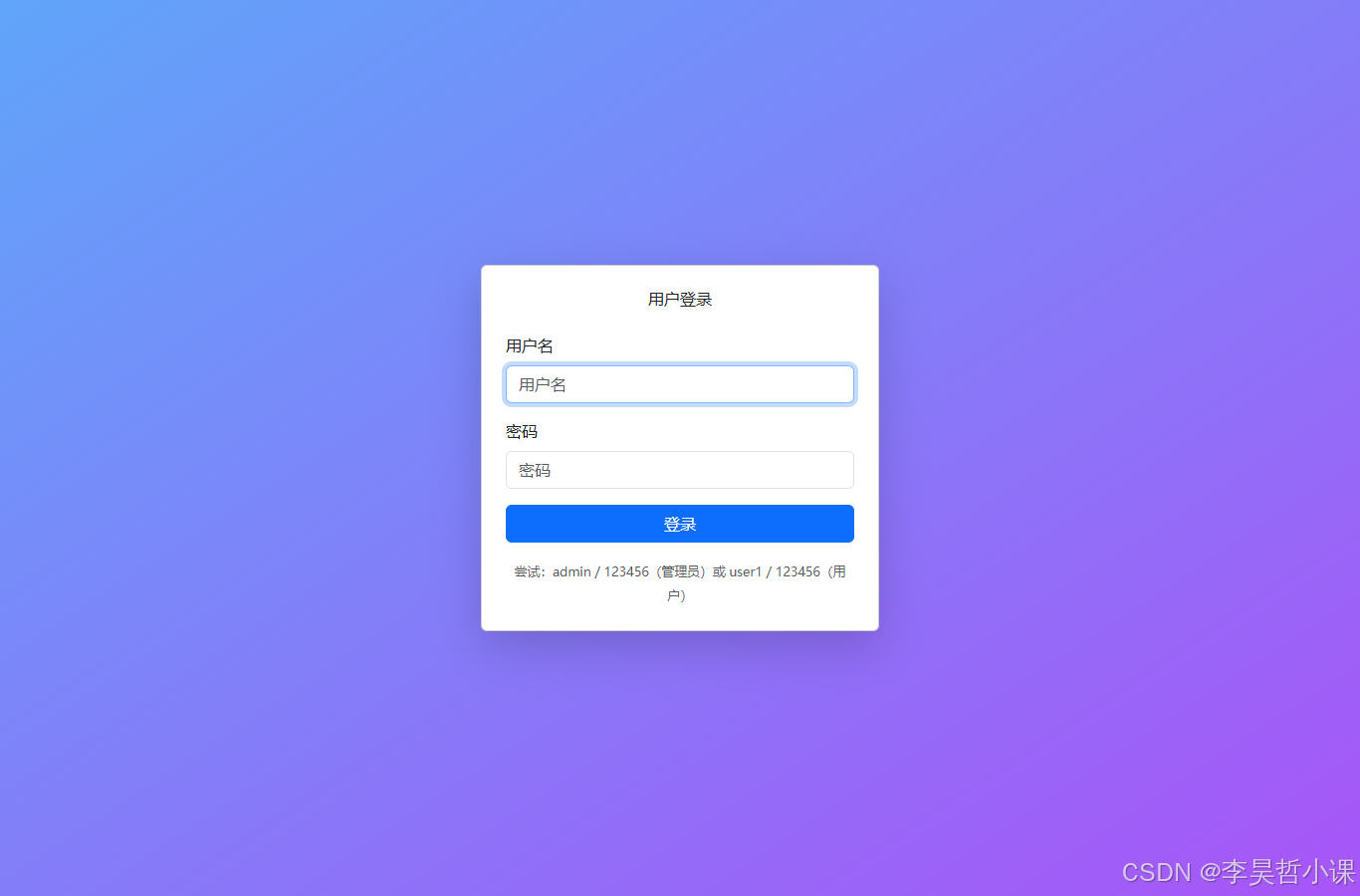

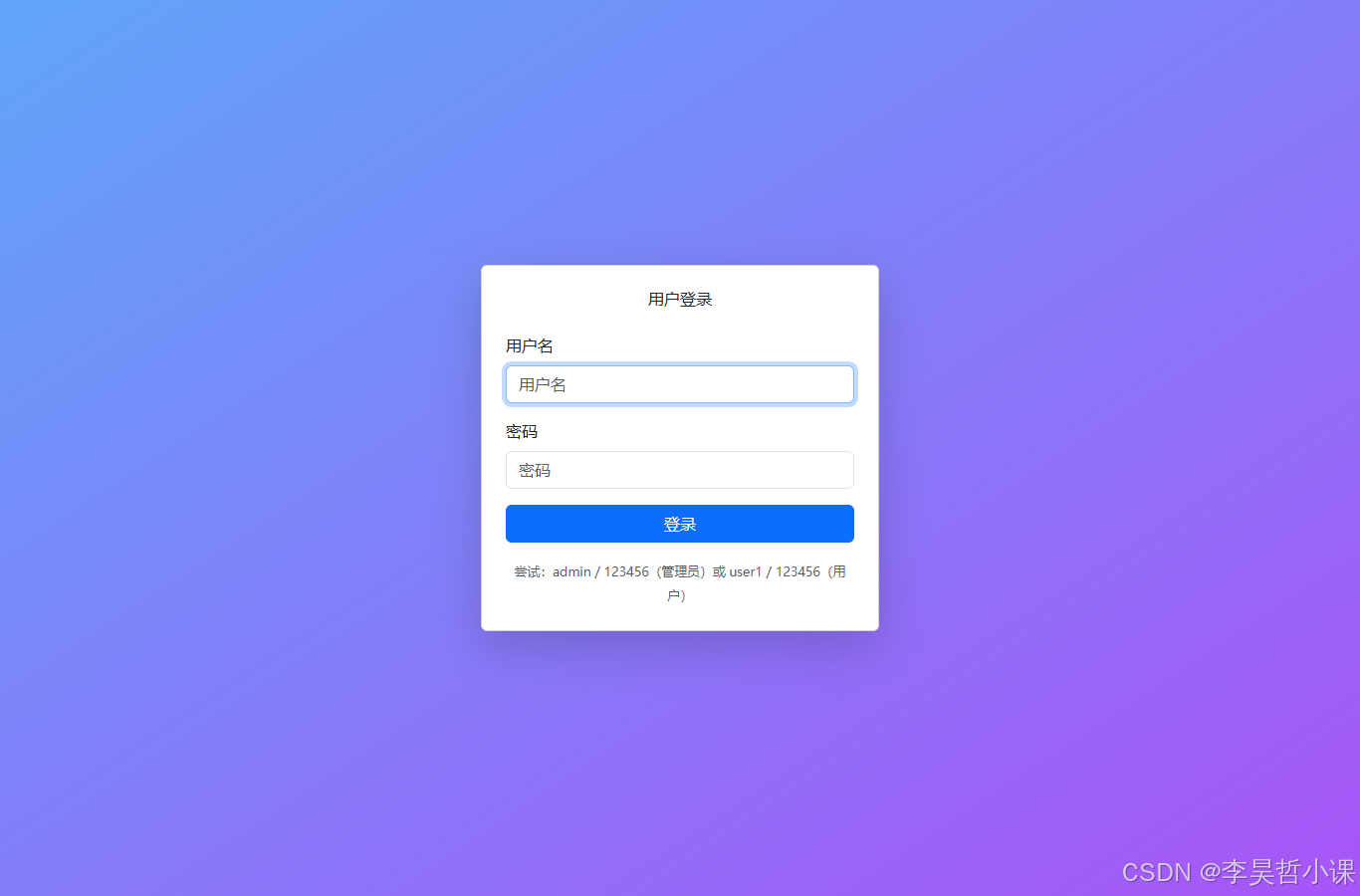
常见坑
1. 使用已废弃的 WebSecurityConfigurerAdapter
问题:仍然继承 WebSecurityConfigurerAdapter 类,并覆盖 configure(HttpSecurity http) 方法。
错误示例:
// ❌ 已废弃的写法
@Configuration
@EnableWebSecurity
public class SecurityConfig extends WebSecurityConfigurerAdapter {
    @Override
    protected void configure(HttpSecurity http) throws Exception {
        // ...
    }
}
正确写法(第20章采用):
// ✅ 现代组件式配置
@Configuration
@EnableWebSecurity
public class SecurityConfig {
    @Bean
    public SecurityFilterChain securityFilterChain(HttpSecurity http) throws Exception {
        // 链式配置
        return http.build();
    }
}
原因:WebSecurityConfigurerAdapter 在 Spring Security 5.7+ 已标记为 @Deprecated,Spring Boot 4 已移除。
2. 表单字段名称不符合 Spring Security 默认约定
问题:登录表单中,username 或 password 字段名称拼写错误,导致认证失败。
错误示例:
<!-- ❌ 错误的字段名 -->
<input type="text" name="user" />
<input type="password" name="pwd" />
正确写法(第20章采用):
<!-- ✅ 符合 Spring Security 默认约定 -->
<input type="text" name="username" />
<input type="password" name="password" />
原因:Spring Security 默认从 username 和 password 参数获取凭据,除非在 formLogin() 中显式配置 usernameParameter() / passwordParameter()。
3. i18n 消息文件编码非 UTF-8 导致中文乱码
问题:messages.properties 或 messages_zh_CN.properties 文件保存为 GBK 或其他编码,导致中文显示乱码。
错误现象:
- 页面出现
???app.title???或乱码 - 消息无法正确解析
正确做法(第20章采用):
-
确保消息文件以 UTF-8 编码保存(IDE 中设置)
-
在
application.yml中明确指定编码:spring: messages: basename: i18n/messages encoding: UTF-8 -
使用 UTF-8 保存所有
.properties文件
验证方法:用文本编辑器(如 Notepad++)打开文件,查看编码格式是否为 UTF-8。
4. 权限判断逻辑错误
问题:在 Thymeleaf 模板中直接使用 sec:authorize 方言,但未正确引入方言依赖,导致编译错误。
错误示例:
<!-- ❌ 未配置方言依赖时无法使用 -->
<div sec:authorize="hasRole('ADMIN')">
    后台管理
</div>
安全做法(第20章采用):
-
在 Controller 中通过
Authentication对象判断角色,传递给 Model:boolean isAdmin = auth.getAuthorities().stream() .anyMatch(a -> a.getAuthority().equals("ROLE_ADMIN")); model.addAttribute("isAdmin", isAdmin); -
在模板中使用
th:if条件判断:<a th:if="${isAdmin}" th:href="@{/admin/dashboard}">后台</a>
原因:sec:authorize 需要额外的 thymeleaf-extras-springsecurity 依赖,且版本需要与 Spring Security 版本匹配,容易出错。通过 Model 传递角色信息更稳妥。
关键知识点总结
| 概念 | 说明 | 第20章实现 |
|---|---|---|
| 组件式 Security 配置 | 使用 SecurityFilterChain Bean 而非继承 WebSecurityConfigurerAdapter | ✅ 采用 |
| 用户加载 | 从数据库查询用户返回 UserDetails | ✅ 通过 UserDetailsService |
| 密码加密 | BCrypt 哈希(生产)/ 明文(教学) | ✅ 使用 NoOpPasswordEncoder |
| 角色保护 | 基于 hasRole() 和 URL 匹配 | ✅ /admin/** 需要 ADMIN |
| 表单登录 | Spring Security 自动处理 | ✅ 自定义登录页 |
| 国际化 | 通过 #{key} 模板语法引用消息 | ✅ 中英文支持 |
| 前端集成 | Tailwind + Bootstrap + jQuery + axios | ✅ CDN 集成 |

电商企业物流数字化转型必备!快递鸟 API 接口,72 小时快速完成物流系统集成。全流程实战1V1指导,营造开放的API技术生态圈。
更多推荐


 19
19 0
0- 0


 已为社区贡献5条内容

所有评论(0)