
糖画铺 · 蜜韵流金 —— 电商风格糖画工艺管理系统的深度技术解析
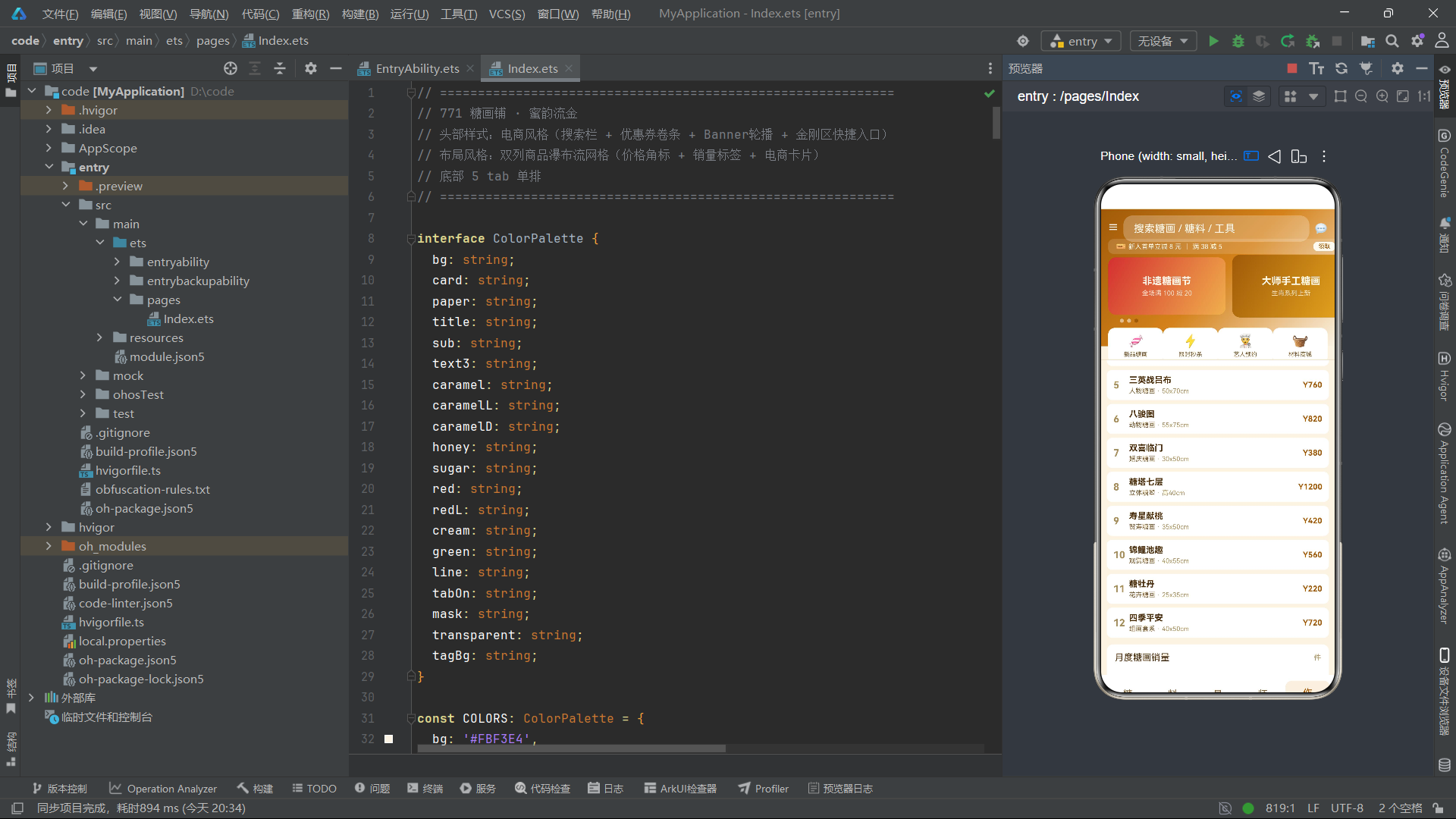
引言:当糖画遇上电商
糖画,这门以热糖为墨、以铜勺为笔、以石板为纸的民间绝技,在街头巷尾陪伴了几代中国人的童年记忆。一勺热糖在艺人手中翻转飞舞,须臾间便在石板上凝固成腾龙飞凤、花鸟鱼虫——这种"以糖作画"的即兴艺术,承载着浓浓的市井烟火气与民俗文化温度。然而,当糖画这门传统街头技艺需要以现代电商模式进行推广与管理时,如何在界面设计中兼顾"非遗文化传承"与"电商商业转化"的双重需求,成为了开发者面临的核心挑战。
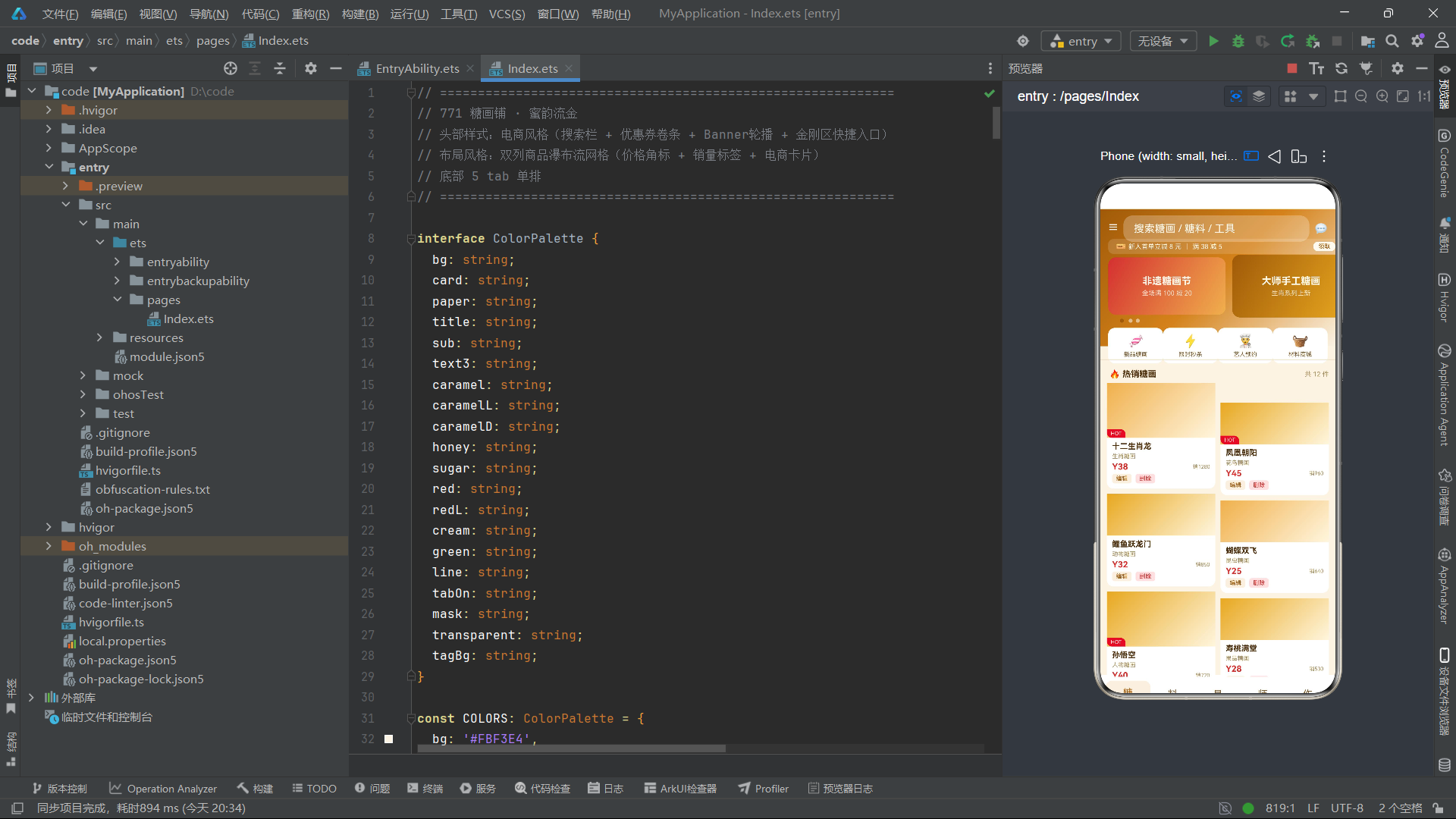
本文将深入解析一个基于 ArkTS 声明式 UI 框架构建的糖画工艺电商化管理系统。与前序系统纯粹的传统工艺管理定位不同,该系统大胆引入了电商风格的界面设计——搜索栏、优惠券卷条、Banner轮播、金刚区快捷入口、双列瀑布流商品网格、HOT热销标签、销量展示、价格角标——一系列电商App的标志性元素被巧妙地融入到了糖画这一非遗主题之中。系统通过焦糖暖色系的视觉基调将传统与现代串联,让用户在熟悉的电商交互模式中体验糖画工艺的魅力。
从技术架构来看,该系统在多个维度上突破了前序系统的设计范式:底部导航从"两行三列六标签"变为了"单排五标签";头部从"渐变Banner+单一动画"扩展为"搜索栏+优惠券+轮播Banner+金刚区"四层复合结构;内容布局从单一列表变为了"双列瀑布流网格"和"横向滑动+纵向列表"的混合模式;数据模型引入了 sales(销量)和 hot(热门布尔值)等电商特有字段;辅助函数从位置计算转向了业务逻辑封装(priceText、gridTagColor、bannerHeight)。每一处变化都体现了系统从"工艺管理工具"向"电商运营平台"的定位转型。
一、色彩体系:焦糖暖色的电商基调
1.1 色彩接口定义
系统通过 interface ColorPalette 定义了一套以焦糖色为核心的色彩类型体系,包含二十个语义化颜色字段。
interface ColorPalette {
  bg: string;
  card: string;
  paper: string;
  title: string;
  sub: string;
  text3: string;
  caramel: string;
  caramelL: string;
  caramelD: string;
  honey: string;
  sugar: string;
  red: string;
  redL: string;
  cream: string;
  green: string;
  line: string;
  tabOn: string;
  mask: string;
  transparent: string;
  tagBg: string;
}
与前序系统相比,糖画系统的色彩接口引入了几个电商特有的语义化字段:redL(浅红色 #FFE0E0)专门用于删除标签的背景色,形成"红字+浅红底"的危险操作视觉规范;tagBg(标签背景色 rgba(212,130,26,0.12))用于编辑标签和标签选中态的极低透明度背景。sugar(糖色 #FFF6DE)是一种极淡的暖白色,模拟白糖或糖霜的色泽,用于商品封面渐变的浅色端。
1.2 色彩常量实例化
const COLORS: ColorPalette = {
  bg: '#FBF3E4',
  card: '#FFFFFF',
  paper: '#F5EAD5',
  title: '#4A2C08',
  sub: '#7A5C2E',
  text3: '#A8905C',
  caramel: '#D4821A',
  caramelL: '#F0B04C',
  caramelD: '#A05A08',
  honey: '#E8A820',
  sugar: '#FFF6DE',
  red: '#D43030',
  redL: '#FFE0E0',
  cream: '#FFFAF0',
  green: '#3C8C40',
  line: '#EADDC0',
  tabOn: '#A05A08',
  mask: 'rgba(0,0,0,0.5)',
  transparent: 'rgba(0,0,0,0)',
  tagBg: 'rgba(212,130,26,0.12)'
};
焦糖色系是整个系统的视觉灵魂。caramel(#D4821A,焦糖橙)、caramelL(#F0B04C,浅焦糖)、caramelD(#A05A08,深焦糖)三色构成了从亮到暗的完整色域——亮色用于金刚区图标背景和渐变起始色,中色用于金刚区交替色和图表柱子,暗色用于价格数字强调和按钮背景。红色 #D43030 在系统中扮演着电商场景中"促销价格"和"热销标签"的双重角色——所有价格数字都以红色粗体显示,HOT标签背景也是红色,形成了"红色=价格/热度"的视觉语义。背景色 #FBF3E4 是极淡的暖米色,介于麦秆画的 #FAF5E8 和核雕的 #EDE5D8 之间,温暖而不浓重。
二、标签元数据与索引体系
2.1 五大电商标签
const TAB_LIST: TabMeta[] = [
  { icon: '糖', label: '糖画' },
  { icon: '料', label: '糖料' },
  { icon: '具', label: '工具' },
  { icon: '师', label: '艺人' },
  { icon: '作', label: '作品' }
];
系统从六个标签缩减为五个——糖画、糖料、工具、艺人、作品。这一变化不仅是数量上的精简,更是定位上的转变:少了"染色"“装裱”"打磨"等工艺工序标签,多了"作品"这一面向消费者的成品展示标签。五个标签以单排排列(而非前序系统的两行三列),更符合电商App底部导航的惯例。"糖、料、具、师、作"五个单字图标简洁明了,每个字都是一个完整的语义单元。
2.2 索引数组体系
const TAB_IDX: number[] = [0, 1, 2, 3, 4];
const BANNER_IDX: number[] = [0, 1, 2];
const KING_IDX: number[] = [0, 1, 2, 3];
const KING_NAME: string[] = ['新品糖画', '限时秒杀', '艺人预约', '材料商城'];
const KING_ICON: string[] = ['🍬', '⚡', '👨🍳', '🧺'];
const MONTH_IDX: number[] = [0, 1, 2, 3, 4, 5];
const MONTH_NAME: string[] = ['正月', '二月', '三月', '四月', '五月', '六月'];
const SALES_IDX: number[] = [32, 48, 56, 70, 85, 62];
const COUNTER_SEC: number[] = [0, 1, 2, 3, 4, 5, 6, 7, 8, 9];
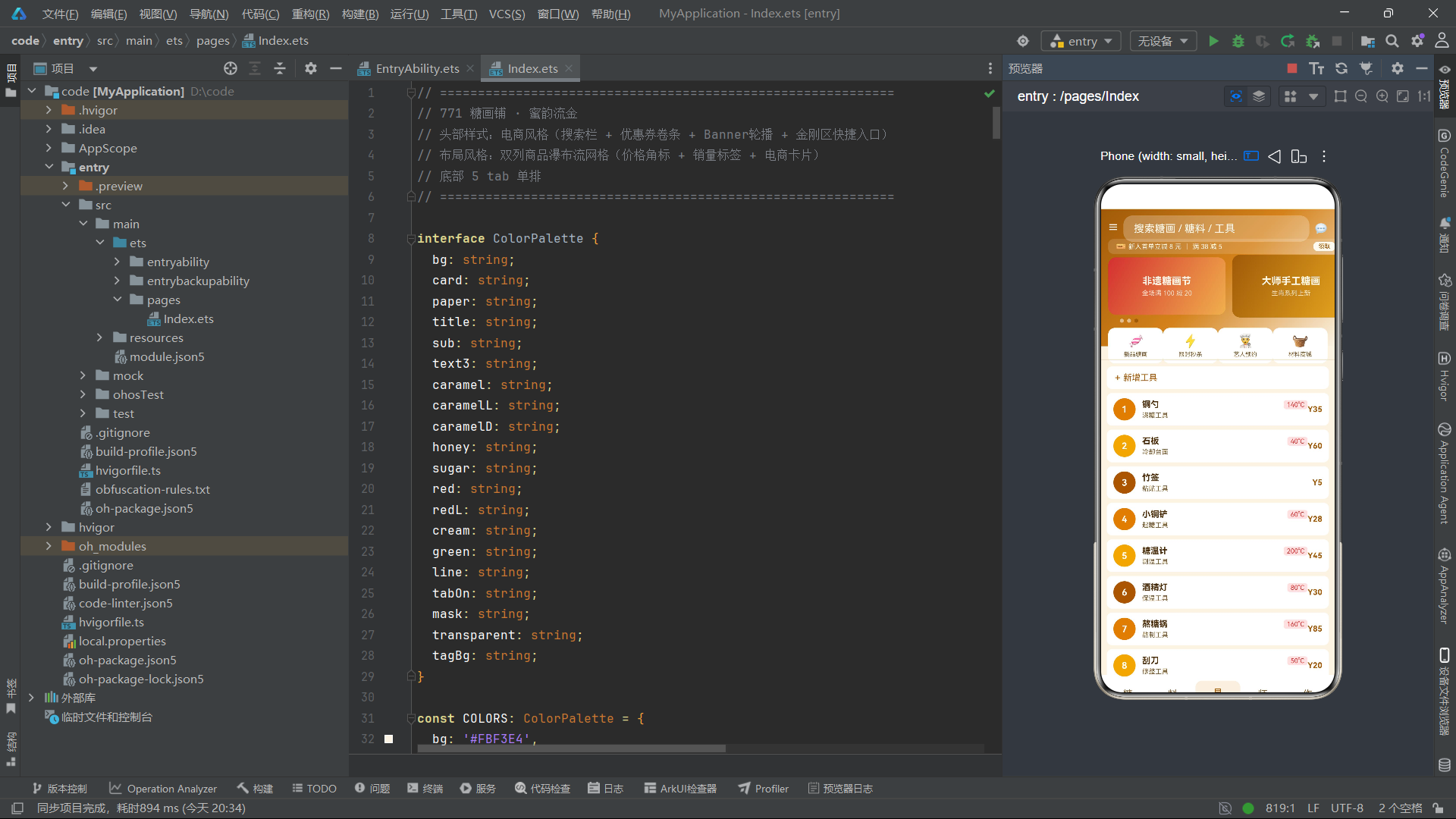
BANNER_IDX(三元素数组)驱动Banner轮播的三帧广告卡片。KING_IDX 和 KING_NAME、KING_ICON 三组数据共同驱动金刚区四个快捷入口——这是糖画系统独有的数据结构。KING_ICON 使用了Emoji表情符号(🍬⚡👨🍳🧺)作为图标,这是前序系统中从未出现过的设计——Emoji的引入为界面增添了一丝轻松活泼的现代感,与传统汉字图标形成了有趣的对比。COUNTER_SEC 是十元素数组(0到9),用于图表底部的数字翻动动画效果。
三、数据模型层:电商化实体设计
3.1 糖画数据模型
@Observed
export class SugarArtItem {
  name: string;
  kind: string;
  sales: number;
  price: number;
  hot: boolean;
  constructor(name: string, kind: string, sales: number, price: number, hot: boolean) {
    this.name = name; this.kind = kind; this.sales = sales; this.price = price; this.hot = hot;
  }
}
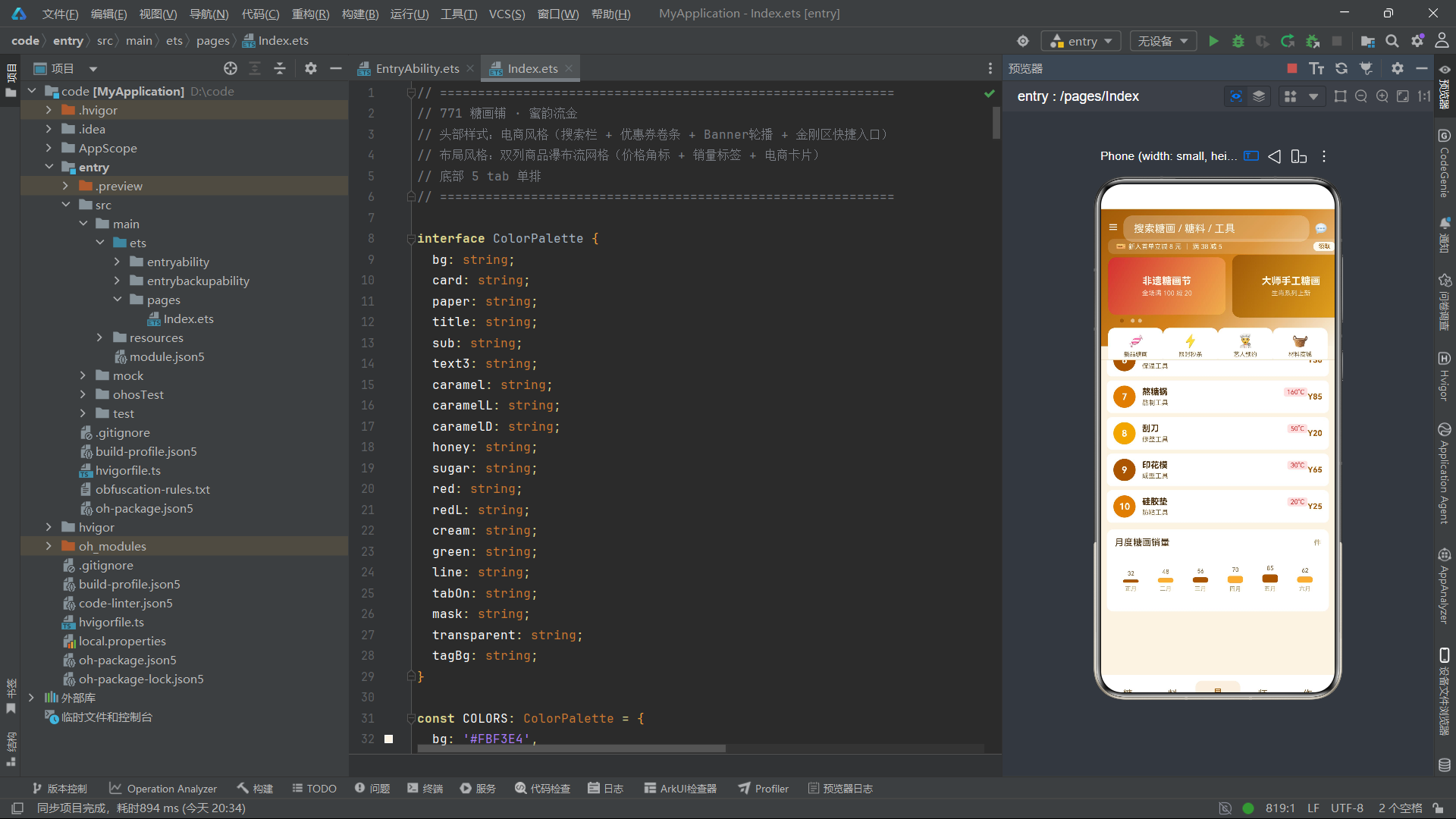
SugarArtItem 是糖画系统中电商特征最鲜明的数据模型。与前序系统的数据模型相比,它引入了两个全新的字段:sales(销量)和 hot(热门布尔值)。sales 字段以数字形式存储历史销量(如"十二生肖龙"销量1280件),在商品卡片中以"销1280"的形式展示,为消费者提供了购买参考。hot 字段是一个布尔值,标记该商品是否为热销品——当 hot 为 true 时,商品封面左下角会显示红色"HOT"标签。这两个字段的引入使得数据模型从纯粹的"信息描述"转向了"营销驱动",是系统电商化定位的核心体现。
3.2 糖料数据模型
@Observed
export class SugarMaterialItem {
  name: string;
  kind: string;
  origin: string;
  price: number;
  color: string;
  constructor(name: string, kind: string, origin: string, price: number, color: string) {
    this.name = name; this.kind = kind; this.origin = origin; this.price = price; this.color = color;
  }
}
SugarMaterialItem 继承了麦秆画系统"数据驱动颜色"的设计理念,包含 color 字段存储糖料的实际颜色值。冰糖的色值为 #E8D8A0(淡金黄)、红糖为 #A05820(深棕红)、蜂蜜糖为 #D8A020(金棕)——每种糖料都能以其实际颜色在列表中渲染为色块。与麦秆画系统的染料色卡不同,糖料的色卡以28像素直径的大圆形展示在横向滑动区域中,形成了更加醒目的"糖料色卡墙"。
3.3 工具与艺人数据模型
@Observed
export class ToolItem {
  name: string;
  kind: string;
  temp: number;
  price: number;
  constructor(name: string, kind: string, temp: number, price: number) {
    this.name = name; this.kind = kind; this.temp = temp; this.price = price;
  }
}

@Observed
export class ArtistItem {
  name: string;
  kind: string;
  years: number;
  works: number;
  constructor(name: string, kind: string, years: number, works: number) {
    this.name = name; this.kind = kind; this.years = years; this.works = works;
  }
}
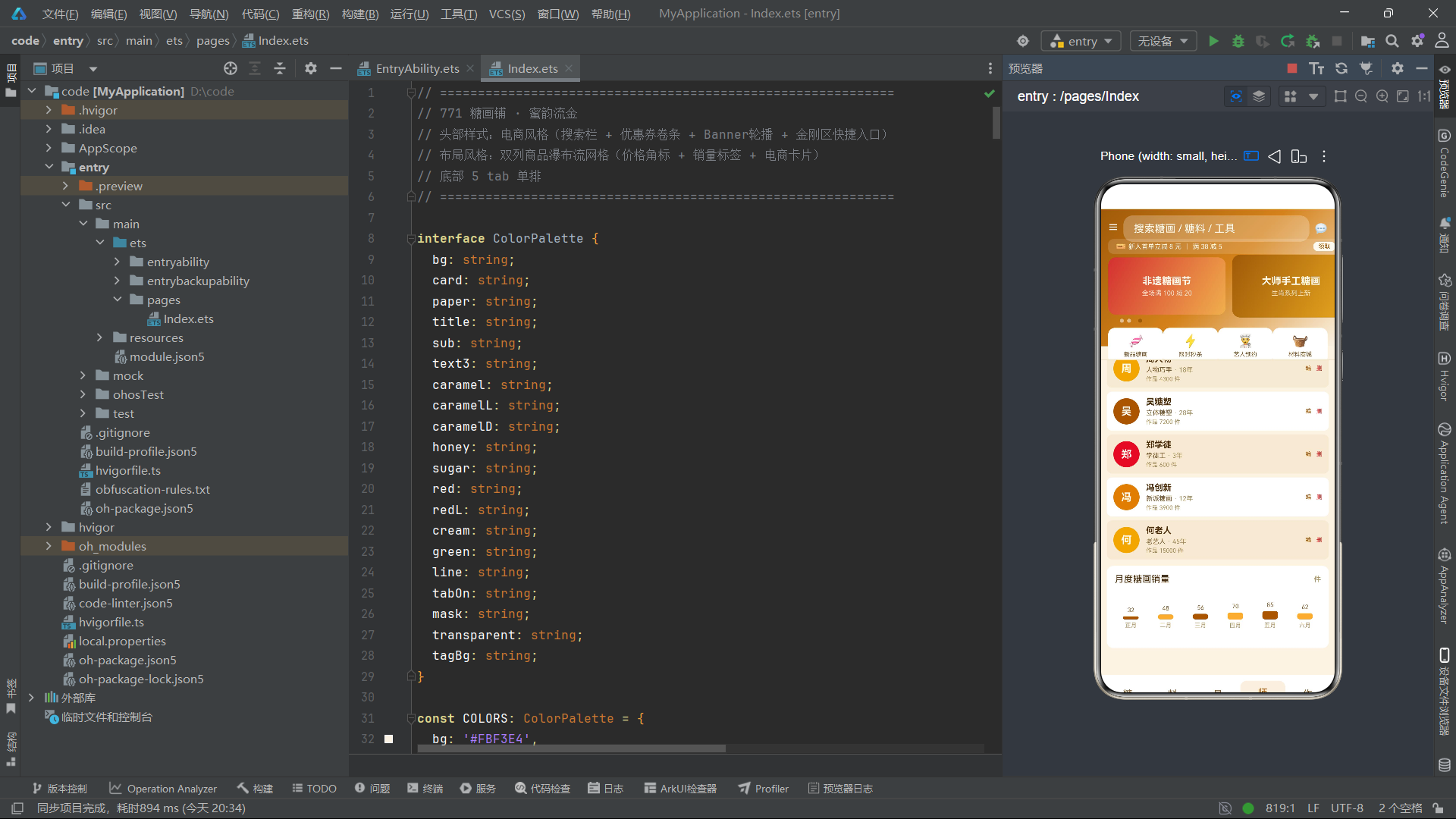
ToolItem 包含 temp(温度)字段,在列表中以红色背景标签的形式显示"XX°C"。当温度为0时(如竹签),通过 if (item.temp > 0) 条件判断跳过温度标签的渲染,避免了"0°C"这种无意义信息的展示。ArtistItem 使用 works(作品数)字段替代了前序系统的 price 字段——艺人不再以价格衡量,而是以作品产出量衡量,更符合"艺人预约"这一电商场景的定位。
3.4 作品数据模型
@Observed
export class ArtWorkItem {
  name: string;
  kind: string;
  size: string;
  price: number;
  constructor(name: string, kind: string, size: string, price: number) {
    this.name = name; this.kind = kind; this.size = string; this.price = price;
  }
}
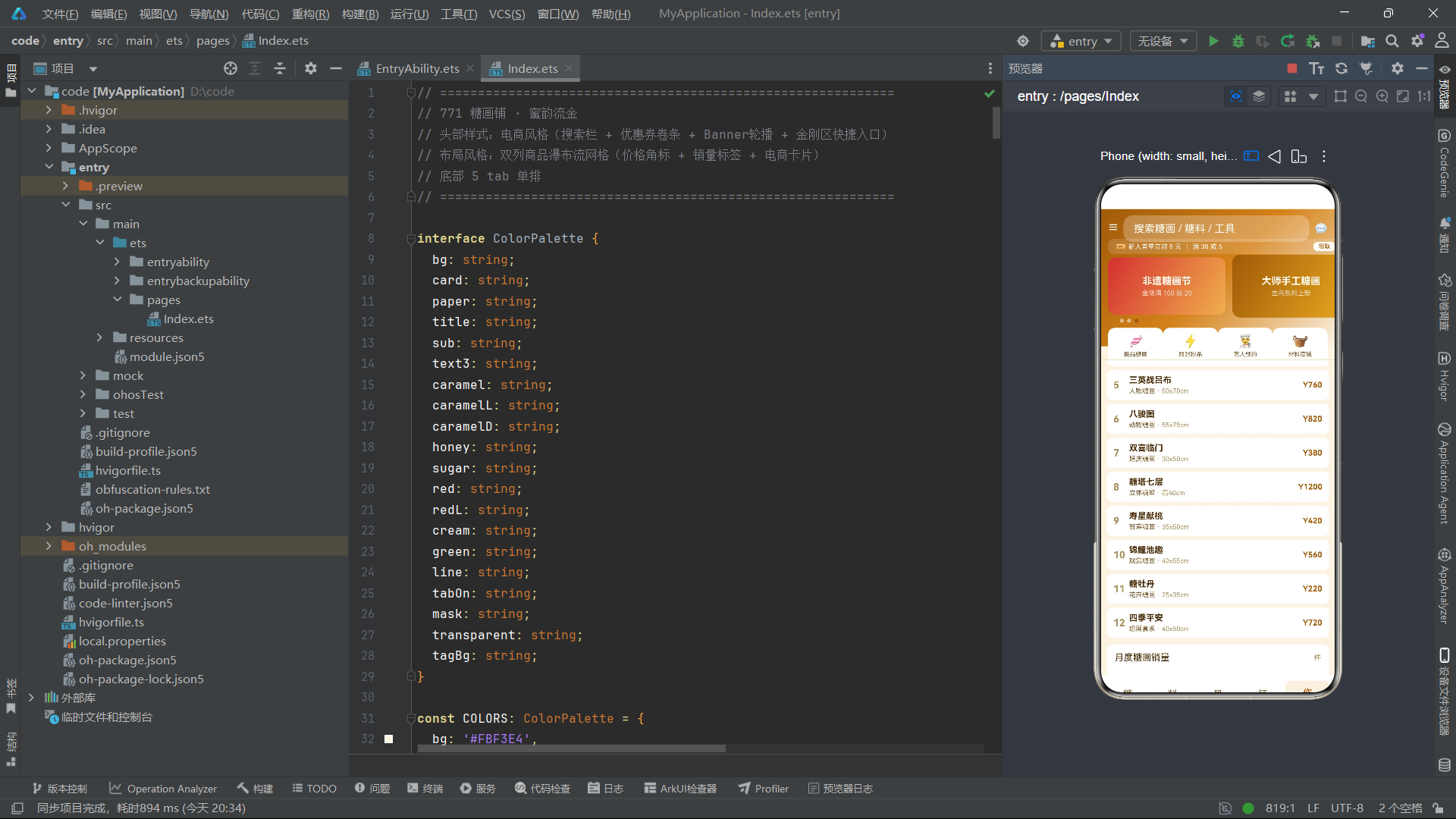
ArtWorkItem 描述糖画作品成品,包含 size(尺寸)和 price(价格)字段。作品数据的价格区间从220元到1200元,"糖塔七层"立体糖塑以1200元成为最高价作品。
四、辅助函数:业务逻辑封装
4.1 Banner高度函数
function bannerHeight(i: number): number {
  return i === 1 ? 96 : 88;
}
bannerHeight 函数为Banner轮播的每帧卡片返回不同的高度——第二帧(i === 1)为96像素,其余为88像素。8像素的高度差使得中间帧在视觉上略高于两侧帧,形成了一种"中间突出"的层次感,暗示用户中间帧是当前推荐的主推内容。
4.2 热销标签颜色函数
function gridTagColor(hot: boolean): string {
  return hot ? COLORS.red : COLORS.caramel;
}
gridTagColor 函数根据 hot 布尔值返回标签颜色——热销品返回红色,普通品返回焦糖色。虽然在实际使用中HOT标签只在 hot 为 true 时显示,但这个函数为未来可能扩展的"普通标签"预留了颜色逻辑。
4.3 价格文本函数
function priceText(p: number): string {
  return 'Y' + p;
}
priceText 函数将数字价格转换为带"Y"前缀的字符串。这个函数虽然简单,但体现了系统对代码复用的重视——在六个 Tab 和弹窗中,价格需要被显示十余次,通过函数封装确保了价格格式的一致性。如果未来需要将"Y"改为"¥"或添加小数位,只需修改一处即可全局生效。
五、页面组件主体
5.1 状态变量
@Entry
@Component
struct Page771 {
  @State selTab: number = 0;
  @State bannerIdx: number = 0;
  @State breath: boolean = false;
  @State showAdd: boolean = false;
  @State showEdit: boolean = false;
  @State showDel: boolean = false;
  @State editIdx: number = 0;
  @State delIdx: number = 0;
  @State sugarList: SugarArtItem[] = mockSugarList;
  @State materialList: SugarMaterialItem[] = mockMaterialList;
  @State toolList: ToolItem[] = mockToolList;
  @State artistList: ArtistItem[] = mockArtistList;
  @State workList: ArtWorkItem[] = mockWorkList;
与前序系统相比,状态变量引入了 bannerIdx(当前Banner帧索引),用于驱动轮播指示点的状态切换。前序系统的 selTag 被移除,因为头部的标签筛选被金刚区快捷入口取代。
5.2 生命周期函数
aboutToAppear() {
  setInterval(() => {
    this.breath = !this.breath;
    this.bannerIdx = (this.bannerIdx + 1) % 3;
  }, 900);
}
定时器间隔为900毫秒,是所有系统中最长的。更重要的是,定时器回调中同时更新了两个状态变量:breath(呼吸动画驱动)和 bannerIdx(Banner轮播帧索引)。bannerIdx 使用 (this.bannerIdx + 1) % 3 的取模运算在0、1、2之间循环递增,实现了Banner的自动轮播。这种"一个定时器驱动多个状态"的设计模式与前序系统的"单一定时器驱动单一 breath 状态"相比更加高效——900毫秒的间隔既驱动了轮播指示点的切换动画,也驱动了图表底部数字的翻动效果和金刚区图标的微动画。
六、构建函数 build() 与页面结构
build() {
  Column() {
    this.headerType()
    Divider().strokeWidth(1).color(COLORS.line)
    Scroll() {
      Column() {
        if (this.selTab === 0) {
          this.sugarTab()
        } else if (this.selTab === 1) {
          this.materialTab()
        } else if (this.selTab === 2) {
          this.toolTab()
        } else if (this.selTab === 3) {
          this.artistTab()
        } else {
          this.workTab()
        }
        this.salesChart()
      }.width('100%').padding({ left: 10, right: 10, top: 10, bottom: 100 })
    }.constraintSize({ maxHeight: '68%' }).scrollBar(BarState.Off)
    this.tabBar()
    if (this.showAdd) { this.addModal() }
    if (this.showEdit) { this.editModal() }
    if (this.showDel) { this.delModal() }
  }.width('100%').height('100%').backgroundColor(COLORS.bg)
}
页面结构与前序系统保持框架一致,但有两个显著差异:滚动区域的 maxHeight 从 '70%' 降低为 '68%',为更高的头部区域(230像素,前序系统为170像素)留出了空间;内容区的条件分支从六个减少为五个,对应五标签的底部导航。
七、头部构建器 headerType():电商风格四层复合结构
7.1 渐变背景与搜索栏
@Builder
headerType() {
  Stack({ alignContent: Alignment.TopStart }) {
    Column()
      .width('100%')
      .height(210)
      .linearGradient({
        angle: 135,
        colors: [[COLORS.caramelD, 0.0], [COLORS.caramel, 0.5], [COLORS.bg, 1.0]]
      })
    Row() {
      Text('☰').fontSize(16).fontColor(COLORS.cream)
      TextInput({ placeholder: '搜索糖画 / 糖料 / 工具' })
        .fontSize(12).fontColor(COLORS.title)
        .placeholderColor(COLORS.cream)
        .backgroundColor('rgba(255,255,255,0.25)').borderRadius(14)
        .margin({ left: 8, right: 8 })
        .layoutWeight(1)
      Text('💬').fontSize(16).fontColor(COLORS.cream)
    }
    .width('100%').padding({ left: 12, right: 12 })
    .position({ x: 0, y: 10 })
头部渐变从深焦糖 #A05A08 到中焦糖 #D4821A 再到背景 #FBF3E4,高度从前序系统的170像素增加到210像素,为四层复合结构提供了足够空间。
搜索栏是电商头部的标志性元素——左侧"☰"菜单图标、中间半透明圆角搜索框(rgba(255,255,255,0.25) 背景配14像素圆角)、右侧"💬"消息图标。搜索框使用 layoutWeight(1) 占满中间空间,placeholder颜色为奶油色,在深色渐变背景上呈现出半透明玻璃质感——这是电商App搜索栏的经典视觉风格。
7.2 优惠券卷条
    Row() {
      Text('🎫').fontSize(12).fontColor(COLORS.cream)
      Text('新人首单立减 8 元').fontSize(10).fontColor(COLORS.cream).margin({ left: 4 })
      Column().width(1).height(10).backgroundColor('rgba(255,255,255,0.4)').margin({ left: 8 })
      Text('满 38 减 5').fontSize(10).fontColor(COLORS.cream).margin({ left: 8 })
      Column().layoutWeight(1)
      Text('领取').fontSize(9).fontColor(COLORS.caramelD)
        .backgroundColor(COLORS.cream)
        .padding({ left: 8, right: 8, top: 2, bottom: 2 })
        .borderRadius(8)
    }
    .width('100%').padding({ left: 12, right: 12, top: 4, bottom: 4 })
    .backgroundColor('rgba(255,255,255,0.15)').borderRadius(8)
    .position({ x: 12, y: 46 })
优惠券卷条是糖画系统独有的电商元素。它以半透明白色 rgba(255,255,255,0.15) 为背景,8像素圆角,内含"🎫"图标、两条优惠信息(“新人首单立减8元"和"满38减5”)、中间分隔线和右侧"领取"按钮。两条优惠信息之间用1像素宽、10像素高的半透明竖线分隔——这种设计模拟了传统优惠券的虚线分割效果。"领取"按钮以奶油色背景配深焦糖文字,形成强烈的对比度,引导用户点击。
7.3 Banner轮播与指示点
    Scroll() {
      Row({ space: 10 }) {
        ForEach(BANNER_IDX, (b: number) => {
          Column() {
            Text(b === 0 ? '非遗糖画节' : b === 1 ? '大师手工糖画' : '亲子体验课').fontSize(15)
              .fontColor(COLORS.cream).fontWeight(FontWeight.Bold)
            Text(b === 0 ? '全场满 100 减 20' : b === 1 ? '生肖系列上新' : '周末场 ¥59/组').fontSize(10)
              .fontColor('rgba(255,250,240,0.8)').margin({ top: 4 })
          }
          .width(180).height(bannerHeight(b))
          .justifyContent(FlexAlign.Center)
          .linearGradient({
            angle: 120,
            colors: [[b === 0 ? COLORS.red : COLORS.caramelD, 0.0], [b === 1 ? COLORS.honey : COLORS.caramelL, 1.0]]
          })
          .borderRadius(12)
        }, (b: number) => 'bn' + b)
      }
      .padding({ left: 12, right: 12 })
    }
    .scrollable(ScrollDirection.Horizontal).scrollBar(BarState.Off)
    .width('100%')
    .position({ x: 0, y: 70 })
    Row({ space: 5 }) {
      ForEach(BANNER_IDX, (b: number) => {
        Circle()
          .width(this.bannerIdx === b ? 12 : 6)
          .height(6)
          .fill(this.bannerIdx === b ? COLORS.caramelD : 'rgba(255,255,255,0.5)')
          .animation({ duration: 400 })
      }, (b: number) => 'dt' + b)
    }
    .position({ x: 30, y: 168 })
Banner轮播是一个横向滑动的 Scroll 组件,内含三个 ForEach 渲染的广告卡片。每帧卡片的宽度和高度通过 bannerHeight(b) 函数返回交替值,形成中间帧略高的层次感。卡片背景使用120度双色渐变——第一帧从红色到蜂蜜色,第二帧从深焦糖到浅焦糖,第三帧从中焦糖到浅焦糖,三帧的色调各不相同但都保持在暖色系内。每帧卡片包含主标题和副标题,通过 b 索引条件渲染不同的文案内容。
指示点位于Banner下方,通过 ForEach 渲染三个 Circle。当前帧的指示点宽度为12像素(变为椭圆形),其余为6像素(正圆形)。填充色也通过 bannerIdx === b 条件在深焦糖和半透明白色间切换。指示点配有400毫秒的动画过渡,当 bannerIdx 每900毫秒更新一次时,指示点会平滑地从一个位置"移动"到另一个位置——实际上是前一个点缩小变浅、当前点放大变深,形成了轮播切换的视觉反馈。
7.4 金刚区快捷入口
    Row() {
      ForEach(KING_IDX, (k: number) => {
        Column({ space: 4 }) {
          Text(KING_ICON[k]).fontSize(20)
          Text(KING_NAME[k]).fontSize(9).fontColor(COLORS.sub)
        }
        .layoutWeight(1)
        .alignItems(HorizontalAlign.Center)
        .padding({ top: 8, bottom: 8 })
        .backgroundColor(COLORS.card)
        .borderRadius(10)
        .animation({ duration: 900, iterations: -1, playMode: PlayMode.Alternate })
        .onClick(() => { this.selTab = k; })
      }, (k: number) => 'kg' + k)
    }
    .width('100%').padding({ left: 12, right: 12 })
    .position({ x: 0, y: 182 })
  }
  .width('100%').height(230)
}
金刚区是电商App的标志性功能入口区域。系统通过 ForEach 遍历 KING_IDX(0到3)渲染四个入口——新品糖画(🍬)、限时秒杀(⚡)、艺人预约(👨🍳)、材料商城(🧺)。每个入口是一个白色卡片,内含20号Emoji图标和9号标签文字。卡片配有900毫秒的 PlayMode.Alternate 动画,与定时器间隔同步——这意味着金刚区卡片在持续进行着微妙的呼吸动画,为静态的入口区域增添了一丝动态活力。点击金刚区入口会直接切换到对应的Tab页面(this.selTab = k),实现了从金刚区到底部导航的快捷跳转。
八、糖画双列电商瀑布流 sugarTab()
8.1 瀑布流容器结构
@Builder
sugarTab() {
  Column({ space: 6 }) {
    Row() {
      Text('🔥 热销糖画').fontSize(13).fontColor(COLORS.title).fontWeight(FontWeight.Bold)
      Column().layoutWeight(1)
      Text('共 ' + this.sugarList.length + ' 件').fontSize(10).fontColor(COLORS.text3)
    }.width('100%').padding({ left: 4, top: 4 })
    Row({ space: 8 }) {
      Column({ space: 8 }) {
        ForEach(this.sugarList, (item: SugarArtItem, idx: number) => {
          if (idx % 2 === 0) {
            this.sugarGridCard(item, idx)
          }
        }, (item: SugarArtItem) => 'L' + item.name)
      }.layoutWeight(1)
      Column({ space: 8 }) {
        ForEach(this.sugarList, (item: SugarArtItem, idx: number) => {
          if (idx % 2 === 1) {
            this.sugarGridCard(item, idx)
          }
        }, (item: SugarArtItem) => 'R' + item.name)
      }.layoutWeight(1)
    }.width('100%')
  }.width('100%')
}
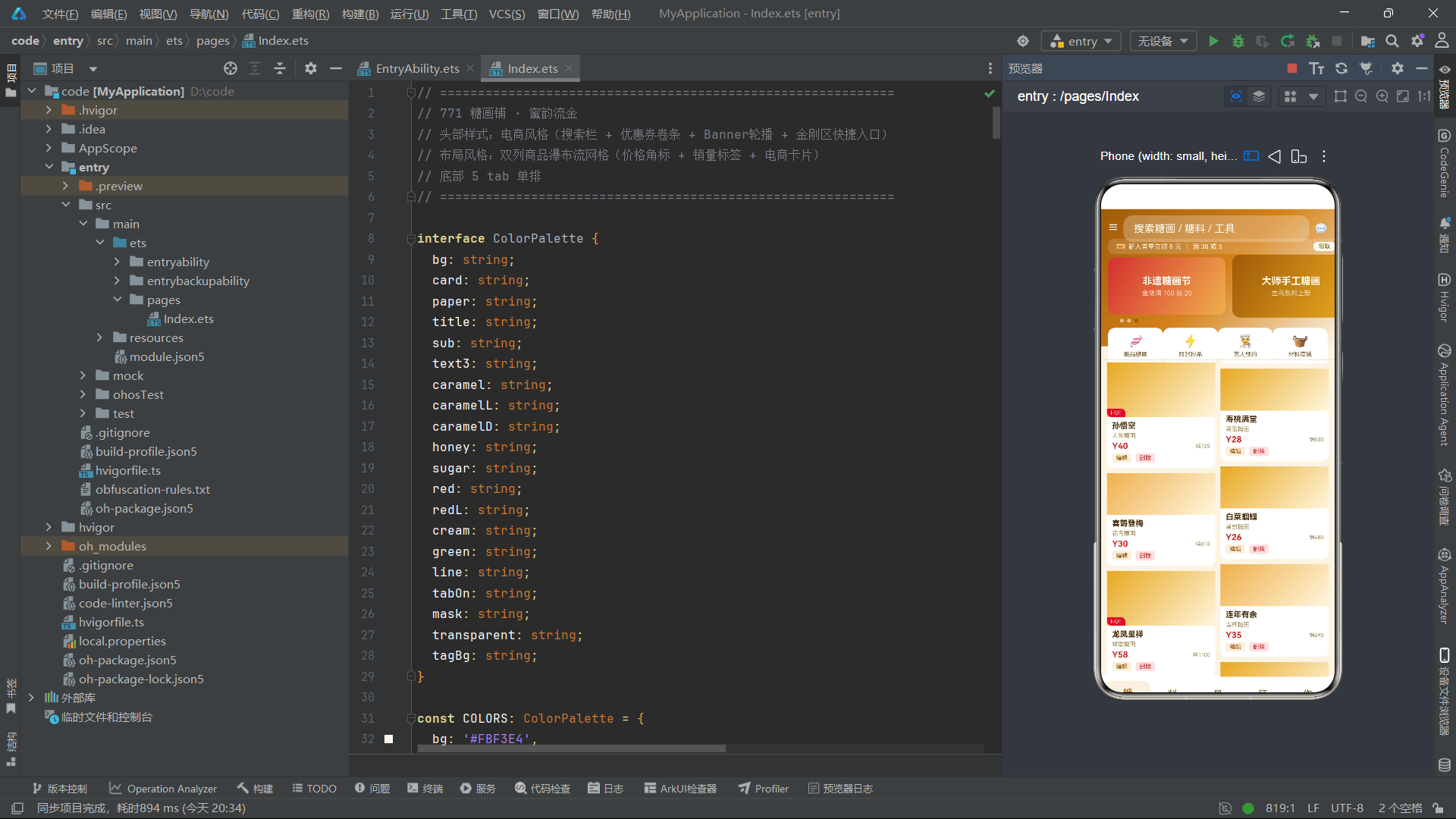
糖画列表采用"双列瀑布流"布局——外层 Row 包含两个等宽 Column,左列通过 if (idx % 2 === 0) 渲染偶数索引项,右列通过 if (idx % 2 === 1) 渲染奇数索引项。由于每个商品卡片的高度通过封面色块高度的交替(84或64像素)产生差异,两列的商品在垂直方向上不会对齐,形成了瀑布流高低错落的效果。列表顶部标题行包含"🔥 热销糖画"标题和"共 X 件"的商品总数,提供了电商式的信息概览。
8.2 电商商品卡片 sugarGridCard()
@Builder
sugarGridCard(item: SugarArtItem, idx: number) {
  Column() {
    Stack({ alignContent: Alignment.BottomStart }) {
      Column()
        .width('100%').height(idx % 4 === 0 ? 84 : 64)
        .linearGradient({
          angle: 135,
          colors: [[idx % 3 === 0 ? COLORS.caramelL : COLORS.honey, 0.0], [COLORS.sugar, 1.0]]
        })
      if (item.hot) {
        Text('HOT').fontSize(8).fontColor(COLORS.cream)
          .backgroundColor(gridTagColor(item.hot))
          .padding({ left: 6, right: 6, top: 2, bottom: 2 })
          .borderRadius({ topLeft: 0, topRight: 8, bottomLeft: 8, bottomRight: 0 })
      }
    }.width('100%')
    Column({ space: 3 }) {
      Text(item.name).fontSize(12).fontColor(COLORS.title).fontWeight(FontWeight.Bold)
      Text(item.kind).fontSize(9).fontColor(COLORS.text3)
      Row() {
        Text(priceText(item.price)).fontSize(13).fontColor(COLORS.red).fontWeight(FontWeight.Bold)
        Column().layoutWeight(1)
        Text('销' + item.sales).fontSize(8).fontColor(COLORS.text3)
      }.width('100%')
      Row() {
        Text('编辑').fontSize(9).fontColor(COLORS.tabOn)
          .padding({ left: 6, right: 6, top: 2, bottom: 2 })
          .backgroundColor(COLORS.tagBg).borderRadius(4)
          .onClick(() => { this.editIdx = idx; this.showEdit = true; })
        Text('删除').fontSize(9).fontColor(COLORS.red)
          .padding({ left: 6, right: 6, top: 2, bottom: 2 })
          .backgroundColor(COLORS.redL).borderRadius(4)
          .margin({ left: 6 })
          .onClick(() => { this.delIdx = idx; this.showDel = true; })
      }.width('100%')
    }
    .width('100%').alignItems(HorizontalAlign.Start)
    .padding({ left: 8, right: 8, top: 6, bottom: 8 })
  }
  .width('100%').backgroundColor(COLORS.card).borderRadius(10)
  .onClick(() => { this.editIdx = idx; this.showEdit = true; })
}
这是系统中最复杂的列表项构建器。每个商品卡片由封面区和信息区两部分组成。
封面区使用 Stack 叠层,底层是一个渐变色块——高度通过 idx % 4 === 0 ? 84 : 64 在84和64像素间交替(每四个中有一个高封面),渐变从焦糖浅色或蜂蜜色到糖色。当 item.hot 为 true 时,左下角叠加一个红色"HOT"标签,标签使用不对称圆角 borderRadius({ topLeft: 0, topRight: 8, bottomLeft: 8, bottomRight: 0 })——右上和左下为8像素圆角,左上和右下为0——形成了一种折角标签的视觉效果。
信息区包含商品名称(粗体)、种类、价格(红色粗体,通过 priceText 函数格式化)、销量("销1280"格式)和编辑/删除操作按钮。编辑按钮使用 tagBg 极低透明度背景配深色文字,删除按钮使用 redL 浅红背景配红色文字——"深字浅底"的标签设计让操作按钮在卡片中既可见又不突兀。
九、其他 Tab 内容构建器
9.1 糖料横向色卡 materialTab()
@Builder
materialTab() {
  Column({ space: 6 }) {
    Scroll() {
      Row({ space: 8 }) {
        ForEach(this.materialList, (item: SugarMaterialItem) => {
          Column({ space: 4 }) {
            Circle().width(28).height(28)
              .fill(item.color)
              .stroke(COLORS.line).strokeWidth(1)
            Text(item.name).fontSize(9).fontColor(COLORS.sub)
          }
          .width(64).padding({ top: 8, bottom: 8 })
          .backgroundColor(COLORS.card).borderRadius(10)
        }, (item: SugarMaterialItem) => 'mc' + item.name)
        .padding({ left: 4, right: 4 })
      }
      .scrollable(ScrollDirection.Horizontal).scrollBar(BarState.Off)
      .width('100%')
    }
    ForEach(this.materialList, (item: SugarMaterialItem, idx: number) => {
      Row() {
        Circle().width(14).height(14)
          .fill(item.color)
          .stroke(COLORS.caramelL).strokeWidth(1)
        Column({ space: 3 }) {
          Text(item.name).fontSize(13).fontColor(COLORS.title).fontWeight(FontWeight.Bold)
          Row() {
            Text(item.kind).fontSize(10).fontColor(COLORS.sub)
            Text(' · ' + item.origin).fontSize(10).fontColor(COLORS.text3)
          }.width('100%')
        }
        .layoutWeight(1).alignItems(HorizontalAlign.Start).padding({ left: 8 })
        Column() {
          Text(priceText(item.price)).fontSize(13).fontColor(COLORS.red).fontWeight(FontWeight.Bold)
          Text('/斤').fontSize(8).fontColor(COLORS.text3)
        }.alignItems(HorizontalAlign.End)
      }
      .width('100%').padding({ left: 10, right: 10, top: 8, bottom: 8 })
      .backgroundColor(idx % 2 === 0 ? COLORS.card : COLORS.paper)
      .borderRadius(8)
      .onClick(() => { this.editIdx = idx; this.showEdit = true; })
    }, (item: SugarMaterialItem) => 'ml' + item.name)
  }.width('100%')
}
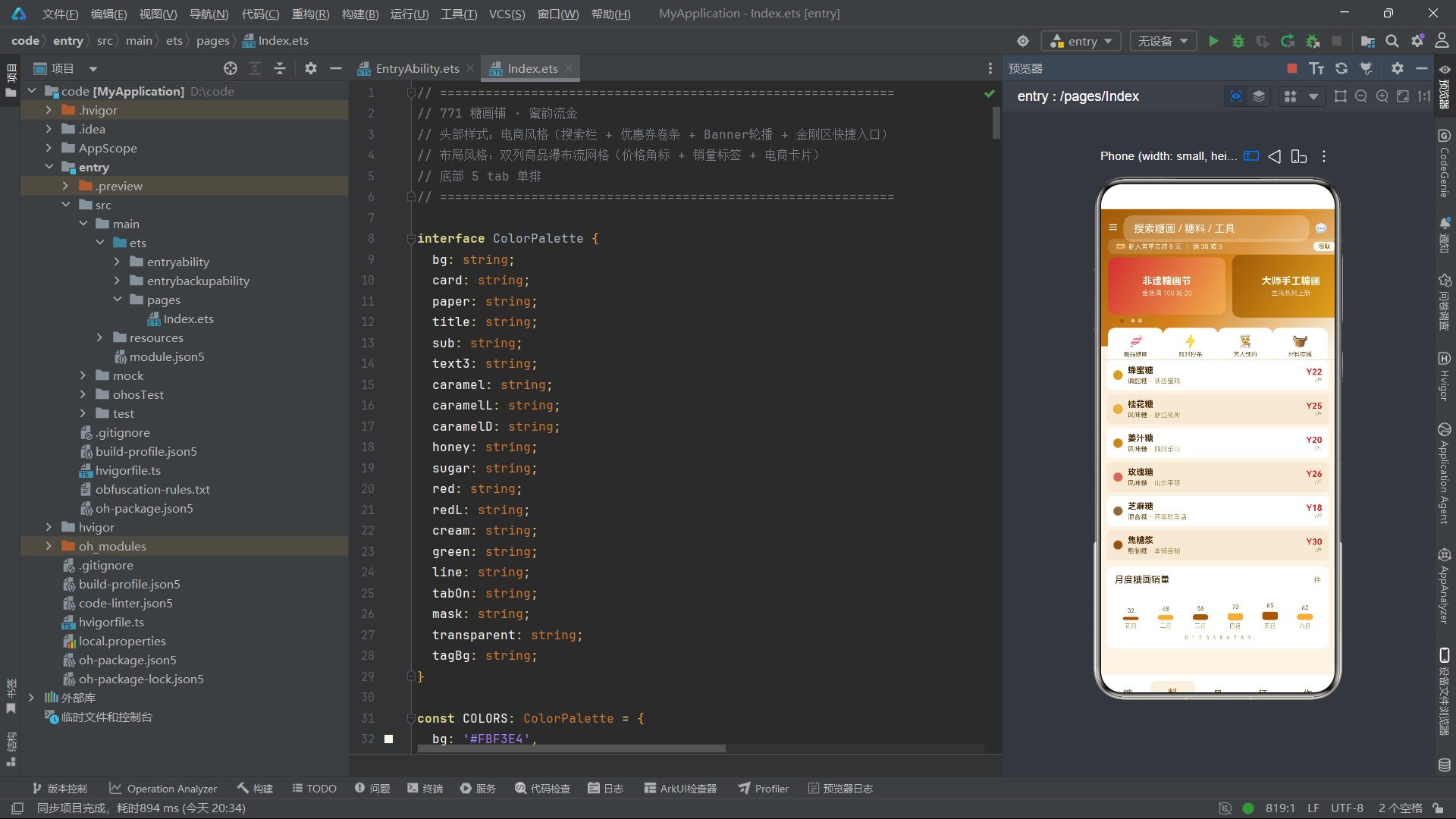
糖料列表采用了"横向色卡+纵向清单"的混合布局。顶部是一个横向滑动的 Scroll 区域,内含十个64像素宽的色卡卡片——每个卡片中心是一个28像素直径的大圆形色块,直接以 item.color 值填充,下方显示糖料名称。这种大色卡的横向展示方式比前序系统中的小色块更加醒目,让用户在滑动浏览中能直观感受不同糖料的色彩差异。纵向清单中每项也有一个14像素的小色块,配合价格(红色粗体,带"/斤"单位后缀)和产地信息。
9.2 工具列表 toolTab()
工具列表的左侧装饰是一个34×34的圆形序号块,背景色通过 idx % 3 在三色间循环。温度以红色背景标签形式显示(item.temp + '°C'),当温度为0时跳过渲染。价格使用 priceText 函数格式化,以深焦糖色显示。
9.3 艺人列表 artistTab()
艺人列表的左侧是一个40×40的圆形头像块,内部显示艺人姓氏首字(item.name.charAt(0)),背景色通过 idx % 4 在四色间循环。艺人信息包含姓名、称号、从业年限和作品数量(“作品 12000 件”),右侧有"编""删"操作按钮。
9.4 作品列表 workTab()
@Builder
workTab() {
  Column({ space: 6 }) {
    Text('🏆 镇店之作').fontSize(13).fontColor(COLORS.title).fontWeight(FontWeight.Bold)
      .width('100%').padding({ left: 4 })
    Scroll() {
      Row({ space: 10 }) {
        ForEach(this.workList, (item: ArtWorkItem, idx: number) => {
          Column() {
            Column()
              .width(120).height(70)
              .linearGradient({
                angle: 135,
                colors: [[idx % 2 === 0 ? COLORS.caramel : COLORS.honey, 0.0], [COLORS.caramelL, 1.0]]
              })
              .borderRadius({ topLeft: 10, topRight: 10, bottomLeft: 0, bottomRight: 0 })
            Column({ space: 3 }) {
              Text(item.name).fontSize(11).fontColor(COLORS.title).fontWeight(FontWeight.Bold)
              Text(item.size).fontSize(8).fontColor(COLORS.text3)
              Text(priceText(item.price)).fontSize(11).fontColor(COLORS.red).fontWeight(FontWeight.Bold)
            }
            .width(120).alignItems(HorizontalAlign.Start)
            .padding({ left: 8, right: 8, top: 6, bottom: 8 })
          }
          .width(120).backgroundColor(COLORS.card).borderRadius(10)
        }, (item: ArtWorkItem) => 'wk' + item.name)
      }
      .padding({ left: 4, right: 4 })
    }
    .scrollable(ScrollDirection.Horizontal).scrollBar(BarState.Off)
    .width('100%')
    ForEach(this.workList, (item: ArtWorkItem, idx: number) => {
      Row() {
        Text((idx + 1).toString()).fontSize(15).fontColor(idx < 3 ? COLORS.red : COLORS.text3)
          .fontWeight(FontWeight.Bold).width(24)
        Column({ space: 3 }) {
          Text(item.name).fontSize(13).fontColor(COLORS.title).fontWeight(FontWeight.Bold)
          Row() {
            Text(item.kind).fontSize(10).fontColor(COLORS.sub)
            Text(' · ' + item.size).fontSize(10).fontColor(COLORS.text3)
          }.width('100%')
        }
        .layoutWeight(1).alignItems(HorizontalAlign.Start)
        Text(priceText(item.price)).fontSize(12).fontColor(COLORS.caramelD).fontWeight(FontWeight.Bold)
      }
      .width('100%').padding({ left: 10, right: 10, top: 8, bottom: 8 })
      .backgroundColor(COLORS.card).borderRadius(8)
      .onClick(() => { this.editIdx = idx; this.showEdit = true; })
    }, (item: ArtWorkItem) => 'wl' + item.name)
  }.width('100%')
}
作品列表采用了"横滑大卡+排行列表"的混合布局。顶部标题"🏆 镇店之作"以13号粗体显示。横滑区域展示120像素宽的作品卡片,封面色块使用不对称圆角(上圆下直),下方信息区显示名称、尺寸和价格。纵向排行榜列表中,前三名(idx < 3)的序号以红色粗体显示,其余以灰色显示——这种"前三名红色高亮"的设计是电商排行榜的经典视觉规范。
十、月度销量图表与数字翻动
@Builder
salesChart() {
  Column({ space: 8 }) {
    Row() {
      Text('月度糖画销量').fontSize(14).fontColor(COLORS.title).layoutWeight(1)
      Text('件').fontSize(11).fontColor(COLORS.text3)
    }.width('100%')
    Row({ space: 4 }) {
      ForEach(MONTH_IDX, (m: number) => {
        Column({ space: 4 }) {
          Text(SALES_IDX[m].toString())
            .fontSize(9).fontColor(COLORS.sub)
          Column()
            .width(24)
            .height(SALES_IDX[m] * 0.15)
            .backgroundColor(m % 2 === 0 ? COLORS.caramelD : COLORS.caramelL)
            .borderRadius(4)
          Text(MONTH_NAME[m])
            .fontSize(9)
            .fontColor(COLORS.text3)
        }
        .layoutWeight(1)
        .alignItems(HorizontalAlign.Center)
      }, (m: number) => 'ch' + m)
    }
    .width('100%').height(60)
    .alignItems(VerticalAlign.Bottom)
    Row() {
      ForEach(COUNTER_SEC, (s: number) => {
        Text(s.toString()).fontSize(8).fontColor(COLORS.text3)
          .opacity(this.breath ? 0.4 : 1.0)
          .animation({ duration: 900, iterations: -1, playMode: PlayMode.Alternate })
          .padding({ left: 3, right: 3 })
      }, (s: number) => 'cs' + s)
    }
    .width('100%').justifyContent(FlexAlign.Center)
  }
  .width('100%').padding(12)
  .backgroundColor(COLORS.card).borderRadius(10)
  .margin({ top: 10 })
}
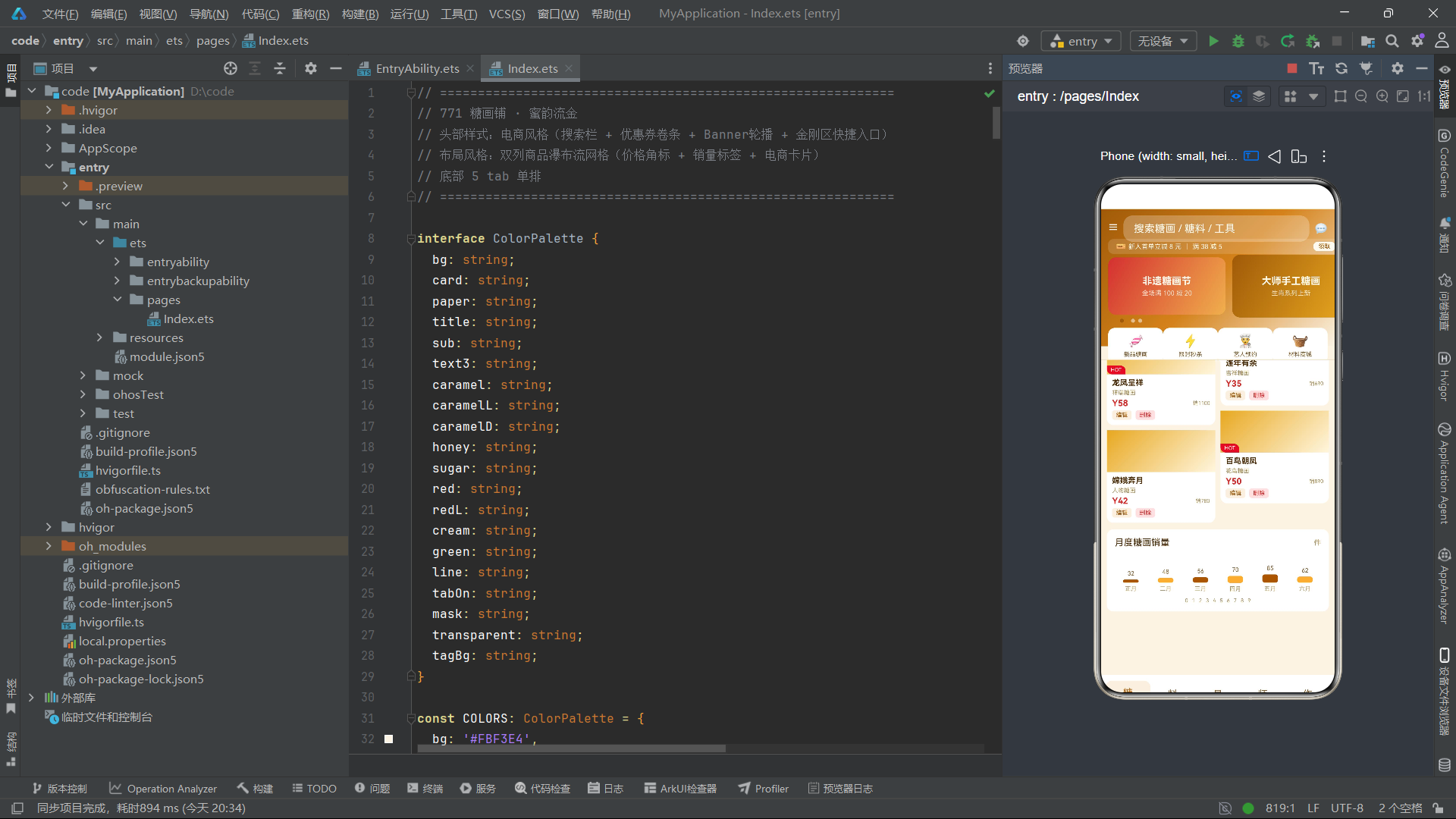
图表主体与前序系统的柱状图结构一致,柱子颜色在深焦糖和浅焦糖间交替。SALES_IDX 的数值从32到85,五月达到峰值85件。
图表的独特之处在于底部的数字翻动效果——ForEach 遍历 COUNTER_SEC(0到9)渲染十个数字,每个数字的透明度随 breath 状态在0.4和1.0之间切换,配有900毫秒的往返动画。这十个数字在图表底部不断闪烁,模拟了电商App中"秒杀倒计时"数字翻动的视觉效果——虽然这里没有实际的倒计时逻辑,但数字的闪烁为图表增添了一层电商特有的"紧迫感"氛围。
十一、底部标签栏 tabBar():单排五标签
@Builder
tabBar() {
  Row() {
    ForEach(TAB_IDX, (i: number) => {
      Column({ space: 2 }) {
        Text(TAB_LIST[i].icon).fontSize(15).fontColor(this.selTab === i ? COLORS.tabOn : COLORS.sub)
        Text(TAB_LIST[i].label).fontSize(9).fontColor(this.selTab === i ? COLORS.tabOn : COLORS.sub)
        if (this.selTab === i) {
          Column().width(16).height(2)
            .backgroundColor(COLORS.caramel).borderRadius(1)
        }
      }
      .layoutWeight(1).height(54)
      .backgroundColor(this.selTab === i ? COLORS.tagBg : COLORS.card)
      .borderRadius(10)
      .justifyContent(FlexAlign.Center)
      .onClick(() => { this.selTab = i; })
    }, (i: number) => 'tb' + i)
  }
  .width('100%').padding({ left: 8, right: 8, top: 6, bottom: 8 })
  .backgroundColor(COLORS.card)
}
底部标签栏从前序系统的"两行三列"变为"单排五列"。标签高度增加到54像素(前序为48像素),为五个标签的单排排列提供了足够的触摸面积。选中态增加了底部指示条——一个16像素宽、2像素高的焦糖色圆角条,只在 selTab === i 时渲染。这种"图标+文字+指示条"的三层结构是现代电商App底部导航的标准设计。选中态背景色使用 COLORS.tagBg(极低透明度焦糖色),与未选中态的白色形成微妙的区分。
十二、模态弹窗系统
模态弹窗结构与前序系统一致,但文案使用了Emoji前缀——新增弹窗标题"🛒 新增商品"、编辑弹窗"✏️ 编辑第X条"、删除弹窗"🗑️ 确认删除"。确定按钮文字从"确定"改为"加入"(电商用语),背景色使用 COLORS.caramelD(深焦糖色)。输入框placeholder也电商化——“商品名称”“商品种类”“销量”“价格”。
十三、系统架构总览流程图
十四、技术对比总结表
| 技术维度 | 实现方式 | 核心特点 | 与前序系统差异 |
|---|---|---|---|
| 色彩体系 | interface + const 常量 | 20色焦糖暖色基调 | 引入redL/tagBg电商字段 |
| 状态管理 | @State + @Observed | 增加bannerIdx轮播状态 | 双状态同步驱动 |
| 动画驱动 | setInterval 900ms | 同时驱动breath和bannerIdx | 间隔最长,双状态更新 |
| 头部结构 | 四层复合(搜索+券+轮播+金刚) | 210px高,电商风格 | 从单一Banner到四层复合 |
| Banner轮播 | Scroll横向+ForEach+指示点 | 3帧自动轮播 | 全新组件 |
| 金刚区 | ForEach+Emoji图标 | 4入口,900ms微动画 | 全新组件 |
| 布局策略 | 双列瀑布流网格 | idx%2分列,封面高度交替 | 全新布局策略 |
| HOT标签 | Stack叠层+不对称圆角 | 红色HOT折角标签 | 电商特色元素 |
| 色卡展示 | 横向Scroll+大圆形色块 | 28px直径色卡 | 比前序更醒目 |
| 排行榜 | 前三名红色高亮 | idx<3红色序号 | 电商排行榜规范 |
| 底部导航 | 单排五标签+指示条 | 54px高,选中下划线 | 从两行六列到单排五列 |
| 数字翻动 | COUNTER_SEC+opacity | 10数字闪烁 | 全新动画效果 |
| 辅助函数 | bannerHeight/gridTagColor/priceText | 业务逻辑封装 | 从位置计算转向业务封装 |
安装DevEco Studio程序
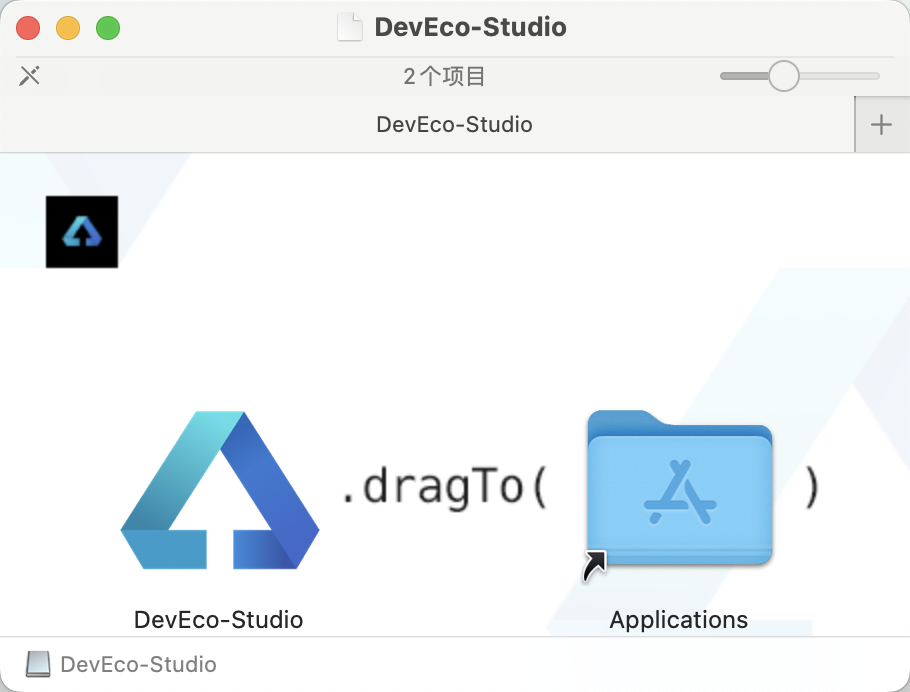
第一次打开需要点击同意一下: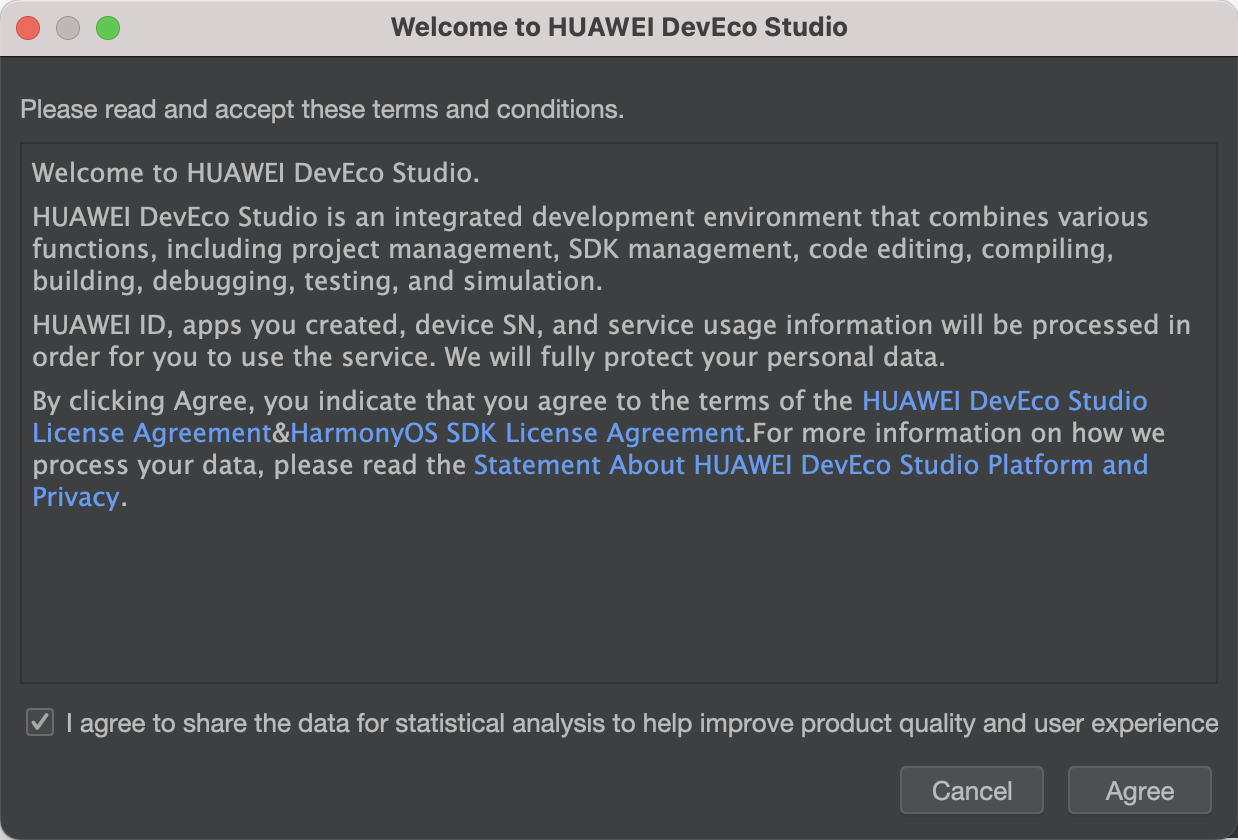
新建一个空白模板:
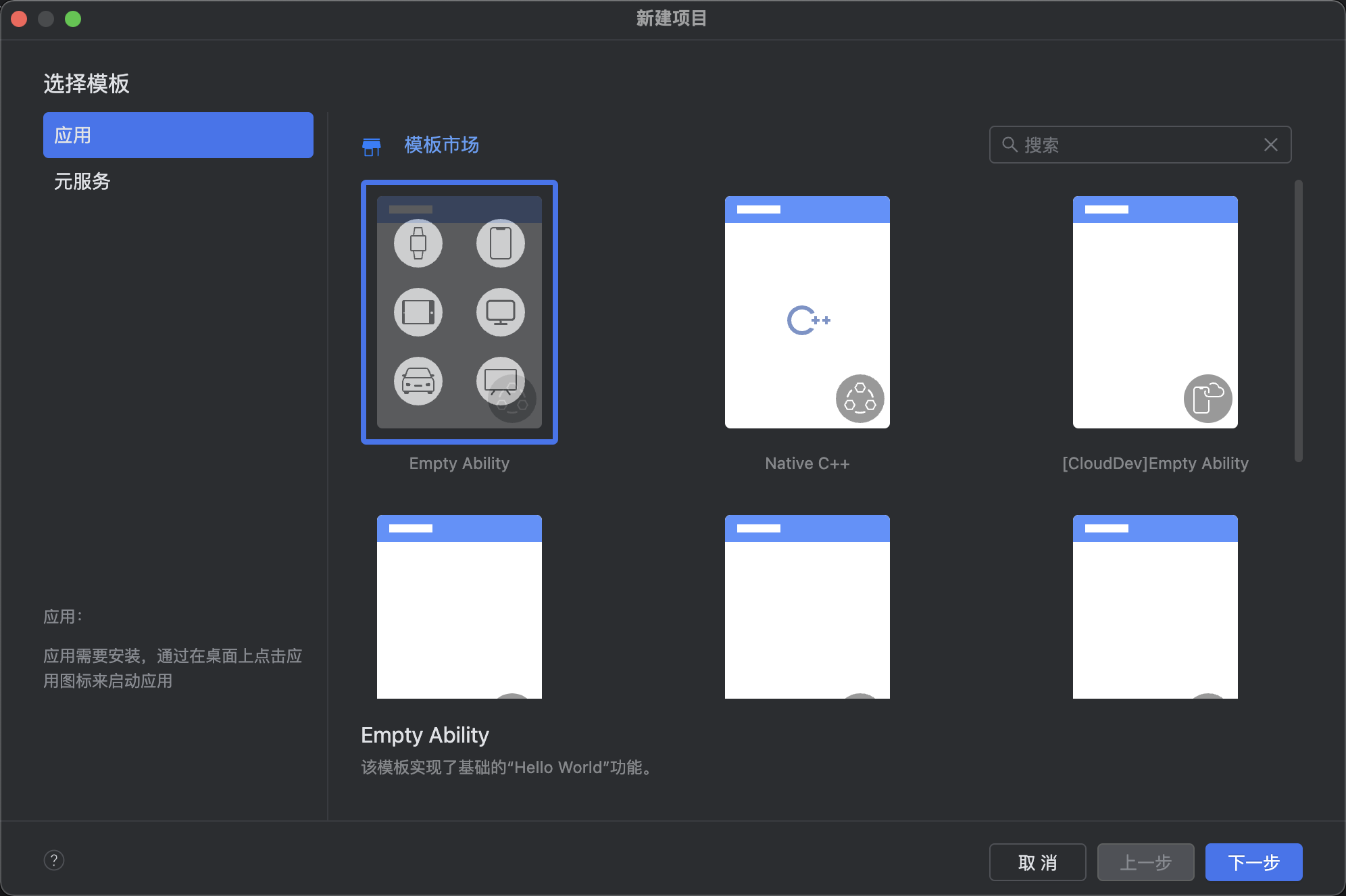
设置API为24的模板项目: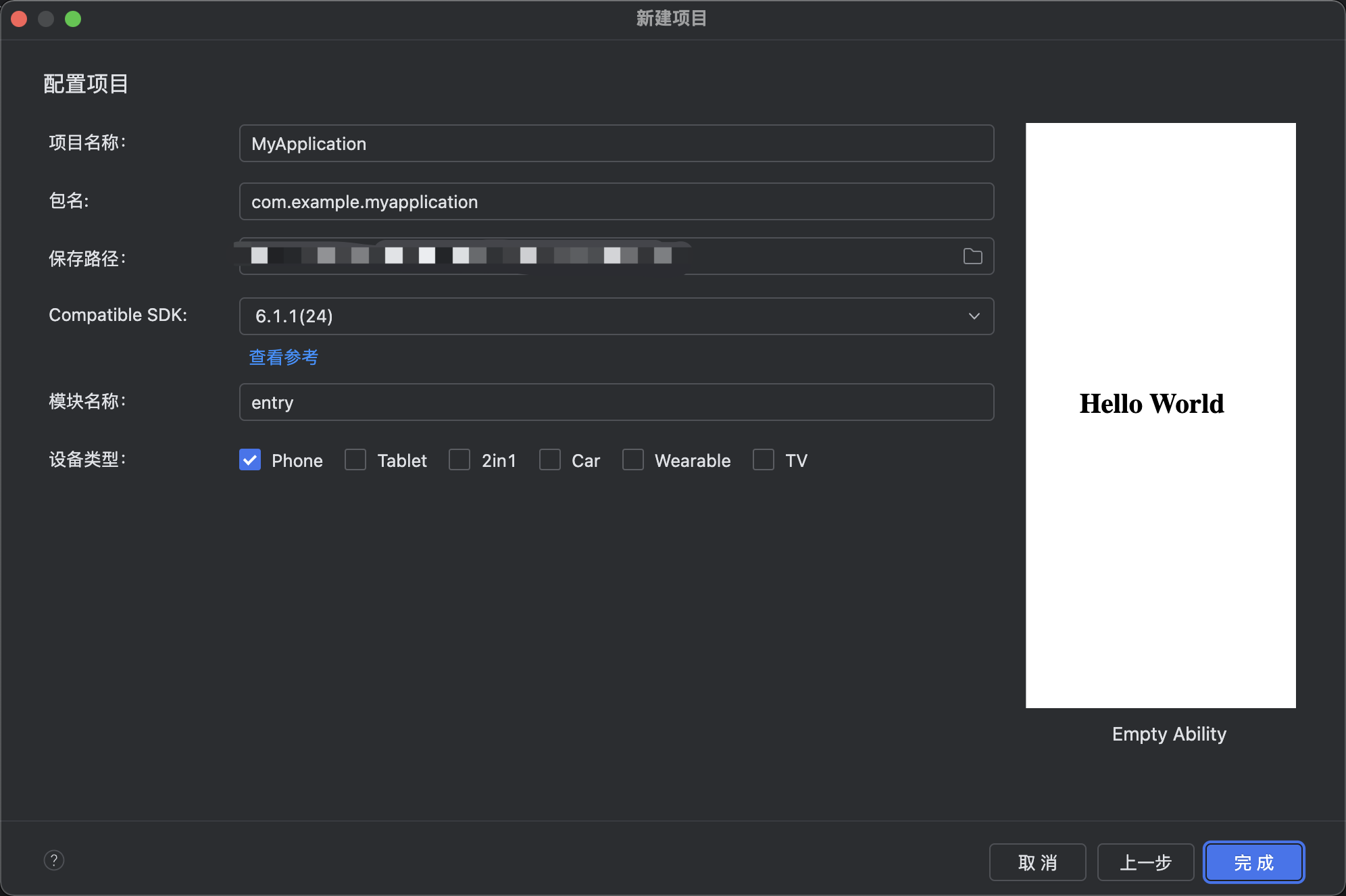
初始化项目,自动下载相关依赖:

完整代码:
// ============================================================
// 771 糖画铺 · 蜜韵流金
// 头部样式:电商风格(搜索栏 + 优惠券卷条 + Banner轮播 + 金刚区快捷入口)
// 布局风格:双列商品瀑布流网格(价格角标 + 销量标签 + 电商卡片)
// 底部 5 tab 单排
// ============================================================
interface ColorPalette {
bg: string;
card: string;
paper: string;
title: string;
sub: string;
text3: string;
caramel: string;
caramelL: string;
caramelD: string;
honey: string;
sugar: string;
red: string;
redL: string;
cream: string;
green: string;
line: string;
tabOn: string;
mask: string;
transparent: string;
tagBg: string;
}
const COLORS: ColorPalette = {
bg: '#FBF3E4',
card: '#FFFFFF',
paper: '#F5EAD5',
title: '#4A2C08',
sub: '#7A5C2E',
text3: '#A8905C',
caramel: '#D4821A',
caramelL: '#F0B04C',
caramelD: '#A05A08',
honey: '#E8A820',
sugar: '#FFF6DE',
red: '#D43030',
redL: '#FFE0E0',
cream: '#FFFAF0',
green: '#3C8C40',
line: '#EADDC0',
tabOn: '#A05A08',
mask: 'rgba(0,0,0,0.5)',
transparent: 'rgba(0,0,0,0)',
tagBg: 'rgba(212,130,26,0.12)'
};
interface TabMeta {
icon: string;
label: string;
}
const TAB_LIST: TabMeta[] = [
{ icon: '糖', label: '糖画' },
{ icon: '料', label: '糖料' },
{ icon: '具', label: '工具' },
{ icon: '师', label: '艺人' },
{ icon: '作', label: '作品' }
];
const TAB_IDX: number[] = [0, 1, 2, 3, 4];
const BANNER_IDX: number[] = [0, 1, 2];
const KING_IDX: number[] = [0, 1, 2, 3];
const KING_NAME: string[] = ['新品糖画', '限时秒杀', '艺人预约', '材料商城'];
const KING_ICON: string[] = ['🍬', '⚡', '👨🍳', '🧺'];
const MONTH_IDX: number[] = [0, 1, 2, 3, 4, 5];
const MONTH_NAME: string[] = ['正月', '二月', '三月', '四月', '五月', '六月'];
const SALES_IDX: number[] = [32, 48, 56, 70, 85, 62];
const COUNTER_SEC: number[] = [0, 1, 2, 3, 4, 5, 6, 7, 8, 9];
@Observed
export class SugarArtItem {
name: string;
kind: string;
sales: number;
price: number;
hot: boolean;
constructor(name: string, kind: string, sales: number, price: number, hot: boolean) {
this.name = name; this.kind = kind; this.sales = sales; this.price = price; this.hot = hot;
}
}
@Observed
export class SugarMaterialItem {
name: string;
kind: string;
origin: string;
price: number;
color: string;
constructor(name: string, kind: string, origin: string, price: number, color: string) {
this.name = name; this.kind = kind; this.origin = origin; this.price = price; this.color = color;
}
}
@Observed
export class ToolItem {
name: string;
kind: string;
temp: number;
price: number;
constructor(name: string, kind: string, temp: number, price: number) {
this.name = name; this.kind = kind; this.temp = temp; this.price = price;
}
}
@Observed
export class ArtistItem {
name: string;
kind: string;
years: number;
works: number;
constructor(name: string, kind: string, years: number, works: number) {
this.name = name; this.kind = kind; this.years = years; this.works = works;
}
}
@Observed
export class ArtWorkItem {
name: string;
kind: string;
size: string;
price: number;
constructor(name: string, kind: string, size: string, price: number) {
this.name = name; this.kind = kind; this.size = size; this.price = price;
}
}
const mockSugarList: SugarArtItem[] = [
new SugarArtItem('十二生肖龙', '生肖糖画', 1280, 38, true),
new SugarArtItem('凤凰朝阳', '花鸟糖画', 960, 45, true),
new SugarArtItem('鲤鱼跃龙门', '动物糖画', 850, 32, false),
new SugarArtItem('蝴蝶双飞', '昆虫糖画', 640, 25, false),
new SugarArtItem('孙悟空', '人物糖画', 720, 40, true),
new SugarArtItem('寿桃满堂', '果品糖画', 530, 28, false),
new SugarArtItem('喜鹊登梅', '花鸟糖画', 610, 30, false),
new SugarArtItem('白菜蝈蝈', '草虫糖画', 480, 26, false),
new SugarArtItem('龙凤呈祥', '祥瑞糖画', 1100, 58, true),
new SugarArtItem('连年有余', '吉祥糖画', 690, 35, false),
new SugarArtItem('嫦娥奔月', '人物糖画', 780, 42, false),
new SugarArtItem('百鸟朝凤', '花鸟糖画', 890, 50, true)
];
const mockMaterialList: SugarMaterialItem[] = [
new SugarMaterialItem('冰糖', '结晶糖', '广西南宁', 12, '#E8D8A0'),
new SugarMaterialItem('白砂糖', '颗粒糖', '广东湛江', 10, '#F5F0E0'),
new SugarMaterialItem('麦芽糖', '淀粉糖', '山东潍坊', 15, '#E8C060'),
new SugarMaterialItem('红糖', '甘蔗糖', '云南临沧', 13, '#A05820'),
new SugarMaterialItem('蜂蜜糖', '调配糖', '陕西宝鸡', 22, '#D8A020'),
new SugarMaterialItem('桂花糖', '风味糖', '浙江杭州', 25, '#E8B040'),
new SugarMaterialItem('姜汁糖', '风味糖', '四川乐山', 20, '#C88820'),
new SugarMaterialItem('玫瑰糖', '风味糖', '山东平阴', 26, '#D06868'),
new SugarMaterialItem('芝麻糖', '混合糖', '河南驻马店', 18, '#8A6848'),
new SugarMaterialItem('焦糖浆', '熬制糖', '本铺自制', 30, '#905020')
];
const mockToolList: ToolItem[] = [
new ToolItem('铜勺', '浇糖工具', 140, 35),
new ToolItem('石板', '冷却台面', 40, 60),
new ToolItem('竹签', '粘贴工具', 0, 5),
new ToolItem('小铜铲', '起糖工具', 60, 28),
new ToolItem('糖温计', '测温工具', 200, 45),
new ToolItem('酒精灯', '保温工具', 80, 30),
new ToolItem('熬糖锅', '熬制工具', 160, 85),
new ToolItem('刮刀', '修整工具', 50, 20),
new ToolItem('印花模', '成型工具', 30, 65),
new ToolItem('硅胶垫', '防粘工具', 20, 25)
];
const mockArtistList: ArtistItem[] = [
new ArtistItem('陈糖仙', '省级传承人', 38, 12000),
new ArtistItem('李转勺', '转勺高手', 25, 8000),
new ArtistItem('王熬糖', '熬糖师傅', 20, 6500),
new ArtistItem('赵画龙', '画龙圣手', 30, 9800),
new ArtistItem('孙花鸟', '花鸟名家', 22, 5600),
new ArtistItem('周人物', '人物巧手', 18, 4300),
new ArtistItem('吴糖塑', '立体糖塑', 28, 7200),
new ArtistItem('郑学徒', '学徒工', 3, 600),
new ArtistItem('冯创新', '新派糖画', 12, 3900),
new ArtistItem('何老人', '老艺人', 45, 15000)
];
const mockWorkList: ArtWorkItem[] = [
new ArtWorkItem('龙腾盛世', '大型糖画', '60x80cm', 680),
new ArtWorkItem('百子闹春', '组画套系', '45x60cm', 880),
new ArtWorkItem('瓜果连绵', '静物糖画', '30x40cm', 260),
new ArtWorkItem('菊韵秋香', '花卉糖画', '35x45cm', 320),
new ArtWorkItem('三英战吕布', '人物糖画', '50x70cm', 760),
new ArtWorkItem('八骏图', '动物糖画', '55x75cm', 820),
new ArtWorkItem('双喜临门', '婚庆糖画', '30x50cm', 380),
new ArtWorkItem('糖塔七层', '立体糖塑', '高40cm', 1200),
new ArtWorkItem('寿星献桃', '贺寿糖画', '35x50cm', 420),
new ArtWorkItem('锦鲤池趣', '观赏糖画', '40x55cm', 560),
new ArtWorkItem('糖牡丹', '花卉糖画', '25x35cm', 220),
new ArtWorkItem('四季平安', '组画套系', '40x50cm', 720)
];
function bannerHeight(i: number): number {
return i === 1 ? 96 : 88;
}
function gridTagColor(hot: boolean): string {
return hot ? COLORS.red : COLORS.caramel;
}
function priceText(p: number): string {
return 'Y' + p;
}
@Entry
@Component
struct Page771 {
@State selTab: number = 0;
@State bannerIdx: number = 0;
@State breath: boolean = false;
@State showAdd: boolean = false;
@State showEdit: boolean = false;
@State showDel: boolean = false;
@State editIdx: number = 0;
@State delIdx: number = 0;
@State sugarList: SugarArtItem[] = mockSugarList;
@State materialList: SugarMaterialItem[] = mockMaterialList;
@State toolList: ToolItem[] = mockToolList;
@State artistList: ArtistItem[] = mockArtistList;
@State workList: ArtWorkItem[] = mockWorkList;
aboutToAppear() {
setInterval(() => {
this.breath = !this.breath;
this.bannerIdx = (this.bannerIdx + 1) % 3;
}, 900);
}
build() {
Column() {
this.headerType()
Divider().strokeWidth(1).color(COLORS.line)
Scroll() {
Column() {
if (this.selTab === 0) {
this.sugarTab()
} else if (this.selTab === 1) {
this.materialTab()
} else if (this.selTab === 2) {
this.toolTab()
} else if (this.selTab === 3) {
this.artistTab()
} else {
this.workTab()
}
this.salesChart()
}.width('100%').padding({ left: 10, right: 10, top: 10, bottom: 100 })
}.constraintSize({ maxHeight: '68%' }).scrollBar(BarState.Off)
this.tabBar()
if (this.showAdd) {
this.addModal()
}
if (this.showEdit) {
this.editModal()
}
if (this.showDel) {
this.delModal()
}
}.width('100%').height('100%').backgroundColor(COLORS.bg)
}
// ============ 电商风格头部:搜索栏 + 优惠券 + Banner轮播 + 金刚区 ============
@Builder
headerType() {
Stack({ alignContent: Alignment.TopStart }) {
Column()
.width('100%')
.height(210)
.linearGradient({
angle: 135,
colors: [[COLORS.caramelD, 0.0], [COLORS.caramel, 0.5], [COLORS.bg, 1.0]]
})
// 顶部搜索栏(电商样式)
Row() {
Text('☰').fontSize(16).fontColor(COLORS.cream)
TextInput({ placeholder: '搜索糖画 / 糖料 / 工具' })
.fontSize(12).fontColor(COLORS.title)
.placeholderColor(COLORS.cream)
.backgroundColor('rgba(255,255,255,0.25)').borderRadius(14)
.margin({ left: 8, right: 8 })
.layoutWeight(1)
Text('💬').fontSize(16).fontColor(COLORS.cream)
}
.width('100%').padding({ left: 12, right: 12 })
.position({ x: 0, y: 10 })
// 优惠券卷条
Row() {
Text('🎫').fontSize(12).fontColor(COLORS.cream)
Text('新人首单立减 8 元').fontSize(10).fontColor(COLORS.cream).margin({ left: 4 })
Column().width(1).height(10).backgroundColor('rgba(255,255,255,0.4)').margin({ left: 8 })
Text('满 38 减 5').fontSize(10).fontColor(COLORS.cream).margin({ left: 8 })
Column().layoutWeight(1)
Text('领取').fontSize(9).fontColor(COLORS.caramelD)
.backgroundColor(COLORS.cream)
.padding({ left: 8, right: 8, top: 2, bottom: 2 })
.borderRadius(8)
}
.width('100%').padding({ left: 12, right: 12, top: 4, bottom: 4 })
.backgroundColor('rgba(255,255,255,0.15)').borderRadius(8)
.position({ x: 12, y: 46 })
// Banner 轮播(横向滑动卡片 + 指示点)
Scroll() {
Row({ space: 10 }) {
ForEach(BANNER_IDX, (b: number) => {
Column() {
Text(b === 0 ? '非遗糖画节' : b === 1 ? '大师手工糖画' : '亲子体验课').fontSize(15)
.fontColor(COLORS.cream).fontWeight(FontWeight.Bold)
Text(b === 0 ? '全场满 100 减 20' : b === 1 ? '生肖系列上新' : '周末场 ¥59/组').fontSize(10)
.fontColor('rgba(255,250,240,0.8)').margin({ top: 4 })
}
.width(180).height(bannerHeight(b))
.justifyContent(FlexAlign.Center)
.linearGradient({
angle: 120,
colors: [[b === 0 ? COLORS.red : COLORS.caramelD, 0.0], [b === 1 ? COLORS.honey : COLORS.caramelL, 1.0]]
})
.borderRadius(12)
}, (b: number) => 'bn' + b)
}
.padding({ left: 12, right: 12 })
}
.scrollable(ScrollDirection.Horizontal).scrollBar(BarState.Off)
.width('100%')
.position({ x: 0, y: 70 })
// 轮播指示点(呼吸动画)
Row({ space: 5 }) {
ForEach(BANNER_IDX, (b: number) => {
Circle()
.width(this.bannerIdx === b ? 12 : 6)
.height(6)
.fill(this.bannerIdx === b ? COLORS.caramelD : 'rgba(255,255,255,0.5)')
.animation({ duration: 400 })
}, (b: number) => 'dt' + b)
}
.position({ x: 30, y: 168 })
// 金刚区快捷入口
Row() {
ForEach(KING_IDX, (k: number) => {
Column({ space: 4 }) {
Text(KING_ICON[k]).fontSize(20)
Text(KING_NAME[k]).fontSize(9).fontColor(COLORS.sub)
}
.layoutWeight(1)
.alignItems(HorizontalAlign.Center)
.padding({ top: 8, bottom: 8 })
.backgroundColor(COLORS.card)
.borderRadius(10)
.animation({ duration: 900, iterations: -1, playMode: PlayMode.Alternate })
.onClick(() => { this.selTab = k; })
}, (k: number) => 'kg' + k)
}
.width('100%').padding({ left: 12, right: 12 })
.position({ x: 0, y: 182 })
}
.width('100%').height(230)
}
// ============ Tab0:糖画双列电商瀑布流网格 ============
@Builder
sugarTab() {
Column({ space: 6 }) {
Row() {
Text('🔥 热销糖画').fontSize(13).fontColor(COLORS.title).fontWeight(FontWeight.Bold)
Column().layoutWeight(1)
Text('共 ' + this.sugarList.length + ' 件').fontSize(10).fontColor(COLORS.text3)
}.width('100%').padding({ left: 4, top: 4 })
Row({ space: 8 }) {
Column({ space: 8 }) {
ForEach(this.sugarList, (item: SugarArtItem, idx: number) => {
if (idx % 2 === 0) {
this.sugarGridCard(item, idx)
}
}, (item: SugarArtItem) => 'L' + item.name)
}.layoutWeight(1)
Column({ space: 8 }) {
ForEach(this.sugarList, (item: SugarArtItem, idx: number) => {
if (idx % 2 === 1) {
this.sugarGridCard(item, idx)
}
}, (item: SugarArtItem) => 'R' + item.name)
}.layoutWeight(1)
}.width('100%')
}.width('100%')
}
@Builder
sugarGridCard(item: SugarArtItem, idx: number) {
Column() {
// 封面占位色块(电商商品图样式)
Stack({ alignContent: Alignment.BottomStart }) {
Column()
.width('100%').height(idx % 4 === 0 ? 84 : 64)
.linearGradient({
angle: 135,
colors: [[idx % 3 === 0 ? COLORS.caramelL : COLORS.honey, 0.0], [COLORS.sugar, 1.0]]
})
if (item.hot) {
Text('HOT').fontSize(8).fontColor(COLORS.cream)
.backgroundColor(gridTagColor(item.hot))
.padding({ left: 6, right: 6, top: 2, bottom: 2 })
.borderRadius({ topLeft: 0, topRight: 8, bottomLeft: 8, bottomRight: 0 })
}
}.width('100%')
Column({ space: 3 }) {
Text(item.name).fontSize(12).fontColor(COLORS.title).fontWeight(FontWeight.Bold)
Text(item.kind).fontSize(9).fontColor(COLORS.text3)
Row() {
Text(priceText(item.price)).fontSize(13).fontColor(COLORS.red).fontWeight(FontWeight.Bold)
Column().layoutWeight(1)
Text('销' + item.sales).fontSize(8).fontColor(COLORS.text3)
}.width('100%')
Row() {
Text('编辑').fontSize(9).fontColor(COLORS.tabOn)
.padding({ left: 6, right: 6, top: 2, bottom: 2 })
.backgroundColor(COLORS.tagBg).borderRadius(4)
.onClick(() => { this.editIdx = idx; this.showEdit = true; })
Text('删除').fontSize(9).fontColor(COLORS.red)
.padding({ left: 6, right: 6, top: 2, bottom: 2 })
.backgroundColor(COLORS.redL).borderRadius(4)
.margin({ left: 6 })
.onClick(() => { this.delIdx = idx; this.showDel = true; })
}.width('100%')
}
.width('100%').alignItems(HorizontalAlign.Start)
.padding({ left: 8, right: 8, top: 6, bottom: 8 })
}
.width('100%').backgroundColor(COLORS.card).borderRadius(10)
.onClick(() => { this.editIdx = idx; this.showEdit = true; })
}
// ============ Tab1:糖料横向色卡 + 纵向清单 ============
@Builder
materialTab() {
Column({ space: 6 }) {
Scroll() {
Row({ space: 8 }) {
ForEach(this.materialList, (item: SugarMaterialItem) => {
Column({ space: 4 }) {
Circle().width(28).height(28)
.fill(item.color)
.stroke(COLORS.line).strokeWidth(1)
Text(item.name).fontSize(9).fontColor(COLORS.sub)
}
.width(64).padding({ top: 8, bottom: 8 })
.backgroundColor(COLORS.card).borderRadius(10)
}, (item: SugarMaterialItem) => 'mc' + item.name)
}
.padding({ left: 4, right: 4 })
}
.scrollable(ScrollDirection.Horizontal).scrollBar(BarState.Off)
.width('100%')
ForEach(this.materialList, (item: SugarMaterialItem, idx: number) => {
Row() {
Circle().width(14).height(14)
.fill(item.color)
.stroke(COLORS.caramelL).strokeWidth(1)
Column({ space: 3 }) {
Text(item.name).fontSize(13).fontColor(COLORS.title).fontWeight(FontWeight.Bold)
Row() {
Text(item.kind).fontSize(10).fontColor(COLORS.sub)
Text(' · ' + item.origin).fontSize(10).fontColor(COLORS.text3)
}.width('100%')
}
.layoutWeight(1).alignItems(HorizontalAlign.Start).padding({ left: 8 })
Column() {
Text(priceText(item.price)).fontSize(13).fontColor(COLORS.red).fontWeight(FontWeight.Bold)
Text('/斤').fontSize(8).fontColor(COLORS.text3)
}.alignItems(HorizontalAlign.End)
}
.width('100%').padding({ left: 10, right: 10, top: 8, bottom: 8 })
.backgroundColor(idx % 2 === 0 ? COLORS.card : COLORS.paper)
.borderRadius(8)
.onClick(() => { this.editIdx = idx; this.showEdit = true; })
}, (item: SugarMaterialItem) => 'ml' + item.name)
}.width('100%')
}
// ============ Tab2:工具列表(左侧图标块样式)============
@Builder
toolTab() {
Column({ space: 6 }) {
Row() {
Text('+').fontSize(16).fontColor(COLORS.tabOn)
Text('新增工具').fontSize(13).fontColor(COLORS.tabOn).margin({ left: 4 })
}
.width('100%').padding({ left: 12, top: 8, bottom: 8 })
.backgroundColor(COLORS.card).borderRadius(8)
.onClick(() => { this.showAdd = true; })
ForEach(this.toolList, (item: ToolItem, idx: number) => {
Row() {
Column() {
Text((idx + 1).toString()).fontSize(14).fontColor(COLORS.cream).fontWeight(FontWeight.Bold)
}
.width(34).height(34)
.backgroundColor(idx % 3 === 0 ? COLORS.caramel : idx % 3 === 1 ? COLORS.honey : COLORS.caramelD)
.borderRadius(17).justifyContent(FlexAlign.Center)
Column({ space: 3 }) {
Row() {
Text(item.name).fontSize(13).fontColor(COLORS.title).fontWeight(FontWeight.Bold)
Column().layoutWeight(1)
if (item.temp > 0) {
Text(item.temp + '°C').fontSize(10).fontColor(COLORS.red)
.backgroundColor(COLORS.redL)
.padding({ left: 5, right: 5, top: 1, bottom: 1 }).borderRadius(4)
}
}.width('100%')
Text(item.kind).fontSize(10).fontColor(COLORS.sub)
}
.layoutWeight(1).alignItems(HorizontalAlign.Start).padding({ left: 10 })
Text(priceText(item.price)).fontSize(12).fontColor(COLORS.caramelD).fontWeight(FontWeight.Bold)
}
.width('100%').padding({ left: 10, right: 10, top: 8, bottom: 8 })
.backgroundColor(COLORS.card).borderRadius(8)
.onClick(() => { this.editIdx = idx; this.showEdit = true; })
}, (item: ToolItem) => 'tl' + item.name)
}.width('100%')
}
// ============ Tab3:艺人头像圆列表 ============
@Builder
artistTab() {
Column({ space: 6 }) {
ForEach(this.artistList, (item: ArtistItem, idx: number) => {
Row() {
Column() {
Text(item.name.charAt(0)).fontSize(16).fontColor(COLORS.cream).fontWeight(FontWeight.Bold)
}
.width(40).height(40)
.backgroundColor(idx % 4 === 0 ? COLORS.caramel : idx % 4 === 1 ? COLORS.honey : idx % 4 === 2 ? COLORS.caramelD : COLORS.red)
.borderRadius(20).justifyContent(FlexAlign.Center)
Column({ space: 3 }) {
Text(item.name).fontSize(13).fontColor(COLORS.title).fontWeight(FontWeight.Bold)
Row() {
Text(item.kind).fontSize(10).fontColor(COLORS.sub)
Text(' · ' + item.years + '年').fontSize(10).fontColor(COLORS.text3)
}.width('100%')
Text('作品 ' + item.works + ' 件').fontSize(9).fontColor(COLORS.text3)
}
.layoutWeight(1).alignItems(HorizontalAlign.Start).padding({ left: 10 })
Row({ space: 8 }) {
Text('编').fontSize(9).fontColor(COLORS.tabOn)
.onClick(() => { this.editIdx = idx; this.showEdit = true; })
Text('删').fontSize(9).fontColor(COLORS.red)
.onClick(() => { this.delIdx = idx; this.showDel = true; })
}
}
.width('100%').padding({ left: 10, right: 10, top: 8, bottom: 8 })
.backgroundColor(idx % 2 === 0 ? COLORS.card : COLORS.paper)
.borderRadius(8)
}, (item: ArtistItem) => 'at' + item.name)
}.width('100%')
}
// ============ Tab4:作品大卡横滑 + 纵向列表 ============
@Builder
workTab() {
Column({ space: 6 }) {
Text('🏆 镇店之作').fontSize(13).fontColor(COLORS.title).fontWeight(FontWeight.Bold)
.width('100%').padding({ left: 4 })
Scroll() {
Row({ space: 10 }) {
ForEach(this.workList, (item: ArtWorkItem, idx: number) => {
Column() {
Column()
.width(120).height(70)
.linearGradient({
angle: 135,
colors: [[idx % 2 === 0 ? COLORS.caramel : COLORS.honey, 0.0], [COLORS.caramelL, 1.0]]
})
.borderRadius({ topLeft: 10, topRight: 10, bottomLeft: 0, bottomRight: 0 })
Column({ space: 3 }) {
Text(item.name).fontSize(11).fontColor(COLORS.title).fontWeight(FontWeight.Bold)
Text(item.size).fontSize(8).fontColor(COLORS.text3)
Text(priceText(item.price)).fontSize(11).fontColor(COLORS.red).fontWeight(FontWeight.Bold)
}
.width(120).alignItems(HorizontalAlign.Start)
.padding({ left: 8, right: 8, top: 6, bottom: 8 })
}
.width(120).backgroundColor(COLORS.card).borderRadius(10)
}, (item: ArtWorkItem) => 'wk' + item.name)
}
.padding({ left: 4, right: 4 })
}
.scrollable(ScrollDirection.Horizontal).scrollBar(BarState.Off)
.width('100%')
ForEach(this.workList, (item: ArtWorkItem, idx: number) => {
Row() {
Text((idx + 1).toString()).fontSize(15).fontColor(idx < 3 ? COLORS.red : COLORS.text3)
.fontWeight(FontWeight.Bold).width(24)
Column({ space: 3 }) {
Text(item.name).fontSize(13).fontColor(COLORS.title).fontWeight(FontWeight.Bold)
Row() {
Text(item.kind).fontSize(10).fontColor(COLORS.sub)
Text(' · ' + item.size).fontSize(10).fontColor(COLORS.text3)
}.width('100%')
}
.layoutWeight(1).alignItems(HorizontalAlign.Start)
Text(priceText(item.price)).fontSize(12).fontColor(COLORS.caramelD).fontWeight(FontWeight.Bold)
}
.width('100%').padding({ left: 10, right: 10, top: 8, bottom: 8 })
.backgroundColor(COLORS.card).borderRadius(8)
.onClick(() => { this.editIdx = idx; this.showEdit = true; })
}, (item: ArtWorkItem) => 'wl' + item.name)
}.width('100%')
}
// ============ 月度销量柱状图 ============
@Builder
salesChart() {
Column({ space: 8 }) {
Row() {
Text('月度糖画销量').fontSize(14).fontColor(COLORS.title).layoutWeight(1)
Text('件').fontSize(11).fontColor(COLORS.text3)
}.width('100%')
Row({ space: 4 }) {
ForEach(MONTH_IDX, (m: number) => {
Column({ space: 4 }) {
Text(SALES_IDX[m].toString())
.fontSize(9).fontColor(COLORS.sub)
Column()
.width(24)
.height(SALES_IDX[m] * 0.15)
.backgroundColor(m % 2 === 0 ? COLORS.caramelD : COLORS.caramelL)
.borderRadius(4)
Text(MONTH_NAME[m])
.fontSize(9)
.fontColor(COLORS.text3)
}
.layoutWeight(1)
.alignItems(HorizontalAlign.Center)
}, (m: number) => 'ch' + m)
}
.width('100%').height(60)
.alignItems(VerticalAlign.Bottom)
Row() {
ForEach(COUNTER_SEC, (s: number) => {
Text(s.toString()).fontSize(8).fontColor(COLORS.text3)
.opacity(this.breath ? 0.4 : 1.0)
.animation({ duration: 900, iterations: -1, playMode: PlayMode.Alternate })
.padding({ left: 3, right: 3 })
}, (s: number) => 'cs' + s)
}
.width('100%').justifyContent(FlexAlign.Center)
}
.width('100%').padding(12)
.backgroundColor(COLORS.card).borderRadius(10)
.margin({ top: 10 })
}
// ============ 底部 5 tab 单排 ============
@Builder
tabBar() {
Row() {
ForEach(TAB_IDX, (i: number) => {
Column({ space: 2 }) {
Text(TAB_LIST[i].icon).fontSize(15).fontColor(this.selTab === i ? COLORS.tabOn : COLORS.sub)
Text(TAB_LIST[i].label).fontSize(9).fontColor(this.selTab === i ? COLORS.tabOn : COLORS.sub)
if (this.selTab === i) {
Column().width(16).height(2)
.backgroundColor(COLORS.caramel).borderRadius(1)
}
}
.layoutWeight(1).height(54)
.backgroundColor(this.selTab === i ? COLORS.tagBg : COLORS.card)
.borderRadius(10)
.justifyContent(FlexAlign.Center)
.onClick(() => { this.selTab = i; })
}, (i: number) => 'tb' + i)
}
.width('100%').padding({ left: 8, right: 8, top: 6, bottom: 8 })
.backgroundColor(COLORS.card)
}
// ============ 弹框 ============
@Builder
modalOverlay(onClose: () => void) {
Column()
.width('100%')
.height('100%')
.backgroundColor(COLORS.mask)
.onClick(() => { onClose(); })
}
@Builder
addModal() {
Stack({ alignContent: Alignment.Center }) {
this.modalOverlay(() => { this.showAdd = false; })
Column({ space: 12 }) {
Text('🛒 新增商品').fontSize(16).fontColor(COLORS.title)
TextInput({ placeholder: '商品名称' })
.fontSize(13).fontColor(COLORS.title)
.backgroundColor(COLORS.paper).borderRadius(8)
TextInput({ placeholder: '商品种类' })
.fontSize(13).fontColor(COLORS.title)
.backgroundColor(COLORS.paper).borderRadius(8)
TextInput({ placeholder: '销量' })
.fontSize(13).fontColor(COLORS.title)
.backgroundColor(COLORS.paper).borderRadius(8)
TextInput({ placeholder: '价格' })
.fontSize(13).fontColor(COLORS.title)
.backgroundColor(COLORS.paper).borderRadius(8)
Row({ space: 10 }) {
Column() {
Text('加入').fontSize(13).fontColor(COLORS.cream)
}
.layoutWeight(1).height(38)
.backgroundColor(COLORS.caramelD).borderRadius(8)
.justifyContent(FlexAlign.Center)
.onClick(() => { this.showAdd = false; })
Column() {
Text('取消').fontSize(13).fontColor(COLORS.sub)
}
.layoutWeight(1).height(38)
.backgroundColor(COLORS.line).borderRadius(8)
.justifyContent(FlexAlign.Center)
.onClick(() => { this.showAdd = false; })
}.width('100%')
}
.width('80%').padding(20)
.backgroundColor(COLORS.card).borderRadius(12)
.constraintSize({ maxHeight: '80%' })
}
.width('100%').height('100%')
.position({ x: 0, y: 0 })
.zIndex(999)
.backgroundColor(COLORS.transparent)
}
@Builder
editModal() {
Stack({ alignContent: Alignment.Center }) {
this.modalOverlay(() => { this.showEdit = false; })
Column({ space: 12 }) {
Text('✏️ 编辑第 ' + (this.editIdx + 1) + ' 条').fontSize(16).fontColor(COLORS.title)
TextInput({ placeholder: '商品名称' })
.fontSize(13).fontColor(COLORS.title)
.backgroundColor(COLORS.paper).borderRadius(8)
TextInput({ placeholder: '商品种类' })
.fontSize(13).fontColor(COLORS.title)
.backgroundColor(COLORS.paper).borderRadius(8)
TextInput({ placeholder: '销量' })
.fontSize(13).fontColor(COLORS.title)
.backgroundColor(COLORS.paper).borderRadius(8)
TextInput({ placeholder: '价格' })
.fontSize(13).fontColor(COLORS.title)
.backgroundColor(COLORS.paper).borderRadius(8)
Row({ space: 10 }) {
Column() {
Text('保存').fontSize(13).fontColor(COLORS.cream)
}
.layoutWeight(1).height(38)
.backgroundColor(COLORS.caramelD).borderRadius(8)
.justifyContent(FlexAlign.Center)
.onClick(() => { this.showEdit = false; })
Column() {
Text('取消').fontSize(13).fontColor(COLORS.sub)
}
.layoutWeight(1).height(38)
.backgroundColor(COLORS.line).borderRadius(8)
.justifyContent(FlexAlign.Center)
.onClick(() => { this.showEdit = false; })
}.width('100%')
}
.width('80%').padding(20)
.backgroundColor(COLORS.card).borderRadius(12)
.constraintSize({ maxHeight: '80%' })
}
.width('100%').height('100%')
.position({ x: 0, y: 0 })
.zIndex(999)
.backgroundColor(COLORS.transparent)
}
@Builder
delModal() {
Stack({ alignContent: Alignment.Center }) {
this.modalOverlay(() => { this.showDel = false; })
Column({ space: 12 }) {
Text('🗑️ 确认删除').fontSize(16).fontColor(COLORS.title)
Text('删除第 ' + (this.delIdx + 1) + ' 条商品?').fontSize(13).fontColor(COLORS.sub)
Text('删除后不可恢复,请谨慎操作。').fontSize(11).fontColor(COLORS.text3)
Row({ space: 10 }) {
Column() {
Text('确认删除').fontSize(13).fontColor(COLORS.cream)
}
.layoutWeight(1).height(38)
.backgroundColor(COLORS.red).borderRadius(8)
.justifyContent(FlexAlign.Center)
.onClick(() => { this.showDel = false; })
Column() {
Text('取消').fontSize(13).fontColor(COLORS.sub)
}
.layoutWeight(1).height(38)
.backgroundColor(COLORS.line).borderRadius(8)
.justifyContent(FlexAlign.Center)
.onClick(() => { this.showDel = false; })
}.width('100%')
}
.width('70%').padding(20)
.backgroundColor(COLORS.card).borderRadius(12)
.constraintSize({ maxHeight: '80%' })
}
.width('100%').height('100%')
.position({ x: 0, y: 0 })
.zIndex(999)
.backgroundColor(COLORS.transparent)
}
}
十五、深度总结
糖画工艺电商化管理系统以其大胆的电商风格转型和焦糖暖色视觉基调,在传统手工艺数字化管理系统中开辟了全新的设计方向。
在定位转型方面,系统是前序系列中第一个从"工艺管理工具"转向"电商运营平台"的系统。这一转型体现在多个层面:数据模型引入了 sales(销量)和 hot(热门)等电商特有字段;头部从单一渐变Banner扩展为搜索栏+优惠券+轮播Banner+金刚区的四层复合结构;底部导航从"两行六标签"变为"单排五标签+指示条";列表布局引入了双列瀑布流网格和HOT折角标签。每一处变化都反映了系统从"面向工艺管理者"到"面向消费者"的用户定位转变。
在布局创新方面,系统的双列瀑布流网格是前序系列中最具电商特征的布局策略。通过 idx % 2 将数据分为左右两列,配合封面色块高度通过 idx % 4 的交替变化(84或64像素),两列商品在垂直方向上自然错落,形成了典型的电商瀑布流效果。HOT标签的不对称圆角设计(borderRadius({ topLeft: 0, topRight: 8, bottomLeft: 8, bottomRight: 0 }))模拟了折角贴纸的视觉效果,是电商商品封面的经典装饰手法。
在动画系统方面,系统采用了"一个定时器驱动多个状态"的高效模式。900毫秒的定时器同时更新 breath(驱动数字翻动和金刚区微动画)和 bannerIdx(驱动轮播指示点切换),比前序系统"单一状态驱动"的模式更加高效。Banner指示点通过宽度变化(12↔6像素)和颜色变化(深焦糖↔半透明白)的双重属性切换,配合400毫秒过渡动画,形成了平滑的轮播切换反馈。

电商企业物流数字化转型必备!快递鸟 API 接口,72 小时快速完成物流系统集成。全流程实战1V1指导,营造开放的API技术生态圈。
更多推荐


 3
3 0
0- 0


 已为社区贡献1条内容

所有评论(0)