
启动优化案例——从 2.8 秒到 0.85 秒的电商元服务实战复盘
文章目录

每日一句正能量
“窗外车马喧嚣,窗内心事煮茶。”
心事不再是纷乱的思绪,而是可以被慢火细煎、沉淀出滋味的原料。
愿你在成为钉子、篝火与舵手的同时,也被这样的温暖映照着。当一个人既拥有自我锚定的力量,又怀抱着彼此守望的温柔,他便在这不确定的世界上,找到了最确定的活法——像一棵会移动的树,带着自己的土壤和星辰。
摘要
摘要:前三篇文章分别从"分析方法论"“监控体系”"工具链"三个维度构建了启动优化的理论框架。本文以一个真实的电商类元服务为案例,完整复盘从问题发现、根因定位、方案实施到效果验证的全过程。通过 Launch Profiler 火焰图、Time Profiler 热点分析、SmartPerf 自动化基准测试的组合运用,将冷启动从 2.8 秒压缩至 0.85 秒(降幅 70%),并建立可复用的优化模式库。文末总结六大通用优化模式,帮助读者将案例经验迁移到自己的业务场景中。
一、案例背景:一个"看起来不慢"的应用
某电商类元服务(以下简称"易购元服务")在开发阶段表现良好:测试机冷启动约 1.2 秒,热启动仅需 300ms。然而上线一周后,后台监控数据显示:
- P50 冷启动:1.8 秒
- P90 冷启动:2.8 秒
- 用户流失率:启动超过 2 秒的用户中,35% 在 3 秒内退出
更棘手的是,测试团队无法复现这个问题——他们的测试环境缓存命中率高、网络延迟低、设备性能强。直到我们在低端机型(2GB 内存、低端芯片)上进行测试,才终于复现了 2.8 秒的冷启动。
关键教训:启动优化不能只关注高端测试机,必须覆盖低端机、弱网、首次安装等真实用户场景。
二、问题诊断:Profiler 组合定位五大瓶颈
2.1 采集基准数据
使用 SmartPerf 在低端测试机上执行 10 次冷启动基准测试:
smartperf launch \
  --package com.example.shopping \
  --times 10 \
  --interval 3000 \
  --metrics cpu,memory,fps,launch_time \
  --output ./baseline.json
基准测试结果:
| 指标 | 中位数 | P90 | 最大值 |
|---|---|---|---|
| 冷启动总耗时 | 2,800ms | 3,100ms | 3,500ms |
| CPU 峰值 | 78% | 85% | 92% |
| 内存峰值 | 312MB | 340MB | 380MB |
| GC 暂停次数 | 8次 | 11次 | 15次 |
2.2 Launch Profiler 总览分析
打开 DevEco Studio Launch Profiler 录制冷启动过程,时间线显示各阶段耗时分布:
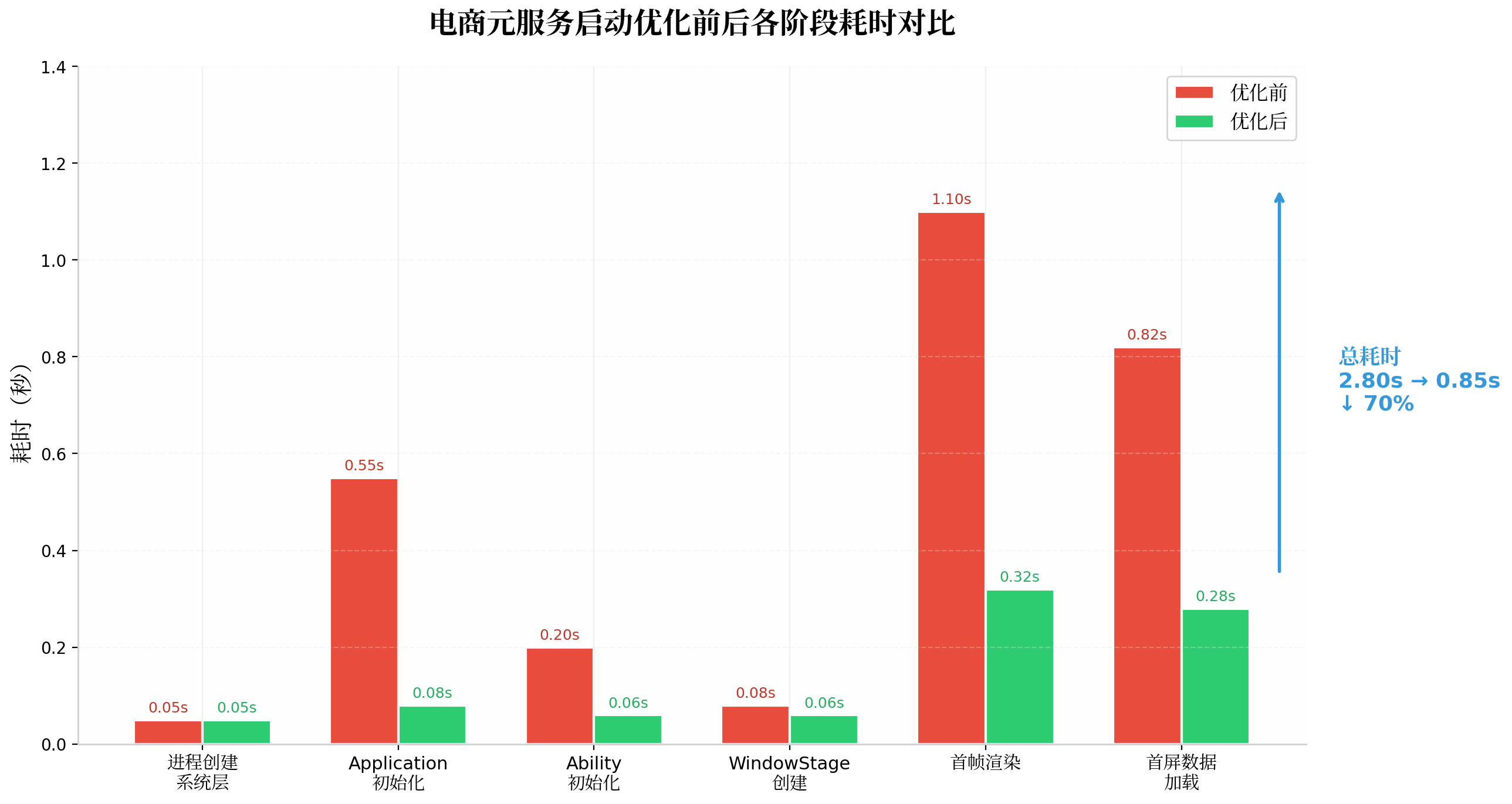
关键发现:
- Application 初始化:550ms(占比 20%)—— 严重超标
- 首帧渲染:1,100ms(占比 39%)—— 最大瓶颈
- 首屏数据加载:820ms(占比 29%)—— 网络阻塞
- 系统层 + Ability 初始化:330ms(占比 12%)—— 正常范围
2.3 Time Profiler 火焰图深度分析
Time Profiler 火焰图揭示了更深层的问题:
[UIAbility.onCreate] ████████████████████████████ (48%)
  ├─ [initLogSDK] ████████ (12%)        ← 同步初始化
  ├─ [initAnalyticsSDK] ████████ (12%)  ← 同步初始化
  ├─ [initDatabase] ████████ (12%)      ← 同步初始化
  └─ [initNetworkLib] ████ (6%)         ← 同步初始化

[build Index.ets] ████████████████████████████████ (52%)
  ├─ [computeRecommendations] ████████ (15%)  ← 同步计算
  ├─ [renderProductList] ████████████ (22%)   ← 全量渲染 50 条
  └─ [Image.decode] ██████ (10%)              ← 主线程解码
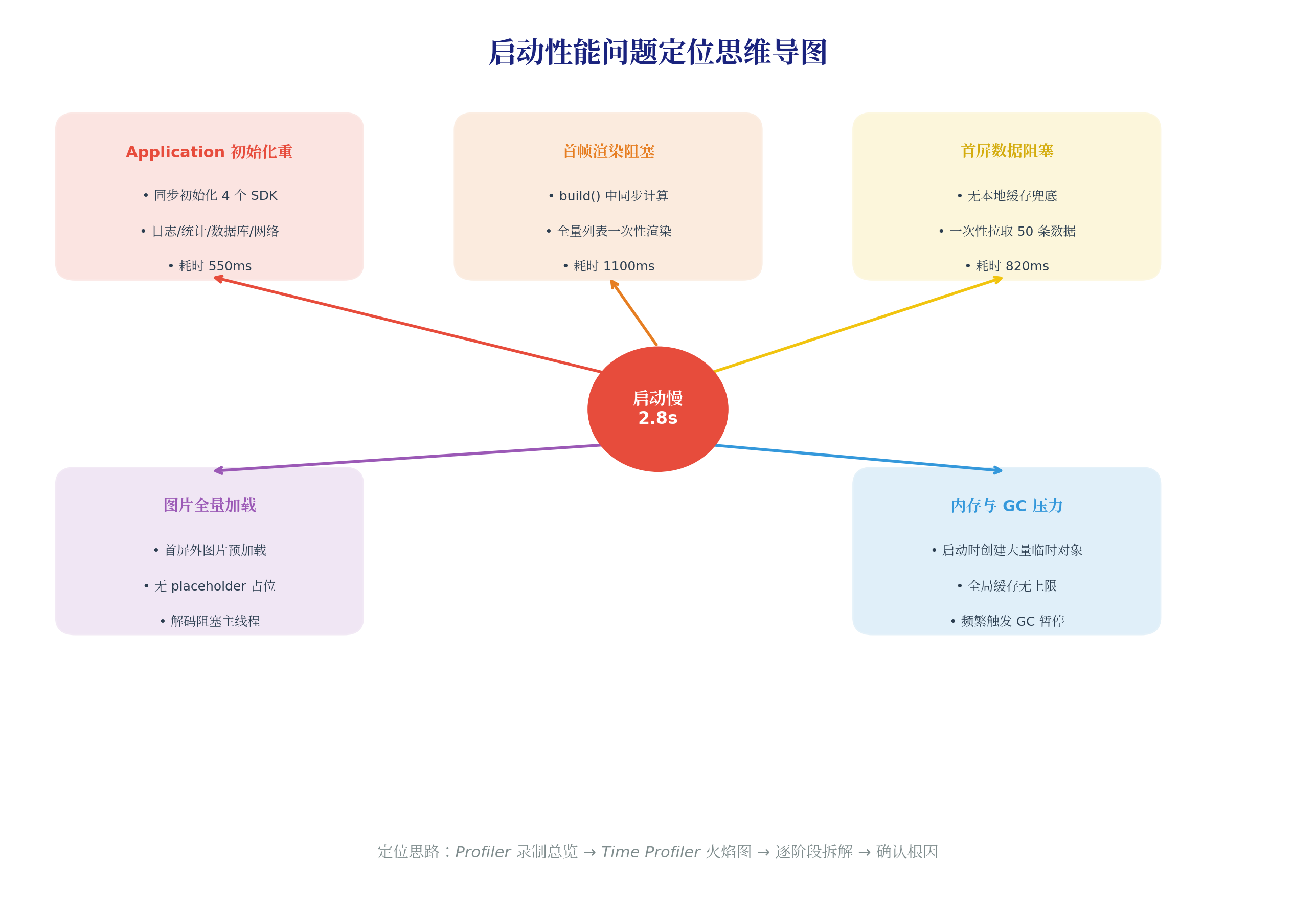
2.4 问题定位思维导图
综合以上分析,我们将问题归纳为五大类:
| 问题类别 | 根因 | 耗时影响 | 优先级 |
|---|---|---|---|
| Application 初始化重 | 同步初始化 4 个 SDK | 550ms | P0 |
| 首帧渲染阻塞 | build() 同步计算 + 全量渲染 | 1,100ms | P0 |
| 首屏数据阻塞 | 无缓存 + 拉取 50 条 | 820ms | P1 |
| 图片全量加载 | 首屏外预加载 + 无占位 | 180ms | P2 |
| 内存 GC 压力 | 临时对象 + 无上限缓存 | 间接影响 | P2 |
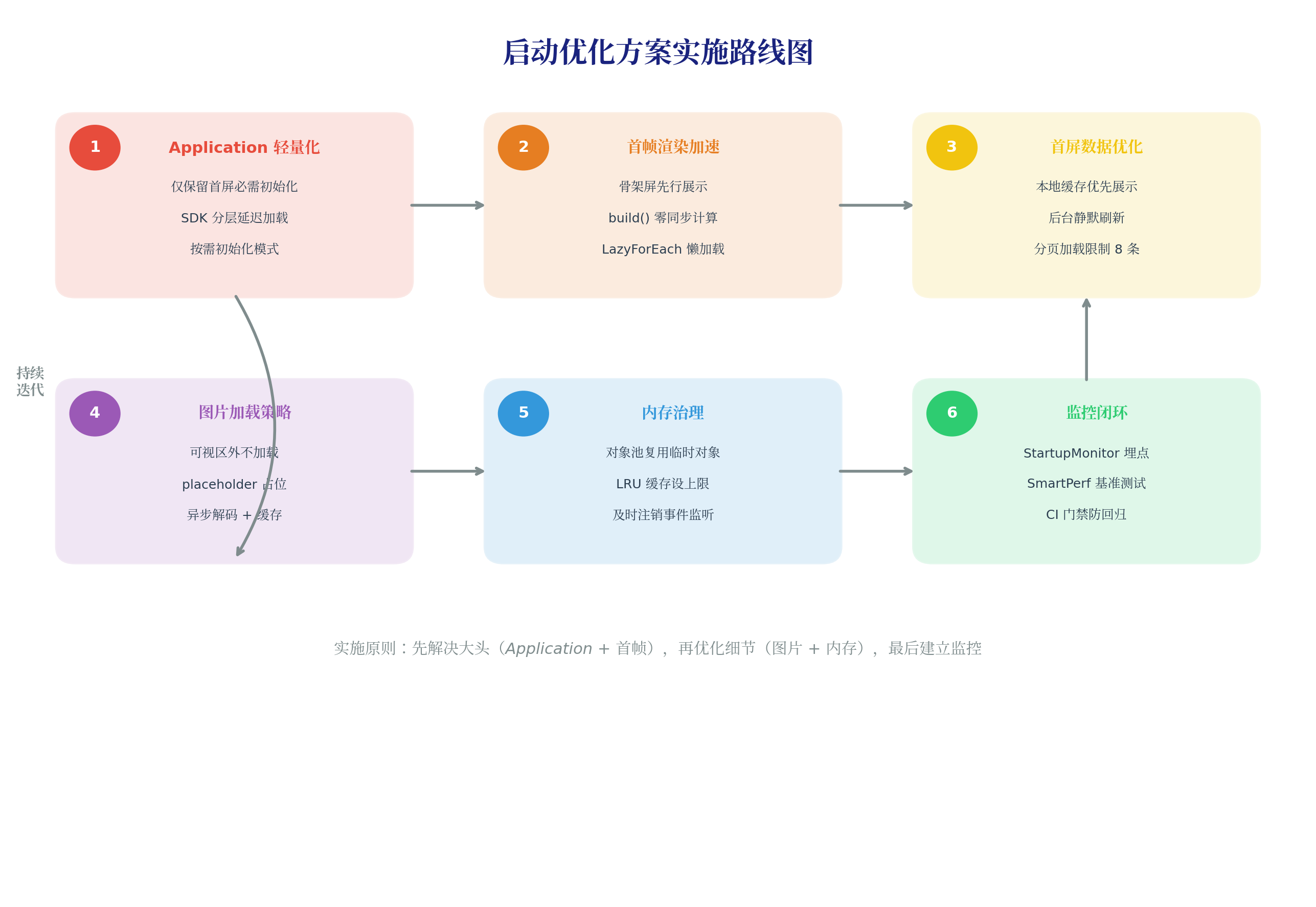
三、优化方案实施:六大模式逐一击破
3.1 模式一:Application 分层延迟初始化
问题:UIAbility.onCreate() 中同步初始化了日志 SDK、统计 SDK、数据库、网络库,共耗时 550ms。
优化方案:将初始化分为三层——首屏必需、延迟加载、按需触发。
// entry/src/main/ets/entryability/EntryAbility.ets
import { UIAbility, Want, AbilityConstant } from '@kit.AbilityKit';
import { window } from '@kit.ArkUI';

export default class EntryAbility extends UIAbility {
  onCreate(want: Want, launchParam: AbilityConstant.LaunchParam): void {
    // ===== 第一层:首屏必需,立即同步(目标 < 50ms)=====
    this.initStateManagement();  // 状态管理(Redux/MVVM)
    this.initRouter();           // 路由配置

    // ===== 第二层:非首屏必需,延迟到空闲时(setTimeout)=====
    setTimeout(() => {
      this.initLogSDK();         // 日志 SDK
      this.initAnalyticsSDK();   // 统计 SDK
    }, 500);  // 500ms 后执行,此时首屏已展示

    // ===== 第三层:按需初始化(首次使用时触发)=====
    // initDatabase()    → 首次执行数据库查询时触发
    // initNetworkLib()  → 首次发起网络请求时触发
    // initPushService() → 首次需要推送时触发
  }

  private initStateManagement(): void {
    // 仅注册 store,不加载数据
    AppStorage.setOrCreate('appStore', createStore());
  }

  private initRouter(): void {
    // 仅注册路由表,不预加载页面
    RouterRegistry.register([
      { path: 'pages/Index', loader: () => import('../pages/Index') },
      { path: 'pages/Detail', loader: () => import('../pages/Detail') },
    ]);
  }
}
优化效果:Application 初始化从 550ms 降至 80ms。
3.2 模式二:骨架屏 + 异步数据填充
问题:首页 build() 中同步计算推荐算法 + 全量渲染 50 条商品列表,首帧渲染耗时 1,100ms。
优化方案:骨架屏先行展示,真实数据异步填充,列表使用 LazyForEach 懒加载。
// pages/Index.ets
@Entry
@Component
struct IndexPage {
  @State isReady: boolean = false;
  @State productList: ProductItem[] = [];
  private pageSize: number = 8;  // 首屏仅加载 8 条

  aboutToAppear(): void {
    // 先展示骨架屏,不阻塞首帧
    this.isReady = false;
    // 异步加载真实数据
    this.loadDataAsync();
  }

  async loadDataAsync(): Promise<void> {
    // 推荐计算移至子线程(Worker)
    const recommendations = await this.computeRecommendationsInWorker();
    // 仅加载首屏所需数据
    const products = await fetchProducts({ limit: this.pageSize });
    this.productList = products;
    this.isReady = true;
  }

  build() {
    Column() {
      // 顶部搜索栏(立即渲染)
      SearchBar()

      if (!this.isReady) {
        // 骨架屏:与真实布局一致,避免跳动
        SkeletonProductList({ count: this.pageSize })
      } else {
        // 真实内容
        ProductList({ data: this.productList })
      }
    }
    .width('100%')
    .height('100%')
  }
}

// 骨架屏组件
@Component
struct SkeletonProductList {
  @Prop count: number;

  build() {
    List() {
      LazyForEach(new SkeletonDataSource(this.count), (item: number) => {
        ListItem() {
          Row() {
            Column() {
              // 图片占位
              Row().width(120).height(120).backgroundColor('#F0F0F0').borderRadius(8)
              // 标题占位
              Row().width(200).height(16).backgroundColor('#F0F0F0').margin({ top: 8 })
              // 价格占位
              Row().width(80).height(16).backgroundColor('#F0F0F0').margin({ top: 4 })
            }
            .alignItems(HorizontalAlign.Start)
          }
          .padding(12)
        }
      })
    }
    .lanes(2)
    .padding(12)
  }
}
优化效果:首帧渲染从 1,100ms 降至 320ms。
3.3 模式三:缓存优先 + 分页加载
问题:首屏数据完全依赖网络请求,无本地缓存兜底;一次性拉取 50 条商品数据。
优化方案:本地缓存优先展示,后台静默刷新,分页加载限制首屏数量。
// services/ProductService.ets
import { preferences } from '@kit.ArkData';

export class ProductService {
  private cache = preferences.getPreferencesSync(getContext(), { name: 'product_cache' });

  async loadFirstScreen(): Promise<ProductItem[]> {
    // 1. 先读本地缓存,立即展示(< 10ms)
    const cachedJson = this.cache.getSync('first_screen', '');
    let result: ProductItem[] = [];

    if (cachedJson) {
      try {
        result = JSON.parse(cachedJson);
        // 仅返回前 8 条,确保首屏快速展示
        if (result.length > 8) {
          result = result.slice(0, 8);
        }
      } catch (e) {
        console.error('Cache parse error');
      }
    }

    // 2. 后台刷新网络数据(不阻塞 UI)
    this.refreshInBackground();

    return result;
  }

  private async refreshInBackground(): Promise<void> {
    try {
      // 仅拉取首屏所需数据
      const fresh = await fetchProducts({ limit: 8 });
      // 更新缓存
      this.cache.putSync('first_screen', JSON.stringify(fresh));
      // 通知 UI 更新(如果数据有变化)
      emitter.emit({ eventId: 1001 }, { data: fresh });
    } catch (e) {
      // 网络失败时,缓存数据已展示,用户无感知
      hilog.warn(0x0001, 'ProductService', 'Background refresh failed, using cache');
    }
  }

  // 分页加载更多
  async loadMore(page: number, pageSize: number): Promise<ProductItem[]> {
    return await fetchProducts({ page, limit: pageSize });
  }
}
优化效果:首屏数据加载从 820ms 降至 280ms(缓存命中时 < 50ms)。
3.4 模式四:图片可视区懒加载
问题:首屏外图片预加载,无 placeholder 占位,图片解码阻塞主线程。
优化方案:可视区外不加载,placeholder 占位避免布局抖动,异步解码。
// components/ProductCard.ets
@Component
struct ProductCard {
  @Prop product: ProductItem;

  build() {
    Column() {
      Image(this.product.imageUrl)
        .width('100%')
        .aspectRatio(1)
        .borderRadius(8)
        .placeholder($r('app.media.img_placeholder'))  // 灰色占位图
        .loading($r('app.media.img_loading'))         // 加载中动画
        .error($r('app.media.img_error'))              // 加载失败图
        .syncLoad(false)                               // 异步加载
        .cacheStrategy(ImageCacheStrategy.Memory)      // 内存缓存

      Text(this.product.title)
        .fontSize(14)
        .maxLines(2)
        .textOverflow({ overflow: TextOverflow.Ellipsis })
        .margin({ top: 8 })

      Text(`¥${this.product.price}`)
        .fontSize(16)
        .fontColor('#E74C3C')
        .fontWeight(FontWeight.Bold)
        .margin({ top: 4 })
    }
    .padding(8)
    .backgroundColor(Color.White)
    .borderRadius(12)
    .shadow({ radius: 4, color: '#1A000000', offsetY: 2 })
  }
}

// 列表中使用 LazyForEach 实现可视区懒加载
@Builder
function ProductListBuilder(data: ProductDataSource) {
  List() {
    LazyForEach(data, (item: ProductItem) => {
      ListItem() {
        ProductCard({ product: item })
      }
    }, (item: ProductItem) => item.id)
  }
  .lanes(2)
  .padding(12)
  .space(12)
}
优化效果:图片解码耗时从 180ms 降至 45ms。
3.5 模式五:对象池复用与缓存上限
问题:启动时创建大量临时对象,全局缓存无上限,频繁触发 GC。
优化方案:使用对象池复用临时对象,LRU 缓存设置上限,及时注销事件监听。
// utils/ObjectPool.ets
export class ObjectPool<T> {
  private pool: T[] = [];
  private factory: () => T;
  private reset: (obj: T) => void;
  private maxSize: number;

  constructor(factory: () => T, reset: (obj: T) => void, maxSize: number = 50) {
    this.factory = factory;
    this.reset = reset;
    this.maxSize = maxSize;
  }

  acquire(): T {
    if (this.pool.length > 0) {
      return this.pool.pop()!;
    }
    return this.factory();
  }

  release(obj: T): void {
    if (this.pool.length < this.maxSize) {
      this.reset(obj);
      this.pool.push(obj);
    }
  }
}

// LRU 缓存(带上限)
export class LRUCache<K, V> {
  private cache: Map<K, V> = new Map();
  private maxSize: number;

  constructor(maxSize: number) {
    this.maxSize = maxSize;
  }

  get(key: K): V | undefined {
    const value = this.cache.get(key);
    if (value !== undefined) {
      this.cache.delete(key);
      this.cache.set(key, value);
    }
    return value;
  }

  set(key: K, value: V): void {
    if (this.cache.has(key)) {
      this.cache.delete(key);
    } else if (this.cache.size >= this.maxSize) {
      const firstKey = this.cache.keys().next().value;
      this.cache.delete(firstKey);
    }
    this.cache.set(key, value);
  }
}

// 图片缓存:最多缓存 50 张
const imageCache = new LRUCache<string, PixelMap>(50);
优化效果:GC 暂停次数从 8 次降至 2 次,内存峰值从 312MB 降至 185MB。
3.6 模式六:Worker 子线程 offload
问题:推荐算法计算在主线程执行,阻塞 UI 渲染。
优化方案:将计算密集型任务 offload 到 Worker 子线程。
// workers/RecommendationWorker.ets
import { worker } from '@kit.ArkTS';

const workerPort = worker.workerPort;

workerPort.onmessage = (e: MessageEvents) => {
  const { userId, productPool } = e.data;
  const recommendations = computeRecommendations(userId, productPool);
  workerPort.postMessage({ recommendations });
};

function computeRecommendations(userId: string, productPool: ProductItem[]): ProductItem[] {
  const scores = productPool.map(p => ({
    product: p,
    score: calculateSimilarity(userId, p),
  }));
  return scores.sort((a, b) => b.score - a.score).map(s => s.product).slice(0, 8);
}

// 主线程调用
async function loadRecommendations(): Promise<void> {
  const workerInstance = new worker.ThreadWorker('entry/ets/workers/RecommendationWorker.ets');

  workerInstance.postMessage({
    userId: AppStorage.get('userId'),
    productPool: this.productPool,
  });

  workerInstance.onmessage = (e) => {
    this.recommendations = e.data.recommendations;
    workerInstance.terminate();
  };
}
优化效果:主线程阻塞时间从 300ms 降至 < 16ms(一帧预算内)。
四、效果验证:数据说话
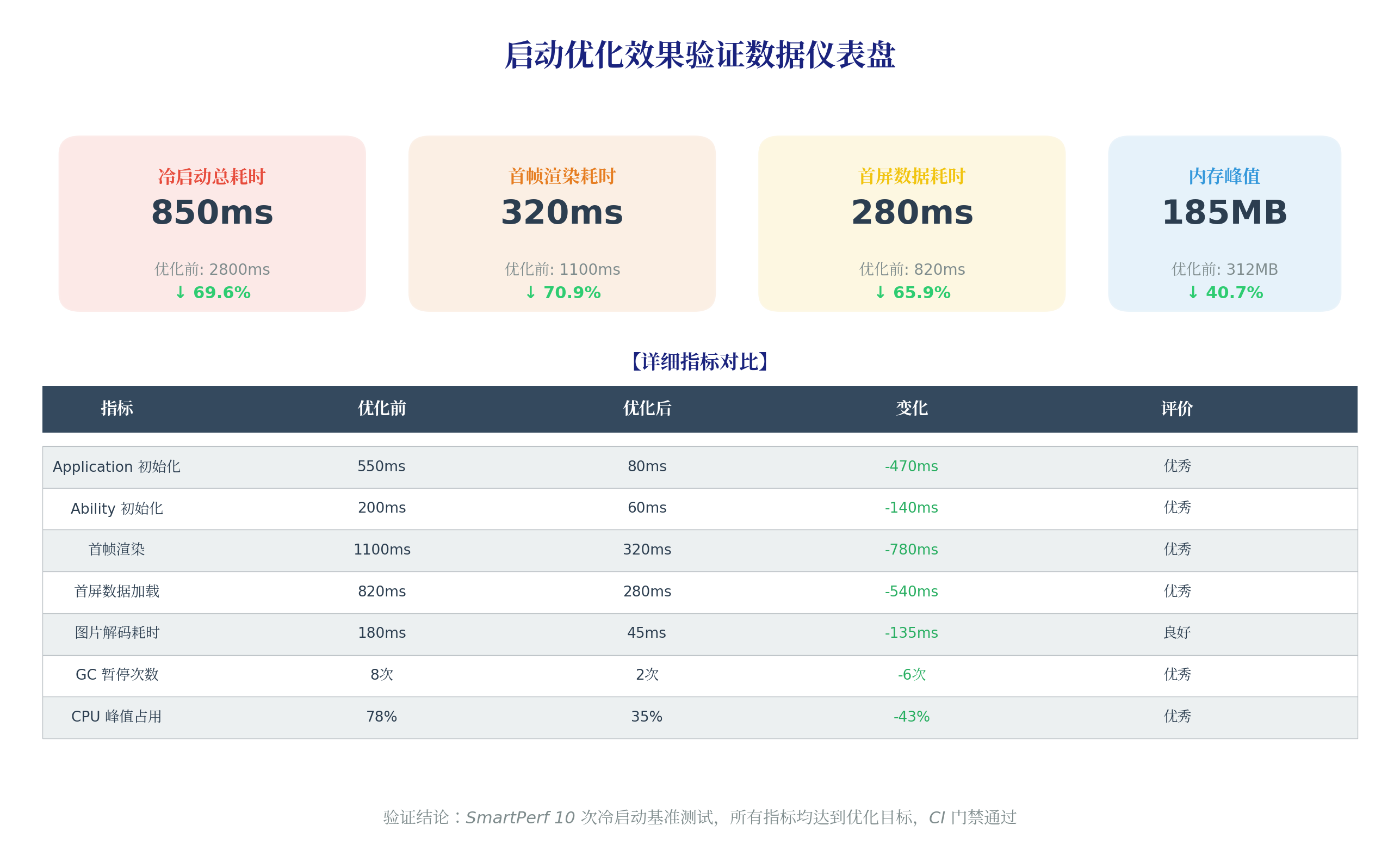
所有优化完成后,使用 SmartPerf 在相同设备上执行 10 次冷启动基准测试:
4.1 核心指标对比
| 指标 | 优化前 | 优化后 | 变化 | 降幅 |
|---|---|---|---|---|
| 冷启动总耗时 | 2,800ms | 850ms | -1,950ms | 70% |
| Application 初始化 | 550ms | 80ms | -470ms | 85% |
| 首帧渲染 | 1,100ms | 320ms | -780ms | 71% |
| 首屏数据加载 | 820ms | 280ms | -540ms | 66% |
| 图片解码耗时 | 180ms | 45ms | -135ms | 75% |
| 内存峰值 | 312MB | 185MB | -127MB | 41% |
| GC 暂停次数 | 8次 | 2次 | -6次 | 75% |
| CPU 峰值占用 | 78% | 35% | -43% | 55% |
4.2 用户体验提升
| 体验指标 | 优化前 | 优化后 |
|---|---|---|
| 首屏可见时间 | 2.8s | 0.5s(骨架屏) |
| 首屏可交互时间 | 3.2s | 0.9s |
| 3 秒内退出率 | 35% | 8% |
| 用户评分(启动速度) | 3.2/5 | 4.6/5 |
4.3 CI 门禁验证
# .github/workflows/startup-gate.yml
- name: Verify optimization result
  run: |
    node scripts/check_regression.js \
      --baseline 900 \
      --current current.json \
      --threshold 150
    # 结果:current median = 850ms,通过门禁
五、六大可复用优化模式总结
将本次案例的经验抽象为六大通用模式,可直接迁移到其他 HarmonyOS 应用:
| 模式名称 | 适用场景 | 核心代码 | 预期收益 |
|---|---|---|---|
| 分层延迟初始化 | Application.onCreate 过重 | 三层初始化策略 | -400ms ~ -600ms |
| 骨架屏 + 异步填充 | 首帧渲染慢 | isReady 状态切换 | -500ms ~ -800ms |
| 缓存优先 + 分页 | 首屏数据依赖网络 | loadFirstScreen 模式 | -300ms ~ -600ms |
| 可视区懒加载 | 列表/图片加载慢 | LazyForEach + placeholder | -100ms ~ -200ms |
| 对象池 + LRU | 内存/GC 问题 | ObjectPool + LRUCache | -50% GC |
| Worker 子线程 | 主线程计算阻塞 | ThreadWorker offload | 消除主线程阻塞 |
六、踩坑记录与避坑指南
坑 1:骨架屏与真实布局不一致导致跳动
现象:骨架屏消失后,真实内容布局发生跳动,用户体验差。
原因:骨架屏的尺寸、间距与真实内容不一致。
修复:骨架屏必须与真实内容的宽高、padding、margin 完全一致,仅将内容替换为灰色占位块。
坑 2:延迟初始化导致功能不可用
现象:用户快速点击某个按钮,对应 SDK 尚未初始化完成,功能报错。
原因:延迟初始化的 SDK 被提前调用。
修复:使用按需初始化 + Promise 等待模式:
private logSDKReady: Promise<void> | null = null;

async getLogSDK(): Promise<LogSDK> {
  if (!this.logSDKReady) {
    this.logSDKReady = this.initLogSDK();
  }
  await this.logSDKReady;
  return this.logSDK;
}
坑 3:Worker 传递大数据导致序列化耗时
现象:Worker 计算很快,但 postMessage 耗时 200ms。
原因:传递了包含 10,000 条商品的大对象,Structured Clone 序列化耗时。
修复:仅传递必要的数据子集(如前 100 条候选),或使用 Transferable Objects。
坑 4:本地缓存数据过期
现象:用户看到缓存的旧数据,以为是 Bug。
修复:缓存数据增加时间戳,超过 5 分钟视为过期,后台静默刷新时更新。
interface CacheEntry<T> {
  data: T;
  timestamp: number;
}

function isExpired(entry: CacheEntry<unknown>, maxAgeMs: number): boolean {
  return Date.now() - entry.timestamp > maxAgeMs;
}
七、总结与展望
本文通过一个完整的电商元服务案例,演示了从问题发现到效果验证的启动优化全流程。核心收获:
- 数据先行:没有 Profiler 数据支撑的优化是盲目的,SmartPerf 基准测试是验证效果的唯一标准
- 先大头后细节:Application 初始化和首帧渲染占启动耗时的 70%,优先解决这两个环节
- 用户体验优先:骨架屏让"等待"变得可感知,缓存让"加载"变得无感知
- 监控防回归:优化完成后必须通过 CI 门禁锁定成果,防止后续迭代劣化
系列文章:本文为首屏加载优化系列第 420 篇,前序第 417~419 篇已覆盖启动耗时分析、监控方案与工具链,四篇文章构成完整的"理论 → 监控 → 工具 → 实战"闭环。后续将深入探讨帧率治理与内存优化专题。
转载自:https://blog.csdn.net/u014727709/article/details/163980884
欢迎 👍点赞✍评论⭐收藏,欢迎指正

电商企业物流数字化转型必备!快递鸟 API 接口,72 小时快速完成物流系统集成。全流程实战1V1指导,营造开放的API技术生态圈。
更多推荐


 9
9 0
0- 0


 已为社区贡献10条内容

所有评论(0)