
鸿蒙电商购物平台基于HarmonyOS ArkTS 24实现完成分批结算的UI实现需要Checkbox的onChange回调实时更新父组件的@State状态,触发calcTotal重新计算
电商购物类应用与球队管理、图书阅读等应用在数据模型上的核心差异在于"交易流程的有限状态机"——OrderModel的status字段(‘待付款’、‘待发货’、‘运输中’、‘已完成’、‘已取消’)构成了一个严格有序的状态流转图:待付款→待发货→运输中→已完成是正向流转,已付款→已取消是异常终止。这种"状态机"数据模型要求每个状态转换都有明确的业务规则支撑:已取消的订单不能发货,已完成的订单不能退款。这种有限状态机(FSM)设计确保了订单数据的内部一致性——系统永远不会出现"已发货但未付款"的矛盾状态。
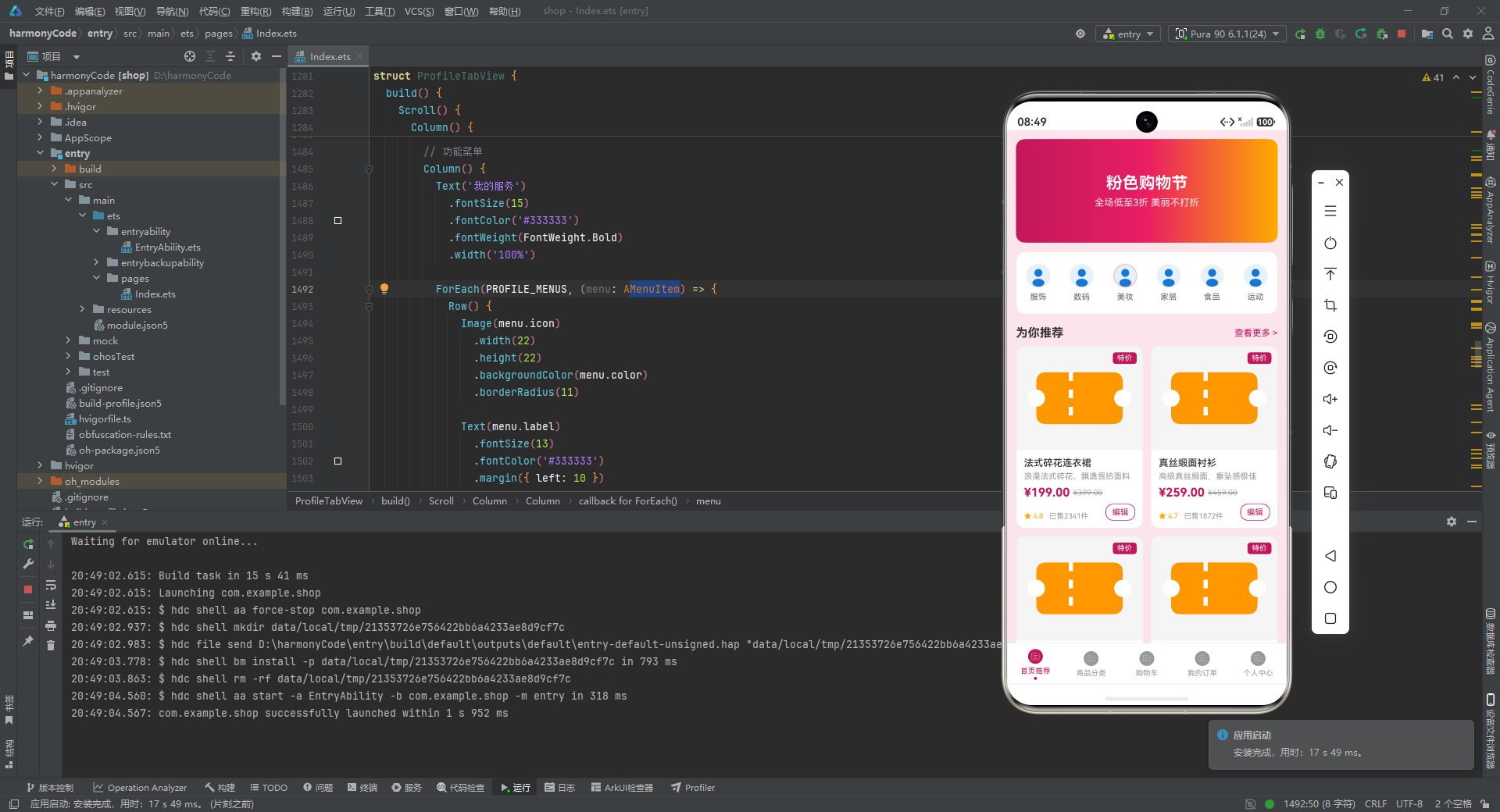
鸿蒙电商平台的配色方案(#C2185B玫红色、#FFAB00琥珀色、#FCE4EC淡粉背景)构建了"女性时尚消费"的产品定位——玫红色代表精致和浪漫,琥珀色代表价值感和促销气氛,淡粉色背景降低视觉刺激度,延长浏览时间。这套配色在电商平台设计中属于"高颜值种草型"配色路线(对应拼多多的"低价红"、京东的"品质蓝"、得物的"潮流绿"),每种配色路线对应不同的目标用户画像和消费心理。
一、ProductModel商品数据模型与"原价-现价"比价系统
ProductModel的price(现价)和originalPrice(原价)双价格字段构成了"比价促销"的核心逻辑——丝绒哑光口红现价89元、原价159元,折扣率=89/159≈56%,相当于4.4折。isOnSale字段(布尔值)驱动了ProductCardView中"特价"标签的显示:isOnSale=true时右上角显示玫红色"特价"标签,用户在商品列表浏览时可快速识别正在促销的商品。比价促销是电商最有效的转化手段之一——当用户看到"原价159,现价89"时,大脑会自动计算节省了70元("损失厌恶"效应:人们对损失的敏感度是同等收益的2倍,节省70元的感觉比获得70元购物积分更强烈)。
formatPrice函数使用toFixed(2)将数值格式化为保留两位小数的价格字符串——这是货币金额显示的标准做法,确保¥199.00而非¥199。浮点数精度问题在货币计算中尤为关键:0.1 + 0.2在IEEE 754浮点数中等于0.30000000000000004,这导致必须用整数运算(分而不是元)处理价格计算,再在显示层用toFixed(2)格式化。calcTotal函数遍历购物车中的所有已选中商品(items[i].isChecked),将price * quantity累加得到选中商品的总金额——未选中的商品(isChecked=false)不参与合计计算。
@Observed
class ProductModel {
  id: string
  name: string
  category: string
  price: number
  originalPrice: number
  sales: number
  stock: number
  rating: number
  image: ResourceStr
  description: string
  isOnSale: boolean

  constructor(
    id: string,
    name: string,
    category: string,
    price: number,
    originalPrice: number,
    sales: number,
    stock: number,
    rating: number,
    image: ResourceStr,
    description: string,
    isOnSale: boolean
  ) {
    this.id = id
    this.name = name
    this.category = category
    this.price = price
    this.originalPrice = originalPrice
    this.sales = sales
    this.stock = stock
    this.rating = rating
    this.image = image
    this.description = description
    this.isOnSale = isOnSale
  }
}

@Observed
class CartModel {
  id: string
  productName: string
  price: number
  quantity: number
  isChecked: boolean
  image: ResourceStr
  stock: number
  shopName: string

  constructor(
    id: string,
    productName: string,
    price: number,
    quantity: number,
    isChecked: boolean,
    image: ResourceStr,
    stock: number,
    shopName: string
  ) {
    this.id = id
    this.productName = productName
    this.price = price
    this.quantity = quantity
    this.isChecked = isChecked
    this.image = image
    this.stock = stock
    this.shopName = shopName
  }
}
二、ProductCardView商品卡片与"促销-评分-销量"三维信任信号
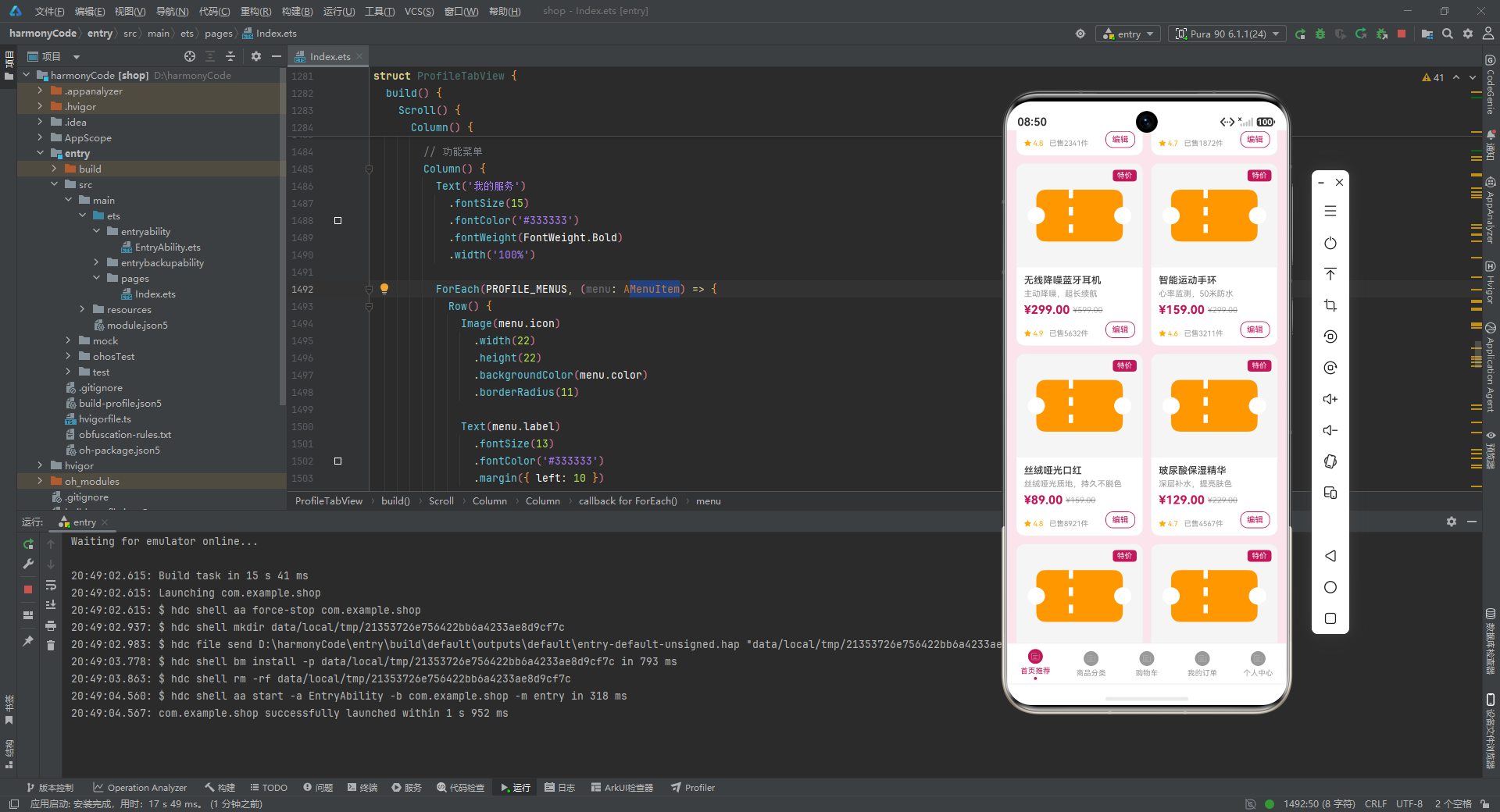
ProductCardView使用了三种信任信号构建商品可信度:星级评分(rating字段,4.8/5.0)、已售数量(sales字段,2341件)、现价对比原价(price vs originalPrice)。丝绒哑光口红(rating=4.8,sales=8921)是所有商品中销量最高的,4.8的评分说明绝大多数购买者都给予了正面评价。销量和评分的关系遵循"销量-评价相关性"规律:高销量商品的评分通常更可靠(更多样本的均值更接近真实值),而低销量商品的5星评分可能存在"幸存者偏差"(只有满意的用户留下评价)。
ProductCardView中原价使用decoration({ type: TextDecorationType.LineThrough })显示删除线——删除线是"心理锚定"效应的视觉实现:原价作为参照点(锚),让现价显得更便宜。用户看到"¥89"和删除的"¥159"时,大脑自动计算折扣幅度(70元),而非孤立地评估89元是否合理。这种锚定效应(Anchoring Effect)在行为经济学中被广泛验证:即使是无关的数字也能影响人们对商品价格的判断——在商品卡片中加入"浏览量888"或"本周热卖200件"等数字锚点,也能提升转化率。
Stack({ alignContent: Alignment.TopEnd })容器实现了"商品图片+叠加标签"的双层布局——商品图片占满整个卡片顶部(borderRadius使顶部两角圆角化),特价标签(Text(‘特价’))使用TopEnd对齐固定在右上角(margin: 8px确保不紧贴边缘)。Stack布局在UI设计中属于"叠加层"(Overlay Layer)模式,常用于实现角标(如"新品"、“热卖”、“TOP1”)、通知气泡(如未读消息数量)、以及商品图片上的品牌水印。右上角是视觉热区(用户从左到右、从上到下的浏览习惯使右上角成为最后到达的位置),角标注解在此位置不会遮挡商品主体内容。
三、CartModel购物车模型与"选中状态驱动合计"响应式计算
CartModel的isChecked字段(布尔值)驱动了购物车的核心交互逻辑——用户通过勾选/取消勾选复选框(Checkbox)决定哪些商品纳入结算总额。Checkbox的onChange回调触发父组件传递的onCheckChange回调函数,该函数更新CartItemView对应商品的isChecked状态,重新计算calcTotal合计。这种"选中状态→触发重算→UI更新"的链式反应是响应式框架的核心价值:开发者只需声明"合计=所有选中商品的价格×数量之和"这一计算规则,无需手动追踪哪些商品的选中状态发生了变化。
购物车数量调整逻辑(onQuantityChange回调)在"减少"按钮中增加了边界检查:if (this.item.quantity > 1),确保数量不会低于1——这是"最低购买数量"的业务规则实现。数量调整还检查了库存上限:if (this.item.quantity < this.item.stock),防止用户将数量调整超过库存。丝绒哑光口红(K003,stock=200)的库存充足,用户可将数量从1调整到200;北欧风布艺沙发(K009,stock=15)库存紧张,最大可调整数量仅为15。这种数量边界检查在库存有限商品(如限量款、秒杀商品)场景下尤为重要,防止超卖。
购物车商品按店铺分组(shopName字段:‘时尚女装旗舰店’、'数码潮品店’等),这对应了电商平台的"店铺概念"——同一店铺的商品可合并发货,不同店铺的商品需要独立发货。K001(时尚女装旗舰店)和K006(同一家店)理论上可合并发货,而K001(女装)和K003(美妆)属于不同品类,物流路径不同。实际电商平台的购物车还会显示"凑单满减"提示(如"再买50元免运费"),推动用户增加购买量——这类功能需要在购物车视图中增加"凑单推荐"模块。
function formatPrice(price: number): string {
  return '¥' + price.toFixed(2)
}

function calcTotal(items: CartModel[]): number {
  let total: number = 0
  for (let i = 0; i < items.length; i++) {
    if (items[i].isChecked) {
      total += items[i].price * items[i].quantity
    }
  }
  return total
}
四、OrderModel订单状态机与五态流转的业务规则
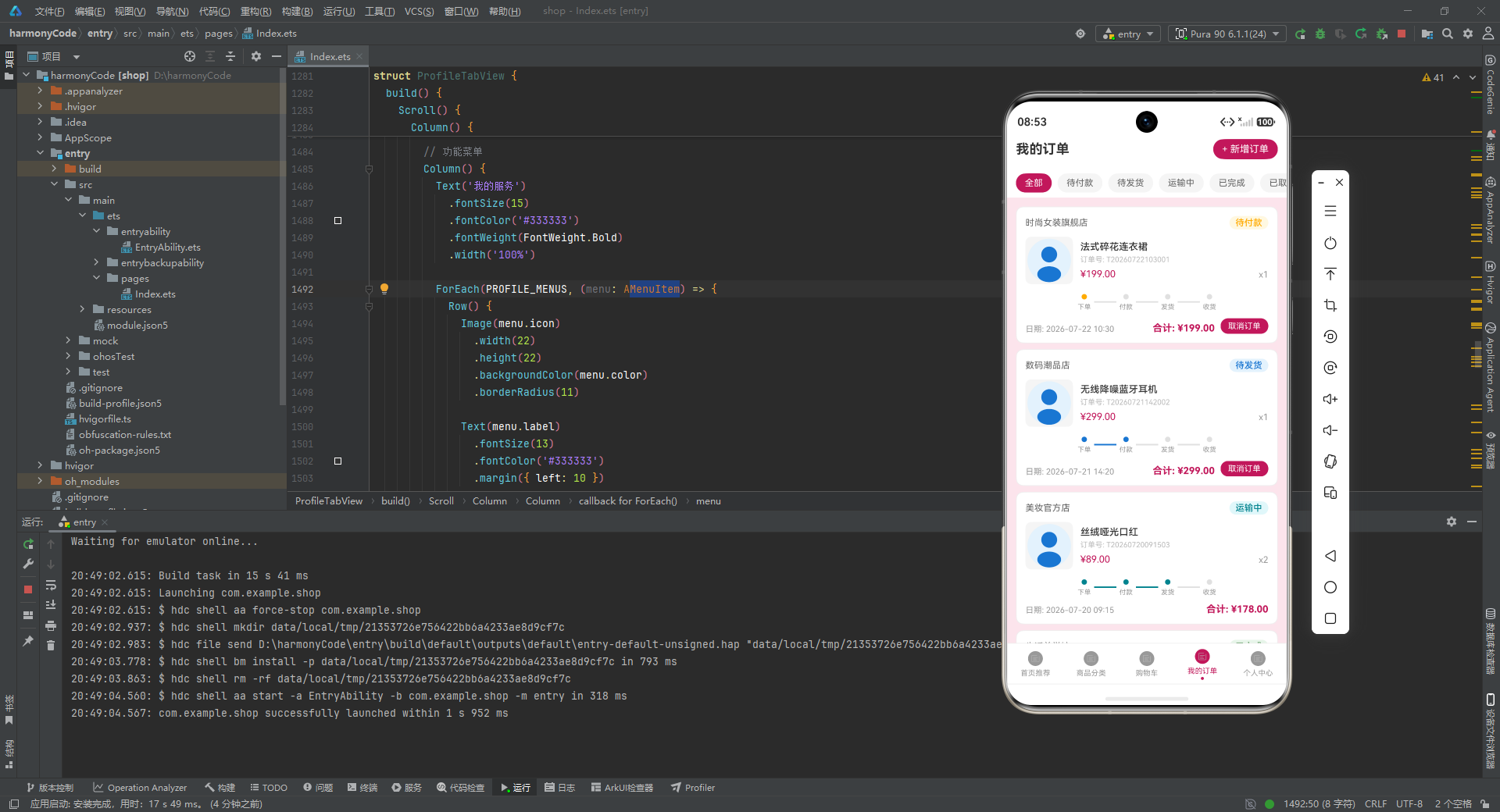
OrderModel的status字段(‘待付款’→’待发货’→’运输中’→’已完成’→’已取消’)构成严格的状态流转序列。O001(法式碎花连衣裙,2026-07-22 10:30,待付款)和O007(智能运动手环,2026-07-22 08:00,待付款)是今日新增的待付款订单,O003(丝绒哑光口红,运输中,运单号T20260720091503)是正在配送中的订单。状态流转必须遵循业务规则:待付款订单在48小时内未支付自动取消(超时取消),待发货订单在商家发货后变更为运输中(需填写运单号),运输中订单在用户确认收货或快递系统自动回传签收信息后变更为已完成。
trackingNo字段(运单号)记录了物流追踪编码——T20260722103001格式的运单号由时间戳+序号构成(T+年月日时分秒+序号),这种编码方式确保运单号的唯一性且可读性强(从运单号可直接读出下单时间)。运单号是电商平台与物流系统对接的核心字段:商家发货时将运单号录入平台,用户可在订单详情页查看实时物流信息。O006(真丝缎面衬衫)状态为"已取消",取消原因可能是用户主动取消(超时未付款)或商家因缺货主动取消——已取消订单的trackingNo通常为空。
OrderItemView的订单卡片设计将订单信息分为三个层级:顶层(商品名称+数量+金额)、中层(订单号+下单时间)、底层(状态标签+操作按钮)。状态标签使用ORDER_STATUS_CONFIG的颜色映射(待付款#FFAB00琥珀色→待发货#1976D2蓝色→运输中#00838F青色→已完成#2E7D32绿色→已取消#9E9E9E灰色)——这套状态色彩系统遵循"情感递进"原则:从"待办"的紧迫黄,到"进行中"的平静蓝/青,再到"已完成"的安心绿,最后是"失败"的灰。色彩的情感语义帮助用户在订单列表中快速定位目标订单。
五、购物车合计计算与"结算"交互的响应式联动
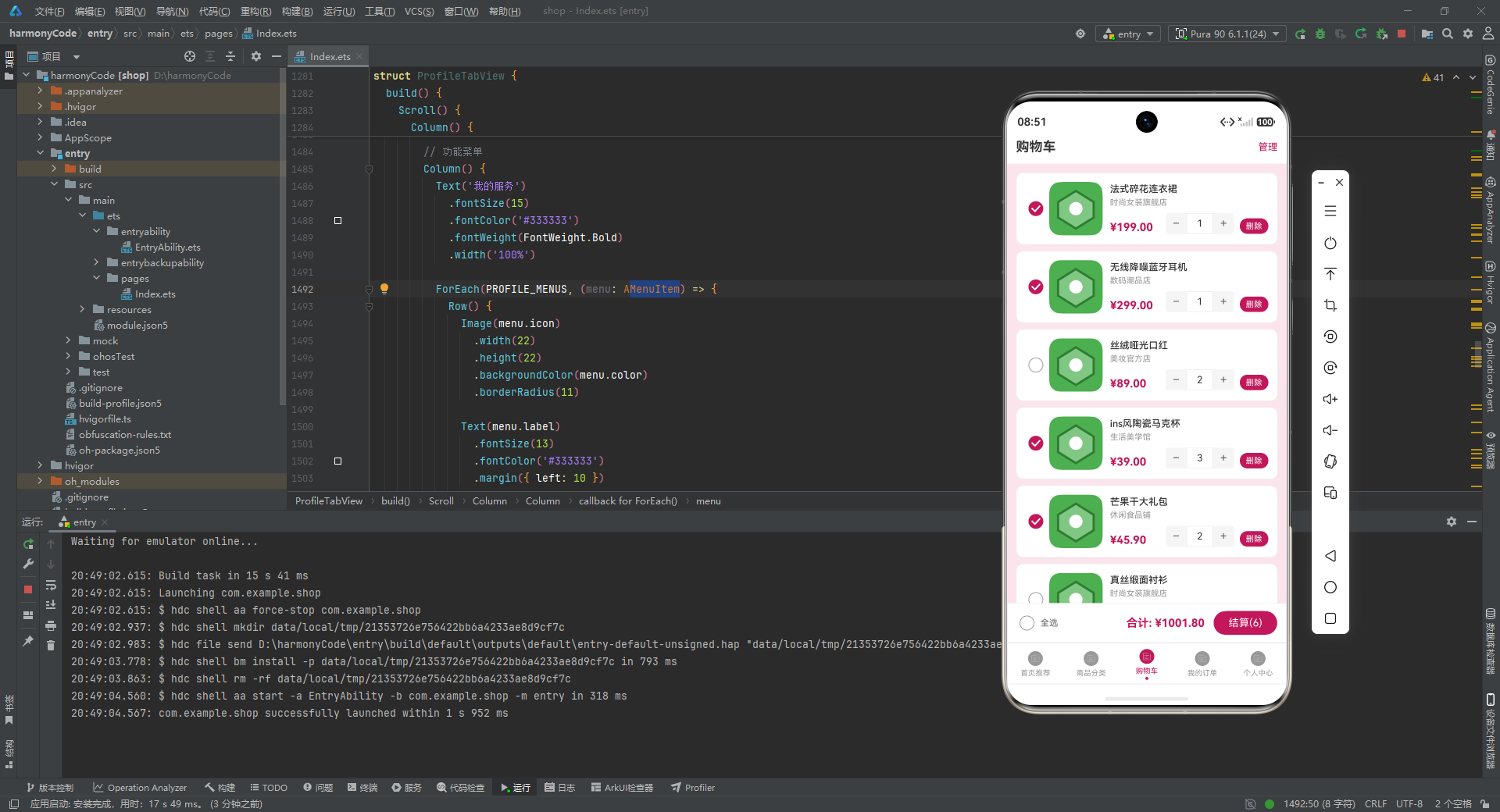
calcTotal函数仅对isChecked=true的商品进行累加,这种设计支持"分批结算"场景:用户在购物车中勾选了部分商品(3件),结算金额只包含这3件商品,其余7件未勾选的商品不参与计算。分批结算的UI实现需要Checkbox的onChange回调实时更新父组件的@State状态,触发calcTotal重新计算,合计金额在每次勾选变化时即时刷新。购物车合计还应显示"已选X件,共Y元"的组合信息——当前实现中合计金额仅在结算按钮处显示,可增加"合计栏"实时展示选中商品的总价和总件数。
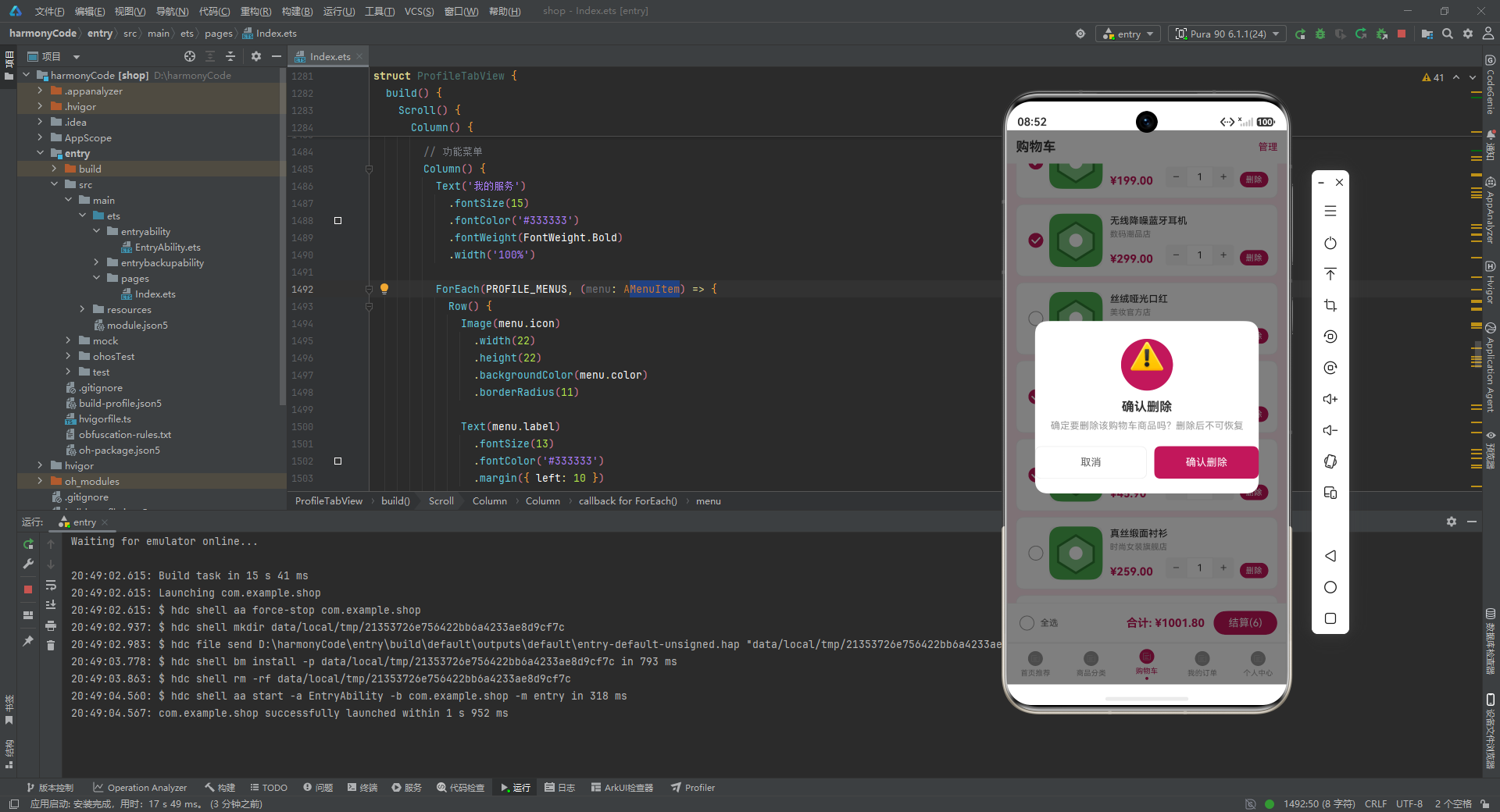
购物车视图中"删除"按钮(onDeleteClick回调)使用了玫红色背景(#C2185B)的文本按钮,点击后弹出确认对话框才执行实际删除——二次确认机制在删除操作中是必要的,因为误删购物车商品可能导致用户需要重新搜索和添加。删除操作的实现使用filter模式:cartItems.filter((item) => item.id !== deletingId),构建"排除待删除商品"的新数组。这种"过滤排除"而非"索引删除"的实现方式符合不可变性(Immutability)原则——@Observed的响应式系统通过数组引用变化检测更新,而非检测数组内容变化。
CartItemView中数量加减按钮使用了自定义UI实现(Text(‘−’)和Text(‘+’))而非系统原生的Stepper或Counter组件。自定义数量控件的优势是"视觉一致性"——整个App的玫红色主题色贯穿所有交互元素,而系统原生控件可能使用平台默认色(iOS蓝色或Material Design紫色),与App整体风格不一致。自定义控件的挑战是"状态同步":数量变更后需要通过回调函数通知父组件,父组件更新@State数组后触发重新渲染——若回调链中的任意环节失效(如onClick未正确绑定),数量显示将与实际状态脱节。
六、商品分类CATEGORY_CONFIG与六类目色彩编码系统
CATEGORY_CONFIG(服饰#C2185B玫红、美妆#AD1457深玫、数码#1565C0蓝、家居#2E7D32绿、食品#EF6C00橙、运动#00838F青)为每个商品类目分配了独特的品牌色。这套色彩编码遵循"品类拟物"原则:服饰和美妆使用女性化的红色系(呼应化妆品和服装在现实中的视觉形象),数码使用科技感的蓝色(电子产品广告的标准配色),家居使用自然感的绿色(家具与自然的关联),食品使用食欲感的橙色(暖色系刺激食欲)。色彩编码在CategoryTabView中驱动分类标签的背景色和文字色,确保每个类目在视觉上立即可辨。
CATEGORY_CONFIG中每个分类都有count字段(固定值8),表示该分类下的商品数量。在实际电商平台中,count通常代表"当前在线商品数"而非固定值——下架商品时count应减1,新上架商品时count应加1。count字段驱动了分类导航的"热度指示":服饰(1234件)远多于运动(234件)时,可将count数字以较小字号显示在分类名称旁,用户据此判断哪个分类商品更丰富。count还是"分类筛选排序"的依据——将count降序排列,热度高的分类排在前面,提升用户的浏览效率。
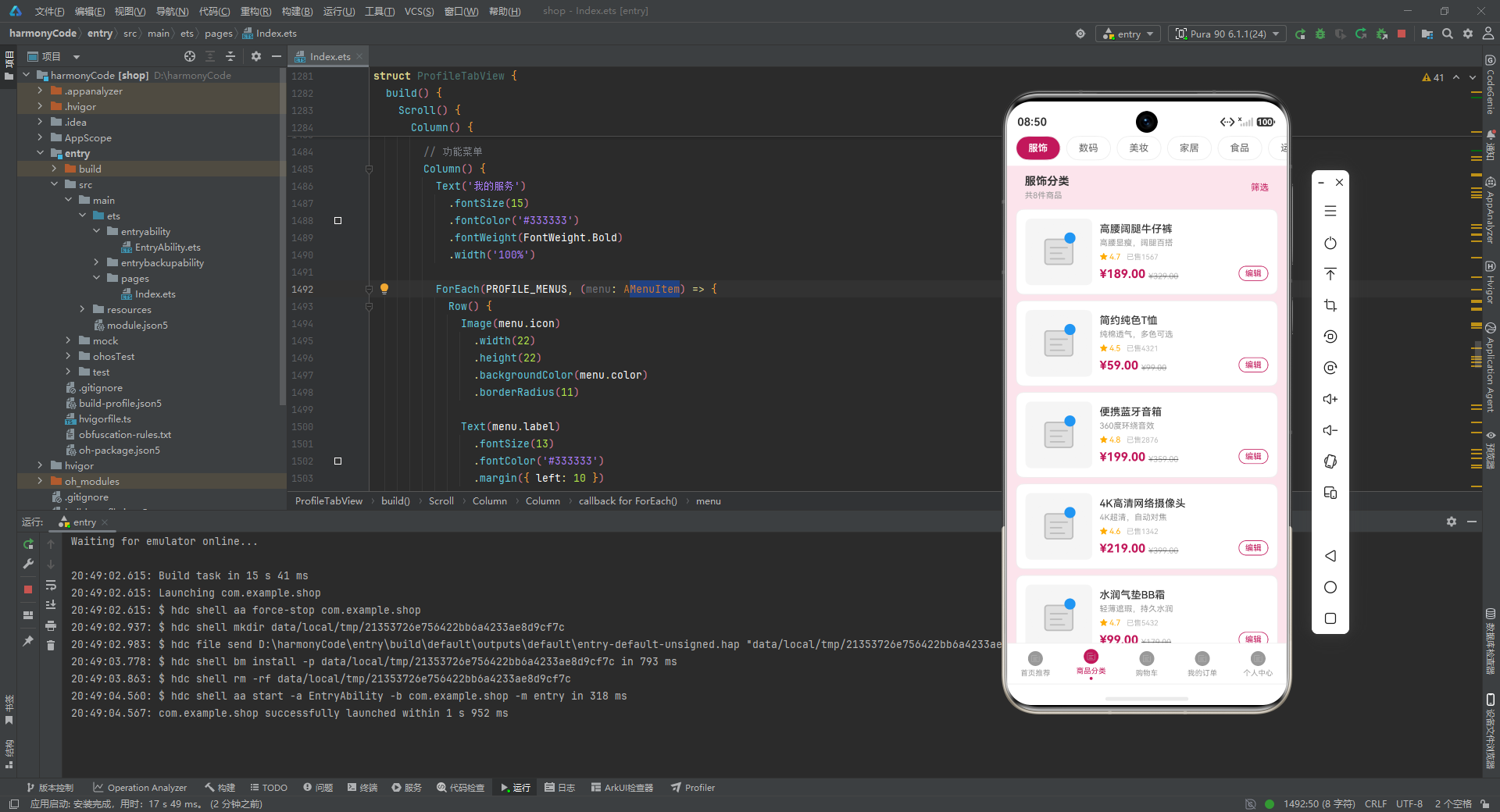
HOME_PRODUCTS和CATEGORY_PRODUCTS两套静态数据覆盖了"首页推荐"和"分类页"两个不同的展示场景。首页推荐商品(如P001法式碎花连衣裙、销量2341件、评分4.8)侧重"高销量+高评分"的质量筛选,是平台运营者手动运营的精选商品;分类页商品(如C001高腰阔腿牛仔裤)侧重"品类覆盖",展示该分类下的代表性商品。两套数据分离的好处是"内容差异化"——用户在不同Tab看到的是不同商品,增加了商品的曝光机会。如果首页和分类页共用同一套数据,用户会感觉"这些商品都见过",降低浏览欲望。
七、订单筛选ORDER_FILTERS与五态订单的快速定位
ORDER_FILTERS([‘全部’, ‘待付款’, ‘待发货’, ‘运输中’, ‘已完成’, ‘已取消’])实现了订单列表的多状态筛选。用户点击"待付款"筛选时,订单列表仅显示status='待付款’的订单(O001和O007),其余订单暂时隐藏。这种"筛选即视图切换"的交互模式将复杂的长订单列表分解为多个子列表,每个子列表只包含同一状态的订单,大幅降低了用户的认知负担——用户不再需要在10条混杂的订单中找到待付款的那一条。
ORDER_STATUS_CONFIG中每种状态都有step字段(0-4),代表在订单流程中的阶段编号。step字段可驱动"订单进度条"的可视化展示——step=0(待付款)、step=1(待发货)、step=2(运输中)、step=3(已完成),四步进度条中前三步高亮表示已完成,最后一步变灰表示未到达。进度条是"物流追踪"功能的简化版本:用户可在不打开物流详情页的情况下,直观看到订单已到达哪个阶段。已取消订单(step=4)通常不显示进度条,而是显示"订单已取消"的特殊状态标识。
CONSUME_STATS消费统计(服饰657元占35%、数码677元占36%、美妆247元占13%、家居1338元占10%、食品182.8元占6%)记录了用户的消费结构。家居消费金额(1338元)虽然占比最低(10%),但绝对金额最高(1338元)——这是因为家居商品(北欧风布艺沙发1299元)的单价远高于服饰(199元连衣裙)和食品(45.9元芒果干)。消费结构统计是"用户画像"构建的重要输入:高频次、低单价的商品(服饰、食品)反映用户的日常消费习惯;低频次、高单价的商品(家居)反映用户的阶段性大额消费决策。
九、购物车结算与"去结算"按钮的响应式联动
购物车结算按钮的金额显示使用calcTotal动态计算——当用户勾选/取消勾选任意商品时,合计金额立即更新,无需用户手动点击"刷新"按钮。这种"实时合计"交互模式使用户的购买决策更加精准:用户反复调整商品组合,观察合计金额的变化,直到找到预算范围内的最优组合。相比之下,"点击结算按钮后才显示合计"的模式迫使学生在提交前不知道总价,容易导致超预算后需要重新调整购买清单。
购物车视图中每个商品行的"店铺名称"(shopName字段)对应了电商平台的"店铺维度"分组逻辑。同店商品合并发货(节省运费),不同店商品需要独立计算运费。结算逻辑需要按店铺维度聚合商品:为每个店铺计算应付金额,然后叠加运费规则(满99元免运费,不满则收6元运费)。CART_ITEMS中K001(时尚女装旗舰店)和K006(同店)理论上合并发货,若两者都被勾选,只需支付一次运费。实际电商平台的运费计算还会考虑商品重量、体积、偏远地区附加费等因素。
CART_ITEMS中的isChecked初始值反映了"默认选中"策略:K001、K002、K004、K005、K007、K010初始勾选(6件),K003、K006、K008、K009未勾选(4件)。默认选中的商品是"高价值、低决策难度"的商品(销量高的服饰和食品),未选中的商品是"高决策难度"的商品(高价家居、大额美妆)。这种默认选中策略基于"默认选项效应"(Default Effect)——用户倾向于接受预设选项,适当的默认选择能提升转化率。如果将所有商品默认不勾选,用户需要主动选择要购买的商品,决策成本增加,结算转化率可能下降。
consume_stats(服饰657元占35%、数码677元占36%)和review_data(好评28条占80%)构成了个人中心的"消费画像"。服饰+美妆合计(904元,占比48%)说明用户在"变美"类商品上花费最多,这与平台的玫红色女性时尚定位高度匹配——平台通过精准的品类和人群定位(25-35岁女性),在"她经济"市场中建立了差异化竞争力。相比之下,家居消费1338元(占比10%)虽然绝对金额高,但属于低频大额消费——家居类商品通常客单价高、复购率低,是平台的利润型品类而非流量型品类。
// 订单状态配置与色彩映射
const ORDER_STATUS_CONFIG: Record<string, OrderStatusMeta> = {
  '待付款': { label: '待付款', color: '#FFAB00', bgColor: '#FFF8E1', step: 0 },
  '待发货': { label: '待发货', color: '#1976D2', bgColor: '#E3F2FD', step: 1 },
  '运输中': { label: '运输中', color: '#00838F', bgColor: '#E0F7FA', step: 2 },
  '已完成': { label: '已完成', color: '#2E7D32', bgColor: '#E8F5E9', step: 3 },
  '已取消': { label: '已取消', color: '#9E9E9E', bgColor: '#F5F5F5', step: 4 }
}

// 商品分类色彩编码(六类目配色方案)
const CATEGORY_CONFIG: Record<string, CategoryMeta> = {
  '服饰': { name: '服饰', color: '#C2185B', bgColor: '#FCE4EC', count: 8 },
  '数码': { name: '数码', color: '#1565C0', bgColor: '#E3F2FD', count: 8 },
  '美妆': { name: '美妆', color: '#AD1457', bgColor: '#F8BBD0', count: 8 },
  '家居': { name: '家居', color: '#2E7D32', bgColor: '#E8F5E9', count: 8 },
  '食品': { name: '食品', color: '#EF6C00', bgColor: '#FFF3E0', count: 8 },
  '运动': { name: '运动', color: '#00838F', bgColor: '#E0F7FA', count: 8 }
}
十、ProfileTabView个人中心与消费行为数据可视化
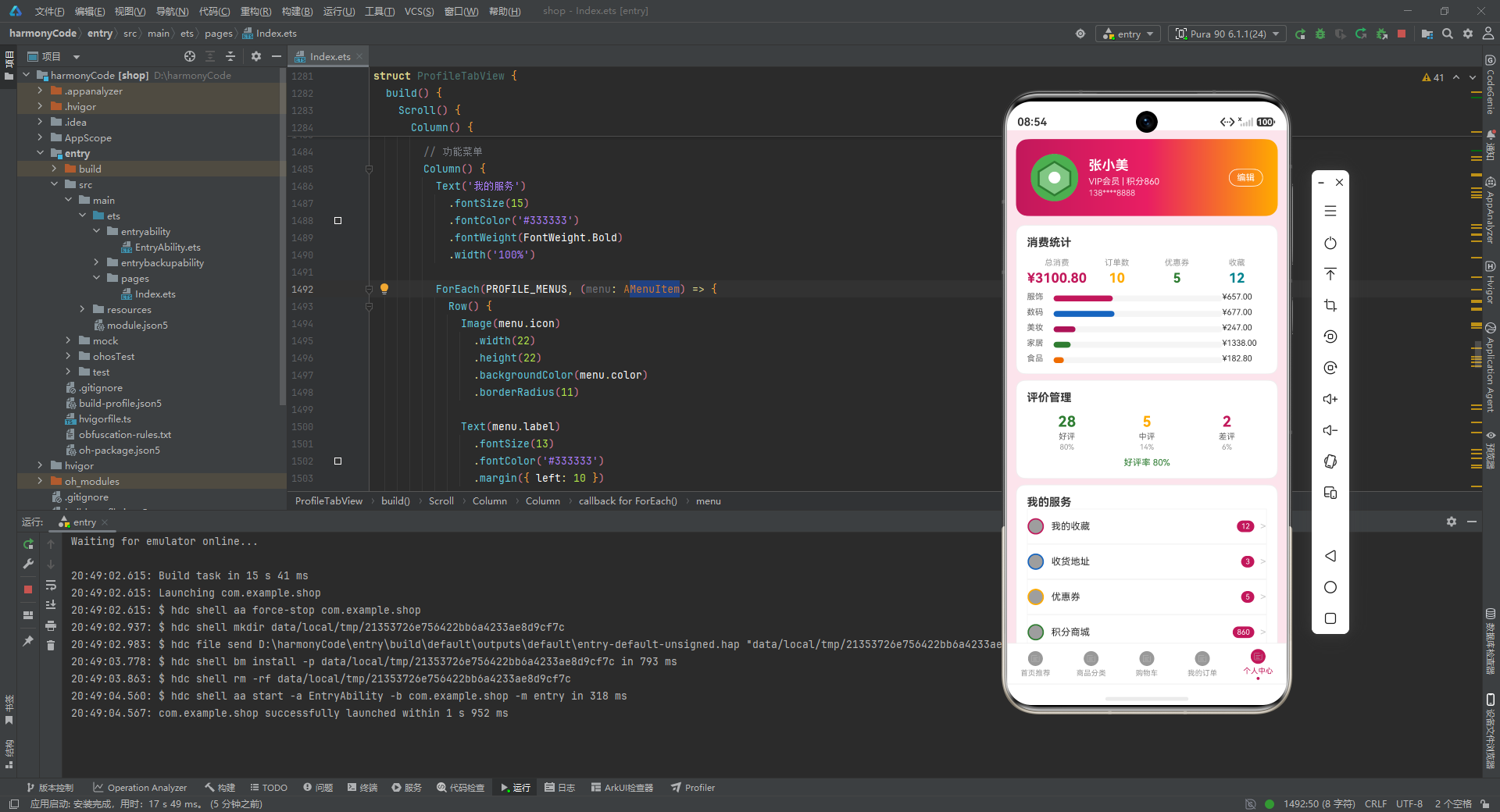
个人中心的消费统计图表(CONSUME_STATS)使用环形进度图展示各类目消费占比——服饰35%、数码36%、家居10%等百分比数值直观呈现了"钱花在哪里了"。环形图相比柱状图的优势在于"部分-整体"关系的表达:每个扇区同时表示绝对金额和占比,用户能同时感知"家居花了最多钱"(最大扇区)和"家居只占10%“(小占比)这两个看似矛盾但同时成立的事实。这种"双编码”(扇形角度=金额,扇形比例=占比)使数据密度更高。
PROFILE_MENUS(我的收藏12件、收货地址3个、优惠券5张、积分860)构成了用户的"资产清单"。收藏商品的收藏时间、收货地址的地理分布、优惠券的有效期(是否临近过期)都是可扩展的数据维度。积分商城(860积分)对应了"积分货币化"机制:用户每消费1元积累1积分,积分可兑换优惠券或礼品——积分体系是电商平台提升用户复购率的核心工具,积分的"沉没成本"效应使用户倾向于在已积累积分的平台上继续消费。
ADDRESS_LIST的两条地址(上海市浦东新区、杭州市西湖区)对应了"双城生活"用户画像——用户可能在上海工作、在杭州有房产,或者经常往返于两座城市。默认地址(isDefault=true)的上海市浦东新区是默认填充地址,杭州地址需要手动切换。收货地址是电商物流的起点,地址信息的准确性直接影响配送效率和退换货体验。部分电商平台会根据历史收货地址预测用户当前位置(通过地址出现频率),自动推荐最近仓库发货,进一步缩短配送时间。
八、商品编辑onEditClick与购物车操作的回调链设计
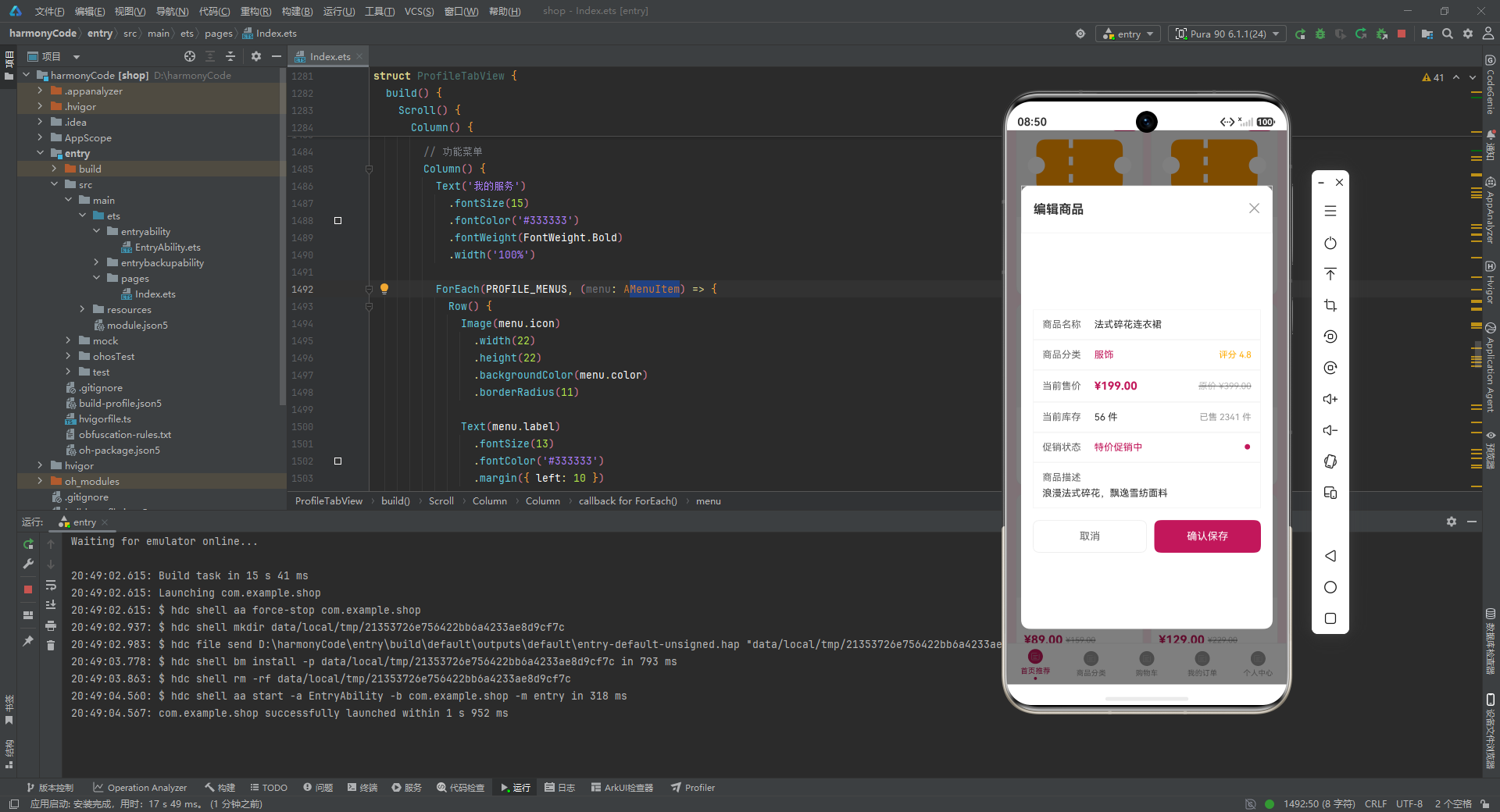
ProductCardView的onEditClick回调(this.onEditClick(this.product))将商品数据从卡片组件传递给父组件,触发编辑页面的打开。在ArkTS的@Prop单向数据流模式下,子组件通过回调函数向父组件传递事件和参数,父组件负责更新状态和重新渲染子组件。这种"子通知父、父更新数据、父重新渲染子"的单向环保证了数据流的可预测性——任何UI变化都可追溯到某个@State变量的变化,任何状态变化都会触发相关UI的更新。相比之下,Vue的v-model双向绑定虽然更简洁,但在复杂场景下可能导致数据流难以追踪。
OrderItemView的编辑操作(打开编辑订单弹框)需要传入完整的OrderModel对象而非单个字段,这是因为编辑表单需要预填充多个字段(商品名称、订单号、收货地址等)。如果onEditClick只传入订单ID,编辑页面需要再次查询订单数据,增加了数据获取的复杂性。直接传递完整对象是"空间换时间"的策略:以一次完整对象传递为代价,避免了编辑页的二次查询。在本地数据场景(数据已在内存中)下,直接传对象是更优的选择;在远程API场景下,传递ID并在编辑页查询是更合理的选择。
ReviewData评价数据(好评28条占80%、中评5条占14%、差评2条占6%)构成了店铺信誉的评估体系。80%的好评率(28/(28+5+2))是用户购买决策的重要参考——但好评率并非越高越好,100%的好评率反而会降低可信度(用户怀疑是刷单)。差评(2条,6%)通常比好评更有信息量:差评内容往往包含真实的使用问题(“褪色”、“尺码偏小"等),这些信息对潜在购买者的决策参考价值更高。部分电商平台会展示"差评摘要”(将所有差评中的关键词提取并统计频率),帮助用户快速了解商品的潜在缺陷。
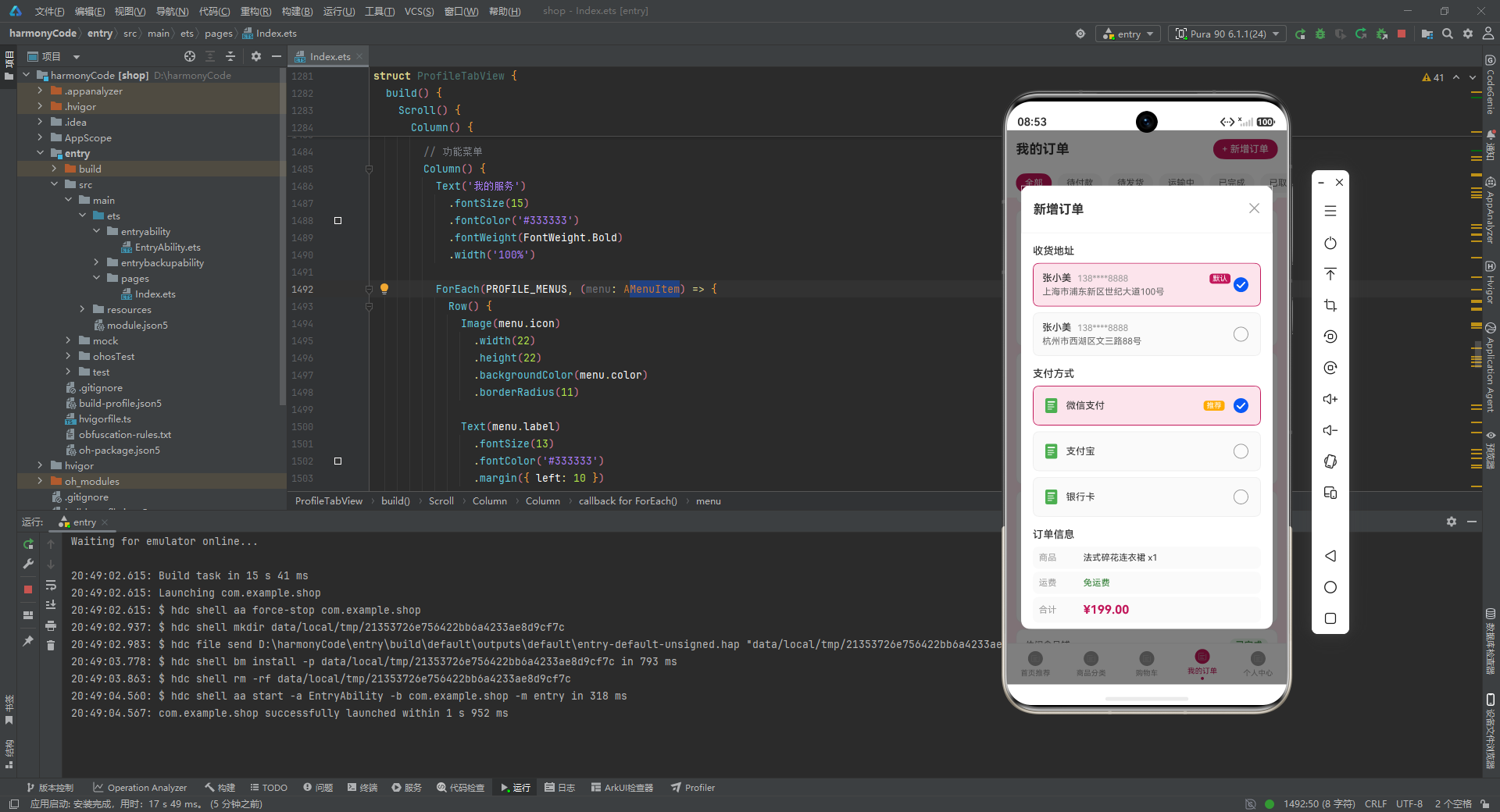
ADDRESS_LIST(上海市浦东新区、杭州市西湖区)记录了用户的多个收货地址,isDefault字段标识默认地址。用户下单时系统自动填充默认地址,减少操作步骤;切换收货地址时只需从地址列表中选择而非手动输入。PAY_METHODS(微信支付、支付宝、银行卡)定义了可用的支付方式,isDefault=true的支付方式在结算页面预选。支付方式的选择还涉及"安全性"考量:微信支付和支付宝提供了资金保障服务(先行赔付),而银行卡直接支付风险较高——这导致大多数用户会将微信支付或支付宝设为默认支付方式。
7. 子组件 - 购物车项
@Component
struct CartItemView {
  @Prop item: CartModel
  onCheckChange: (id: string, checked: boolean) => void = () => {}
  onQuantityChange: (id: string, delta: number) => void = () => {}
  onDeleteClick: (id: string) => void = () => {}

  build() {
    Row() {
      Checkbox()
        .select(this.item.isChecked)
        .selectedColor('#C2185B')
        .onChange((value: boolean) => {
          this.onCheckChange(this.item.id, value)
        })

      Image(this.item.image)
        .width(72)
        .height(72)
        .borderRadius(8)

      Column() {
        Text(this.item.productName)
          .maxLines(2)
          .textOverflow({ overflow: TextOverflow.Ellipsis })

        Text(this.item.shopName)
          .fontSize(11)
          .fontColor('#999999')

        Row() {
          Text(formatPrice(this.item.price))
            .fontColor('#C2185B')

          Column().layoutWeight(1)

          // 数量加减器
          Row() {
            Text('−')
              .onClick(() => {
                if (this.item.quantity > 1) {
                  this.onQuantityChange(this.item.id, -1)
                }
              })

            Text(this.item.quantity.toString())
              .width(36)
              .textAlign(TextAlign.Center)
              .border({ width: 1, color: '#EEEEEE' })

            Text('+')
              .onClick(() => {
                if (this.item.quantity < this.item.stock) {
                  this.onQuantityChange(this.item.id, 1)
                }
              })
          }

          Text('删除')
            .backgroundColor('#C2185B')
            .onClick(() => {
              this.onDeleteClick(this.item.id)
            })
        }
      }
    }
  }
}
CartItemView 是购物车商品项组件,接收 @Prop item 和三个回调函数(选中变化、数量变化、删除)。左侧是 Checkbox 复选框,中间是商品图片,右侧是信息区。数量加减器使用 − 和 + 文字按钮包裹中间的数量显示,− 按钮在数量为 1 时禁用(quantity > 1 判断),+ 按钮在达到库存上限时禁用(quantity < stock 判断)。这种用文字模拟加减按钮的方式简洁直观。
8. 子组件 - 订单项与步骤进度条
@Component
struct OrderItemView {
  @Prop order: OrderModel
  onDeleteOrder: (id: string) => void = () => {}

  build() {
    Column() {
      // 顶部:店铺名 + 状态标签
      Row() {
        Text(this.order.shopName)
        Column().layoutWeight(1)
        Text(this.order.status)
          .fontColor(getStatusColor(this.order.status))
          .backgroundColor(
            ORDER_STATUS_CONFIG[this.order.status]
              ? ORDER_STATUS_CONFIG[this.order.status].bgColor
              : '#F5F5F5'
          )
          .borderRadius(10)
      }

      // 中部:商品图 + 名称/订单号/价格
      Row() {
        Image($r('app.media.icon'))
          .width(64).height(64)
        Column() {
          Text(this.order.productName)
          Text('订单号: ' + this.order.trackingNo)
          Row() {
            Text(formatPrice(this.order.price))
            Column().layoutWeight(1)
            Text('x' + this.order.quantity)
          }
        }
      }

      // 订单步骤进度条
      Row() {
        Column() {
          Text('●').fontColor(this.getStepColor(this.order.status, 0))
          Text('下单')
        }
        Line().width(30).height(2)
          .backgroundColor(this.getStepColor(this.order.status, 1))
        Column() {
          Text('●').fontColor(this.getStepColor(this.order.status, 1))
          Text('付款')
        }
        Line().width(30).height(2)
          .backgroundColor(this.getStepColor(this.order.status, 2))
        Column() {
          Text('●').fontColor(this.getStepColor(this.order.status, 2))
          Text('发货')
        }
        Line().width(30).height(2)
          .backgroundColor(this.getStepColor(this.order.status, 3))
        Column() {
          Text('●').fontColor(this.getStepColor(this.order.status, 3))
          Text('收货')
        }
      }

      // 底部:日期 + 合计 + 取消按钮
      Row() {
        Text('日期: ' + this.order.date)
        Column().layoutWeight(1)
        Text('合计: ' + formatPrice(this.order.totalAmount))
        if (this.order.status === '待付款' || this.order.status === '待发货') {
          Text('取消订单')
            .onClick(() => { this.onDeleteOrder(this.order.id) })
        }
      }
    }
  }

  getStepColor(status: string, step: number): string {
    let currentStep: number = 0
    if (ORDER_STATUS_CONFIG[status]) {
      currentStep = ORDER_STATUS_CONFIG[status].step
    }
    if (step <= currentStep) {
      return getStatusColor(status)
    }
    return '#E0E0E0'
  }
}
OrderItemView 是订单卡片组件,最核心的亮点是订单步骤进度条。进度条由四个步骤节点(下单→付款→发货→收货)和三段 Line 连接线交替排列组成。每个节点使用 ● 圆点 + 步骤标签,getStepColor 方法根据当前订单状态的 step 值决定颜色:如果节点步骤 ≤ 当前状态步骤,使用状态主题色(已完成的步骤),否则使用灰色 #E0E0E0(未到达的步骤)。Line 连接线也遵循同样的逻辑。这样,"待付款"订单只有下单节点亮起,"运输中"订单则下单→付款→发货三个节点和两段连接线都亮起,形成直观的进度可视化。
底部行使用条件渲染:只有"待付款"和"待发货"状态的订单才显示"取消订单"按钮。
9. 子组件 - 首页 Tab
@Component
struct HomeTabView {
  @State homeProducts: ProductModel[] = HOME_PRODUCTS
  onEditProduct: (product: ProductModel) => void = () => {}

  build() {
    Scroll() {
      Column() {
        // Banner 渐变
        Stack({ alignContent: Alignment.Center }) {
          Column() {
            Text('粉色购物节')
              .fontSize(22)
              .fontColor('#FFFFFF')
              .fontWeight(FontWeight.Bold)
            Text('全场低至3折 美丽不打折')
              .fontSize(13)
              .fontColor('#FFFFFF')
              .opacity(0.9)
          }
        }
        .width('100%')
        .height(140)
        .linearGradient({
          direction: GradientDirection.Right,
          colors: [['#C2185B', 0.0], ['#E91E63', 0.5], ['#FFAB00', 1.0]]
        })
        .borderRadius(12)

        // 快捷分类入口
        Row() {
          ForEach(CATEGORY_CONFIG_KEYS, (key: string) => {
            Column() {
              Image(getCategoryIcon(key))
                .backgroundColor(CATEGORY_CONFIG[key].bgColor)
                .borderRadius(16)
              Text(CATEGORY_CONFIG[key].name)
            }
            .layoutWeight(1)
          })
        }

        // 两列商品网格
        Grid() {
          ForEach(this.homeProducts, (product: ProductModel) => {
            GridItem() {
              ProductCardView({
                product: product,
                onEditClick: (p: ProductModel) => {
                  this.onEditProduct(p)
                }
              })
            }
          })
        }
        .columnsTemplate('1fr 1fr')
        .columnsGap(10)
        .rowsGap(10)
      }
    }
    .layoutWeight(1)
  }
}

const CATEGORY_CONFIG_KEYS: string[] = ['服饰', '数码', '美妆', '家居', '食品', '运动']
HomeTabView 是首页推荐子组件。Banner 使用 linearGradient 实现从玫红 #C2185B 经粉红 #E91E63 到琥珀 #FFAB00 的水平渐变(GradientDirection.Right),三个颜色停靠点分别在 0.0、0.5 和 1.0 位置。快捷分类入口通过 CATEGORY_CONFIG_KEYS 数组遍历 CATEGORY_CONFIG Record,使用 layoutWeight(1) 等分六列。商品网格使用 Grid + columnsTemplate('1fr 1fr') 实现两列等宽布局,列间距和行间距均为 10。
10. 子组件 - 购物车 Tab
@Component
struct CartTabView {
  @State cartItems: CartModel[] = CART_ITEMS
  @State checkedIds: string[] = CART_ITEMS
    .filter((item: CartModel) => item.isChecked)
    .map((item: CartModel) => item.id)
  onDeleteItem: (id: string) => void = () => {}

  toggleCheck(id: string, checked: boolean) {
    if (checked) {
      if (!this.checkedIds.includes(id)) {
        this.checkedIds.push(id)
      }
    } else {
      this.checkedIds = this.checkedIds.filter((cid: string) => cid !== id)
    }
    for (let i = 0; i < this.cartItems.length; i++) {
      if (this.cartItems[i].id === id) {
        this.cartItems[i].isChecked = checked
      }
    }
  }

  changeQuantity(id: string, delta: number) {
    for (let i = 0; i < this.cartItems.length; i++) {
      if (this.cartItems[i].id === id) {
        this.cartItems[i].quantity += delta
      }
    }
  }

  build() {
    Column() {
      // 标题行
      Row() {
        Text('购物车')
        Column().layoutWeight(1)
        Text('管理')
      }

      // 购物车列表
      Scroll() {
        Column() {
          ForEach(this.cartItems, (item: CartModel) => {
            CartItemView({
              item: item,
              onCheckChange: (id: string, checked: boolean) => {
                this.toggleCheck(id, checked)
              },
              onQuantityChange: (id: string, delta: number) => {
                this.changeQuantity(id, delta)
              },
              onDeleteClick: (id: string) => {
                this.onDeleteItem(id)
              }
            })
          })
        }
      }
      .layoutWeight(1)

      // 底部结算栏
      Row() {
        Checkbox()
          .select(this.checkedIds.length === this.cartItems.length
            && this.cartItems.length > 0)
          .onChange((value: boolean) => {
            for (let i = 0; i < this.cartItems.length; i++) {
              this.cartItems[i].isChecked = value
            }
            if (value) {
              this.checkedIds = this.cartItems.map(
                (item: CartModel) => item.id
              )
            } else {
              this.checkedIds = []
            }
          })

        Text('全选')
        Column().layoutWeight(1)
        Text('合计: ' + formatPrice(calcTotal(this.cartItems)))
        Text('结算(' + this.checkedIds.length + ')')
      }
    }
  }
}
CartTabView 是购物车子组件,维护了 checkedIds 字符串数组来跟踪选中状态。toggleCheck 方法处理单个商品的选中切换——选中时用 push 添加 ID(避免重复),取消时用 filter 移除 ID,同时同步更新 cartItems 中对应商品的 isChecked 字段。底部结算栏的"全选" Checkbox 通过 checkedIds.length === cartItems.length 判断是否全选,点击时遍历所有商品统一设置选中状态。合计金额通过 calcTotal 函数实时计算。
11. 子组件 - 个人中心
@Component
struct ProfileTabView {
  build() {
    Scroll() {
      Column() {
        // 个人信息头部 - 渐变背景
        Row() {
          Image($r('app.media.icon'))
            .width(64).height(64)
            .borderRadius(32)
            .backgroundColor('#F8BBD0')

          Column() {
            Text('张小美')
              .fontSize(18)
              .fontColor('#FFFFFF')
            Text('VIP会员 | 积分860')
              .opacity(0.9)
            Text('138****8888')
              .opacity(0.8)
          }
          Column().layoutWeight(1)
          Text('编辑')
            .border({ width: 1, color: '#FFFFFF' })
            .borderRadius(12)
        }
        .linearGradient({
          direction: GradientDirection.Right,
          colors: [['#C2185B', 0.0], ['#E91E63', 0.5], ['#FFAB00', 1.0]]
        })
        .borderRadius(16)

        // 消费统计 - 水平柱状图
        ForEach(CONSUME_STATS, (stat: ChartMeta) => {
          Row() {
            Text(stat.label).width(36)

            Stack({ alignContent: Alignment.Start }) {
              Column()  // 背景条
                .width('100%').height(8)
                .backgroundColor('#F5F5F5')
                .borderRadius(4)

              Column()  // 前景条
                .width(stat.percentage + '%')
                .height(8)
                .backgroundColor(stat.color)
                .borderRadius(4)
            }
            .layoutWeight(1)

            Text(formatPrice(stat.value))
              .width(60)
              .textAlign(TextAlign.Right)
          }
        })

        // 评价管理
        Row() {
          ForEach(REVIEW_DATA, (review: ChartMeta) => {
            Column() {
              Text(review.value.toString())
                .fontColor(review.color)
              Text(review.label)
              Text(review.percentage + '%')
            }
            .layoutWeight(1)
          })
        }
        Text('好评率 80%')

        // 功能菜单 - badge 角标
        ForEach(PROFILE_MENUS, (menu: MenuItem) => {
          Row() {
            Image(menu.icon)
              .backgroundColor(menu.color)
              .borderRadius(11)
            Text(menu.label)
            Column().layoutWeight(1)
            if (menu.badge > 0) {
              Text(menu.badge.toString())
                .backgroundColor('#C2185B')
                .borderRadius(8)
            }
            Text('>')
          }
        })
      }
    }
  }
}
个人中心子组件包含四个信息区块。个人信息头部使用与首页 Banner 相同的 linearGradient 渐变效果,白色文字在渐变背景上清晰可读。消费统计使用 Stack + Alignment.Start 实现水平柱状图:底层是灰色全宽背景条,上层是彩色前景条,宽度使用 stat.percentage + '%' 字符串拼接实现百分比宽度。评价管理三列展示好评/中评/差评的数量和占比。功能菜单使用 if (menu.badge > 0) 条件渲染角标——badge 为 0 时不显示,大于 0 时显示玫红底白字的数字徽章。
12. 弹窗系统
@Builder editProductModal() {
  Stack() {
    Column()
      .backgroundColor('rgba(0,0,0,0.5)')
      .onClick(() => { this.showEdit = false })

    Column() {
      // 标题行 + 关闭按钮
      Row() {
        Text('编辑商品')
        Column().layoutWeight(1)
        Text('✕').onClick(() => { this.showEdit = false })
      }

      Scroll() {
        Column() {
          // 商品名称、分类(带颜色)、当前售价/原价删除线
          // 库存/已售、促销状态(带●圆点指示)、商品描述
          // 取消 + 确认保存 按钮
        }
      }
      .layoutWeight(1)
    }
    .width('90%')
    .constraintSize({ maxHeight: '80%' })
    .backgroundColor('#FFFFFF')
    .borderRadius(12)
  }
  .alignContent(Alignment.Center)
}
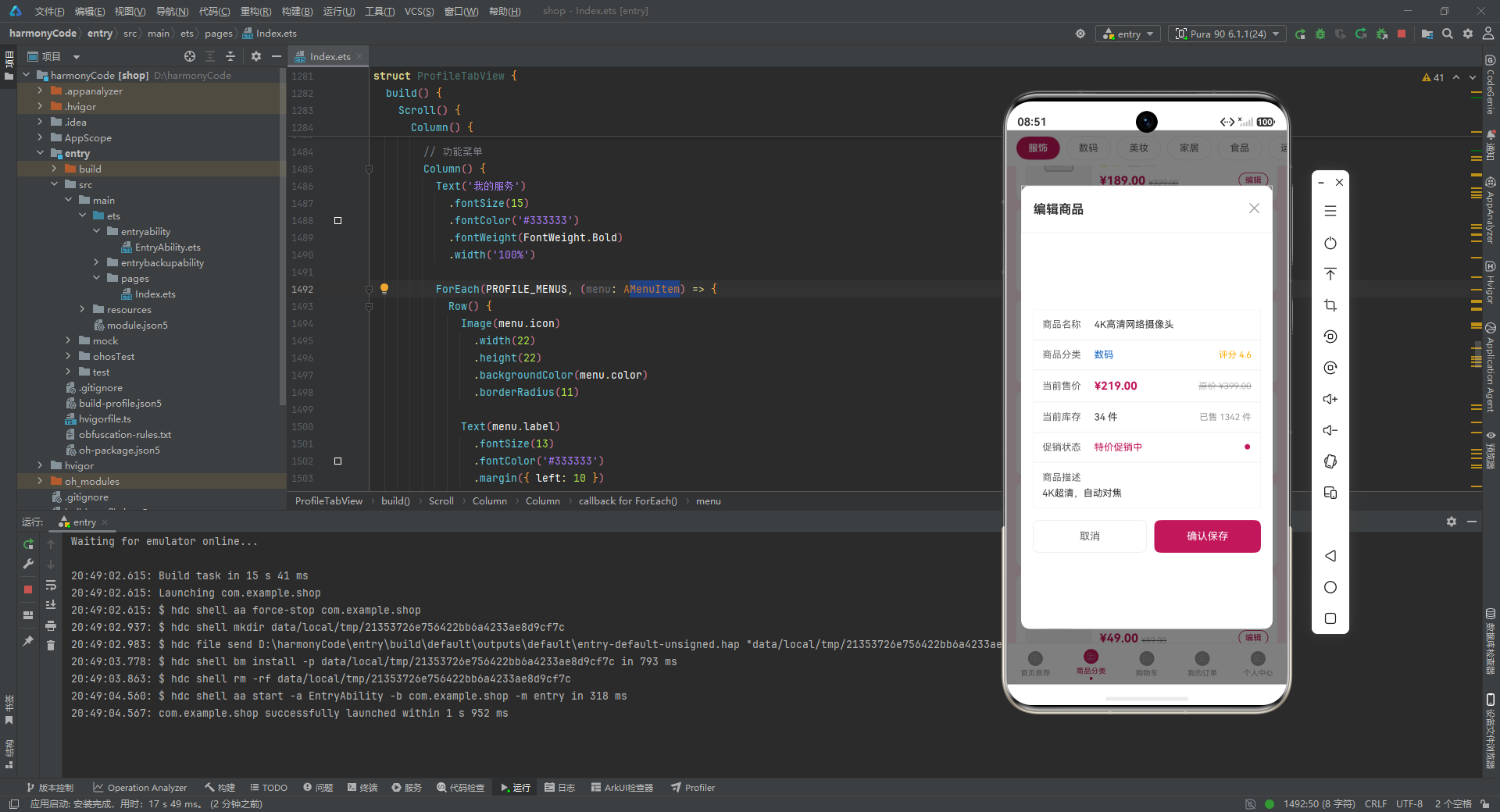
编辑商品弹窗使用 Stack + alignContent(Alignment.Center) 将弹窗内容居中。遮罩层直接绑定 onClick 关闭弹窗(点击遮罩任意位置关闭)。弹窗内以行列表形式展示商品的各项信息:分类使用 getCategoryColor 着色,价格使用删除线显示原价,促销状态使用 ● 圆点指示。
@Builder addOrderModal() {
  Stack() {
    // 遮罩层
    Column() {
      // 收货地址选择 - Radio 单选
      ForEach(ADDRESS_LIST, (addr: AddressItem, index: number) => {
        Row() {
          // 地址信息(姓名、电话、详细地址、默认标签)
          Radio({ value: addr.id, group: 'address' })
            .checked(this.selectedAddress === index)
            .onChange(() => { this.selectedAddress = index })
            .selectedColor('#C2185B')
        }
        .backgroundColor(this.selectedAddress === index ? '#FCE4EC' : '#FAFAFA')
        .border({ width: this.selectedAddress === index ? 1 : 1,
                  color: this.selectedAddress === index ? '#C2185B' : '#EEEEEE' })
      })

      // 支付方式选择 - Radio 单选
      ForEach(PAY_METHODS, (pay: PayMethod, index: number) => {
        Row() {
          Image(pay.icon)
          Text(pay.name).layoutWeight(1)
          if (pay.isDefault) {
            Text('推荐').backgroundColor('#FFAB00')
          }
          Radio({ value: pay.id, group: 'pay' })
            .checked(this.selectedPay === index)
        }
      })

      // 订单信息(商品名、运费、合计)
      // 取消 + 确认下单 按钮
    }
    .width('90%')
    .constraintSize({ maxHeight: '80%' })
  }
}
新增订单弹窗展示了完整的下单流程:首先选择收货地址(使用 Radio 单选按钮 + group: 'address' 分组),选中项高亮显示(粉色背景 + 玫红边框);然后选择支付方式(同样使用 Radio + group: 'pay' 分组),默认支付方式旁显示琥珀色"推荐"标签;最后展示订单摘要信息(商品、运费、合计金额)。
@Builder deleteCartModal() {
  Stack() {
    // 遮罩层
    Column() {
      // 警告图标(圆形玫红背景 + ⚠ emoji)
      Stack({ alignContent: Alignment.Center }) {
        Column() {
          Text('⚠').fontSize(40).fontColor('#FFFFFF')
        }
        .width(70).height(70)
        .backgroundColor('#C2185B')
        .borderRadius(35)
      }

      Text('确认删除')
      Text('确定要删除该购物车商品吗?删除后不可恢复')

      // 取消 + 确认删除 按钮
    }
    .width('80%')
  }
}
删除确认弹窗宽度为屏幕的 80%,顶部使用圆形玫红背景 + ⚠ 警告 emoji 作为视觉警示,中间显示提示文字,底部提供取消和确认删除两个操作按钮。
1. @Component 子组件的页面级封装
本示例将五个 Tab 页面各自封装为独立的 @Component 子组件(HomeTabView、CategoryTabView、CartTabView、OrderTabView、ProfileTabView),每个子组件内部维护自己的 @State 状态。这种设计使得每个页面拥有独立的状态管理空间,切换 Tab 时不会互相干扰。子组件通过回调函数(如 onEditProduct、onDeleteItem、onAddOrder)向主组件传递事件,主组件在回调中设置弹窗状态,实现了页面内容与弹窗系统的解耦。
2. Record<number, T> 数字键配置
TAB_CONFIG 使用 Record<number, TabMeta> 结构,以数字索引作为 key。这使得在 tabBarItem Builder 中可以直接通过 TAB_CONFIG[index].label 访问 Tab 标签文本,无需额外的数组索引查找。这种模式适用于 key 为连续整数的配置场景。
3. Line 组件模拟订单步骤进度条
OrderItemView 中使用 Line 组件 + ● 文字圆点构建了四步订单进度条(下单→付款→发货→收货)。getStepColor 方法通过比较节点步骤索引与当前订单状态的 step 值,决定每个节点和连接线的颜色——已完成的步骤使用状态主题色,未到达的步骤使用灰色。Line 组件的 width(30) 和 height(2) 定义了连接线的长度和粗细。
4. Stack 叠加实现水平柱状图
个人中心的消费统计使用 Stack({ alignContent: Alignment.Start }) 叠加两层 Column 实现水平柱状图效果:底层灰色 Column 占满全宽作为背景轨道,上层彩色 Column 使用 width(stat.percentage + '%') 设置百分比宽度作为数据条。这种纯布局方案无需 Progress 组件即可实现自定义样式的进度条效果。
安装DevEco Studio程序

选择目标安装目录:

设置环境变量,但是需要重启一下:

新建一个空白模板:

设置API为24的模板项目:
初始化项目,自动下载相关依赖:

完整代码:
// ============================================================
// 鸿蒙电商购物平台 - 粉色购物风
// 主色#C2185B(玫红) 辅色#FFAB00(琥珀) 背景#FCE4EC(淡粉)
// ============================================================
// ============================================================
// 一、Interface 定义
// ============================================================
interface CategoryMeta {
name: string
color: string
icon: ResourceStr
bgColor: string
count: number
}
interface OrderStatusMeta {
label: string
color: string
bgColor: string
icon: ResourceStr
step: number
}
interface ProductMeta {
id: string
name: string
category: string
price: number
originalPrice: number
sales: number
stock: number
rating: number
image: ResourceStr
description: string
isOnSale: boolean
}
interface TabMeta {
label: string
icon: ResourceStr
activeColor: string
index: number
}
interface ChartMeta {
label: string
value: number
color: string
percentage: number
}
interface MenuItem {
label: string
icon: ResourceStr
badge: number
color: string
}
interface AddressItem {
id: string
name: string
phone: string
address: string
isDefault: boolean
}
interface PayMethod {
id: string
name: string
icon: ResourceStr
isDefault: boolean
}
// ============================================================
// 二、@Observed class 定义
// ============================================================
@Observed
class ProductModel {
id: string
name: string
category: string
price: number
originalPrice: number
sales: number
stock: number
rating: number
image: ResourceStr
description: string
isOnSale: boolean
constructor(
id: string,
name: string,
category: string,
price: number,
originalPrice: number,
sales: number,
stock: number,
rating: number,
image: ResourceStr,
description: string,
isOnSale: boolean
) {
this.id = id
this.name = name
this.category = category
this.price = price
this.originalPrice = originalPrice
this.sales = sales
this.stock = stock
this.rating = rating
this.image = image
this.description = description
this.isOnSale = isOnSale
}
}
@Observed
class CartModel {
id: string
productName: string
price: number
quantity: number
isChecked: boolean
image: ResourceStr
stock: number
shopName: string
constructor(
id: string,
productName: string,
price: number,
quantity: number,
isChecked: boolean,
image: ResourceStr,
stock: number,
shopName: string
) {
this.id = id
this.productName = productName
this.price = price
this.quantity = quantity
this.isChecked = isChecked
this.image = image
this.stock = stock
this.shopName = shopName
}
}
@Observed
class OrderModel {
id: string
productName: string
price: number
quantity: number
totalAmount: number
status: string
date: string
shopName: string
trackingNo: string
constructor(
id: string,
productName: string,
price: number,
quantity: number,
totalAmount: number,
status: string,
date: string,
shopName: string,
trackingNo: string
) {
this.id = id
this.productName = productName
this.price = price
this.quantity = quantity
this.totalAmount = totalAmount
this.status = status
this.date = date
this.shopName = shopName
this.trackingNo = trackingNo
}
}
// ============================================================
// 三、Record 配置
// ============================================================
const CATEGORY_CONFIG: Record<string, CategoryMeta> = {
'服饰': { name: '服饰', color: '#C2185B', bgColor: '#FCE4EC', icon: $r('app.media.icon'), count: 8 },
'数码': { name: '数码', color: '#1565C0', bgColor: '#E3F2FD', icon: $r('app.media.icon'), count: 8 },
'美妆': { name: '美妆', color: '#AD1457', bgColor: '#F8BBD0', icon: $r('app.media.icon'), count: 8 },
'家居': { name: '家居', color: '#2E7D32', bgColor: '#E8F5E9', icon: $r('app.media.icon'), count: 8 },
'食品': { name: '食品', color: '#EF6C00', bgColor: '#FFF3E0', icon: $r('app.media.icon'), count: 8 },
'运动': { name: '运动', color: '#00838F', bgColor: '#E0F7FA', icon: $r('app.media.icon'), count: 8 }
}
const ORDER_STATUS_CONFIG: Record<string, OrderStatusMeta> = {
'待付款': { label: '待付款', color: '#FFAB00', bgColor: '#FFF8E1', icon: $r('app.media.icon'), step: 0 },
'待发货': { label: '待发货', color: '#1976D2', bgColor: '#E3F2FD', icon: $r('app.media.icon'), step: 1 },
'运输中': { label: '运输中', color: '#00838F', bgColor: '#E0F7FA', icon: $r('app.media.icon'), step: 2 },
'已完成': { label: '已完成', color: '#2E7D32', bgColor: '#E8F5E9', icon: $r('app.media.icon'), step: 3 },
'已取消': { label: '已取消', color: '#9E9E9E', bgColor: '#F5F5F5', icon: $r('app.media.icon'), step: 4 }
}
const TAB_CONFIG: Record<number, TabMeta> = {
0: { label: '首页推荐', icon: $r('app.media.icon'), activeColor: '#C2185B', index: 0 },
1: { label: '商品分类', icon: $r('app.media.icon'), activeColor: '#C2185B', index: 1 },
2: { label: '购物车', icon: $r('app.media.icon'), activeColor: '#C2185B', index: 2 },
3: { label: '我的订单', icon: $r('app.media.icon'), activeColor: '#C2185B', index: 3 },
4: { label: '个人中心', icon: $r('app.media.icon'), activeColor: '#C2185B', index: 4 }
}
// ============================================================
// 四、全局函数
// ============================================================
function getCategoryColor(category: string): string {
if (CATEGORY_CONFIG[category]) {
return CATEGORY_CONFIG[category].color
}
return '#C2185B'
}
function getCategoryIcon(category: string): ResourceStr {
if (CATEGORY_CONFIG[category]) {
return CATEGORY_CONFIG[category].icon
}
return $r('app.media.icon')
}
function getStatusColor(status: string): string {
if (ORDER_STATUS_CONFIG[status]) {
return ORDER_STATUS_CONFIG[status].color
}
return '#9E9E9E'
}
function getStatusIcon(status: string): ResourceStr {
if (ORDER_STATUS_CONFIG[status]) {
return ORDER_STATUS_CONFIG[status].icon
}
return $r('app.media.icon')
}
function formatPrice(price: number): string {
return '¥' + price.toFixed(2)
}
function calcTotal(items: CartModel[]): number {
let total: number = 0
for (let i = 0; i < items.length; i++) {
if (items[i].isChecked) {
total += items[i].price * items[i].quantity
}
}
return total
}
// ============================================================
// 五、enum 定义
// ============================================================
enum ShopTab {
Home = 0,
Category = 1,
Cart = 2,
Order = 3,
Profile = 4
}
// ============================================================
// 六、静态数据
// ============================================================
// 首页推荐商品 10条
const HOME_PRODUCTS: ProductModel[] = [
new ProductModel('P001', '法式碎花连衣裙', '服饰', 199.00, 399.00, 2341, 56, 4.8, $r('app.media.icon'), '浪漫法式碎花,飘逸雪纺面料', true),
new ProductModel('P002', '真丝缎面衬衫', '服饰', 259.00, 459.00, 1872, 38, 4.7, $r('app.media.icon'), '高级真丝缎面,垂坠感极佳', true),
new ProductModel('P003', '无线降噪蓝牙耳机', '数码', 299.00, 599.00, 5632, 120, 4.9, $r('app.media.icon'), '主动降噪,超长续航', true),
new ProductModel('P004', '智能运动手环', '数码', 159.00, 299.00, 3211, 89, 4.6, $r('app.media.icon'), '心率监测,50米防水', true),
new ProductModel('P005', '丝绒哑光口红', '美妆', 89.00, 159.00, 8921, 200, 4.8, $r('app.media.icon'), '丝绒哑光质地,持久不脱色', true),
new ProductModel('P006', '玻尿酸保湿精华', '美妆', 129.00, 229.00, 4567, 67, 4.7, $r('app.media.icon'), '深层补水,提亮肤色', true),
new ProductModel('P007', '北欧风布艺沙发', '家居', 1299.00, 2399.00, 432, 15, 4.6, $r('app.media.icon'), '北欧简约设计,高密度海绵', true),
new ProductModel('P008', 'ins风陶瓷马克杯', '家居', 39.00, 69.00, 6789, 300, 4.5, $r('app.media.icon'), '手作陶瓷,温暖触感', true),
new ProductModel('P009', '芒果干大礼包', '食品', 45.90, 89.00, 3456, 150, 4.7, $r('app.media.icon'), '泰国进口芒果,香甜软糯', true),
new ProductModel('P010', '黑巧克力礼盒', '食品', 68.00, 128.00, 2123, 80, 4.6, $r('app.media.icon'), '72%可可,丝滑醇香', true)
]
// 分类商品 10条(用于分类tab展示)
const CATEGORY_PRODUCTS: ProductModel[] = [
new ProductModel('C001', '高腰阔腿牛仔裤', '服饰', 189.00, 329.00, 1567, 45, 4.7, $r('app.media.icon'), '高腰显瘦,阔腿百搭', true),
new ProductModel('C002', '简约纯色T恤', '服饰', 59.00, 99.00, 4321, 230, 4.5, $r('app.media.icon'), '纯棉透气,多色可选', true),
new ProductModel('C003', '便携蓝牙音箱', '数码', 199.00, 359.00, 2876, 56, 4.8, $r('app.media.icon'), '360度环绕音效', true),
new ProductModel('C004', '4K高清网络摄像头', '数码', 219.00, 399.00, 1342, 34, 4.6, $r('app.media.icon'), '4K超清,自动对焦', true),
new ProductModel('C005', '水润气垫BB霜', '美妆', 99.00, 179.00, 5432, 120, 4.7, $r('app.media.icon'), '轻薄遮瑕,持久水润', true),
new ProductModel('C006', '氨基酸洁面乳', '美妆', 49.00, 89.00, 7654, 200, 4.6, $r('app.media.icon'), '温和清洁不紧绷', true),
new ProductModel('C007', '全棉四件套', '家居', 199.00, 399.00, 987, 28, 4.7, $r('app.media.icon'), '新疆长绒棉,亲肤柔软', true),
new ProductModel('C008', '香薰蜡烛礼盒', '家居', 79.00, 139.00, 2345, 90, 4.5, $r('app.media.icon'), '大豆蜡,持久留香', true),
new ProductModel('C009', '坚果零食大礼包', '食品', 59.90, 109.00, 4567, 180, 4.6, $r('app.media.icon'), '每日坚果,混合装', true),
new ProductModel('C010', '专业瑜伽垫', '运动', 89.00, 159.00, 3211, 75, 4.7, $r('app.media.icon'), 'TPE材质,防滑加厚', true)
]
// 购物车商品 10条
const CART_ITEMS: CartModel[] = [
new CartModel('K001', '法式碎花连衣裙', 199.00, 1, true, $r('app.media.icon'), 56, '时尚女装旗舰店'),
new CartModel('K002', '无线降噪蓝牙耳机', 299.00, 1, true, $r('app.media.icon'), 120, '数码潮品店'),
new CartModel('K003', '丝绒哑光口红', 89.00, 2, false, $r('app.media.icon'), 200, '美妆官方店'),
new CartModel('K004', 'ins风陶瓷马克杯', 39.00, 3, true, $r('app.media.icon'), 300, '生活美学馆'),
new CartModel('K005', '芒果干大礼包', 45.90, 2, true, $r('app.media.icon'), 150, '休闲食品铺'),
new CartModel('K006', '真丝缎面衬衫', 259.00, 1, false, $r('app.media.icon'), 38, '时尚女装旗舰店'),
new CartModel('K007', '智能运动手环', 159.00, 1, true, $r('app.media.icon'), 89, '数码潮品店'),
new CartModel('K008', '玻尿酸保湿精华', 129.00, 1, false, $r('app.media.icon'), 67, '美妆官方店'),
new CartModel('K009', '北欧风布艺沙发', 1299.00, 1, false, $r('app.media.icon'), 15, '家居生活馆'),
new CartModel('K010', '黑巧克力礼盒', 68.00, 2, true, $r('app.media.icon'), 80, '休闲食品铺')
]
// 订单 10条
const ORDER_LIST: OrderModel[] = [
new OrderModel('O001', '法式碎花连衣裙', 199.00, 1, 199.00, '待付款', '2026-07-22 10:30', '时尚女装旗舰店', 'T20260722103001'),
new OrderModel('O002', '无线降噪蓝牙耳机', 299.00, 1, 299.00, '待发货', '2026-07-21 14:20', '数码潮品店', 'T20260721142002'),
new OrderModel('O003', '丝绒哑光口红', 89.00, 2, 178.00, '运输中', '2026-07-20 09:15', '美妆官方店', 'T20260720091503'),
new OrderModel('O004', 'ins风陶瓷马克杯', 39.00, 3, 117.00, '已完成', '2026-07-18 16:45', '生活美学馆', 'T20260718164504'),
new OrderModel('O005', '芒果干大礼包', 45.90, 2, 91.80, '已完成', '2026-07-15 11:30', '休闲食品铺', 'T20260715113005'),
new OrderModel('O006', '真丝缎面衬衫', 259.00, 1, 259.00, '已取消', '2026-07-14 13:00', '时尚女装旗舰店', 'T20260714130006'),
new OrderModel('O007', '智能运动手环', 159.00, 1, 159.00, '待付款', '2026-07-22 08:00', '数码潮品店', 'T20260722080007'),
new OrderModel('O008', '玻尿酸保湿精华', 129.00, 1, 129.00, '待发货', '2026-07-21 18:30', '美妆官方店', 'T20260721183008'),
new OrderModel('O009', '北欧风布艺沙发', 1299.00, 1, 1299.00, '运输中', '2026-07-19 10:00', '家居生活馆', 'T20260719100009'),
new OrderModel('O010', '黑巧克力礼盒', 68.00, 2, 136.00, '已完成', '2026-07-12 15:20', '休闲食品铺', 'T20260712152010')
]
// 消费统计
const CONSUME_STATS: ChartMeta[] = [
{ label: '服饰', value: 657.00, color: '#C2185B', percentage: 35 },
{ label: '数码', value: 677.00, color: '#1565C0', percentage: 36 },
{ label: '美妆', value: 247.00, color: '#AD1457', percentage: 13 },
{ label: '家居', value: 1338.00, color: '#2E7D32', percentage: 10 },
{ label: '食品', value: 182.80, color: '#EF6C00', percentage: 6 }
]
// 个人菜单
const PROFILE_MENUS: MenuItem[] = [
{ label: '我的收藏', icon: $r('app.media.icon'), badge: 12, color: '#C2185B' },
{ label: '收货地址', icon: $r('app.media.icon'), badge: 3, color: '#1565C0' },
{ label: '优惠券', icon: $r('app.media.icon'), badge: 5, color: '#FFAB00' },
{ label: '积分商城', icon: $r('app.media.icon'), badge: 860, color: '#2E7D32' },
{ label: '帮助中心', icon: $r('app.media.icon'), badge: 0, color: '#00838F' },
{ label: '设置', icon: $r('app.media.icon'), badge: 0, color: '#9E9E9E' }
]
// 地址列表
const ADDRESS_LIST: AddressItem[] = [
{ id: 'A001', name: '张小美', phone: '138****8888', address: '上海市浦东新区世纪大道100号', isDefault: true },
{ id: 'A002', name: '张小美', phone: '138****8888', address: '杭州市西湖区文三路88号', isDefault: false }
]
// 支付方式
const PAY_METHODS: PayMethod[] = [
{ id: 'PAY001', name: '微信支付', icon: $r('app.media.icon'), isDefault: true },
{ id: 'PAY002', name: '支付宝', icon: $r('app.media.icon'), isDefault: false },
{ id: 'PAY003', name: '银行卡', icon: $r('app.media.icon'), isDefault: false }
]
// 评价管理
const REVIEW_DATA: ChartMeta[] = [
{ label: '好评', value: 28, color: '#2E7D32', percentage: 80 },
{ label: '中评', value: 5, color: '#FFAB00', percentage: 14 },
{ label: '差评', value: 2, color: '#C2185B', percentage: 6 }
]
// ============================================================
// 七、子组件 - 商品卡片
// ============================================================
@Component
struct ProductCardView {
@Prop product: ProductModel
onEditClick: (product: ProductModel) => void = () => {}
build() {
Column() {
Stack({ alignContent: Alignment.TopEnd }) {
Image(this.product.image)
.width('100%')
.height(140)
.backgroundColor('#F5F5F5')
.borderRadius({ topLeft: 12, topRight: 12 })
.objectFit(ImageFit.Cover)
if (this.product.isOnSale) {
Text('特价')
.fontSize(10)
.fontColor('#FFFFFF')
.backgroundColor('#C2185B')
.padding({ left: 6, right: 6, top: 2, bottom: 2 })
.borderRadius(4)
.margin({ top: 8, right: 8 })
}
}
.width('100%')
Column() {
Text(this.product.name)
.fontSize(13)
.fontColor('#333333')
.fontWeight(FontWeight.Medium)
.maxLines(2)
.textOverflow({ overflow: TextOverflow.Ellipsis })
.width('100%')
Text(this.product.description)
.fontSize(11)
.fontColor('#999999')
.maxLines(1)
.textOverflow({ overflow: TextOverflow.Ellipsis })
.width('100%')
.margin({ top: 4 })
Row() {
Text(formatPrice(this.product.price))
.fontSize(16)
.fontColor('#C2185B')
.fontWeight(FontWeight.Bold)
Text(formatPrice(this.product.originalPrice))
.fontSize(11)
.fontColor('#BBBBBB')
.decoration({ type: TextDecorationType.LineThrough })
.margin({ left: 4 })
}
.width('100%')
.margin({ top: 6 })
Row() {
Row() {
Text('★')
.fontSize(10)
.fontColor('#FFAB00')
Text(this.product.rating.toFixed(1))
.fontSize(10)
.fontColor('#FFAB00')
.margin({ left: 2 })
}
Text('已售' + this.product.sales + '件')
.fontSize(10)
.fontColor('#999999')
.margin({ left: 8 })
Column()
.layoutWeight(1)
Text('编辑')
.fontSize(11)
.fontColor('#C2185B')
.padding({ left: 8, right: 8, top: 4, bottom: 4 })
.border({ width: 1, color: '#C2185B' })
.borderRadius(10)
.onClick(() => {
this.onEditClick(this.product)
})
}
.width('100%')
.alignItems(VerticalAlign.Bottom)
.margin({ top: 6 })
}
.padding(10)
.alignItems(HorizontalAlign.Start)
}
.backgroundColor('#FFFFFF')
.borderRadius(12)
.border({ width: 1, color: '#EEEEEE' })
.clip(true)
}
}
// ============================================================
// 八、子组件 - 购物车项
// ============================================================
@Component
struct CartItemView {
@Prop item: CartModel
onCheckChange: (id: string, checked: boolean) => void = () => {}
onQuantityChange: (id: string, delta: number) => void = () => {}
onDeleteClick: (id: string) => void = () => {}
build() {
Row() {
Checkbox()
.select(this.item.isChecked)
.selectedColor('#C2185B')
.onChange((value: boolean) => {
this.onCheckChange(this.item.id, value)
})
.margin({ right: 8 })
Image(this.item.image)
.width(72)
.height(72)
.borderRadius(8)
.backgroundColor('#F5F5F5')
.objectFit(ImageFit.Cover)
Column() {
Text(this.item.productName)
.fontSize(13)
.fontColor('#333333')
.fontWeight(FontWeight.Medium)
.maxLines(2)
.textOverflow({ overflow: TextOverflow.Ellipsis })
.width('100%')
Text(this.item.shopName)
.fontSize(11)
.fontColor('#999999')
.margin({ top: 4 })
Row() {
Text(formatPrice(this.item.price))
.fontSize(15)
.fontColor('#C2185B')
.fontWeight(FontWeight.Bold)
Column()
.layoutWeight(1)
Row() {
Text('−')
.fontSize(16)
.fontColor('#666666')
.width(28)
.height(28)
.textAlign(TextAlign.Center)
.backgroundColor('#F5F5F5')
.borderRadius({ topLeft: 4, bottomLeft: 4 })
.onClick(() => {
if (this.item.quantity > 1) {
this.onQuantityChange(this.item.id, -1)
}
})
Text(this.item.quantity.toString())
.fontSize(13)
.fontColor('#333333')
.width(36)
.height(28)
.textAlign(TextAlign.Center)
.backgroundColor('#FFFFFF')
.border({ width: 1, color: '#EEEEEE' })
Text('+')
.fontSize(16)
.fontColor('#666666')
.width(28)
.height(28)
.textAlign(TextAlign.Center)
.backgroundColor('#F5F5F5')
.borderRadius({ topRight: 4, bottomRight: 4 })
.onClick(() => {
if (this.item.quantity < this.item.stock) {
this.onQuantityChange(this.item.id, 1)
}
})
}
.alignItems(VerticalAlign.Bottom)
Text('删除')
.fontSize(11)
.fontColor('#FFFFFF')
.backgroundColor('#C2185B')
.padding({ left: 8, right: 8, top: 4, bottom: 4 })
.borderRadius(10)
.margin({ left: 8 })
.onClick(() => {
this.onDeleteClick(this.item.id)
})
}
.width('100%')
.alignItems(VerticalAlign.Bottom)
.margin({ top: 8 })
}
.layoutWeight(1)
.alignItems(HorizontalAlign.Start)
.margin({ left: 10 })
}
.width('100%')
.padding(12)
.backgroundColor('#FFFFFF')
.borderRadius(10)
.border({ width: 1, color: '#EEEEEE' })
}
}
// ============================================================
// 九、子组件 - 订单项
// ============================================================
@Component
struct OrderItemView {
@Prop order: OrderModel
onDeleteOrder: (id: string) => void = () => {}
build() {
Column() {
Row() {
Text(this.order.shopName)
.fontSize(12)
.fontColor('#666666')
Column()
.layoutWeight(1)
Text(this.order.status)
.fontSize(12)
.fontColor(getStatusColor(this.order.status))
.fontWeight(FontWeight.Medium)
.padding({ left: 8, right: 8, top: 2, bottom: 2 })
.backgroundColor(ORDER_STATUS_CONFIG[this.order.status] ? ORDER_STATUS_CONFIG[this.order.status].bgColor : '#F5F5F5')
.borderRadius(10)
}
.width('100%')
Row() {
Image($r('app.media.icon'))
.width(64)
.height(64)
.borderRadius(8)
.backgroundColor('#F5F5F5')
.objectFit(ImageFit.Cover)
Column() {
Text(this.order.productName)
.fontSize(13)
.fontColor('#333333')
.fontWeight(FontWeight.Medium)
.maxLines(2)
.textOverflow({ overflow: TextOverflow.Ellipsis })
.width('100%')
Text('订单号: ' + this.order.trackingNo)
.fontSize(10)
.fontColor('#BBBBBB')
.margin({ top: 4 })
Row() {
Text(formatPrice(this.order.price))
.fontSize(13)
.fontColor('#C2185B')
Column()
.layoutWeight(1)
Text('x' + this.order.quantity)
.fontSize(12)
.fontColor('#999999')
}
.width('100%')
.alignItems(VerticalAlign.Bottom)
.margin({ top: 6 })
}
.layoutWeight(1)
.alignItems(HorizontalAlign.Start)
.margin({ left: 10 })
}
.width('100%')
.margin({ top: 10 })
// 订单步骤状态条
Row() {
Column() {
Text('●')
.fontSize(10)
.fontColor(this.getStepColor(this.order.status, 0))
Text('下单')
.fontSize(9)
.fontColor('#999999')
.margin({ top: 2 })
}
.alignItems(HorizontalAlign.Center)
Line()
.width(30)
.height(2)
.backgroundColor(this.getStepColor(this.order.status, 1))
.margin({ left: 4, right: 4 })
Column() {
Text('●')
.fontSize(10)
.fontColor(this.getStepColor(this.order.status, 1))
Text('付款')
.fontSize(9)
.fontColor('#999999')
.margin({ top: 2 })
}
.alignItems(HorizontalAlign.Center)
Line()
.width(30)
.height(2)
.backgroundColor(this.getStepColor(this.order.status, 2))
.margin({ left: 4, right: 4 })
Column() {
Text('●')
.fontSize(10)
.fontColor(this.getStepColor(this.order.status, 2))
Text('发货')
.fontSize(9)
.fontColor('#999999')
.margin({ top: 2 })
}
.alignItems(HorizontalAlign.Center)
Line()
.width(30)
.height(2)
.backgroundColor(this.getStepColor(this.order.status, 3))
.margin({ left: 4, right: 4 })
Column() {
Text('●')
.fontSize(10)
.fontColor(this.getStepColor(this.order.status, 3))
Text('收货')
.fontSize(9)
.fontColor('#999999')
.margin({ top: 2 })
}
.alignItems(HorizontalAlign.Center)
}
.width('100%')
.justifyContent(FlexAlign.Center)
.margin({ top: 12 })
Row() {
Text('日期: ' + this.order.date)
.fontSize(11)
.fontColor('#999999')
Column()
.layoutWeight(1)
Text('合计: ' + formatPrice(this.order.totalAmount))
.fontSize(13)
.fontColor('#C2185B')
.fontWeight(FontWeight.Bold)
if (this.order.status === '待付款' || this.order.status === '待发货') {
Text('取消订单')
.fontSize(11)
.fontColor('#FFFFFF')
.backgroundColor('#C2185B')
.padding({ left: 10, right: 10, top: 4, bottom: 4 })
.borderRadius(10)
.margin({ left: 8 })
.onClick(() => {
this.onDeleteOrder(this.order.id)
})
}
}
.width('100%')
.alignItems(VerticalAlign.Bottom)
.margin({ top: 10 })
}
.width('100%')
.padding(12)
.backgroundColor('#FFFFFF')
.borderRadius(10)
.border({ width: 1, color: '#EEEEEE' })
}
getStepColor(status: string, step: number): string {
let currentStep: number = 0
if (ORDER_STATUS_CONFIG[status]) {
currentStep = ORDER_STATUS_CONFIG[status].step
}
if (step <= currentStep) {
return getStatusColor(status)
}
return '#E0E0E0'
}
}
// ============================================================
// 十、子组件 - 首页Tab
// ============================================================
@Component
struct HomeTabView {
@State homeProducts: ProductModel[] = HOME_PRODUCTS
onEditProduct: (product: ProductModel) => void = () => {}
build() {
Scroll() {
Column() {
// 顶部Banner
Stack({ alignContent: Alignment.Center }) {
Column() {
Text('粉色购物节')
.fontSize(22)
.fontColor('#FFFFFF')
.fontWeight(FontWeight.Bold)
Text('全场低至3折 美丽不打折')
.fontSize(13)
.fontColor('#FFFFFF')
.opacity(0.9)
.margin({ top: 6 })
}
.alignItems(HorizontalAlign.Center)
}
.width('100%')
.height(140)
.linearGradient({
direction: GradientDirection.Right,
colors: [['#C2185B', 0.0], ['#E91E63', 0.5], ['#FFAB00', 1.0]]
})
.borderRadius(12)
// 快捷入口
Row() {
ForEach(CATEGORY_CONFIG_KEYS, (key: string) => {
Column() {
Image(getCategoryIcon(key))
.width(32)
.height(32)
.backgroundColor(CATEGORY_CONFIG[key].bgColor)
.borderRadius(16)
Text(CATEGORY_CONFIG[key].name)
.fontSize(11)
.fontColor('#666666')
.margin({ top: 6 })
}
.layoutWeight(1)
.alignItems(HorizontalAlign.Center)
})
}
.width('100%')
.padding({ top: 16, bottom: 16 })
.backgroundColor('#FFFFFF')
.borderRadius(12)
.border({ width: 1, color: '#EEEEEE' })
.margin({ top: 12 })
// 推荐标题
Row() {
Text('为你推荐')
.fontSize(16)
.fontColor('#333333')
.fontWeight(FontWeight.Bold)
Column()
.layoutWeight(1)
Text('查看更多 >')
.fontSize(12)
.fontColor('#C2185B')
}
.width('100%')
.margin({ top: 16, bottom: 8 })
// 商品网格 2列
Grid() {
ForEach(this.homeProducts, (product: ProductModel) => {
GridItem() {
ProductCardView({ product: product, onEditClick: (p: ProductModel) => {
this.onEditProduct(p)
} })
}
})
}
.columnsTemplate('1fr 1fr')
.columnsGap(10)
.rowsGap(10)
.width('100%')
.padding({ bottom: 20 })
}
.width('100%')
.padding(12)
}
.width('100%')
.layoutWeight(1)
.backgroundColor('#FCE4EC')
.scrollBar(BarState.Off)
.align(Alignment.Top)
}
}
const CATEGORY_CONFIG_KEYS: string[] = ['服饰', '数码', '美妆', '家居', '食品', '运动']
// ============================================================
// 十一、子组件 - 分类Tab
// ============================================================
@Component
struct CategoryTabView {
@State currentCategory: string = '服饰'
@State categoryProducts: ProductModel[] = CATEGORY_PRODUCTS
onEditProduct: (product: ProductModel) => void = () => {}
build() {
Column() {
// 横向分类切换
Scroll() {
Row() {
ForEach(CATEGORY_CONFIG_KEYS, (key: string) => {
Column() {
Text(CATEGORY_CONFIG[key].name)
.fontSize(13)
.fontColor(this.currentCategory === key ? '#FFFFFF' : '#666666')
.fontWeight(this.currentCategory === key ? FontWeight.Bold : FontWeight.Normal)
}
.padding({ left: 16, right: 16, top: 8, bottom: 8 })
.backgroundColor(this.currentCategory === key ? '#C2185B' : '#FFFFFF')
.borderRadius(20)
.border({ width: 1, color: '#EEEEEE' })
.margin({ right: 8 })
.onClick(() => {
this.currentCategory = key
})
})
}
.padding({ left: 12, right: 12 })
}
.scrollable(ScrollDirection.Horizontal)
.scrollBar(BarState.Off)
.width('100%')
.height(48)
.backgroundColor('#FFFFFF')
// 商品列表
Scroll() {
Column() {
// 分类信息
Row() {
Column() {
Text(this.currentCategory + '分类')
.fontSize(15)
.fontColor('#333333')
.fontWeight(FontWeight.Bold)
Text('共' + CATEGORY_CONFIG[this.currentCategory].count + '件商品')
.fontSize(11)
.fontColor('#999999')
.margin({ top: 4 })
}
.alignItems(HorizontalAlign.Start)
Column()
.layoutWeight(1)
Text('筛选')
.fontSize(12)
.fontColor('#C2185B')
}
.width('100%')
.padding(12)
// 商品列表
ForEach(this.categoryProducts, (product: ProductModel) => {
Row() {
Image(product.image)
.width(90)
.height(90)
.borderRadius(8)
.backgroundColor('#F5F5F5')
.objectFit(ImageFit.Cover)
Column() {
Text(product.name)
.fontSize(14)
.fontColor('#333333')
.fontWeight(FontWeight.Medium)
.maxLines(1)
.textOverflow({ overflow: TextOverflow.Ellipsis })
.width('100%')
Text(product.description)
.fontSize(11)
.fontColor('#999999')
.maxLines(1)
.textOverflow({ overflow: TextOverflow.Ellipsis })
.width('100%')
.margin({ top: 4 })
Row() {
Text('★')
.fontSize(11)
.fontColor('#FFAB00')
Text(product.rating.toFixed(1))
.fontSize(11)
.fontColor('#FFAB00')
.margin({ left: 2 })
Text('已售' + product.sales)
.fontSize(10)
.fontColor('#BBBBBB')
.margin({ left: 8 })
}
.alignItems(VerticalAlign.Bottom)
.margin({ top: 6 })
Row() {
Text(formatPrice(product.price))
.fontSize(16)
.fontColor('#C2185B')
.fontWeight(FontWeight.Bold)
Text(formatPrice(product.originalPrice))
.fontSize(11)
.fontColor('#BBBBBB')
.decoration({ type: TextDecorationType.LineThrough })
.margin({ left: 4 })
Column()
.layoutWeight(1)
Text('编辑')
.fontSize(11)
.fontColor('#C2185B')
.padding({ left: 8, right: 8, top: 3, bottom: 3 })
.border({ width: 1, color: '#C2185B' })
.borderRadius(10)
.onClick(() => {
this.onEditProduct(product)
})
}
.width('100%')
.alignItems(VerticalAlign.Bottom)
.margin({ top: 6 })
}
.layoutWeight(1)
.alignItems(HorizontalAlign.Start)
.margin({ left: 10 })
}
.width('100%')
.padding(12)
.backgroundColor('#FFFFFF')
.borderRadius(10)
.border({ width: 1, color: '#EEEEEE' })
.margin({ bottom: 8 })
})
}
.width('100%')
.padding({ left: 12, right: 12, bottom: 20 })
}
.layoutWeight(1)
.backgroundColor('#FCE4EC')
.scrollBar(BarState.Off)
}
.width('100%')
.layoutWeight(1)
}
}
// ============================================================
// 十二、子组件 - 购物车Tab
// ============================================================
@Component
struct CartTabView {
@State cartItems: CartModel[] = CART_ITEMS
@State checkedIds: string[] = CART_ITEMS.filter((item: CartModel) => item.isChecked).map((item: CartModel) => item.id)
onDeleteItem: (id: string) => void = () => {}
toggleCheck(id: string, checked: boolean) {
if (checked) {
if (!this.checkedIds.includes(id)) {
this.checkedIds.push(id)
}
} else {
this.checkedIds = this.checkedIds.filter((cid: string) => cid !== id)
}
for (let i = 0; i < this.cartItems.length; i++) {
if (this.cartItems[i].id === id) {
this.cartItems[i].isChecked = checked
}
}
}
changeQuantity(id: string, delta: number) {
for (let i = 0; i < this.cartItems.length; i++) {
if (this.cartItems[i].id === id) {
this.cartItems[i].quantity += delta
}
}
}
build() {
Column() {
// 购物车标题
Row() {
Text('购物车')
.fontSize(18)
.fontColor('#333333')
.fontWeight(FontWeight.Bold)
Column()
.layoutWeight(1)
Text('管理')
.fontSize(13)
.fontColor('#C2185B')
}
.width('100%')
.padding(12)
.backgroundColor('#FFFFFF')
// 购物车列表
Scroll() {
Column() {
ForEach(this.cartItems, (item: CartModel) => {
CartItemView({
item: item,
onCheckChange: (id: string, checked: boolean) => {
this.toggleCheck(id, checked)
},
onQuantityChange: (id: string, delta: number) => {
this.changeQuantity(id, delta)
},
onDeleteClick: (id: string) => {
this.onDeleteItem(id)
}
})
.margin({ bottom: 8 })
})
}
.width('100%')
.padding(12)
}
.layoutWeight(1)
.backgroundColor('#FCE4EC')
.scrollBar(BarState.Off)
// 底部结算栏
Row() {
Checkbox()
.select(this.checkedIds.length === this.cartItems.length && this.cartItems.length > 0)
.selectedColor('#C2185B')
.onChange((value: boolean) => {
for (let i = 0; i < this.cartItems.length; i++) {
this.cartItems[i].isChecked = value
}
if (value) {
this.checkedIds = this.cartItems.map((item: CartModel) => item.id)
} else {
this.checkedIds = []
}
})
Text('全选')
.fontSize(12)
.fontColor('#666666')
.margin({ left: 4 })
Column()
.layoutWeight(1)
Text('合计: ' + formatPrice(calcTotal(this.cartItems)))
.fontSize(15)
.fontColor('#C2185B')
.fontWeight(FontWeight.Bold)
Text('结算(' + this.checkedIds.length + ')')
.fontSize(14)
.fontColor('#FFFFFF')
.backgroundColor('#C2185B')
.padding({ left: 20, right: 20, top: 8, bottom: 8 })
.borderRadius(20)
.margin({ left: 12 })
}
.width('100%')
.padding({ left: 12, right: 12, top: 10, bottom: 10 })
.backgroundColor('#FFFFFF')
.border({ width: 1, color: '#EEEEEE' })
}
.width('100%')
.layoutWeight(1)
}
}
// ============================================================
// 十三、子组件 - 订单Tab
// ============================================================
@Component
struct OrderTabView {
@State orders: OrderModel[] = ORDER_LIST
@State currentFilter: string = '全部'
onAddOrder: () => void = () => {}
onDeleteOrder: (id: string) => void = () => {}
build() {
Column() {
// 订单标题 + 新增按钮
Row() {
Text('我的订单')
.fontSize(18)
.fontColor('#333333')
.fontWeight(FontWeight.Bold)
Column()
.layoutWeight(1)
Text('+ 新增订单')
.fontSize(13)
.fontColor('#FFFFFF')
.backgroundColor('#C2185B')
.padding({ left: 12, right: 12, top: 6, bottom: 6 })
.borderRadius(16)
.onClick(() => {
this.onAddOrder()
})
}
.width('100%')
.padding(12)
.backgroundColor('#FFFFFF')
// 状态筛选
Scroll() {
Row() {
ForEach(ORDER_FILTERS, (filter: string) => {
Text(filter)
.fontSize(12)
.fontColor(this.currentFilter === filter ? '#FFFFFF' : '#666666')
.padding({ left: 12, right: 12, top: 6, bottom: 6 })
.backgroundColor(this.currentFilter === filter ? '#C2185B' : '#F5F5F5')
.borderRadius(14)
.margin({ right: 8 })
.onClick(() => {
this.currentFilter = filter
})
})
}
.padding({ left: 12, right: 12 })
}
.scrollable(ScrollDirection.Horizontal)
.scrollBar(BarState.Off)
.width('100%')
.height(40)
// 订单列表
Scroll() {
Column() {
ForEach(this.orders, (order: OrderModel) => {
if (this.currentFilter === '全部' || this.currentFilter === order.status) {
OrderItemView({
order: order,
onDeleteOrder: (id: string) => {
this.onDeleteOrder(id)
}
})
.margin({ bottom: 8 })
}
})
}
.width('100%')
.padding(12)
}
.layoutWeight(1)
.backgroundColor('#FCE4EC')
.scrollBar(BarState.Off)
}
.width('100%')
.layoutWeight(1)
}
}
const ORDER_FILTERS: string[] = ['全部', '待付款', '待发货', '运输中', '已完成', '已取消']
// ============================================================
// 十四、子组件 - 个人中心Tab
// ============================================================
@Component
struct ProfileTabView {
build() {
Scroll() {
Column() {
// 个人信息头部
Row() {
Image($r('app.media.icon'))
.width(64)
.height(64)
.borderRadius(32)
.backgroundColor('#F8BBD0')
Column() {
Text('张小美')
.fontSize(18)
.fontColor('#FFFFFF')
.fontWeight(FontWeight.Bold)
Text('VIP会员 | 积分860')
.fontSize(12)
.fontColor('#FFFFFF')
.opacity(0.9)
.margin({ top: 4 })
Text('138****8888')
.fontSize(11)
.fontColor('#FFFFFF')
.opacity(0.8)
.margin({ top: 2 })
}
.alignItems(HorizontalAlign.Start)
.margin({ left: 14 })
Column()
.layoutWeight(1)
Text('编辑')
.fontSize(12)
.fontColor('#FFFFFF')
.padding({ left: 10, right: 10, top: 4, bottom: 4 })
.border({ width: 1, color: '#FFFFFF' })
.borderRadius(12)
}
.width('100%')
.padding(20)
.linearGradient({
direction: GradientDirection.Right,
colors: [['#C2185B', 0.0], ['#E91E63', 0.5], ['#FFAB00', 1.0]]
})
.borderRadius(16)
// 消费统计
Column() {
Text('消费统计')
.fontSize(15)
.fontColor('#333333')
.fontWeight(FontWeight.Bold)
.width('100%')
Row() {
Column() {
Text('总消费')
.fontSize(11)
.fontColor('#999999')
Text(formatPrice(3100.80))
.fontSize(18)
.fontColor('#C2185B')
.fontWeight(FontWeight.Bold)
.margin({ top: 4 })
}
.alignItems(HorizontalAlign.Center)
.layoutWeight(1)
Column() {
Text('订单数')
.fontSize(11)
.fontColor('#999999')
Text('10')
.fontSize(18)
.fontColor('#FFAB00')
.fontWeight(FontWeight.Bold)
.margin({ top: 4 })
}
.alignItems(HorizontalAlign.Center)
.layoutWeight(1)
Column() {
Text('优惠券')
.fontSize(11)
.fontColor('#999999')
Text('5')
.fontSize(18)
.fontColor('#2E7D32')
.fontWeight(FontWeight.Bold)
.margin({ top: 4 })
}
.alignItems(HorizontalAlign.Center)
.layoutWeight(1)
Column() {
Text('收藏')
.fontSize(11)
.fontColor('#999999')
Text('12')
.fontSize(18)
.fontColor('#00838F')
.fontWeight(FontWeight.Bold)
.margin({ top: 4 })
}
.alignItems(HorizontalAlign.Center)
.layoutWeight(1)
}
.width('100%')
.margin({ top: 12 })
// 分类消费柱状图
ForEach(CONSUME_STATS, (stat: ChartMeta) => {
Row() {
Text(stat.label)
.fontSize(11)
.fontColor('#666666')
.width(36)
Stack({ alignContent: Alignment.Start }) {
Column()
.width('100%')
.height(8)
.backgroundColor('#F5F5F5')
.borderRadius(4)
Column()
.width(stat.percentage + '%')
.height(8)
.backgroundColor(stat.color)
.borderRadius(4)
}
.layoutWeight(1)
.height(8)
Text(formatPrice(stat.value))
.fontSize(11)
.fontColor('#333333')
.width(60)
.textAlign(TextAlign.Right)
}
.width('100%')
.alignItems(VerticalAlign.Bottom)
.margin({ top: 8 })
})
}
.width('100%')
.padding(14)
.backgroundColor('#FFFFFF')
.borderRadius(12)
.border({ width: 1, color: '#EEEEEE' })
.margin({ top: 12 })
// 评价管理
Column() {
Text('评价管理')
.fontSize(15)
.fontColor('#333333')
.fontWeight(FontWeight.Bold)
.width('100%')
Row() {
ForEach(REVIEW_DATA, (review: ChartMeta) => {
Column() {
Text(review.value.toString())
.fontSize(20)
.fontColor(review.color)
.fontWeight(FontWeight.Bold)
Text(review.label)
.fontSize(11)
.fontColor('#666666')
.margin({ top: 2 })
Text(review.percentage + '%')
.fontSize(10)
.fontColor('#999999')
.margin({ top: 2 })
}
.alignItems(HorizontalAlign.Center)
.layoutWeight(1)
})
}
.width('100%')
.margin({ top: 12 })
Text('好评率 80%')
.fontSize(12)
.fontColor('#2E7D32')
.margin({ top: 8 })
.width('100%')
.textAlign(TextAlign.Center)
}
.width('100%')
.padding(14)
.backgroundColor('#FFFFFF')
.borderRadius(12)
.border({ width: 1, color: '#EEEEEE' })
.margin({ top: 8 })
// 功能菜单
Column() {
Text('我的服务')
.fontSize(15)
.fontColor('#333333')
.fontWeight(FontWeight.Bold)
.width('100%')
ForEach(PROFILE_MENUS, (menu: MenuItem) => {
Row() {
Image(menu.icon)
.width(22)
.height(22)
.backgroundColor(menu.color)
.borderRadius(11)
Text(menu.label)
.fontSize(13)
.fontColor('#333333')
.margin({ left: 10 })
Column()
.layoutWeight(1)
if (menu.badge > 0) {
Text(menu.badge.toString())
.fontSize(10)
.fontColor('#FFFFFF')
.backgroundColor('#C2185B')
.padding({ left: 6, right: 6, top: 2, bottom: 2 })
.borderRadius(8)
.margin({ right: 8 })
}
Text('>')
.fontSize(14)
.fontColor('#CCCCCC')
}
.width('100%')
.padding({ top: 12, bottom: 12 })
.border({ width: 1, color: '#F5F5F5' })
})
}
.width('100%')
.padding(14)
.backgroundColor('#FFFFFF')
.borderRadius(12)
.border({ width: 1, color: '#EEEEEE' })
.margin({ top: 8, bottom: 20 })
}
.width('100%')
.padding(12)
}
.width('100%')
.layoutWeight(1)
.backgroundColor('#FCE4EC')
.scrollBar(BarState.Off)
}
}
// ============================================================
// 十五、主组件
// ============================================================
@Entry
@Component
struct ShopApp {
@State activeTab: number = ShopTab.Home
@State showAdd: boolean = false
@State showEdit: boolean = false
@State showDelete: boolean = false
@State checkedIds: string[] = []
@State editProduct: ProductModel = HOME_PRODUCTS[0]
@State deleteCartId: string = ''
@State deleteOrderId: string = ''
@State selectedAddress: number = 0
@State selectedPay: number = 0
@State cartItems: CartModel[] = CART_ITEMS
@State orders: OrderModel[] = ORDER_LIST
// 遮罩层
@Builder
overlayMask() {
Stack() {
Column()
.width('100%')
.height('100%')
.backgroundColor('rgba(0,0,0,0.5)')
}
.width('100%')
.height('100%')
}
// 编辑商品弹框
@Builder
editProductModal() {
Stack() {
Column()
.width('100%')
.height('100%')
.backgroundColor('rgba(0,0,0,0.5)')
.onClick(() => {
this.showEdit = false
})
Column() {
// 弹框标题
Row() {
Text('编辑商品')
.fontSize(17)
.fontColor('#333333')
.fontWeight(FontWeight.Bold)
Column()
.layoutWeight(1)
Text('✕')
.fontSize(18)
.fontColor('#999999')
.onClick(() => {
this.showEdit = false
})
}
.width('100%')
.padding(16)
.border({ width: 1, color: '#EEEEEE' })
Scroll() {
Column() {
// 商品名称
Row() {
Text('商品名称')
.fontSize(13)
.fontColor('#666666')
.width(70)
Text(this.editProduct.name)
.fontSize(13)
.fontColor('#333333')
.layoutWeight(1)
}
.width('100%')
.padding(12)
.border({ width: 1, color: '#F5F5F5' })
// 商品分类
Row() {
Text('商品分类')
.fontSize(13)
.fontColor('#666666')
.width(70)
Text(this.editProduct.category)
.fontSize(13)
.fontColor(getCategoryColor(this.editProduct.category))
.layoutWeight(1)
Text('评分 ' + this.editProduct.rating.toFixed(1))
.fontSize(12)
.fontColor('#FFAB00')
}
.width('100%')
.padding(12)
.border({ width: 1, color: '#F5F5F5' })
// 当前价格
Row() {
Text('当前售价')
.fontSize(13)
.fontColor('#666666')
.width(70)
Text(formatPrice(this.editProduct.price))
.fontSize(15)
.fontColor('#C2185B')
.fontWeight(FontWeight.Bold)
.layoutWeight(1)
Text('原价 ' + formatPrice(this.editProduct.originalPrice))
.fontSize(12)
.fontColor('#BBBBBB')
.decoration({ type: TextDecorationType.LineThrough })
}
.width('100%')
.padding(12)
.border({ width: 1, color: '#F5F5F5' })
// 库存
Row() {
Text('当前库存')
.fontSize(13)
.fontColor('#666666')
.width(70)
Text(this.editProduct.stock + ' 件')
.fontSize(13)
.fontColor('#333333')
.layoutWeight(1)
Text('已售 ' + this.editProduct.sales + ' 件')
.fontSize(12)
.fontColor('#999999')
}
.width('100%')
.padding(12)
.border({ width: 1, color: '#F5F5F5' })
// 促销状态
Row() {
Text('促销状态')
.fontSize(13)
.fontColor('#666666')
.width(70)
Text(this.editProduct.isOnSale ? '特价促销中' : '正常价格')
.fontSize(13)
.fontColor(this.editProduct.isOnSale ? '#C2185B' : '#999999')
.layoutWeight(1)
if (this.editProduct.isOnSale) {
Text('●')
.fontSize(10)
.fontColor('#C2185B')
}
}
.width('100%')
.padding(12)
.border({ width: 1, color: '#F5F5F5' })
// 商品描述
Column() {
Text('商品描述')
.fontSize(13)
.fontColor('#666666')
Text(this.editProduct.description)
.fontSize(13)
.fontColor('#333333')
.margin({ top: 6 })
}
.width('100%')
.padding(12)
.alignItems(HorizontalAlign.Start)
.border({ width: 1, color: '#F5F5F5' })
// 操作按钮
Row() {
Text('取消')
.fontSize(14)
.fontColor('#666666')
.layoutWeight(1)
.height(44)
.textAlign(TextAlign.Center)
.border({ width: 1, color: '#EEEEEE' })
.borderRadius(8)
.onClick(() => {
this.showEdit = false
})
Text('确认保存')
.fontSize(14)
.fontColor('#FFFFFF')
.backgroundColor('#C2185B')
.layoutWeight(1)
.height(44)
.textAlign(TextAlign.Center)
.borderRadius(8)
.margin({ left: 10 })
.onClick(() => {
this.showEdit = false
})
}
.width('100%')
.margin({ top: 16 })
}
.width('100%')
.padding(16)
}
.layoutWeight(1)
}
.width('90%')
.constraintSize({ maxHeight: '80%' })
.backgroundColor('#FFFFFF')
.borderRadius(12)
}
.width('100%')
.height('100%')
.alignContent(Alignment.Center)
}
// 新增订单弹框
@Builder
addOrderModal() {
Stack() {
Column()
.width('100%')
.height('100%')
.backgroundColor('rgba(0,0,0,0.5)')
.onClick(() => {
this.showAdd = false
})
Column() {
// 弹框标题
Row() {
Text('新增订单')
.fontSize(17)
.fontColor('#333333')
.fontWeight(FontWeight.Bold)
Column()
.layoutWeight(1)
Text('✕')
.fontSize(18)
.fontColor('#999999')
.onClick(() => {
this.showAdd = false
})
}
.width('100%')
.padding(16)
.border({ width: 1, color: '#EEEEEE' })
Scroll() {
Column() {
// 收货地址选择
Text('收货地址')
.fontSize(14)
.fontColor('#333333')
.fontWeight(FontWeight.Medium)
.width('100%')
.margin({ bottom: 8 })
ForEach(ADDRESS_LIST, (addr: AddressItem, index: number) => {
Row() {
Column() {
Row() {
Text(addr.name)
.fontSize(13)
.fontColor('#333333')
.fontWeight(FontWeight.Medium)
Text(addr.phone)
.fontSize(12)
.fontColor('#999999')
.margin({ left: 8 })
Column()
.layoutWeight(1)
if (addr.isDefault) {
Text('默认')
.fontSize(10)
.fontColor('#FFFFFF')
.backgroundColor('#C2185B')
.padding({ left: 4, right: 4, top: 1, bottom: 1 })
.borderRadius(4)
}
}
.width('100%')
.alignItems(VerticalAlign.Bottom)
Text(addr.address)
.fontSize(12)
.fontColor('#666666')
.margin({ top: 4 })
}
.alignItems(HorizontalAlign.Start)
.layoutWeight(1)
Radio({ value: addr.id, group: 'address' })
.checked(this.selectedAddress === index)
.onChange(() => {
this.selectedAddress = index
})
.selectedColor('#C2185B')
}
.width('100%')
.padding(12)
.backgroundColor(this.selectedAddress === index ? '#FCE4EC' : '#FAFAFA')
.borderRadius(8)
.border({ width: 1, color: this.selectedAddress === index ? '#C2185B' : '#EEEEEE' })
.margin({ bottom: 8 })
})
// 支付方式选择
Text('支付方式')
.fontSize(14)
.fontColor('#333333')
.fontWeight(FontWeight.Medium)
.width('100%')
.margin({ top: 8, bottom: 8 })
ForEach(PAY_METHODS, (pay: PayMethod, index: number) => {
Row() {
Image(pay.icon)
.width(24)
.height(24)
.borderRadius(12)
Text(pay.name)
.fontSize(13)
.fontColor('#333333')
.margin({ left: 8 })
.layoutWeight(1)
if (pay.isDefault) {
Text('推荐')
.fontSize(10)
.fontColor('#FFFFFF')
.backgroundColor('#FFAB00')
.padding({ left: 4, right: 4, top: 1, bottom: 1 })
.borderRadius(4)
.margin({ right: 8 })
}
Radio({ value: pay.id, group: 'pay' })
.checked(this.selectedPay === index)
.onChange(() => {
this.selectedPay = index
})
.selectedColor('#C2185B')
}
.width('100%')
.padding(12)
.backgroundColor(this.selectedPay === index ? '#FCE4EC' : '#FAFAFA')
.borderRadius(8)
.border({ width: 1, color: this.selectedPay === index ? '#C2185B' : '#EEEEEE' })
.margin({ bottom: 8 })
})
// 订单信息
Text('订单信息')
.fontSize(14)
.fontColor('#333333')
.fontWeight(FontWeight.Medium)
.width('100%')
.margin({ top: 8, bottom: 8 })
Row() {
Text('商品')
.fontSize(12)
.fontColor('#999999')
.width(60)
Text('法式碎花连衣裙 x1')
.fontSize(12)
.fontColor('#333333')
.layoutWeight(1)
}
.width('100%')
.padding(8)
.backgroundColor('#FAFAFA')
.borderRadius(8)
Row() {
Text('运费')
.fontSize(12)
.fontColor('#999999')
.width(60)
Text('免运费')
.fontSize(12)
.fontColor('#2E7D32')
.layoutWeight(1)
}
.width('100%')
.padding(8)
.backgroundColor('#FAFAFA')
.borderRadius(8)
.margin({ top: 4 })
Row() {
Text('合计')
.fontSize(12)
.fontColor('#999999')
.width(60)
Text(formatPrice(199.00))
.fontSize(16)
.fontColor('#C2185B')
.fontWeight(FontWeight.Bold)
.layoutWeight(1)
}
.width('100%')
.padding(8)
.backgroundColor('#FAFAFA')
.borderRadius(8)
.margin({ top: 4 })
// 操作按钮
Row() {
Text('取消')
.fontSize(14)
.fontColor('#666666')
.layoutWeight(1)
.height(44)
.textAlign(TextAlign.Center)
.border({ width: 1, color: '#EEEEEE' })
.borderRadius(8)
.onClick(() => {
this.showAdd = false
})
Text('确认下单')
.fontSize(14)
.fontColor('#FFFFFF')
.backgroundColor('#C2185B')
.layoutWeight(1)
.height(44)
.textAlign(TextAlign.Center)
.borderRadius(8)
.margin({ left: 10 })
.onClick(() => {
this.showAdd = false
})
}
.width('100%')
.margin({ top: 16 })
}
.width('100%')
.padding(16)
}
.layoutWeight(1)
}
.width('90%')
.constraintSize({ maxHeight: '80%' })
.backgroundColor('#FFFFFF')
.borderRadius(12)
}
.width('100%')
.height('100%')
.alignContent(Alignment.Center)
}
// 删除购物车确认弹框
@Builder
deleteCartModal() {
Stack() {
Column()
.width('100%')
.height('100%')
.backgroundColor('rgba(0,0,0,0.5)')
.onClick(() => {
this.showDelete = false
})
Column() {
// 警告图标
Stack({ alignContent: Alignment.Center }) {
Column() {
Text('⚠')
.fontSize(40)
.fontColor('#FFFFFF')
}
.width(70)
.height(70)
.backgroundColor('#C2185B')
.borderRadius(35)
}
.width(70)
.height(70)
.margin({ top: 24 })
Text('确认删除')
.fontSize(17)
.fontColor('#333333')
.fontWeight(FontWeight.Bold)
.margin({ top: 12 })
Text('确定要删除该购物车商品吗?删除后不可恢复')
.fontSize(13)
.fontColor('#999999')
.margin({ top: 8 })
.textAlign(TextAlign.Center)
Row() {
Text('取消')
.fontSize(14)
.fontColor('#666666')
.layoutWeight(1)
.height(44)
.textAlign(TextAlign.Center)
.border({ width: 1, color: '#EEEEEE' })
.borderRadius(8)
.onClick(() => {
this.showDelete = false
})
Text('确认删除')
.fontSize(14)
.fontColor('#FFFFFF')
.backgroundColor('#C2185B')
.layoutWeight(1)
.height(44)
.textAlign(TextAlign.Center)
.borderRadius(8)
.margin({ left: 10 })
.onClick(() => {
this.showDelete = false
})
}
.width('100%')
.margin({ top: 20, bottom: 20, left: 20, right: 20 })
}
.width('80%')
.backgroundColor('#FFFFFF')
.borderRadius(16)
.alignItems(HorizontalAlign.Center)
}
.width('100%')
.height('100%')
.alignContent(Alignment.Center)
}
// 底部Tab项
@Builder
tabBarItem(index: number) {
Column() {
Image($r('app.media.icon'))
.width(24)
.height(24)
.fillColor(this.activeTab === index ? '#C2185B' : '#999999')
Text(TAB_CONFIG[index].label)
.fontSize(10)
.fontColor(this.activeTab === index ? '#C2185B' : '#999999')
.margin({ top: 2 })
if (this.activeTab === index) {
Column()
.width(4)
.height(4)
.backgroundColor('#C2185B')
.borderRadius(2)
.margin({ top: 2 })
}
}
.layoutWeight(1)
.alignItems(HorizontalAlign.Center)
.justifyContent(FlexAlign.Center)
.onClick(() => {
this.activeTab = index
})
}
build() {
Stack() {
Column() {
// 主内容区
Column() {
if (this.activeTab === ShopTab.Home) {
HomeTabView({
onEditProduct: (product: ProductModel) => {
this.editProduct = product
this.showEdit = true
}
})
}
if (this.activeTab === ShopTab.Category) {
CategoryTabView({
onEditProduct: (product: ProductModel) => {
this.editProduct = product
this.showEdit = true
}
})
}
if (this.activeTab === ShopTab.Cart) {
CartTabView({
onDeleteItem: (id: string) => {
this.deleteCartId = id
this.showDelete = true
}
})
}
if (this.activeTab === ShopTab.Order) {
OrderTabView({
onAddOrder: () => {
this.showAdd = true
},
onDeleteOrder: (id: string) => {
this.deleteOrderId = id
this.showDelete = true
}
})
}
if (this.activeTab === ShopTab.Profile) {
ProfileTabView()
}
}
.layoutWeight(1)
.width('100%')
// 底部Tab栏
Row() {
this.tabBarItem(ShopTab.Home)
this.tabBarItem(ShopTab.Category)
this.tabBarItem(ShopTab.Cart)
this.tabBarItem(ShopTab.Order)
this.tabBarItem(ShopTab.Profile)
}
.width('100%')
.height(56)
.backgroundColor('#FFFFFF')
.border({ width: 1, color: '#EEEEEE' })
}
.width('100%')
.height('100%')
// 弹框层
if (this.showEdit) {
this.editProductModal()
}
if (this.showAdd) {
this.addOrderModal()
}
if (this.showDelete) {
this.deleteCartModal()
}
}
.width('100%')
.height('100%')
}
}
5. Radio 组件与表单选择
新增订单弹窗中使用 Radio 组件实现收货地址和支付方式的单选。Radio 通过 group 参数分组('address' 和 'pay'),checked 属性绑定当前选中索引,onChange 回调更新选中状态。选中项的行背景变为淡粉色(#FCE4EC),边框变为主色,形成视觉反馈。默认地址显示"默认"标签,默认支付方式显示"推荐"标签。
6. Checkbox 全选与合计计算联动
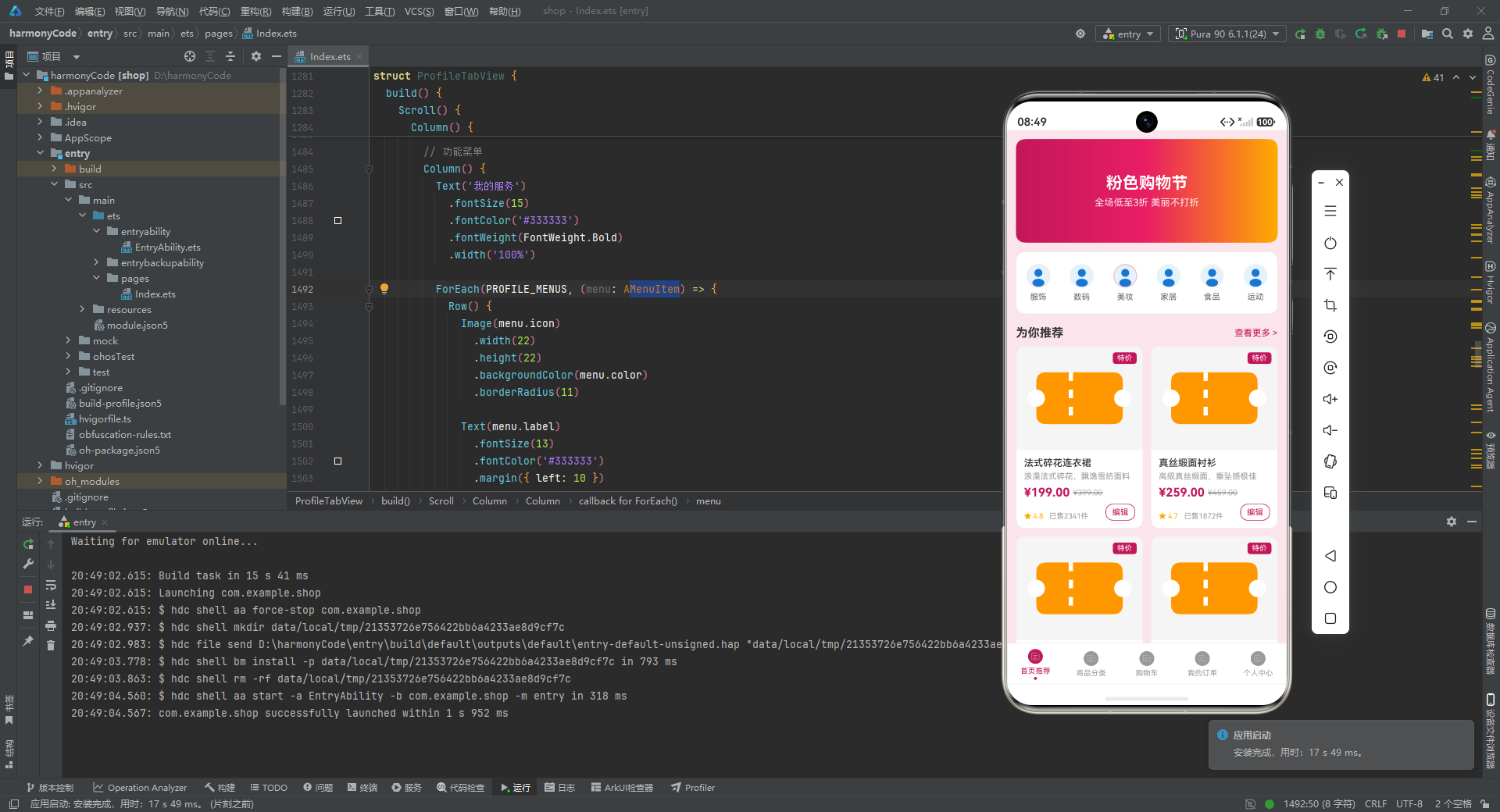
购物车页面的全选功能实现了 Checkbox、checkedIds 数组和 calcTotal 函数的三方联动。单个商品选中变化时,toggleCheck 方法同步更新 checkedIds 和 cartItems[i].isChecked;全选 Checkbox 点击时遍历所有商品统一设置状态。底部合计金额通过 calcTotal(this.cartItems) 实时计算只选中商品的总价,结算按钮显示 checkedIds.length 表示待结算商品数量。

电商企业物流数字化转型必备!快递鸟 API 接口,72 小时快速完成物流系统集成。全流程实战1V1指导,营造开放的API技术生态圈。
更多推荐

 5
5 0
0- 0


 已为社区贡献1条内容

所有评论(0)