
ragas官方文档中文版(六十四)
操作指南
本节中的每个指南都针对您作为有经验的用户在使用 Ragas 时可能遇到的实际问题提供了专注的解决方案。这些指南设计得简洁直接,为您的问题提供快速解决方案。我们假设您对 Ragas 的概念有基本了解且能够熟练使用。如果不是,请先浏览 快速入门 (Get Started)部分。
构建与评估 ReAct 智能体获取金属价格
AI 智能体在金融、电商和客户支持等领域的价值日益凸显。这些智能体可以自主与 API 交互,获取实时数据,并执行与用户目标一致的任务。评估这些智能体至关重要,以确保它们在不同输入下都能有效、准确且响应迅速。
在本教程中,我们将:
- 构建一个 ReAct 智能体来获取金属价格。
- 设置评估管道以跟踪关键性能指标。
- 使用不同查询运行并评估智能体的有效性。
点击链接在 Google Colab 中打开笔记本。
前置要求
- Python 3.8+
- 基本了解 LangGraph、LangChain 和 LLM
安装 Ragas 和其他依赖
使用 pip 安装 Ragas 和 LangGraph:
%pip install langgraph==0.2.44
%pip install ragas
%pip install nltk
构建 ReAct 智能体
初始化外部组件
首先,您有两种方式设置外部组件:
- 使用实时 API Key:
- 在 metals.dev 上注册账户以获取您的 API 密钥。
- 模拟 API 响应:
- 或者,您可以使用预定义的 JSON 对象来模拟 API 响应。这使您无需实时 API 密钥即可快速开始。
选择最适合您需求的方法继续设置。
预定义 JSON 对象模拟 API 响应
如果您想在不创建账户的情况下快速开始,可以绕过设置过程,使用下面给出的预定义 JSON 对象来模拟 API 响应。
metal_price = {
    "gold": 88.1553,
    "silver": 1.0523,
    "platinum": 32.169,
    "palladium": 35.8252,
    "lbma_gold_am": 88.3294,
    "lbma_gold_pm": 88.2313,
    "lbma_silver": 1.0545,
    "lbma_platinum_am": 31.99,
    "lbma_platinum_pm": 32.2793,
    "lbma_palladium_am": 36.0088,
    "lbma_palladium_pm": 36.2017,
    "mcx_gold": 93.2689,
    "mcx_gold_am": 94.281,
    "mcx_gold_pm": 94.1764,
    "mcx_silver": 1.125,
    "mcx_silver_am": 1.1501,
    "mcx_silver_pm": 1.1483,
    "ibja_gold": 93.2713,
    "copper": 0.0098,
    "aluminum": 0.0026,
    "lead": 0.0021,
    "nickel": 0.0159,
    "zinc": 0.0031,
    "lme_copper": 0.0096,
    "lme_aluminum": 0.0026,
    "lme_lead": 0.002,
    "lme_nickel": 0.0158,
    "lme_zinc": 0.0031,
}
定义 get_metal_price 工具
get_metal_price 工具将被智能体用于获取指定金属的价格。我们将使用 LangChain 的 @tool 装饰器创建此工具。
如果您想使用 metals.dev API 的实时数据,可以修改函数以向 API 发送实时请求。
from langchain_core.tools import tool


# Define the tools for the agent to use
@tool
def get_metal_price(metal_name: str) -> float:
    """Fetches the current per gram price of the specified metal.

    Args:
        metal_name : The name of the metal (e.g., 'gold', 'silver', 'platinum').

    Returns:
        float: The current price of the metal in dollars per gram.

    Raises:
        KeyError: If the specified metal is not found in the data source.
    """
    try:
        metal_name = metal_name.lower().strip()
        if metal_name not in metal_price:
            raise KeyError(
                f"Metal '{metal_name}' not found. Available metals: {', '.join(metal_price['metals'].keys())}"
            )
        return metal_price[metal_name]
    except Exception as e:
        raise Exception(f"Error fetching metal price: {str(e)}")
将工具绑定到 LLM
定义好 get_metal_price 工具后,下一步是将其绑定到 ChatOpenAI 模型。这使智能体能够在执行过程中根据用户请求调用该工具,从而与外部数据交互并执行超出其原生能力的操作。
from langchain_openai import ChatOpenAI

tools = [get_metal_price]
llm = ChatOpenAI(model="gpt-4o-mini")
llm_with_tools = llm.bind_tools(tools)
在 LangGraph 中,状态在图表执行过程中扮演着跟踪和更新信息的关键角色。随着图表不同部分的运行,状态会演进以反映变化,并包含在节点之间传递的信息。
例如,在像这样的对话系统中,状态用于跟踪交换的消息。每次生成新消息时,它都会被添加到状态中,更新后的状态会通过节点传递,确保对话逻辑地向前推进。
定义状态
要在 LangGraph 中实现这一点,我们定义一个状态类来维护消息列表。每当产生新消息时,它会被追加到这个列表中,确保对话历史不断更新。
from langgraph.graph import END
from langchain_core.messages import AnyMessage
from langgraph.graph.message import add_messages
from typing import Annotated
from typing_extensions import TypedDict


class GraphState(TypedDict):
    messages: Annotated[list[AnyMessage], add_messages]
定义 should_continue 函数
should_continue 函数决定对话是否应该继续进行进一步的工具交互或结束。具体来说,它检查最后一条消息是否包含任何工具调用(例如,对金属价格的请求)。
- 如果最后一条消息包含工具调用,表示智能体已调用外部工具,则对话继续并进入“工具”节点。
- 如果没有工具调用,则对话结束,表示为 END 状态。
# Define the function that determines whether to continue or not
def should_continue(state: GraphState):
    messages = state["messages"]
    last_message = messages[-1]
    if last_message.tool_calls:
        return "tools"
    return END
调用模型
call_model 函数与语言模型(LLM)交互,根据对话的当前状态生成响应。它接收更新后的状态作为输入,对其进行处理并返回模型生成的响应。
# Define the function that calls the model
def call_model(state: GraphState):
    messages = state["messages"]
    response = llm_with_tools.invoke(messages)
    return {"messages": [response]}
创建助手节点
助手节点是一个关键组件,负责处理对话的当前状态并使用语言模型(LLM)生成相关响应。它评估状态,确定适当的行动方案,并调用 LLM 生成与正在进行的对话相符的响应。
# Node
def assistant(state: GraphState):
    response = llm_with_tools.invoke(state["messages"])
    return {"messages": [response]}
创建工具节点
tool_node 负责管理与外部工具的交互,例如获取金属价格或执行其他超出 LLM 原生能力的操作。工具本身在代码前面定义, tool_node 根据当前状态和对话需求调用这些工具。
from langgraph.prebuilt import ToolNode

# Node
tools = [get_metal_price]
tool_node = ToolNode(tools)
构建图表
图表结构是智能体工作流的核心,由相互连接的节点和边组成。要构建此图表,我们使用 StateGraph 构建器,它允许我们定义和连接各种节点。每个节点代表过程中的一个步骤(例如,助手节点、工具节点),边决定这些步骤之间的执行流程。
from langgraph.graph import START, StateGraph
from IPython.display import Image, display

# Define a new graph for the agent
builder = StateGraph(GraphState)

# Define the two nodes we will cycle between
builder.add_node("assistant", assistant)
builder.add_node("tools", tool_node)

# Set the entrypoint as `agent`
builder.add_edge(START, "assistant")

# Making a conditional edge
# should_continue will determine which node is called next.
builder.add_conditional_edges("assistant", should_continue, ["tools", END])

# Making a normal edge from `tools` to `agent`.
# The `agent` node will be called after the `tool`.
builder.add_edge("tools", "assistant")

# Compile and display the graph for a visual overview
react_graph = builder.compile()
display(Image(react_graph.get_graph(xray=True).draw_mermaid_png()))
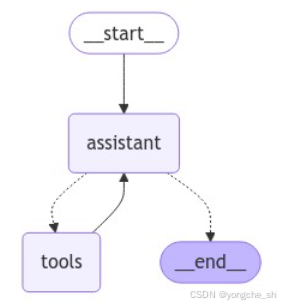
为了测试我们的设置,我们将使用查询运行智能体。智能体将使用 metals.dev API 获取铜的价格。
from langchain_core.messages import HumanMessage

messages = [HumanMessage(content="What is the price of copper?")]
result = react_graph.invoke({"messages": messages})
result["messages"]
[HumanMessage(content='What is the price of copper?', id='4122f5d4-e298-49e8-a0e0-c98adda78c6c'),
 AIMessage(content='', additional_kwargs={'tool_calls': [{'id': 'call_DkVQBK4UMgiXrpguUS2qC4mA', 'function': {'arguments': '{"metal_name":"copper"}', 'name': 'get_metal_price'}, 'type': 'function'}]}, response_metadata={'token_usage': {'completion_tokens': 18, 'prompt_tokens': 116, 'total_tokens': 134, 'prompt_tokens_details': {'cached_tokens': 0, 'audio_tokens': 0}, 'completion_tokens_details': {'reasoning_tokens': 0, 'audio_tokens': 0, 'accepted_prediction_tokens': 0, 'rejected_prediction_tokens': 0}}, 'model_name': 'gpt-4o-mini-2024-07-18', 'system_fingerprint': 'fp_0ba0d124f1', 'finish_reason': 'tool_calls', 'logprobs': None}, id='run-0f77b156-e43e-4c1e-bd3a-307333eefb68-0', tool_calls=[{'name': 'get_metal_price', 'args': {'metal_name': 'copper'}, 'id': 'call_DkVQBK4UMgiXrpguUS2qC4mA', 'type': 'tool_call'}], usage_metadata={'input_tokens': 116, 'output_tokens': 18, 'total_tokens': 134}),
 ToolMessage(content='0.0098', name='get_metal_price', id='422c089a-6b76-4e48-952f-8925c3700ae3', tool_call_id='call_DkVQBK4UMgiXrpguUS2qC4mA'),
 AIMessage(content='The price of copper is $0.0098 per gram.', response_metadata={'token_usage': {'completion_tokens': 14, 'prompt_tokens': 148, 'total_tokens': 162, 'prompt_tokens_details': {'cached_tokens': 0, 'audio_tokens': 0}, 'completion_tokens_details': {'reasoning_tokens': 0, 'audio_tokens': 0, 'accepted_prediction_tokens': 0, 'rejected_prediction_tokens': 0}}, 'model_name': 'gpt-4o-mini-2024-07-18', 'system_fingerprint': 'fp_0ba0d124f1', 'finish_reason': 'stop', 'logprobs': None}, id='run-67cbf98b-4fa6-431e-9ce4-58697a76c36e-0', usage_metadata={'input_tokens': 148, 'output_tokens': 14, 'total_tokens': 162})]
将消息转换为 Ragas 评估格式
在当前实现中, GraphState 以列表形式存储人类用户、AI(LLM 的响应)和任何外部工具(AI 使用的 API 或服务)之间交换的消息。每条消息都是 LangChain 格式的对象。
# Implementation of Graph State
class GraphState(TypedDict):
    messages: Annotated[list[AnyMessage], add_messages]
每次智能体执行过程中交换消息时,它都会被添加到 GraphState 的消息列表中。然而,Ragas 需要特定的消息格式来评估交互。
Ragas 使用自己的格式来评估智能体交互。因此,如果您使用 LangGraph,则需要将 LangChain 消息对象转换为 Ragas 消息对象。这使您能够使用 Ragas 的内置评估工具评估 AI 智能体。
目标: 将 LangChain 消息列表(例如 HumanMessage 、 AIMessage 和 ToolMessage )转换为 Ragas 期望的格式,以便评估框架能够正确理解和处理它们。
要将 LangChain 消息列表转换为适合 Ragas 评估的格式,Ragas 提供了 convert_to_ragas_messages 函数,可用于将 LangChain 消息转换为 Ragas 期望的格式。
以下是使用该函数的方法:
from ragas.integrations.langgraph import convert_to_ragas_messages

# Assuming 'result["messages"]' contains the list of LangChain messages
ragas_trace = convert_to_ragas_messages(result["messages"])
ragas_trace # List of Ragas messages
[HumanMessage(content='What is the price of copper?', metadata=None, type='human'),
 AIMessage(content='', metadata=None, type='ai', tool_calls=[ToolCall(name='get_metal_price', args={'metal_name': 'copper'})]),
 ToolMessage(content='0.0098', metadata=None, type='tool'),
 AIMessage(content='The price of copper is $0.0098 per gram.', metadata=None, type='ai', tool_calls=None)]
评估智能体性能
在本教程中,我们将使用以下指标评估智能体:
- 工具调用准确性(ToolCallAccuracy) :用于评估 LLM 在识别和调用完成给定任务所需工具方面的性能。
- 智能体目标准确性(Agent Goal Accuracy) :用于评估 LLM 在识别和实现用户目标方面的性能。这是一个二值指标,1 表示 AI 已达成目标,0 表示 AI 未达成目标。
首先,让我们实际运行智能体处理几个查询,并确保我们拥有这些查询的真实标签。
工具调用准确性
工具调用准确性:1,因为 LLM 正确识别并使用了必要的工具( get_metal_price ),且参数正确(即金属名称为 “copper”)。
from ragas.metrics import ToolCallAccuracy
from ragas.dataset_schema import MultiTurnSample
from ragas.integrations.langgraph import convert_to_ragas_messages
import ragas.messages as r


ragas_trace = convert_to_ragas_messages(
    messages=result["messages"]
)  # List of Ragas messages converted using the Ragas function

sample = MultiTurnSample(
    user_input=ragas_trace,
    reference_tool_calls=[
        r.ToolCall(name="get_metal_price", args={"metal_name": "copper"})
    ],
)

tool_accuracy_scorer = ToolCallAccuracy()
await tool_accuracy_scorer.multi_turn_ascore(sample)
1.0
工具调用准确性:1,因为 LLM 正确识别并使用了必要的工具( get_metal_price ),且参数正确(即金属名称为 “copper”)。
智能体目标准确性
messages = [HumanMessage(content="What is the price of 10 grams of silver?")]

result = react_graph.invoke({"messages": messages})
result["messages"] # List of LangChain messages
[HumanMessage(content='What is the price of 10 grams of silver?', id='51a469de-5b7c-4d01-ab71-f8db64c8da49'),
 AIMessage(content='', additional_kwargs={'tool_calls': [{'id': 'call_rdplOo95CRwo3mZcPu4dmNxG', 'function': {'arguments': '{"metal_name":"silver"}', 'name': 'get_metal_price'}, 'type': 'function'}]}, response_metadata={'token_usage': {'completion_tokens': 17, 'prompt_tokens': 120, 'total_tokens': 137, 'prompt_tokens_details': {'cached_tokens': 0, 'audio_tokens': 0}, 'completion_tokens_details': {'reasoning_tokens': 0, 'audio_tokens': 0, 'accepted_prediction_tokens': 0, 'rejected_prediction_tokens': 0}}, 'model_name': 'gpt-4o-mini-2024-07-18', 'system_fingerprint': 'fp_0ba0d124f1', 'finish_reason': 'tool_calls', 'logprobs': None}, id='run-3bb60e27-1275-41f1-a46e-03f77984c9d8-0', tool_calls=[{'name': 'get_metal_price', 'args': {'metal_name': 'silver'}, 'id': 'call_rdplOo95CRwo3mZcPu4dmNxG', 'type': 'tool_call'}], usage_metadata={'input_tokens': 120, 'output_tokens': 17, 'total_tokens': 137}),
 ToolMessage(content='1.0523', name='get_metal_price', id='0b5f9260-df26-4164-b042-6df2e869adfb', tool_call_id='call_rdplOo95CRwo3mZcPu4dmNxG'),
 AIMessage(content='The current price of silver is approximately $1.0523 per gram. Therefore, the price of 10 grams of silver would be about $10.52.', response_metadata={'token_usage': {'completion_tokens': 34, 'prompt_tokens': 151, 'total_tokens': 185, 'prompt_tokens_details': {'cached_tokens': 0, 'audio_tokens': 0}, 'completion_tokens_details': {'reasoning_tokens': 0, 'audio_tokens': 0, 'accepted_prediction_tokens': 0, 'rejected_prediction_tokens': 0}}, 'model_name': 'gpt-4o-mini-2024-07-18', 'system_fingerprint': 'fp_0ba0d124f1', 'finish_reason': 'stop', 'logprobs': None}, id='run-93e38f71-cc9d-41d6-812a-bfad9f9231b2-0', usage_metadata={'input_tokens': 151, 'output_tokens': 34, 'total_tokens': 185})]
from ragas.integrations.langgraph import convert_to_ragas_messages

ragas_trace = convert_to_ragas_messages(
    result["messages"]
)  # List of Ragas messages converted using the Ragas function
ragas_trace
[HumanMessage(content='What is the price of 10 grams of silver?', metadata=None, type='human'),
 AIMessage(content='', metadata=None, type='ai', tool_calls=[ToolCall(name='get_metal_price', args={'metal_name': 'silver'})]),
 ToolMessage(content='1.0523', metadata=None, type='tool'),
 AIMessage(content='The current price of silver is approximately $1.0523 per gram. Therefore, the price of 10 grams of silver would be about $10.52.', metadata=None, type='ai', tool_calls=None)]
from ragas.dataset_schema import MultiTurnSample
from ragas.metrics import AgentGoalAccuracyWithReference
from ragas.llms import LangchainLLMWrapper


sample = MultiTurnSample(
    user_input=ragas_trace,
    reference="Price of 10 grams of silver",
)

scorer = AgentGoalAccuracyWithReference()

evaluator_llm = LangchainLLMWrapper(ChatOpenAI(model="gpt-4o-mini"))
scorer.llm = evaluator_llm
await scorer.multi_turn_ascore(sample)
1.0
智能体目标准确性:1,因为 LLM 正确实现了用户获取 10 克银价格的目标。
下一步
🎉 恭喜!我们已经学习了如何使用 Ragas 评估框架评估智能体。

电商企业物流数字化转型必备!快递鸟 API 接口,72 小时快速完成物流系统集成。全流程实战1V1指导,营造开放的API技术生态圈。
更多推荐


 18
18 0
0- 0


 已为社区贡献1条内容

所有评论(0)