
基于51单片机ESP8266wifi控制机器人—送餐、快递
基于51单片机wifi控制机器人
(程序+原理图+PCB+设计报告)
功能介绍
具体功能:
1.L298N驱动电机,机器人行走;
2.装备红外线感应检测到周围环境,进行行程判断;
3.ESP8266WiFi模块进行通信,机器人接收指令;
4.手机APP进行地址信息派送,小车接收到信息走到对应地址去卸货;
5.若不小心走到的地点为非配送地点,则继续行走到轨道外,等待人工重新操作;
演示视频:
基于51单片机ESP8266wifi控制机器人—送餐、快递
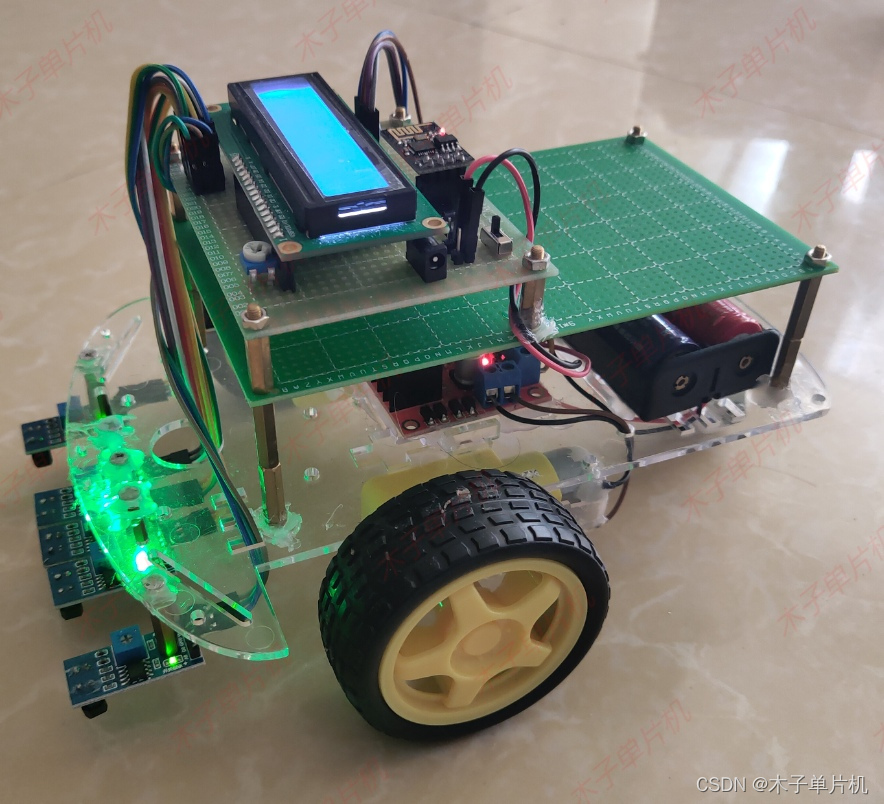 添加图片注释,不超过 140 字(可选)
程序
#include<reg52.h>	   //头文件
#include<LCD1602.h>
#include<ESP8266.h>
#include<EEPROM.h>
/*****************灯、蜂鸣器、按键引脚定义*******************/
sbit red1    = P2^0;
sbit red2    = P2^1;
sbit red3    = P2^2;
sbit red4    = P2^3;
sbit red5    = P2^4;

sbit moto1	= P3^4;	 //
sbit moto2	= P3^5;	 //
sbit moto3	= P3^6;	 //
sbit moto4	= P3^7;	 //
/************************变量定义***********************/
uchar temp_f=0,diqu_f=0,diqu_f2=0;
uchar T0_num=100;		//计数变量

/********************************************************
函数名称:void delayms(uint ms)
函数作用:毫毛延时函数
参数说明:ms为延时的毫秒数
********************************************************/
void delayms(uint ms)
{
	unsigned char i=100,j;
	for(;ms;ms--)
	{
		while(--i)
		{
			j=10;
			while(--j);
		}
	}
}
void delay (unsigned int a)	   //这是一个延时函数
{
	 unsigned char i;
	 while( --a != 0)
	 {
	 	for(i = 0; i < 8; i++);
	 }
}
/********************************************************
函数名称:void display()
函数作用:正常显示
参数说明:
********************************************************/
void display()
{
	if(ESP8266_f==1)//接收到WIFI控制指令
	{
		if(Hand("+IPD,0,1:A"))
		{
			temp_f=1;
		}
			else
				if(Hand("+IPD,0,1:B"))
				{
					temp_f=2;		diqu_f=0;
				}
					else
						if(Hand("+IPD,0,1:C"))
						{
							temp_f=3;
						}
							else
								if(Hand("+IPD,0,1:D"))
								{
									temp_f=4;
								}
		clearBuff();	      //清除缓存
	}
	if(temp_f==0)
	{
			moto1=0;moto2=0;moto3=0;moto4=0;
		  lcd1602_write_character(0,2," Waiting status ");
	}
	else
	{
		if(temp_f==1)
		{
				 lcd1602_write_character(0,2," Location one   ");
				 if(red4==1&&red5==1)//第一个地点识别到
				 {
							temp_f=0;
							lcd1602_write_character(0,1,"  one finish    ");
				 }
				else
				{
					lcd1602_write_character(0,1,"  one working   ");
					if((red1==1&&red2==1&&red3==1)||(red1==0&&red2==0&&red3==0))//三个都检测到黑线或者白线停止
					{
						 moto1=0;moto2=0;moto3=0;moto4=0;
					}
					if((red1==1&&red2==0&&red3==0)||(red1==1&&red2==1&&red3==0))//右边检测到
					{
							moto1=0;moto2=1;moto3=1;moto4=0;delay(50); moto3=0;delay(100-50);

					}
					if((red1==0&&red2==0&&red3==1)||(red1==0&&red2==1&&red3==1))//左边检测到
					{

						 moto1=1;moto2=0;moto3=0;moto4=1;delay(50); moto1=0;delay(100-50);
					}
					if((red1==0&&red2==1&&red3==0))//中间
					{
						moto1=0;moto3=0;
					  moto2=moto4=1;
					  delay(50);
					  moto2=moto4=0;
					  delay(100-50);
					}
				}
		}

		if(temp_f==2)
		{
			   lcd1602_write_character(0,2," Location two   ");
			    if(diqu_f<2)
					{
							lcd1602_write_character(0,1,"  two working   ");
							if((red1==1&&red2==1&&red3==1)||(red1==0&&red2==0&&red3==0))//三个都检测到黑线或者白线停止
							{
								 moto1=0;moto2=0;moto3=0;moto4=0;
							}
							if((red1==1&&red2==0&&red3==0)||(red1==1&&red2==1&&red3==0))//右边检测到
							{
									moto1=0;moto2=1;moto3=1;moto4=0;delay(50); moto3=0;delay(100-50);
							}
							if((red1==0&&red2==0&&red3==1)||(red1==0&&red2==1&&red3==1))//左边检测到
							{
								 moto1=1;moto2=0;moto3=0;moto4=1;delay(50); moto1=0;delay(100-50);
							}
							if((red1==0&&red2==1&&red3==0))//中间
							{
								moto1=0;moto3=0;
								moto2=moto4=1;
								delay(50);
								moto2=moto4=0;
								delay(100-50);
							}
							if(red4==0&&red5==0)	diqu_f2=0;
							if(red4==1&&red5==1&&diqu_f2==0)
							{
									diqu_f++;
							  	diqu_f2=1;
								  lcd1602_write_character(0,1,"  two working 1 ");
							}
					}
					else
					{
							temp_f=0;
							diqu_f=0;diqu_f2=0;
					    lcd1602_write_character(0,1,"  two finish    ");
					}
		}

		if(temp_f==3)
		{
			   lcd1602_write_character(0,2," Location three ");
			    if(diqu_f<3)
					{
							lcd1602_write_character(0,1,"  three working ");
							if((red1==1&&red2==1&&red3==1)||(red1==0&&red2==0&&red3==0))//三个都检测到黑线或者白线停止
							{
								 moto1=0;moto2=0;moto3=0;moto4=0;
							}
							if((red1==1&&red2==0&&red3==0)||(red1==1&&red2==1&&red3==0))//右边检测到
							{
									moto1=0;moto2=1;moto3=1;moto4=0;delay(50); moto3=0;delay(100-50);
							}
							if((red1==0&&red2==0&&red3==1)||(red1==0&&red2==1&&red3==1))//左边检测到
							{
								 moto1=1;moto2=0;moto3=0;moto4=1;delay(50); moto1=0;delay(100-50);
							}
							if((red1==0&&red2==1&&red3==0))//中间
							{
								moto1=0;moto3=0;
								moto2=moto4=1;
								delay(50);
								moto2=moto4=0;
								delay(100-50);
							}
							if(red4==0&&red5==0)	diqu_f2=0;
							if(red4==1&&red5==1&&diqu_f2==0)
							{
									diqu_f++;
							  	diqu_f2=1;
							}
					}
					else
					{
							temp_f=0;
							diqu_f=0;diqu_f2=0;
					    lcd1602_write_character(0,1,"  three finish  ");
					}
		}

		if(temp_f==4)
		{
							if((red1==1&&red2==1&&red3==1)||(red1==0&&red2==0&&red3==0))//三个都检测到黑线或者白线停止
							{
								 moto1=0;moto2=0;moto3=0;moto4=0;
							}
							if((red1==1&&red2==0&&red3==0)||(red1==1&&red2==1&&red3==0))//右边检测到
							{
									moto1=0;moto2=1;moto3=1;moto4=0;delay(50); moto3=0;delay(100-50);
							}
							if((red1==0&&red2==0&&red3==1)||(red1==0&&red2==1&&red3==1))//左边检测到
							{
								 moto1=1;moto2=0;moto3=0;moto4=1;delay(50); moto1=0;delay(100-50);
							}
							if((red1==0&&red2==1&&red3==0))//中间
							{
								moto1=0;moto3=0;
								moto2=moto4=1;
								delay(50);
								moto2=moto4=0;
								delay(100-50);
							}
		}
	}

}
/********************************************************
函数名称:void main()
函数作用:主函数
参数说明:
********************************************************/
void main()
{
	LCD_init();				    //LCD1602初始化
	lcd1602_write_pic(0x00,pic);//将自定义字符“°”写入到LCD1602中
	ESP8266_uart();//ESP8266配置参数
	ESP8266_init();			    //ESP8266初始化
	while(1)			        //死循环
	{
		display();	        //显示当状态
	}
}
硬件设计
使用元器件:
单片机:STC89C52;
(注意:单片机是通用的,无论51还是52、无论stc还是at都一样,引脚功能都一样。程序也是一样的。)
STC89C52RC是STC公司生产的一种低功耗、高性能CMOS8位微控制器,具有8K字节系统可编程Flash存储器。STC89C52使用经典的MCS-51内核,但是做了很多的改进使得芯片具有传统51单片机不具备的功能。在单芯片上,拥有灵巧的8 位CPU 和在系统可编程Flash,使得STC89C52为众多嵌入式控制应用系统提供高灵活、超有效的解决方案。
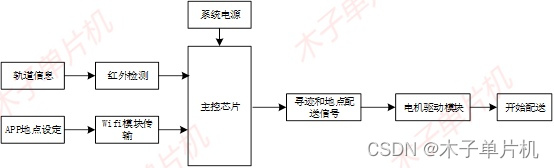
流程图
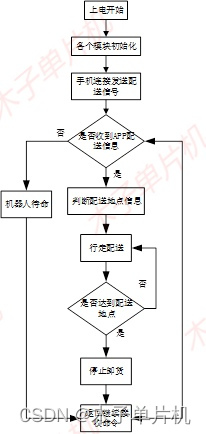
设计资料
01 PCB图
本系统原理图采用Altium Designer19设计,具体如图!
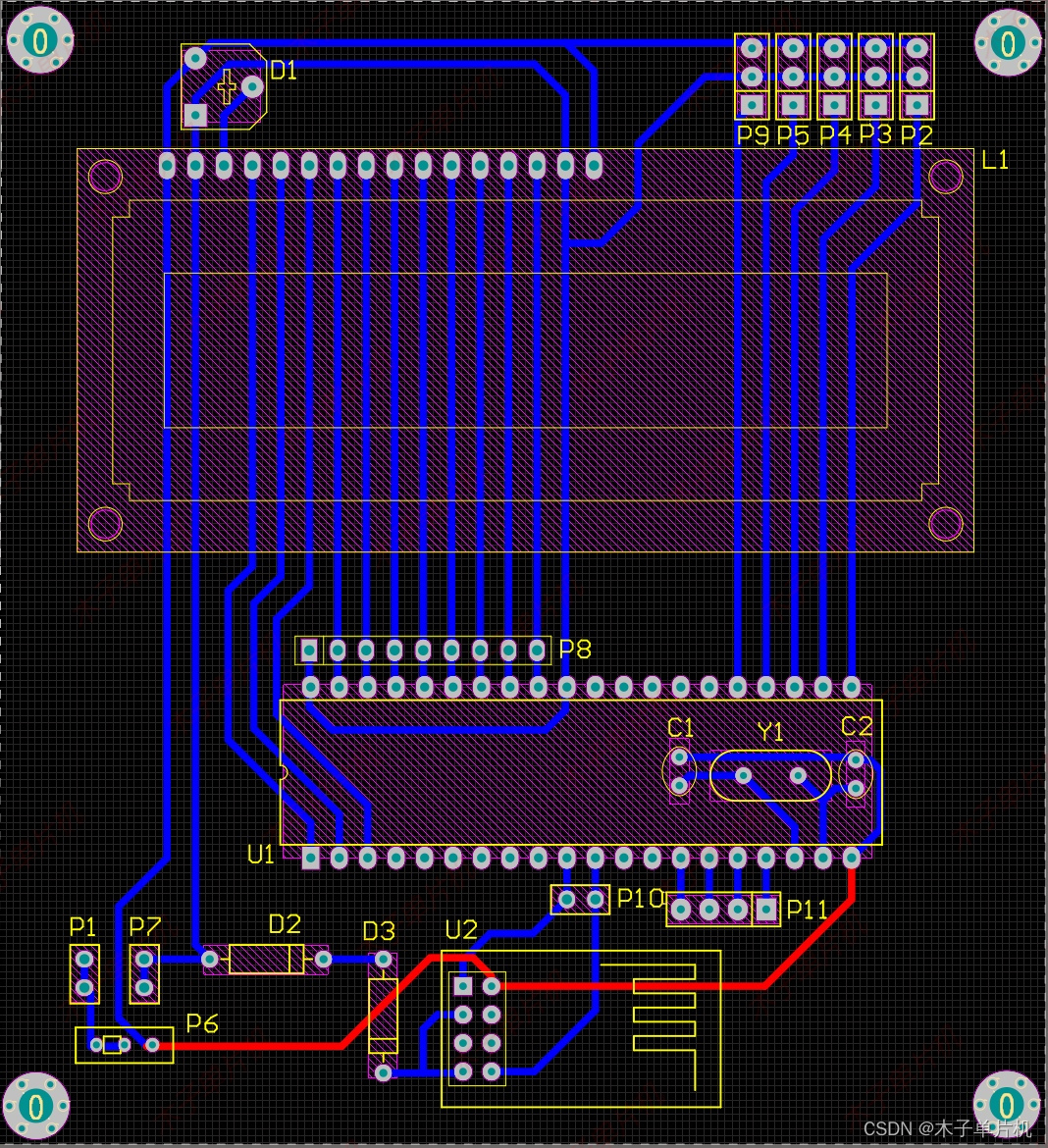 添加图片注释,不超过 140 字(可选)
02 原理图
本系统原理图采用Altium Designer19设计,具体如图!
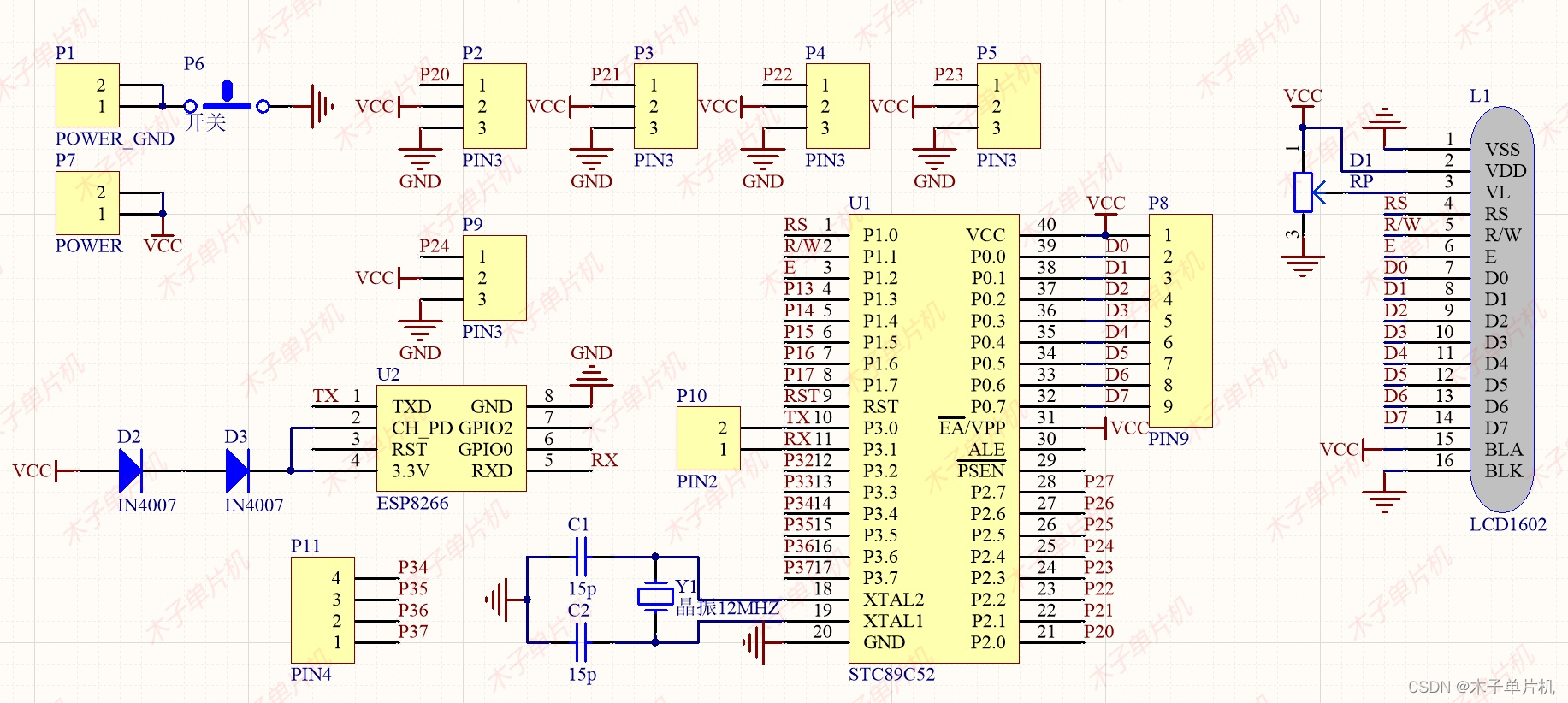 添加图片注释,不超过 140 字(可选)
03 程序
本设计使用软件keil4和keil5两个版本编程设计,无需担心!具体如图!
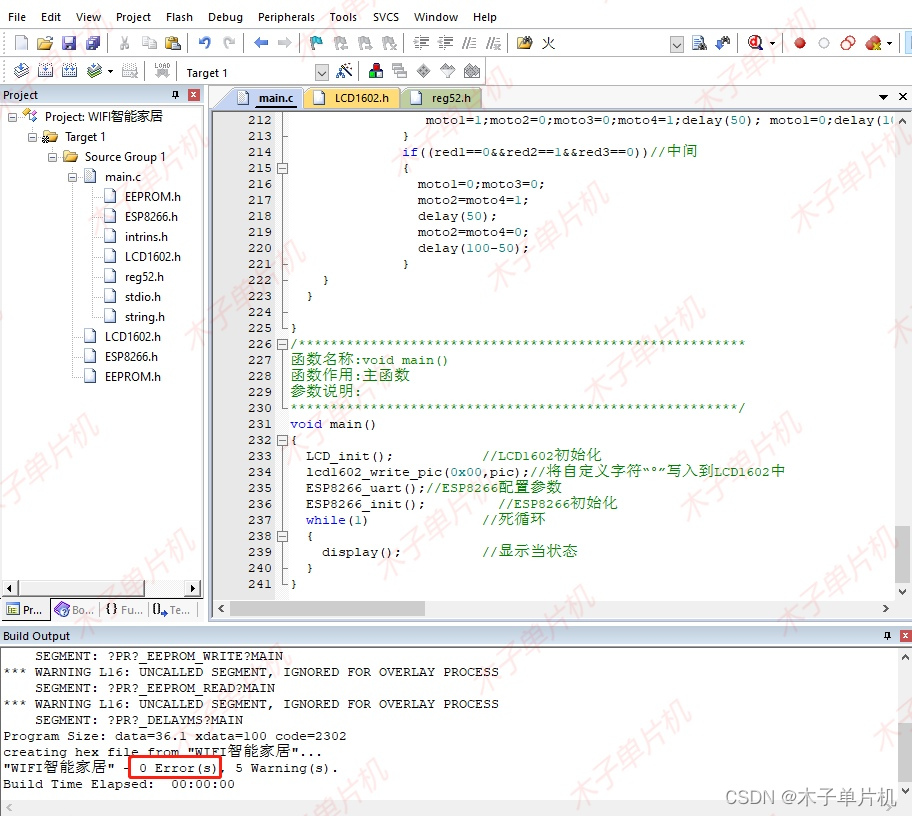 添加图片注释,不超过 140 字(可选)
04 设计报告
六千字设计报告,具体如下!
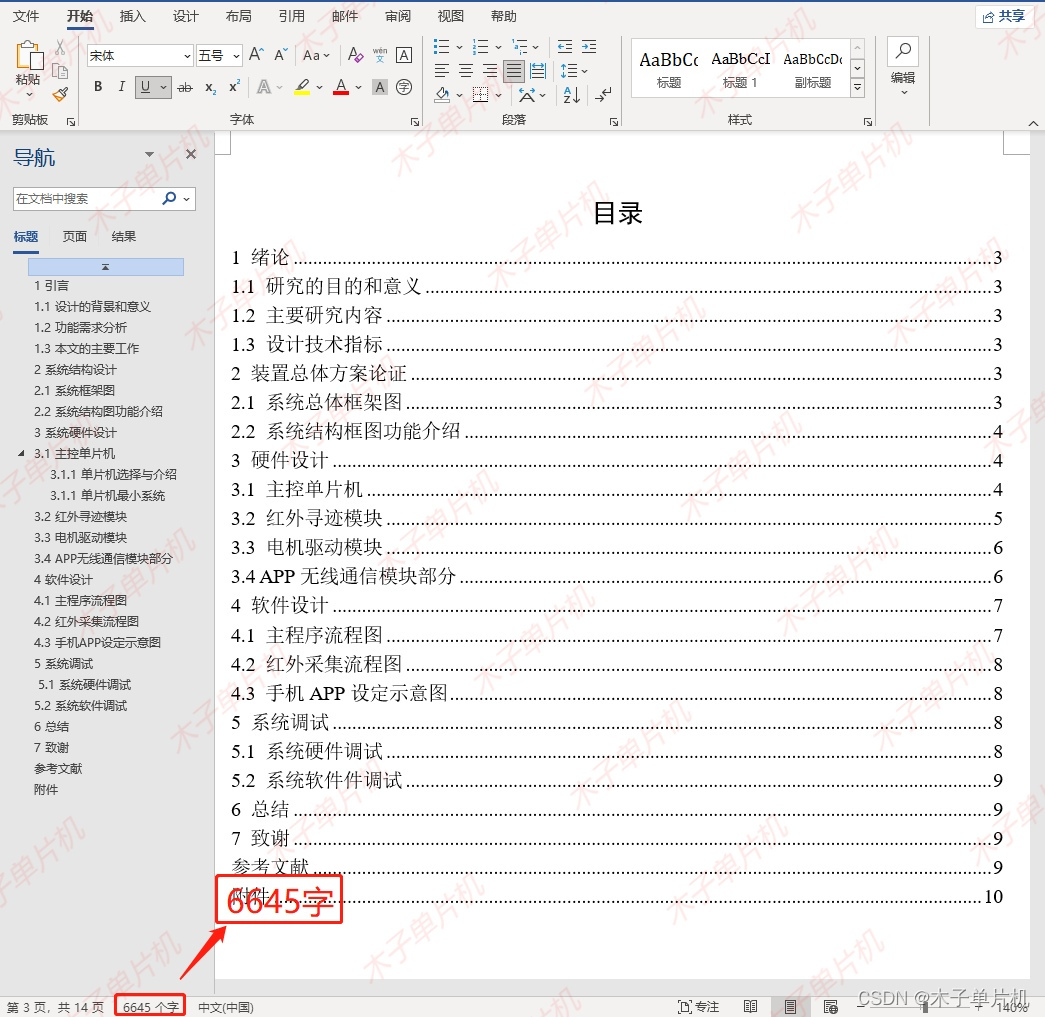 添加图片注释,不超过 140 字(可选)
05 设计资料
资料获取请关注同名公众号,全部资料包括程序(含注释)、AD原理图、PCB电路图、设计报告、结构框图、实物图、流程图等。具体内容如下,全网最全! !
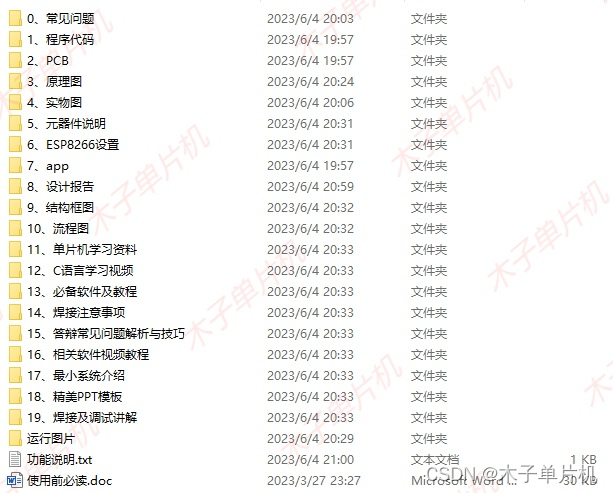
资料获取请观看前面演示视频!
点赞分享一起学习成长。

电商企业物流数字化转型必备!快递鸟 API 接口,72 小时快速完成物流系统集成。全流程实战1V1指导,营造开放的API技术生态圈。
更多推荐


 5
5 0
0- 0


 已为社区贡献1条内容

所有评论(0)