
小兔鲜电商项目(五)---购物车
目录
本地加入购物车实现
创建stores/cartStore.js封装购物车模块
// 封装购物车模块
import { defineStore } from "pinia"
import { ref } from "vue"

export const useCartStore = defineStore('cart', () => {
  const cartList = ref([])
  const addCart = (goods) => {
    // 添加购物车操作
    const item = cartList.value.find((item) => goods.skuId === item.skuId)
    if (item) {
      item.count++
    } else {
      cartList.value.push(goods)
    }
  }
  return {
    cartList, addCart
  }
}, {
  persist: true
})
在views/Detail/index.vue中编辑事件触发逻辑,添加数据组件并绑定相关事件
<script setup>
import DetailHot from './components/DetailHot.vue'
import {getDetail} from '@/apis/detail'
import { ElMessage } from 'element-plus'
import {onMounted,ref} from 'vue'
import {useRoute} from 'vue-router'
import { useCartStore } from '@/stores/cartStore'
const cartStore=useCartStore()
const goods=ref({})
const route=useRoute()
const getGoods=async()=>{
  const res=await getDetail(route.params.id)
  goods.value=res.result
}
onMounted(() => getGoods())

// sku规格被操作时
let skuObj={}
const skuChange=(sku)=>{
    console.log(sku)
    skuObj=sku
}

// count
const count=ref(1)
const countChange=(count)=>{
    console.log(count)

}

// 添加购物车
const addCart=()=>{
    if(skuObj.skuId){
        // 触发action
        cartStore.addCart({
            id:goods.value.id,
            name:goods.value.name,
            picture:goods.value.mainPictures[0],
            price:goods.value.price,
            count:count.value,
            skuId:skuObj.skuId,
            attrsText:skuObj.specsText,
            selected:true
        })
    }else{
        // 提示用户
        ElMessage.warning('请选择规格')
    }
}
</script>
<!-- sku组件 -->
<XtxSku :goods="goods" @change="skuChange" />
<!-- 数据组件 -->
<el-input-number v-model="count" @change="countChange" />头部购物车列表渲染
创建 src\views\Layout\components\HeaderCart.vue 文件,添加以下代码:
<script setup>
</script>
<template>
<div class="cart">
<a class="curr" href="javascript:;">
<i class="iconfont icon-cart"></i><em>2</em>
</a>
<div class="layer">
<div class="list">
<!--
<div class="item" v-for="i in cartList" :key="i">
<RouterLink to="">
<img :src="i.picture" alt="" />
<div class="center">
<p class="name ellipsis-2">
{{ i.name }}
</p>
<p class="attr ellipsis">{{ i.attrsText }}</p>
</div>
<div class="right">
<p class="price">¥{{ i.price }}</p>
<p class="count">x{{ i.count }}</p>
</div>
</RouterLink>
<i class="iconfont icon-close-new" @click="store.delCart(i.skuId)"></i>
</div>
-->
</div>
<div class="foot">
<div class="total">
<p>共 10 件商品</p>
<p>¥ 100.00 </p>
</div>
<el-button size="large" type="primary" >去购物车结算</el-button>
</div>
</div>
</div>
</template>
<style scoped lang="scss">
.cart {
width: 50px;
position: relative;
z-index: 600;
.curr {
height: 32px;
line-height: 32px;
text-align: center;
position: relative;
display: block;
.icon-cart {
font-size: 22px;
}
em {
font-style: normal;
position: absolute;
right: 0;
top: 0;
padding: 1px 6px;
line-height: 1;
background: $helpColor;
color: #fff;
font-size: 12px;
border-radius: 10px;
font-family: Arial;
}
}
&:hover {
.layer {
opacity: 1;
transform: none;
}
}
.layer {
opacity: 0;
transition: all 0.4s 0.2s;
transform: translateY(-200px) scale(1, 0);
width: 400px;
height: 400px;
position: absolute;
top: 50px;
right: 0;
box-shadow: 0 0 10px rgba(0, 0, 0, 0.2);
background: #fff;
border-radius: 4px;
padding-top: 10px;
&::before {
content: "";
position: absolute;
right: 14px;
top: -10px;
width: 20px;
height: 20px;
background: #fff;
transform: scale(0.6, 1) rotate(45deg);
box-shadow: -3px -3px 5px rgba(0, 0, 0, 0.1);
}
.foot {
position: absolute;
left: 0;
bottom: 0;
height: 70px;
width: 100%;
padding: 10px;
display: flex;
justify-content: space-between;
background: #f8f8f8;
align-items: center;
.total {
padding-left: 10px;
color: #999;
p {
&:last-child {
font-size: 18px;
color: $priceColor;
}
}
}
}
}
.list {
height: 310px;
overflow: auto;
padding: 0 10px;
&::-webkit-scrollbar {
width: 10px;
height: 10px;
}
&::-webkit-scrollbar-track {
background: #f8f8f8;
border-radius: 2px;
}
&::-webkit-scrollbar-thumb {
background: #eee;
border-radius: 10px;
}
&::-webkit-scrollbar-thumb:hover {
background: #ccc;
}
.item {
border-bottom: 1px solid #f5f5f5;
padding: 10px 0;
position: relative;
i {
position: absolute;
bottom: 38px;
right: 0;
opacity: 0;
color: #666;
transition: all 0.5s;
}
&:hover {
i {
opacity: 1;
cursor: pointer;
}
}
a {
display: flex;
align-items: center;
img {
height: 80px;
width: 80px;
}
.center {
padding: 0 10px;
width: 200px;
.name {
font-size: 16px;
}
.attr {
color: #999;
padding-top: 5px;
}
}
.right {
width: 100px;
padding-right: 20px;
text-align: center;
.price {
font-size: 16px;
color: $priceColor;
}
.count {
color: #999;
margin-top: 5px;
font-size: 16px;
}
}
}
}
}
}
</style>
数据渲染
<script setup>
import { useCartStore } from '@/stores/cartStore'
const cartStore=useCartStore()
</script>
<template>
<div class="cart">
<a class="curr" href="javascript:;">
<i class="iconfont icon-cart"></i><em>{{ cartStore.cartList.length }}</em>
</a>
<div class="layer">
<div class="list">
<div class="item" v-for="i in cartStore.cartList" :key="i">
<RouterLink to="">
<img :src="i.picture" alt="" />
<div class="center">
<p class="name ellipsis-2">
{{ i.name }}
</p>
<p class="attr ellipsis">{{ i.attrsText }}</p>
</div>
<div class="right">
<p class="price">¥{{ i.price }}</p>
<p class="count">x{{ i.count }}</p>
</div>
</RouterLink>
<i class="iconfont icon-close-new" @click="store.delCart(i.skuId)"></i>
</div>
</div>
<div class="foot">
<div class="total">
<p>共 10 件商品</p>
<p>¥ 100.00 </p>
</div>
<el-button size="large" type="primary" >去购物车结算</el-button>
</div>
</div>
</div>
</template>
<style scoped lang="scss">
.cart {
width: 50px;
position: relative;
z-index: 600;
.curr {
height: 32px;
line-height: 32px;
text-align: center;
position: relative;
display: block;
.icon-cart {
font-size: 22px;
}
em {
font-style: normal;
position: absolute;
right: 0;
top: 0;
padding: 1px 6px;
line-height: 1;
background: $helpColor;
color: #fff;
font-size: 12px;
border-radius: 10px;
font-family: Arial;
}
}
&:hover {
.layer {
opacity: 1;
transform: none;
}
}
.layer {
opacity: 0;
transition: all 0.4s 0.2s;
transform: translateY(-200px) scale(1, 0);
width: 400px;
height: 400px;
position: absolute;
top: 50px;
right: 0;
box-shadow: 0 0 10px rgba(0, 0, 0, 0.2);
background: #fff;
border-radius: 4px;
padding-top: 10px;
&::before {
content: "";
position: absolute;
right: 14px;
top: -10px;
width: 20px;
height: 20px;
background: #fff;
transform: scale(0.6, 1) rotate(45deg);
box-shadow: -3px -3px 5px rgba(0, 0, 0, 0.1);
}
.foot {
position: absolute;
left: 0;
bottom: 0;
height: 70px;
width: 100%;
padding: 10px;
display: flex;
justify-content: space-between;
background: #f8f8f8;
align-items: center;
.total {
padding-left: 10px;
color: #999;
p {
&:last-child {
font-size: 18px;
color: $priceColor;
}
}
}
}
}
.list {
height: 310px;
overflow: auto;
padding: 0 10px;
&::-webkit-scrollbar {
width: 10px;
height: 10px;
}
&::-webkit-scrollbar-track {
background: #f8f8f8;
border-radius: 2px;
}
&::-webkit-scrollbar-thumb {
background: #eee;
border-radius: 10px;
}
&::-webkit-scrollbar-thumb:hover {
background: #ccc;
}
.item {
border-bottom: 1px solid #f5f5f5;
padding: 10px 0;
position: relative;
i {
position: absolute;
bottom: 38px;
right: 0;
opacity: 0;
color: #666;
transition: all 0.5s;
}
&:hover {
i {
opacity: 1;
cursor: pointer;
}
}
a {
display: flex;
align-items: center;
img {
height: 80px;
width: 80px;
}
.center {
padding: 0 10px;
width: 200px;
.name {
font-size: 16px;
}
.attr {
color: #999;
padding-top: 5px;
}
}
.right {
width: 100px;
padding-right: 20px;
text-align: center;
.price {
font-size: 16px;
color: $priceColor;
}
.count {
color: #999;
margin-top: 5px;
font-size: 16px;
}
}
}
}
}
}
</style>
头部购物车删除功能实现
在stores/cartStore.js中补充删除购物车功能
  const delCart = (skuId) => {
    // splice
    const idx = cartList.value.findIndex((item) => skuId === item.skuId)
    cartList.value.splice(idx, 1)
  }
  return {
    cartList, addCart, delCart
  }
在HeaderCart.vue中修改代码,调用delCart删除对应的购物车
<i class="iconfont icon-close-new" @click="cartStore.delCart(i.skuId)"></i>头部购物车统计计算
在stores/cartStore.js中补充计算商品总数量和总价格的计算属性
const allCount = computed(() => cartList.value.reduce((a, c) => a + c.count, 0))
const allPrice = computed(() => cartList.value.reduce((a, c) => a + c.count * c.price, 0))
在HeaderCart.vue中修改代码,渲染商品总数量和总价格
<div class="foot">
<div class="total">
<p>共 {{ cartStore.allCount }} 件商品</p>
<p>¥ {{ cartStore.allPrice.toFixed(2) }} </p>
</div>
<el-button size="large" type="primary" >去购物车结算</el-button>
</div>
</div>列表购物车基础数据渲染
创建views/CartList/index.vue文件
<script setup>
</script>
<template>
<div class="xtx-cart-page">
<div class="container m-top-20">
<div class="cart">
<table>
<thead>
<tr>
<th width="120">
<el-checkbox/>
</th>
<th width="400">商品信息</th>
<th width="220">单价</th>
<th width="180">数量</th>
<th width="180">小计</th>
<th width="140">操作</th>
</tr>
</thead>
<!-- 商品列表 -->
<tbody>
<tr v-for="i in cartList" :key="i.id">
<td>
<el-checkbox />
</td>
<td>
<div class="goods">
<RouterLink to="/"><img :src="i.picture" alt="" /></RouterLink>
<div>
<p class="name ellipsis">
{{ i.name }}
</p>
</div>
</div>
</td>
<td class="tc">
<p>¥{{ i.price }}</p>
</td>
<td class="tc">
<el-input-number v-model="i.count" />
</td>
<td class="tc">
<p class="f16 red">¥{{ (i.price * i.count).toFixed(2) }}</p>
</td>
<td class="tc">
<p>
<el-popconfirm title="确认删除吗?" confirm-button-text="确认" cancel-button-text="取消" @confirm="delCart(i)">
<template #reference>
<a href="javascript:;">删除</a>
</template>
</el-popconfirm>
</p>
</td>
</tr>
<tr v-if="cartList.length === 0">
<td colspan="6">
<div class="cart-none">
<el-empty description="购物车列表为空">
<el-button type="primary">随便逛逛</el-button>
</el-empty>
</div>
</td>
</tr>
</tbody>
</table>
</div>
<!-- 操作栏 -->
<div class="action">
<div class="batch">
共 10 件商品,已选择 2 件,商品合计:
<span class="red">¥ 200.00 </span>
</div>
<div class="total">
<el-button size="large" type="primary" >下单结算</el-button>
</div>
</div>
</div>
</div>
</template>
<style scoped lang="scss">
.xtx-cart-page {
margin-top: 20px;
.cart {
background: #fff;
color: #666;
table {
border-spacing: 0;
border-collapse: collapse;
line-height: 24px;
th,
td {
padding: 10px;
border-bottom: 1px solid #f5f5f5;
&:first-child {
text-align: left;
padding-left: 30px;
color: #999;
}
}
th {
font-size: 16px;
font-weight: normal;
line-height: 50px;
}
}
}
.cart-none {
text-align: center;
padding: 120px 0;
background: #fff;
p {
color: #999;
padding: 20px 0;
}
}
.tc {
text-align: center;
a {
color: $xtxColor;
}
.xtx-numbox {
margin: 0 auto;
width: 120px;
}
}
.red {
color: $priceColor;
}
.green {
color: $xtxColor;
}
.f16 {
font-size: 16px;
}
.goods {
display: flex;
align-items: center;
img {
width: 100px;
height: 100px;
}
>div {
width: 280px;
font-size: 16px;
padding-left: 10px;
.attr {
font-size: 14px;
color: #999;
}
}
}
.action {
display: flex;
background: #fff;
margin-top: 20px;
height: 80px;
align-items: center;
font-size: 16px;
justify-content: space-between;
padding: 0 30px;
.xtx-checkbox {
color: #999;
}
.batch {
a {
margin-left: 20px;
}
}
.red {
font-size: 18px;
margin-right: 20px;
font-weight: bold;
}
}
.tit {
color: #666;
font-size: 16px;
font-weight: normal;
line-height: 50px;
}
}
</style>
在HeaderCart.vue文件中补充路由跳转代码
<el-button size="large" type="primary" @click="$router.push('/cartlist')">去购物车结算</el-button>在router/index.js中进行路由配置
import CartList from '@/views/CartList/index.vue'
{
    path: 'cartlist',
    component: CartList
}
列表购物车单选功能
思路:始终把单选框的状态和Pinia中store对应的状态保持同步
注意:v-model双向绑定指令不方便进行命令式的操作(因为后续还需要调用接口),所以把 v-model 回退到一般模式,也就是::model-value和@change的配合实现。
在CartList/index.vue中绑定点击事件
// 单选回调
const singleCheck=(i,selected)=>{
  /*
    store中cartList是一个数组,无法知道要修改谁的选中状态
    除了selected补充一个用来筛选的参数 - skuId
  */
 cartStore.singleCheck(i.skuId,selected)
}
<!-- 单选框 -->
<el-checkbox :model-value="i.selected" @change="(selected)=>singleCheck(i,selected)"/>在stores/cartStore.js中寻找需要修改的单选按钮
  // 单选功能
  const singleCheck = (skuId, selected) => {
    // 找到需要修改的项
    const item = cartList.value.find((item) => item.skuId === skuId)
    item.selected = selected
  }
购物车列表全选功能
思路:操作单选决定全选;操作全选决定单选
在CartList/index.vue中绑定点击事件
<script setup>
// 全选回调
const allCheck=(selected)=>{
  cartStore.allCheck(selected)
}
</script>
<template>
<!-- 全选框 -->
    <el-checkbox :model-value="cartStore.isAll" @change="allCheck"/>
</template>
在stores/cartStore.js中修改单选按钮
// 全选
  const isAll = computed(() => cartList.value.every((item) => item.selected))
购物车列表统计数据
在CartList/index.vue中渲染数据
        <div class="batch">
          共 {{ cartStore.allCount }} 件商品,已选择 {{ cartStore.selectedCount }} 件,商品合计:
          <span class="red">¥ {{ cartStore.selectedPrice.toFixed(2) }} </span>
        </div>
在stores/cartStore.js中添加计算属性
  // 已选择数量
  const selectedCount = computed(() => cartList.value.filter(item => item.selected).reduce((a, c) => a + c.count, 0))
  const selectedPrice = computed(() => cartList.value.filter(item => item.selected).reduce((a, c) => a + c.count * c.price, 0))
接口
加入购物车
新建 src\apis\cart.js 文件,接口封装
// 封装购物车相关接口

import http from '@/utils/http'

// 加入购物车
export const insertCartAPI = ({ skuId, count }) => {
  return http({
    url: '/member/cart',
    method: 'POST',
    data: {
      skuId,
      count
    }
  })
}

//获取最新的购物车列表
export const findNewCartListAPI = () => {
  return http({
    url: '/member/cart'
  })
}
修改加入购物车逻辑,先判断是否有用户登录
import { insertCartAPI, findNewCartListAPI } from '@/apis/cart'
  const useStore = useUserStore()
  const isLogin = computed(() => useStore.userInfo.token)
  const addCart = async (goods) => {
    const { skuId, count } = goods
    if (isLogin) {
      // 登录之后的加入购物车逻辑
      await insertCartAPI({ skuId, count })
      const res = await findNewCartListAPI()
      cartList.value = res.result
    } else {
      // 添加购物车操作
      const item = cartList.value.find((item) => goods.skuId === item.skuId)
      if (item) {
        item.count++
      } else {
        cartList.value.push(goods)
      }
    }

  }
删除购物车
在apis/cart.js中封装接口
// 删除购物车
export const delCartAPI = (ids) => {
  return http({
    url: '/member/cart',
    method: 'DELETE',
    data: {
      ids
    }
  })
}
import { insertCartAPI, findNewCartListAPI, delCartAPI } from '@/apis/cart'
  const delCart = async (skuId) => {
    if (isLogin.value) {
      // 调用接口删除购物车
      await delCartAPI([skuId])
      const res = await findNewCartListAPI()
      cartList.value = res.result
    } else {
      // splice
      const idx = cartList.value.findIndex((item) => skuId === item.skuId)
      cartList.value.splice(idx, 1)
    }

  }
优化
添加购物车和删除购物车时使用了两次更新购物车:
  // 获取最新购物车列表
  const updateNewList = async () => {
    const res = await findNewCartListAPI()
    cartList.value = res.result
  }
  const addCart = async (goods) => {
    const { skuId, count } = goods
    if (isLogin) {
      // 登录之后的加入购物车逻辑
      await insertCartAPI({ skuId, count })
      updateNewList()
    } else {
      // 添加购物车操作
      const item = cartList.value.find((item) => goods.skuId === item.skuId)
      if (item) {
        item.count++
      } else {
        cartList.value.push(goods)
      }
    }

  }
  const delCart = async (skuId) => {
    if (isLogin.value) {
      // 调用接口删除购物车
      await delCartAPI([skuId])
      updateNewList()
    } else {
      // splice
      const idx = cartList.value.findIndex((item) => skuId === item.skuId)
      cartList.value.splice(idx, 1)
    }

  }
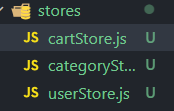
统一命名格式:
退出登录 - 清空购物车数据
当用户退出登录时,除了清除用户信息之外,还要清除购物车信息
在cartStore.js中编写清除购物车action
  // 清除购物车
  const clearCart = () => {
    cartList.value = []
  }
  return {
    cartList, allCount, allPrice, isAll, selectedCount, selectedPrice, clearCart, addCart, delCart, singleCheck, allCheck
  }
在userStore.js中当用户退出时,调用清除购物车的action
import { useCartStore } from "./cartStore"
  const cartStore = useCartStore()
  // 退出时清除用户信息
  const clearUserInfo = () => {
    userInfo.value = {}
    // 执行清除购物车的action
    cartStore.clearCart()
  }
合并本地购物车到服务器
由于用户在非登录时进行的所有购物车操作,我们的服务器不能知道,因此,在用户登陆时,把本地的购物车数据和服务端购物车数据进行合并操作
1. 登录时调用合并购物车接口,在apis/cart,js中封装接口
// 合并购物车
export const mergeCartAPI = (data) => {
  return http({
    url: '/member/cart/merge',
    method: 'POST',
    data
  })
}
在userStore.js中合并购物车操作
import { mergeCartAPI } from "@/apis/cart"
    // 合并购物车操作
    mergeCartAPI(cartStore.cartList.map(item => {
      return {
        skuId: item.skuId,
        selected: item.selected,
        count: item.count
      }
    }))
2. 获取最新的购物车列表
cartStore.updateCartList()
电商企业物流数字化转型必备!快递鸟 API 接口,72 小时快速完成物流系统集成。全流程实战1V1指导,营造开放的API技术生态圈。
更多推荐


 17
17 0
0- 0


 已为社区贡献6条内容

所有评论(0)