
小兔鲜电商项目(六)---结算、支付和会员中心
目录
一、结算
模板代码
<script setup>
const checkInfo = {} // 订单对象
const curAddress = {} // 地址对象
</script>
<template>
<div class="xtx-pay-checkout-page">
<div class="container">
<div class="wrapper">
<!-- 收货地址 -->
<h3 class="box-title">收货地址</h3>
<div class="box-body">
<div class="address">
<div class="text">
<div class="none" v-if="!curAddress">您需要先添加收货地址才可提交订单。</div>
<ul v-else>
<li><span>收<i />货<i />人:</span>{{ curAddress.receiver }}</li>
<li><span>联系方式:</span>{{ curAddress.contact }}</li>
<li><span>收货地址:</span>{{ curAddress.fullLocation }} {{ curAddress.address }}</li>
</ul>
</div>
<div class="action">
<el-button size="large">切换地址</el-button>
<el-button size="large">添加地址</el-button>
</div>
</div>
</div>
<!-- 商品信息 -->
<h3 class="box-title">商品信息</h3>
<div class="box-body">
<table class="goods">
<thead>
<tr>
<th width="520">商品信息</th>
<th width="170">单价</th>
<th width="170">数量</th>
<th width="170">小计</th>
<th width="170">实付</th>
</tr>
</thead>
<tbody>
<tr v-for="i in checkInfo.goods" :key="i.id">
<td>
<a href="javascript:;" class="info">
<img :src="i.picture" alt="">
<div class="right">
<p>{{ i.name }}</p>
<p>{{ i.attrsText }}</p>
</div>
</a>
</td>
<td>¥{{ i.price }}</td>
<td>{{ i.price }}</td>
<td>¥{{ i.totalPrice }}</td>
<td>¥{{ i.totalPayPrice }}</td>
</tr>
</tbody>
</table>
</div>
<!-- 配送时间 -->
<h3 class="box-title">配送时间</h3>
<div class="box-body">
<a class="my-btn active" href="javascript:;">不限送货时间:周一至周日</a>
<a class="my-btn" href="javascript:;">工作日送货:周一至周五</a>
<a class="my-btn" href="javascript:;">双休日、假日送货:周六至周日</a>
</div>
<!-- 支付方式 -->
<h3 class="box-title">支付方式</h3>
<div class="box-body">
<a class="my-btn active" href="javascript:;">在线支付</a>
<a class="my-btn" href="javascript:;">货到付款</a>
<span style="color:#999">货到付款需付5元手续费</span>
</div>
<!-- 金额明细 -->
<h3 class="box-title">金额明细</h3>
<div class="box-body">
<div class="total">
<dl>
<dt>商品件数:</dt>
<dd>{{ checkInfo.summary?.goodsCount }}件</dd>
</dl>
<dl>
<dt>商品总价:</dt>
<dd>¥{{ checkInfo.summary?.totalPrice.toFixed(2) }}</dd>
</dl>
<dl>
<dt>运<i></i>费:</dt>
<dd>¥{{ checkInfo.summary?.postFee.toFixed(2) }}</dd>
</dl>
<dl>
<dt>应付总额:</dt>
<dd class="price">{{ checkInfo.summary?.totalPayPrice.toFixed(2) }}</dd>
</dl>
</div>
</div>
<!-- 提交订单 -->
<div class="submit">
<el-button type="primary" size="large" >提交订单</el-button>
</div>
</div>
</div>
</div>
<!-- 切换地址 -->
<!-- 添加地址 -->
</template>
<style scoped lang="scss">
.xtx-pay-checkout-page {
margin-top: 20px;
.wrapper {
background: #fff;
padding: 0 20px;
.box-title {
font-size: 16px;
font-weight: normal;
padding-left: 10px;
line-height: 70px;
border-bottom: 1px solid #f5f5f5;
}
.box-body {
padding: 20px 0;
}
}
}
.address {
border: 1px solid #f5f5f5;
display: flex;
align-items: center;
.text {
flex: 1;
min-height: 90px;
display: flex;
align-items: center;
.none {
line-height: 90px;
color: #999;
text-align: center;
width: 100%;
}
>ul {
flex: 1;
padding: 20px;
li {
line-height: 30px;
span {
color: #999;
margin-right: 5px;
>i {
width: 0.5em;
display: inline-block;
}
}
}
}
>a {
color: $xtxColor;
width: 160px;
text-align: center;
height: 90px;
line-height: 90px;
border-right: 1px solid #f5f5f5;
}
}
.action {
width: 420px;
text-align: center;
.btn {
width: 140px;
height: 46px;
line-height: 44px;
font-size: 14px;
&:first-child {
margin-right: 10px;
}
}
}
}
.goods {
width: 100%;
border-collapse: collapse;
border-spacing: 0;
.info {
display: flex;
text-align: left;
img {
width: 70px;
height: 70px;
margin-right: 20px;
}
.right {
line-height: 24px;
p {
&:last-child {
color: #999;
}
}
}
}
tr {
th {
background: #f5f5f5;
font-weight: normal;
}
td,
th {
text-align: center;
padding: 20px;
border-bottom: 1px solid #f5f5f5;
&:first-child {
border-left: 1px solid #f5f5f5;
}
&:last-child {
border-right: 1px solid #f5f5f5;
}
}
}
}
.my-btn {
width: 228px;
height: 50px;
border: 1px solid #e4e4e4;
text-align: center;
line-height: 48px;
margin-right: 25px;
color: #666666;
display: inline-block;
&.active,
&:hover {
border-color: $xtxColor;
}
}
.total {
dl {
display: flex;
justify-content: flex-end;
line-height: 50px;
dt {
i {
display: inline-block;
width: 2em;
}
}
dd {
width: 240px;
text-align: right;
padding-right: 70px;
&.price {
font-size: 20px;
color: $priceColor;
}
}
}
}
.submit {
text-align: right;
padding: 60px;
border-top: 1px solid #f5f5f5;
}
.addressWrapper {
max-height: 500px;
overflow-y: auto;
}
.text {
flex: 1;
min-height: 90px;
display: flex;
align-items: center;
&.item {
border: 1px solid #f5f5f5;
margin-bottom: 10px;
cursor: pointer;
&.active,
&:hover {
border-color: $xtxColor;
background: lighten($xtxColor, 50%);
}
>ul {
padding: 10px;
font-size: 14px;
line-height: 30px;
}
}
}
</style>
路由配置
在router/index.js中配置路由关系
import Checkout from '@/views/Checkout/index.vue'
        {
          path:'checkout',
          component: Checkout
        }
在views/CartList/index.vue文件中配置路由跳转
<el-button size="large" type="primary" @click="$router.push('/checkout')">下单结算</el-button>基础数据渲染
创建apis/checkout.js文件封装接口
import http from '@/utils/http'

// 获取详情接口
export const getCheckInfoAPI = () => {
  return http({
    url: '/member/order/pre'
  })
}
在views/Checkout/index.vue文件中获取数据
import {getCheckInfoAPI} from '@/apis/checkout'
import { onMounted, ref } from 'vue'

const checkInfo = ref({})  // 订单对象
const curAddress=ref({})  // 地址对象

const getCheckInfo =async ()=>{
  const res=await getCheckInfoAPI()
  checkInfo.value=res.result
  const item=checkInfo.value.userAddresses.find(item=>item.isDefault===0)
  curAddress.value=item
}
onMounted(()=>getCheckInfo())
地址切换
打开弹框交互实现
点击切换地址按钮,打开弹框,回显用户可选地址列表
在Checkout/index.vue文件中准备弹框组件
  <!-- 切换地址 -->
  <el-dialog title="切换收货地址" width="30%" center>
    <div class="addressWrapper">
      <div class="text item" v-for="item in checkInfo.userAddresses" :key="item.id">
        <ul>
          <li><span>收<i />货<i />人:</span>{{ item.receiver }} </li>
          <li><span>联系方式:</span>{{ item.contact }}</li>
          <li><span>收货地址:</span>{{ item.fullLocation + item.address }}</li>
        </ul>
      </div>
    </div>
    <template #footer>
      <span class="dialog-footer">
        <el-button>取消</el-button>
        <el-button type="primary">确定</el-button>
      </span>
    </template>
  </el-dialog>
在Checkout/index.vue文件中控制弹窗打开
// 控制弹框打开
const showDialog =ref(false)
<el-button size="large" @click="showDialog=true">切换地址</el-button>
<el-dialog v-model="showDialog" title="切换收货地址" width="30%" center>地址激活交互实现
点击切换地址,点击确定按钮,激活地址替换默认收获地址
事件绑定,动态渲染类名active实现选中激活效果
  <el-dialog v-model="showDialog" title="切换收货地址" width="30%" center>
    <div class="addressWrapper">
      <div class="text item" :class="{active:activeAddress.id===item.id}" @click="switchAddress(item)" v-for="item in checkInfo.userAddresses" :key="item.id">
        <ul>
          <li><span>收<i />货<i />人:</span>{{ item.receiver }} </li>
          <li><span>联系方式:</span>{{ item.contact }}</li>
          <li><span>收货地址:</span>{{ item.fullLocation + item.address }}</li>
        </ul>
      </div>
    </div>
    <template #footer>
      <span class="dialog-footer">
        <el-button @click="showDialog=false">取消</el-button>
        <el-button type="primary" @click="confirm">确定</el-button>
      </span>
    </template>
  </el-dialog>
// 切换地址
const activeAddress=ref({})
const switchAddress=(item)=>{
activeAddress.value=item
}
const confirm=()=>{
curAddress.value=activeAddress.value
showDialog.value=false
}生成订单功能实现
调用接口生成订单id,并且携带id跳转到支付页;调用更新购物车列表接口,更新购物车状态
模板代码
<script setup>
const payInfo = {}
</script>


<template>
  <div class="xtx-pay-page">
    <div class="container">
      <!-- 付款信息 -->
      <div class="pay-info">
        <span class="icon iconfont icon-queren2"></span>
        <div class="tip">
          <p>订单提交成功!请尽快完成支付。</p>
          <p>支付还剩 <span>24分30秒</span>, 超时后将取消订单</p>
        </div>
        <div class="amount">
          <span>应付总额:</span>
          <span>¥{{ payInfo.payMoney?.toFixed(2) }}</span>
        </div>
      </div>
      <!-- 付款方式 -->
      <div class="pay-type">
        <p class="head">选择以下支付方式付款</p>
        <div class="item">
          <p>支付平台</p>
          <a class="btn wx" href="javascript:;"></a>
          <a class="btn alipay" :href="payUrl"></a>
        </div>
        <div class="item">
          <p>支付方式</p>
          <a class="btn" href="javascript:;">招商银行</a>
          <a class="btn" href="javascript:;">工商银行</a>
          <a class="btn" href="javascript:;">建设银行</a>
          <a class="btn" href="javascript:;">农业银行</a>
          <a class="btn" href="javascript:;">交通银行</a>
        </div>
      </div>
    </div>
  </div>
</template>

<style scoped lang="scss">
.xtx-pay-page {
  margin-top: 20px;
}

.pay-info {

  background: #fff;
  display: flex;
  align-items: center;
  height: 240px;
  padding: 0 80px;

  .icon {
    font-size: 80px;
    color: #1dc779;
  }

  .tip {
    padding-left: 10px;
    flex: 1;

    p {
      &:first-child {
        font-size: 20px;
        margin-bottom: 5px;
      }

      &:last-child {
        color: #999;
        font-size: 16px;
      }
    }
  }

  .amount {
    span {
      &:first-child {
        font-size: 16px;
        color: #999;
      }

      &:last-child {
        color: $priceColor;
        font-size: 20px;
      }
    }
  }
}

.pay-type {
  margin-top: 20px;
  background-color: #fff;
  padding-bottom: 70px;

  p {
    line-height: 70px;
    height: 70px;
    padding-left: 30px;
    font-size: 16px;

    &.head {
      border-bottom: 1px solid #f5f5f5;
    }
  }

  .btn {
    width: 150px;
    height: 50px;
    border: 1px solid #e4e4e4;
    text-align: center;
    line-height: 48px;
    margin-left: 30px;
    color: #666666;
    display: inline-block;

    &.active,
    &:hover {
      border-color: $xtxColor;
    }

    &.alipay {
      background: url(https://cdn.cnbj1.fds.api.mi-img.com/mi-mall/7b6b02396368c9314528c0bbd85a2e06.png) no-repeat center / contain;
    }

    &.wx {
      background: url(https://cdn.cnbj1.fds.api.mi-img.com/mi-mall/c66f98cff8649bd5ba722c2e8067c6ca.jpg) no-repeat center / contain;
    }
  }
}
</style>
配置路由
import Pay from '@/views/Pay/index.vue'
        {
          path: 'checkout',
          component: Checkout
        }
封装接口
// 创建订单
export const createOrderAPI = (data) => {
  return http({
    url: `/member/order`,
    method: 'POST',
    data
  })
}
点击按钮调用接口,得到订单id,携带id完成路由跳转
import {getCheckInfoAPI,createOrderAPI} from '@/apis/checkout'
import { useRouter } from 'vue-router'
import { useCartStore } from '@/stores/cartStore'
const cartStore=useCartStore()
const router=useRouter()
const createOrder=async ()=>{
  const res=await createOrderAPI({
    deliveryTimeType:1,
    payType:1,
    payChannel:1,
    buyerMessage:'',
    goods:checkInfo.value.goods.map(item=>{
      return {
        skuId:item.skuId,
        count:item.count
      }
    }),
    addressId:curAddress.value.id
  })
  const orderId=res.result.id
  router.push({
    path:'/pay',
    query:{
      id:orderId
    }
  })
  // 更新购物车
  cartStore.updateNewList()
}
<!-- 提交订单 -->
<div class="submit">
<el-button @click="createOrder" type="primary" size="large" >提交订单</el-button>
</div>二、支付
渲染基础数据
创建apis/pay.js文件封装接口
import http from '@/utils/http'

export const getOrderAPI = (id) => {
  return http({
    url: `/member/order/${id}`
  })
}
关键数据渲染
import { getOrderAPI } from '@/apis/pay'
import { onMounted, ref } from 'vue'
import { useRoute } from 'vue-router'
// 获取订单数据
const route=useRoute()
const payInfo = ref({})
const getPayInfo=async()=>{
  const res=await getOrderAPI(route.query.id)
  payInfo.value=res.result
}
onMounted(()=>getPayInfo())
实现支付功能
流程:
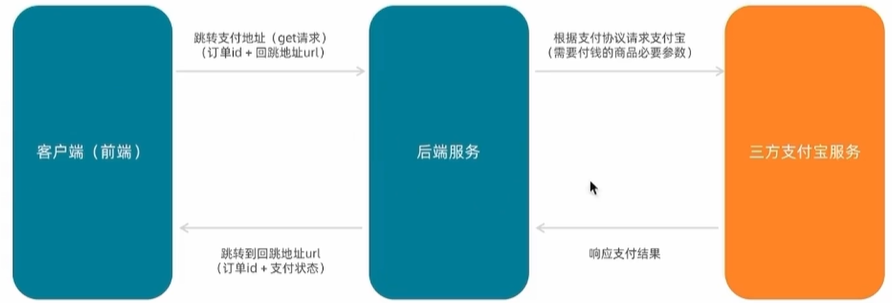
支付携带参数
// 支付地址
const baseURL = 'http://pcapi-xiaotuxian-front-devtest.itheima.net/'
const backURL = 'http://127.0.0.1:5173/paycallback'
const redirectUrl = encodeURIComponent(backURL)
const payUrl = `${baseURL}pay/aliPay?orderId=${route.query.id}&redirect=${redirectUrl}`
支付宝沙箱账号信息
沙箱新账号如下:
| 账号 | scobys4865@sandbox.com |
|---|---|
| 登录密码 | 111111 |
| 支付密码 | 111111 |
支付结果展示
配置路由:
<script setup>

</script>

<template>
  <div class="xtx-pay-page">
    <div class="container">
      <!-- 支付结果 -->
      <div class="pay-result">
        <span class="iconfont icon-queren2 green"></span>
        <span class="iconfont icon-shanchu red"></span>
        <p class="tit">支付成功</p>
        <p class="tip">我们将尽快为您发货,收货期间请保持手机畅通</p>
        <p>支付方式:<span>支付宝</span></p>
        <p>支付金额:<span>¥200.00</span></p>
        <div class="btn">
          <el-button type="primary" style="margin-right:20px">查看订单</el-button>
          <el-button>进入首页</el-button>
        </div>
        <p class="alert">
          <span class="iconfont icon-tip"></span>
          温馨提示:小兔鲜儿不会以订单异常、系统升级为由要求您点击任何网址链接进行退款操作,保护资产、谨慎操作。
        </p>
      </div>
    </div>
  </div>
</template>

<style scoped lang="scss">
.pay-result {
  padding: 100px 0;
  background: #fff;
  text-align: center;
  margin-top: 20px;

  >.iconfont {
    font-size: 100px;
  }

  .green {
    color: #1dc779;
  }

  .red {
    color: $priceColor;
  }

  .tit {
    font-size: 24px;
  }

  .tip {
    color: #999;
  }

  p {
    line-height: 40px;
    font-size: 16px;
  }

  .btn {
    margin-top: 50px;
  }

  .alert {
    font-size: 12px;
    color: #999;
    margin-top: 50px;
  }
}
</style>
根据支付结果适配支付状态:
import { getOrderAPI } from '@/apis/pay'
import { onMounted, ref } from 'vue'
import { useRoute } from 'vue-router'
const route=useRoute()
const orderInfo=ref({})
const getOrderInfo=async ()=>{
  const res=await getOrderAPI(route.query.id)
  orderInfo.value=res.result
}
onMounted(()=>getOrderInfo())
<span class="iconfont icon-queren2 green" v-if="$route.query.payResult==='true'"></span>
<span class="iconfont icon-shanchu red" v-else></span>
<p class="tit">支付{{ $route.query.payResult==='true'?'成功':'失败' }}</p>获取订单数据渲染支付信息:
orderInfo初始是一个空对象,orderInfo.payMoney是一个undefined,它没有toFixed方法,因此我们可以使用v-if条件渲染或者使用?可选链,如下:
<p>支付金额:<span>¥{{ orderInfo.payMoney?.toFixed(2) }}</span></p>封装倒计时函数
安装格式化插件:npm i dayjs
// 封装倒计时函数

import { computed, onUnmounted, ref } from "vue"
import dayjs from 'dayjs'
export const useCountDown = () => {
  // 响应式数据
  let timer = null
  const time = ref(0)
  // 格式化时间 x分x秒
  const formatTime = computed(() => dayjs.unix(time.value).format('mm分ss秒'))

  // 开启倒计时的函数
  const start = (currentTime) => {
    // 每隔1s就 -1
    time.value = currentTime
    timer = setInterval(() => {
      time.value--
    }, 1000)
  }
  // 组件销毁时清除定时器
  onUnmounted(() => {
    timer && clearInterval(timer)
  })
  return {
    formatTime, start
  }
}
import { useCountDown } from '@/composables/useCountDown'
const {formatTime,start}=useCountDown()
const getPayInfo=async()=>{
const res=await getOrderAPI(route.query.id)
payInfo.value=res.result
// 初始化倒计时秒数
start(res.result.countdown)
}<p>支付还剩 <span>{{ formatTime }}</span>, 超时后将取消订单</p>三、会员中心
路由配置(包括三级路由配置)
模板代码
会员中心
创建 src \views\Member\index.vue 文件,添加会员中心模板代码:
<script setup> </script>

<template>
  <div class="container">
    <div class="xtx-member-aside">
      <div class="user-manage">
        <h4>我的账户</h4>
        <div class="links">
          <RouterLink to="/member/user">个人中心</RouterLink>
        </div>
        <h4>交易管理</h4>
        <div class="links">
          <RouterLink to="/member/order">我的订单</RouterLink>
        </div>
      </div>
    </div>
    <div class="article">
      <!-- 三级路由的挂载点 -->
      <RouterView />
    </div>
  </div>
</template>

<style scoped lang="scss">
.container {
  display: flex;
  padding-top: 20px;

  .xtx-member-aside {
    width: 220px;
    margin-right: 20px;
    border-radius: 2px;
    background-color: #fff;

    .user-manage {
      background-color: #fff;

      h4 {
        font-size: 18px;
        font-weight: 400;
        padding: 20px 52px 5px;
        border-top: 1px solid #f6f6f6;
      }

      .links {
        padding: 0 52px 10px;
      }

      a {
        display: block;
        line-height: 1;
        padding: 15px 0;
        font-size: 14px;
        color: #666;
        position: relative;

        &:hover {
          color: $xtxColor;
        }

        &.active,
        &.router-link-exact-active {
          color: $xtxColor;

          &:before {
            display: block;
          }
        }

        &:before {
          content: '';
          display: none;
          width: 6px;
          height: 6px;
          border-radius: 50%;
          position: absolute;
          top: 19px;
          left: -16px;
          background-color: $xtxColor;
        }
      }
    }
  }

  .article {
    width: 1000px;
    background-color: #fff;
  }
}
</style>
个人信息
创建 src\views\Member\components\UserInfo.vue 文件,添加代码:
<script setup>
const userStore = {}
</script>

<template>
  <div class="home-overview">
    <!-- 用户信息 -->
    <div class="user-meta">
      <div class="avatar">
        <img :src="userStore.userInfo?.avatar" />
      </div>
      <h4>{{ userStore.userInfo?.account }}</h4>
    </div>
    <div class="item">
      <a href="javascript:;">
        <span class="iconfont icon-hy"></span>
        <p>会员中心</p>
      </a>
      <a href="javascript:;">
        <span class="iconfont icon-aq"></span>
        <p>安全设置</p>
      </a>
      <a href="javascript:;">
        <span class="iconfont icon-dw"></span>
        <p>地址管理</p>
      </a>
    </div>
  </div>
  <div class="like-container">
    <div class="home-panel">
      <div class="header">
        <h4 data-v-bcb266e0="">猜你喜欢</h4>
      </div>
      <div class="goods-list">
        <!-- <GoodsItem v-for="good in likeList" :key="good.id" :good="good" /> -->
      </div>
    </div>
  </div>
</template>

<style scoped lang="scss">
.home-overview {
  height: 132px;
  background: url(@/assets/images/center-bg.png) no-repeat center / cover;
  display: flex;

  .user-meta {
    flex: 1;
    display: flex;
    align-items: center;

    .avatar {
      width: 85px;
      height: 85px;
      border-radius: 50%;
      overflow: hidden;
      margin-left: 60px;

      img {
        width: 100%;
        height: 100%;
      }
    }

    h4 {
      padding-left: 26px;
      font-size: 18px;
      font-weight: normal;
      color: white;
    }
  }

  .item {
    flex: 1;
    display: flex;
    align-items: center;
    justify-content: space-around;

    &:first-child {
      border-right: 1px solid #f4f4f4;
    }

    a {
      color: white;
      font-size: 16px;
      text-align: center;

      .iconfont {
        font-size: 32px;
      }

      p {
        line-height: 32px;
      }
    }
  }
}

.like-container {
  margin-top: 20px;
  border-radius: 4px;
  background-color: #fff;
}

.home-panel {
  background-color: #fff;
  padding: 0 20px;
  margin-top: 20px;
  height: 400px;

  .header {
    height: 66px;
    border-bottom: 1px solid #f5f5f5;
    padding: 18px 0;
    display: flex;
    justify-content: space-between;
    align-items: baseline;

    h4 {
      font-size: 22px;
      font-weight: 400;
    }

  }

  .goods-list {
    display: flex;
    justify-content: space-around;
  }
}
</style>
用户订单
创建 src\views\Member\components \UserOrder.vue 文件,添加代码:
<script setup>
// tab列表
const tabTypes = [
  { name: "all", label: "全部订单" },
  { name: "unpay", label: "待付款" },
  { name: "deliver", label: "待发货" },
  { name: "receive", label: "待收货" },
  { name: "comment", label: "待评价" },
  { name: "complete", label: "已完成" },
  { name: "cancel", label: "已取消" }
]
// 订单列表
const orderList = []

</script>

<template>
  <div class="order-container">
    <el-tabs>
      <!-- tab切换 -->
      <el-tab-pane v-for="item in tabTypes" :key="item.name" :label="item.label" />

      <div class="main-container">
        <div class="holder-container" v-if="orderList.length === 0">
          <el-empty description="暂无订单数据" />
        </div>
        <div v-else>
          <!-- 订单列表 -->
          <div class="order-item" v-for="order in orderList" :key="order.id">
            <div class="head">
              <span>下单时间:{{ order.createTime }}</span>
              <span>订单编号:{{ order.id }}</span>
              <!-- 未付款,倒计时时间还有 -->
              <span class="down-time" v-if="order.orderState === 1">
                <i class="iconfont icon-down-time"></i>
                <b>付款截止: {{order.countdown}}</b>
              </span>
            </div>
            <div class="body">
              <div class="column goods">
                <ul>
                  <li v-for="item in order.skus" :key="item.id">
                    <a class="image" href="javascript:;">
                      <img :src="item.image" alt="" />
                    </a>
                    <div class="info">
                      <p class="name ellipsis-2">
                        {{ item.name }}
                      </p>
                      <p class="attr ellipsis">
                        <span>{{ item.attrsText }}</span>
                      </p>
                    </div>
                    <div class="price">¥{{ item.realPay?.toFixed(2) }}</div>
                    <div class="count">x{{ item.quantity }}</div>
                  </li>
                </ul>
              </div>
              <div class="column state">
                <p>{{ order.orderState }}</p>
                <p v-if="order.orderState === 3">
                  <a href="javascript:;" class="green">查看物流</a>
                </p>
                <p v-if="order.orderState === 4">
                  <a href="javascript:;" class="green">评价商品</a>
                </p>
                <p v-if="order.orderState === 5">
                  <a href="javascript:;" class="green">查看评价</a>
                </p>
              </div>
              <div class="column amount">
                <p class="red">¥{{ order.payMoney?.toFixed(2) }}</p>
                <p>(含运费:¥{{ order.postFee?.toFixed(2) }})</p>
                <p>在线支付</p>
              </div>
              <div class="column action">
                <el-button  v-if="order.orderState === 1" type="primary"
                  size="small">
                  立即付款
                </el-button>
                <el-button v-if="order.orderState === 3" type="primary" size="small">
                  确认收货
                </el-button>
                <p><a href="javascript:;">查看详情</a></p>
                <p v-if="[2, 3, 4, 5].includes(order.orderState)">
                  <a href="javascript:;">再次购买</a>
                </p>
                <p v-if="[4, 5].includes(order.orderState)">
                  <a href="javascript:;">申请售后</a>
                </p>
                <p v-if="order.orderState === 1"><a href="javascript:;">取消订单</a></p>
              </div>
            </div>
          </div>
          <!-- 分页 -->
          <div class="pagination-container">
            <el-pagination background layout="prev, pager, next" />
          </div>
        </div>
      </div>

    </el-tabs>
  </div>

</template>

<style scoped lang="scss">
.order-container {
  padding: 10px 20px;

  .pagination-container {
    display: flex;
    justify-content: center;
  }

  .main-container {
    min-height: 500px;

    .holder-container {
      min-height: 500px;
      display: flex;
      justify-content: center;
      align-items: center;
    }
  }
}

.order-item {
  margin-bottom: 20px;
  border: 1px solid #f5f5f5;

  .head {
    height: 50px;
    line-height: 50px;
    background: #f5f5f5;
    padding: 0 20px;
    overflow: hidden;

    span {
      margin-right: 20px;

      &.down-time {
        margin-right: 0;
        float: right;

        i {
          vertical-align: middle;
          margin-right: 3px;
        }

        b {
          vertical-align: middle;
          font-weight: normal;
        }
      }
    }

    .del {
      margin-right: 0;
      float: right;
      color: #999;
    }
  }

  .body {
    display: flex;
    align-items: stretch;

    .column {
      border-left: 1px solid #f5f5f5;
      text-align: center;
      padding: 20px;

      >p {
        padding-top: 10px;
      }

      &:first-child {
        border-left: none;
      }

      &.goods {
        flex: 1;
        padding: 0;
        align-self: center;

        ul {
          li {
            border-bottom: 1px solid #f5f5f5;
            padding: 10px;
            display: flex;

            &:last-child {
              border-bottom: none;
            }

            .image {
              width: 70px;
              height: 70px;
              border: 1px solid #f5f5f5;
            }

            .info {
              width: 220px;
              text-align: left;
              padding: 0 10px;

              p {
                margin-bottom: 5px;

                &.name {
                  height: 38px;
                }

                &.attr {
                  color: #999;
                  font-size: 12px;

                  span {
                    margin-right: 5px;
                  }
                }
              }
            }

            .price {
              width: 100px;
            }

            .count {
              width: 80px;
            }
          }
        }
      }

      &.state {
        width: 120px;

        .green {
          color: $xtxColor;
        }
      }

      &.amount {
        width: 200px;

        .red {
          color: $priceColor;
        }
      }

      &.action {
        width: 140px;

        a {
          display: block;

          &:hover {
            color: $xtxColor;
          }
        }
      }
    }
  }
}
</style>
配置路由
import Member from '@/views/Member/index.vue'
import UserInfo from '@/views/Member/components/UserInfo.vue'
import UserOrder from '@/views/Member/components/UserOrder.vue'
        {
          path: 'member',
          component: Member,
          children: [
            {
              path: 'user',
              component: UserInfo
            }, {
              path: 'order',
              component: UserOrder
            }
          ]
        }
个人中心信息渲染
在apis/user.js中封装猜你喜欢接口
export const getLikeListAPI = ({ limit = 4 }) => {
  return http({
    url: '/goods/relevant',
    params: {
      limit
    }
  })
}
import { useUserStore } from '@/stores/userStore'
import { getLikeListAPI } from '@/apis/user'
import { onMounted, ref } from 'vue'
import GoodsItem from '@/views/Home/components/GoodsItem.vue'
const userStore=useUserStore()
const likeList=ref([])
const getLikeList=async ()=>{
const res=await getLikeListAPI({limit:4})
likeList.value=res.result
}
onMounted(()=>getLikeList()) <div class="goods-list">
<GoodsItem v-for="good in likeList" :key="good.id" :goods="good" />
</div>我的订单
基础订单列表实现
封装接口:
import http from "@/utils/http"

/*
params: {
  orderState:0,
  page:1,
  pageSize:2
}
*/
export const getUserOrder = (params) => {
  return http({
    url: '/member/order',
    method: 'GET',
    params
  })
}
准备基础请求参数:
// 订单列表
const orderList = ref([])
const params=ref({
  orderState:0,
  page:1,
  pageSize:2
})
调用接口请求数据(这里需要把http中的timeout改高,实测20000可以通过):
import { getUserOrder } from '@/apis/order'
import { onMounted, ref } from 'vue'
const getOrderList=async ()=>{
  const res=await getUserOrder(params.value)
  orderList.value=res.result.items
}
onMounted(()=>getOrderList())
tab切换实现
// tab切换
const tabChange=(type)=>{
  params.value.orderState=type
  getOrderList()
}
<div class="order-container">
<el-tabs @tab-change="tabChange">分页逻辑
const total=ref(0)
const getOrderList=async ()=>{
  const res=await getUserOrder(params.value)
  orderList.value=res.result.items
  total.value=res.result.counts
}
// 页数切换
const pageChange=(page)=>{
  params.value.page=page
  getOrderList()
}
          <!-- 分页 -->
          <div class="pagination-container">
            <el-pagination :total="total" @current-change="pageChange" :page-size="params.pageSize" background layout="prev, pager, next" />
          </div>
细节优化
默认三级路由设置
效果:当路由path为二级路由路径member的时候,右侧可以显示个人中心三级路由对应的组件
我们可以将嵌套路由的path置空
        {
          path: 'member',
          component: Member,
          children: [
            {
              path: '',
              component: UserInfo
            }, {
              path: 'order',
              component: UserOrder
            }
          ]
        }
<h4>我的账户</h4>
<div class="links">
<RouterLink to="/member">个人中心</RouterLink>
</div>订单状态显示适配
// 创建格式化函数
const fomartPayState = (payState) => {
  const stateMap = {
    1: '待付款',
    2: '待发货',
    3: '待收货',
    4: '待评价',
    5: '已完成',
    6: '已取消'
  }
  return stateMap[payState]
}
<div class="column amount">
<p class="red">¥{{ order.payMoney?.toFixed(2) }}</p>
<p>(含运费:¥{{ order.postFee?.toFixed(2) }})</p>
<p>在线支付</p>
</div>
电商企业物流数字化转型必备!快递鸟 API 接口,72 小时快速完成物流系统集成。全流程实战1V1指导,营造开放的API技术生态圈。
更多推荐


 14
14 0
0- 0


 已为社区贡献6条内容

所有评论(0)