
原生js+css实现仿京东物流效果
纯js+css实现仿京东物流效果首先是html部分:<div id="toptxt"> </div><input type="text">首先我们可以使用css写出上边那个提示气泡,值得注意的是这边的倒三角形是使用的伪类的border属性来实现的:#toptxt {position: relative;...
·
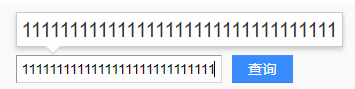
首先是html部分:
<div id="toptxt"> </div>
<input type="text">
首先我们可以使用css写出上边那个提示气泡,值得注意的是这边的倒三角形是使用的伪类的border属性来实现的:
  #toptxt {
            position: relative;
            min-width: 200px;
            height: 30px;
            display: none;
            font-size: 20px;
            background-size: contain;
            border: 1px #999 solid;
            padding-left: 4px;
            padding-right: 4px;
            box-shadow: 0px 0px 6px #ccc;
        }
		//这里是画一个实心的三角形,再利用定位移动到下方
        #toptxt:before {
            position: absolute;
            width: 0;
            height: 0;
            content: '';
            border-style: solid;
            border-color: #999 transparent transparent;
            border-width: 16px 14px;
            top: 31px;
            left: 20px;
        }
		//这里用一个伪类画一个白色三角形,覆盖上边那个三角形,比上一个实心三角行像上偏移一点,
		看上去的效果就是连接起来的
        #toptxt:after {
            position: absolute;
            width: 0;
            height: 0;
            content: '';
            border-style: solid;
            border-color: white transparent transparent;
            border-width: 16px 14px;
            top: 29px;
            left: 20px;
        }


        input {
            width: 200px;
            position: relative;
            top: 16px;
        }
接下来就是js部分:
 var div1 = document.querySelector('#toptxt');
 var txt1 = document.querySelector('input');
 document.addEventListener('keyup', function (e) {
         var e = e || window.event;
         // 监听键盘s键的时候,输入框聚焦
         if (e.keyCode == '83' && txt1 !== document.activeElement) {
              txt1.focus();
         }
         let val = txt1.value;
         if (val.length > 0) {
             div1.style.display = 'table';// 这个属性让上边那个文本框能自动加长
             div1.innerHTML = val;
         } else {
             div1.style.display = 'none';//隐藏这个框
             div1.innerHTML = val;
         }
 });
最后附上,实现的图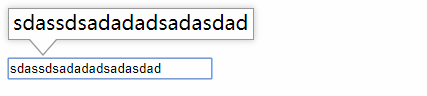

电商企业物流数字化转型必备!快递鸟 API 接口,72 小时快速完成物流系统集成。全流程实战1V1指导,营造开放的API技术生态圈。
更多推荐
 0
0 0
0- 0


 已为社区贡献1条内容

所有评论(0)