
全国快递物流查询API:自动识别快递公司并实时展示物流轨迹
·
一、接口功能:自动识别,轨迹实时返回
该API提供了两个子接口:
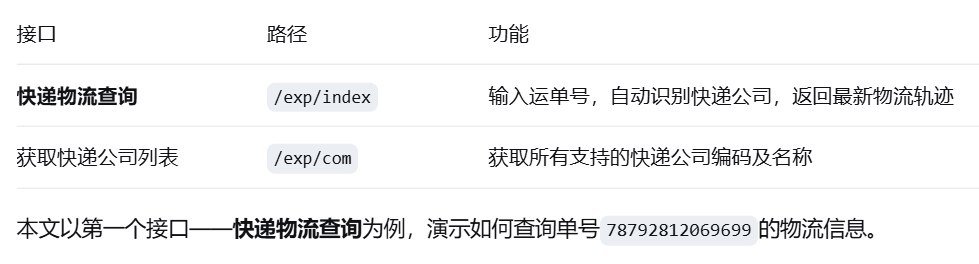
二、实战演示:查询运单号 78792812069699 的物流信息
下面通过 PHP 代码调用该接口。
<?php
$host = "https://market.aliyun.com/detail/cmapi00065859";#接口地址
$path = "/exp/index";
$method = "GET";
$appcode = "你自己的AppCode";   // 替换为真实 AppCode

$headers = array("Authorization:APPCODE " . $appcode);
$querys = "no=78792812069699";   // 只需传入单号,可自动识别公司
$url = $host . $path . "?" . $querys;

$curl = curl_init();
curl_setopt($curl, CURLOPT_CUSTOMREQUEST, $method);
curl_setopt($curl, CURLOPT_URL, $url);
curl_setopt($curl, CURLOPT_HTTPHEADER, $headers);
curl_setopt($curl, CURLOPT_RETURNTRANSFER, true);
curl_setopt($curl, CURLOPT_HEADER, true);
if (1 == strpos("$".$host, "https://")) {
    curl_setopt($curl, CURLOPT_SSL_VERIFYPEER, false);
    curl_setopt($curl, CURLOPT_SSL_VERIFYHOST, false);
}
$result = curl_exec($curl);
$headerSize = curl_getinfo($curl, CURLINFO_HEADER_SIZE);
$body = substr($result, $headerSize);
curl_close($curl);

$data = json_decode($body, true);
print_r($data);
?>
三、返回字段解析
| 字段 | 说明 |
|---|---|
company |
快递公司中文名称 |
com |
快递公司编码(如zto) |
no |
运单号 |
com_phone |
快递公司客服电话 |
com_url |
快递公司官网 |
take_time |
物流全程耗时 |
courier_phone |
快递员电话 |
status_desc |
签收状态文案(如“已签收”) |
status_detail |
状态节点码:1揽件,2运输中,3派送中,4已签收,5包裹异常/签收失败,10退回 |
list |
物流轨迹数组,按时间倒序排列 |
list[].datetime |
节点时间 |
list[].remark |
节点详细描述(含地点、动作、联系方式等) |

电商企业物流数字化转型必备!快递鸟 API 接口,72 小时快速完成物流系统集成。全流程实战1V1指导,营造开放的API技术生态圈。
更多推荐


 14
14 0
0- 0


 已为社区贡献7条内容

所有评论(0)