
微信小程序 --- 物流快递查询
一、前言我对小程序开发实现 物流信息查询 功能比较感兴趣。在网上查找了一些相关资料,实现了相关功能。效果图:点击选择要查看的物流公司,输入快递单号,点击查询物流信息:二、准备工作使用阿里云 — 快递物流查询API接口1.购买套餐登录或注册阿里云,进入https://market.aliyun.com/products/57126001/cmapi010996.html?spm=5176.20205
一、前言
我对小程序开发实现 物流信息查询 功能比较感兴趣。在网上查找了一些相关资料,实现了相关功能。
效果图:
点击选择要查看的物流公司,输入快递单号,点击查询

物流信息:
二、准备工作
使用阿里云 — 快递物流查询API接口
1.购买套餐
登录或注册阿里云,进入
https://market.aliyun.com/products/57126001/cmapi010996.html?spm=5176.2020520132.101.2.fd3b7218w99ZrP#sku=yuncode499600008链接,
购买如下套餐:
2. 快递物流节点跟踪 API接口 的 调试使用

点击“去调试”,进入接口调式页面:
三、小程序 代码实现
1. wxml 代码
<!--pages/wechat-logistics/wechat-logistics.wxml-->
<view class="main" wx:if="{{!isShow}}">
    <view class="section">
        <picker mode="selector" value="{{index}}" range="{{expNames}}" bindchange="bindPickerChange">
            <view class="picker">
                物流公司:{{expNames[index]}}
            </view>
        </picker>
    </view>
    <input type="text" class="text" value="" placeholder="请输入快递单号" bindblur="bindblurInput"/>
    <button type="primary" class="btn" bindtap = "search">查询</button>
</view>
<view class="main" wx:else>
    <view class="title">物流信息</view>
    <!--direction :设置显示方向,可选值为 horizontal、vertical;默认horizontal-->
    <view class="item">
        <van-steps steps="{{steps}}" direction="vertical"  active="{{active}}"></van-steps>
    </view>
</view>
2. js 代码实现
// pages/wechat-logistics/wechat-logistics.js
Page({

  /**
   * 页面的初始数据
   */
  data: {
    orderNumber: "",//快递单号
    expNames:["申通","顺丰","圆通","中通","韵达","天天","京东","EMS","宅急送","百世","四通一达"],//物流公司
    expAbbrs:["shentong","shunfeng","yuantong","zhongtong","yunda","tiantian","jingdong","ems","zhaijisong","baishi","sitongyida"],
    index: 0,
    expAbbr:"shentong",//当前选中快递公司名称
    isShow: false, //是否显示物流信息
    steps:[ //物流信息
    ],
    active:0,
  },

  /**
   * 生命周期函数--监听页面加载
   */
  onLoad: function (options) {

  },

  /**
   * 生命周期函数--监听页面显示
   */
  onShow: function () {

  },
  //文本框失去焦点事件
  bindblurInput: function(e){
    console.log(e.detail.value)
    this.data.orderNumber = e.detail.value
  },
  //点击城市组件确定事件
  bindPickerChange: function(e){
    this.setData({
      index:e.detail.value
    })
    this.data.expAbbr=this.data.expAbbrs[e.detail.value]
  },
  //查看快递物流信息
  search(){
    if(this.data.orderNumber){
      this.setData({
        isShow: true
      })
      this.getExpressInfo(this.data.expAbbr,this.data.orderNumber)
    }else {
      wx.showToast({
        title: '请输入快递单号',
        icon: 'none'
      })
    }

  },
  /**
   * 阿里云api接口获取快递物流信息
   *  com:物流公司字母简称,(如不知道快递公司名,可以使用 auto 代替)
   *  number:快递单号
   */
  getExpressInfo: function(com,number){
    let that = this
    wx.request({
      url: 'https://ali-deliver.showapi.com/showapi_expInfo?com='+com+"&nu="+number,
      data: {

      },
      method: 'GET', // OPTIONS, GET, HEAD, POST, PUT, DELETE, TRACE, CONNECT
       header: {
         'Authorization': "APPCODE ec2b8ebb41a442dda9c5902866e442dd"
       }, // 设置请求的 header
      success: function(res){
        // success
        console.log("success",res)
        let showapi_res_code = res.data.showapi_res_code //showapi平台返回码,0位成功,其他为失败
        let showapi_res_error = res.data.showapi_res_error///showapi平台返回的错误信息
        let showapi_res_body = res.data.showapi_res_body

        if(showapi_res_code == 0){
          let flag = showapi_res_body.flag //物流信息是否获取成功
          let status = showapi_res_body.status //状态 -1 待查询 0 查询异常 1 暂无记录 2 在途中 3 派送中 4 已签收 5 用户拒签 6 疑难件 7 无效单 8 超时单 9 签收失败 10 退回
          let data = showapi_res_body.data //具体快递路径信息
          let steps=[]
          if(flag){
            for(var i=0;i<data.length;i++){
              let obj={
                text:data[i].context,
                desc:data[i].time
              }
              steps.push(obj)
            }
            that.setData({
              steps:steps,
              active:0
            })
          }else{
            wx.showToast({
              title: showapi_res_body.msg,
              icon: 'none',
              duration:2000
            })
          }
        }else{
          //showapi平台返回的错误信息
          wx.showToast({
            title: showapi_res_error,
            icon: 'none',
            duration:2000
          })
        }
      },
      fail: function(res) {
        // fail
        console.log("fail",res)
      }
    })
  }
})
3. wxss 代码
/* pages/wechat-logistics/wechat-logistics.wxss */
.main{
    width: 100%;
    margin-top: 20rpx;
}
/*物流公司*/
.section{
    margin-left: 20rpx;
    height: 60rpx;
    line-height: 60rpx;
}
.text{
    font-size: 28rpx;
    width:90%;
    margin-left: 20rpx;
    padding-left: 20rpx;
    height: 60rpx;
    border:2rpx solid #cccccc;
}
.btn{
    margin-top: 20rpx;
}
.title{
    text-align: center;
}
4.物流信息区 采用 步骤条的方式显示。我使用第三方插件 Vant Weapp 中的Steps 步骤条 来呈现 查询出的物流结果。
要想使用 Vant Weapp 的 Steps 插件,需要在 对应页面文件的 .json文件中引入:
{
  "navigationBarTitleText":"快递物流追踪",
  "usingComponents": {
    "van-steps":"../../static/vant/steps/index"
  }
}
注意:
接口传参 com 要按照文档 要求: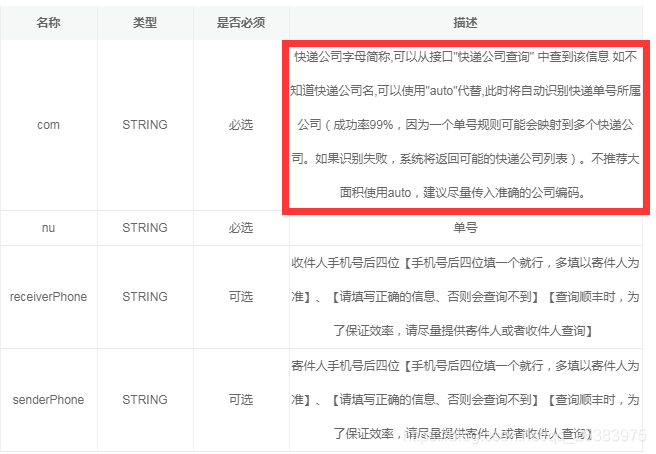
快递公司如下:
expNames :物流公司名称 ,用于物流公司显示;
expAbbrs:物流公司字母简称,用于 https://ali-deliver.showapi.com/showapi_expInfo?com=’+com+"&nu="+number接口传参,查看物流信息
参考资料:https://blog.csdn.net/m0_45329584/article/details/104494815

电商企业物流数字化转型必备!快递鸟 API 接口,72 小时快速完成物流系统集成。全流程实战1V1指导,营造开放的API技术生态圈。
更多推荐
 4
4 0
0- 0


 已为社区贡献1条内容

所有评论(0)